Recent Discussions
Windows App expands auto logoff support to managed Android devices (Public Preview)
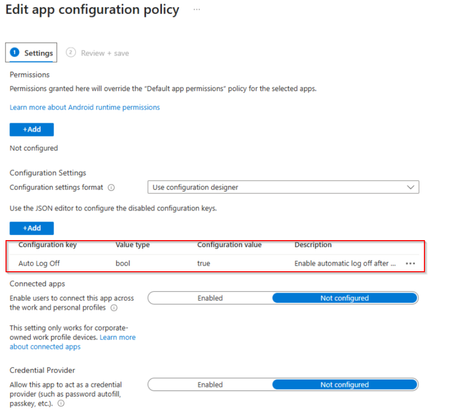
We're excited to announce that Windows App auto logoff on Android is now in public preview, giving administrators a simple, Mobile Device Management (MDM)–configured way to keep shared devices clean between sessions. Already available on Windows, auto logoff now extends to MDM-enrolled Android devices, a key step toward enabling frontline and shared-device scenarios on Android hardware. What is auto logoff? Windows App auto logoff on Android is an admin-configured setting that signs the user out of Windows App and removes locally stored app data when the app is closed, disconnected, or left inactive for a configured period. By removing locally stored app data, auto logoff helps ensure that every session starts with a clean state when users sign in with their own credentials. It's designed for operational convenience and device hygiene — not as a security boundary — and it does not interrupt active Azure Virtual Desktop or Windows 365 sessions. Only the local Windows App state is reset. Why it matters for shared devices Auto logoff is ideal for shared-device deployments where Windows App is the primary app users interact with to access Azure Virtual Desktop or Windows 365: Clean handoffs: when one worker finishes and closes the app, the next person signs in fresh Local Windows App data is removed automatically: cached app data is cleared when configured logoff conditions occur (app close, disconnect, or inactivity) Streamlined re-entry: an optional setting skips the onboarding and privacy screens after logoff, so shared agreements are accepted once per device rather than by every user Flexible triggers: reset on app close, sign-out, remote-session disconnect, or after a defined period of inactivity How to configure it Windows App auto logoff on Android is set from your MDM admin console (for example, Microsoft Intune) via a managed app configuration profile assigned to Windows App. Core settings include: Enable auto logoff: the master switch (off by default) Inactivity timeout: minutes of idle time (with the screen locked) before Windows App signs out and resets; set to 0 to rely only on close/disconnect triggers Skip first-run experience: recommended for shared devices so users aren't re-prompted through setup The setting names and value types are the same across MDM providers, only the admin UI differs. Prerequisites Windows App version 11.0.0.113 or later on a supported Android device The device enrolled in your MDM, with Windows App installed as a managed app Admin access to a supported MDM provider that can deliver app configuration to Windows App Note: Inactivity-based auto logoff depends on the Android device’s screen lock setting. If a device is configured never to lock, the inactivity timer won't fire (close, sign-out, and disconnect triggers still work). Learn more For the full setup walkthrough, configuration examples, and known limitations, see Configure auto logoff for Windows App on Microsoft Learn. We'd love to hear how you're using auto logoff for your shared-device and frontline deployments, drop a comment below and let us know what scenarios you'd like to see us light up next.37Views0likes1CommentBuilding Resilient Cloud Architectures with Azure’s Agentic Agents
Cloud computing has evolved far beyond simply moving workloads from on-premises servers to virtual machines. Organizations today expect their cloud environments to be intelligent, resilient, secure, and capable of adapting to changing business demands with minimal human intervention. As artificial intelligence continues to reshape enterprise technology, Microsoft Azure is introducing a new generation of AI-powered capabilities through Agentic AI. https://dellenny.com/building-resilient-cloud-architectures-with-azures-agentic-agents-migration-observability-and-optimization/54Views1like0Comments
Looking for guidance on designing an Azure data analytics pipeline for reporting
I’m working on modernizing an old reporting workflow that currently runs on a few on-premises databases and scheduled scripts. The current process collects operational data from multiple systems, performs some basic transformation and aggregation, and then generates reports for different business teams. As the data volume is growing, the existing setup is becoming difficult to maintain and slow to refresh. I’m looking for an Azure-based architecture that can ingest data from different sources, store both raw and processed data, run scheduled transformations, and make the final datasets available for reporting tools like Power BI. Would appreciate any suggestions on the recommended architecture, especially around data storage, transformation, refresh performance, and cost control. Thanks45Views0likes2CommentsWhich Azure service do you find yourself using the most, and why?
Whether it's Virtual Machines, Storage Accounts, App Services, Azure SQL, Key Vault, Azure Monitor, or something else, I'm curious to know which service has become essential in your day-to-day work. Share your experience, tips, or lessons learned.35Views0likes1Comment
Entra ID logins to Azure VMs.
Hello everyone. I've posted a much longer, more detailed question about this on the Azure support forums, but I'm trying to get more people to look at this. Basically, I'm trying to set up Entra accounts that can log into an Azure-based Windows VM, using the instructions Microsoft have put here: https://learn.microsoft.com/en-us/entra/identity/devices/howto-vm-sign-in-azure-ad-windows I've treated the Microsoft instructions as a checklist, in order to be as precise as possible. My own notes and records from 2024 seem to indicate I built a similar system then, following the same instructions. I was surprised that it didn't work as easily this time. Does anyone know of changes that were made to Entra ID since 2024 (or 9 months ago, when most of the newest YouTube tutorials were made) to make it much harder to use? In addition to Microsoft's instructions, I have also experimented with alternative configurations (a lot of them) detailed on YouTube, none of which worked. My VM (and Entra itself) both seem to indicate that my Entra accounts are valid, and that the VMs are correctly joined to Entra. I am still able to log into the VMs with local accounts, so the VMs are correctly connected to Azure. I've tried both with and without a Bastion, with the same results. Local accounts work, but Entra doesn't. I've so far been unable to log the Entra accounts in at all, as the passwords (all of them valid, and double-checked) have been rejected. I think if I could find one method of using the Entra accounts which worked, I would settle on it, but so far I haven't found a single configuration that works. Does anyone have a theory of what's blocking me? I do have more test data, but I don't want to flood this post. Thanks.67Views0likes8Comments
Azure Event Grid with ASB
Hi, we need to push Event Grid events for blob creation to an Azure Service Bis queue to deduplicate as the EG guarantee "At least one delivery" pattern, but the problem is that we need to deduplicate with blob name as "MessageId" on ASB side. The problem is that the blob name is not present in the event data. we have only "subject" with the full url that can exceed 128 characters, the limit of ASb Messageid. In some duplicate events I found that the filed "data/storageDiagnostics/batchId" is the same for duplicated events. I'm wonderring if this batchId will be always the same for duplicate events, I can use it as "MessagesId" in "Delivery properties"37Views0likes2Comments
FPGA vs ASIC for AI at the Edge: What factors influence your hardware choice?
As AI continues to move closer to edge devices, choosing the right hardware platform has become an important design decision. While both FPGAs and ASICs have their strengths, the best choice often depends on the application's requirements. Here are some of the key factors that engineering teams typically evaluate: Performance and latency requirements Power efficiency Development cost and NRE Time-to-market Production volume Need for future hardware updates FPGAs offer flexibility for rapid prototyping and evolving workloads, making them well-suited for early-stage development. ASICs, on the other hand, can provide significant advantages in performance, power consumption, and cost efficiency for high-volume production. I recently came across a technical article that explains these trade-offs in a structured way and found it useful as a reference: https://www.signoffsemiconductors.com/asic-vs-fpga/ I'd be interested to hear how others approach this decision. Have you migrated a design from FPGA to ASIC? What factors influenced your choice? Are there workloads where you would always choose one over the other?51Views0likes1CommentPortable Azure topology and documentation snapshots with OSIRIS JSON
Ciao everyone, I’m working on https://github.com/osirisjson/osiris, a vendor-neutral specification for describing infrastructure resources and their relationships as portable point-in-time snapshots. To proof that the specification could work in real-scenarios I already built an initial https://osirisjson.org/en/docs/producers/hyperscalers/microsoft-azure in Go. You run on-premise and it connects through the Azure CLI, reads Azure subscriptions and emits an OSIRIS JSON document that can be used for documentation, topology diagrams, audits, configuration drift analysis, CMDB/IPAM/DCIM workflows, or controlled AI/context workflows without giving those platforms/tools direct access to Azure. The producer currently covers several Azure areas, including networking, compute, storage, identity, databases, containers, integration, observability, backup, automation, management groups, and cross-resource dependency edges such as Private Endpoint to PaaS targets, App Service to Application Insights / Log Analytics, AKS to subnets and node pools, and backup vault relationships. It supports two output purposes: documentation: minimal high-level projection for diagrams, inventory dashboards, and architectural documentation audit: deeper projection with readable properties and extensions after sensitive-field redaction This is not intended to replace Azure tooling, Azure Resource Graph, IaC, Azure Policy, or any existing governance/control-plane workflow. OSIRIS JSON is simply a read-only external producer that generates a vendor-neutral snapshot of the observed Azure environment. I would really appreciate feedback from Azure architects, cloud engineers, and governance practitioners on the mapping model: Which Azure resources and relationships are the most important for documentation and topology generation? Are the current connection types useful for real-world architecture views? What should be prioritized in next releases? Would a documentation/audit split be useful in enterprise environments? You find the current Azure producer documentation here: https://osirisjson.org/en/docs/producers/hyperscalers/microsoft-azure I would really appreciate any feedback, suggestions, edge cases, or ideas from people who operate, document, audit, or govern Azure environments and I also welcome anyone who want to participate on development. Ciao from Italy, Tia74Views0likes2Comments
How to recover global admin access to tenant
I have already tried posting this to the general Microsoft Q&A forums and received no response. We are desperate to figure something out so if this is not the correct line of communication, please direct me to where I should go. My company is in a bit of a bind right now, and I am at my wit's end after almost a week of trying to get in contact with anyone who could help. We have multiple directories in Azure that belong to us, but they are all independent of each other. As such, some directories have multiple global admins (and thus are not an issue); others -- and quite frankly, the most important ones -- only have one global admin, and it was our DevOps person, who is no longer employed with us. We have no way of accessing his account, and thus no way of accessing a global admin account for these directories/tenants. Access to these directories is critical to our operations. We were informed last Friday by someone from the data protection team that they could not give us access to these tenants we pay thousands of dollars a month for because: Our former DevOps person registered all other users as guests/external users, and DPT "can't give external users admin permissions", and To reset the MFA of the current global admin account, the owner of the account (who no longer works for our company) would need to contact them and verify their identity What options do we have here? We have blobs full of user-uploaded files in these tenants. Starting over from scratch is a doomsday scenario we are trying everything we can to avoid. Surely there has to be something that can be done?80Views0likes2Comments
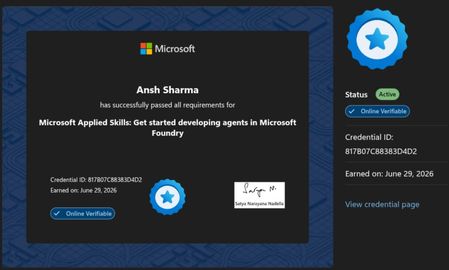
Passed Microsoft Applied Skills: Developing Agents in Microsoft Foundry
I recently completed the Microsoft Applied Skills: Get Started Developing Agents in Microsoft Foundry credential. It was a great hands-on experience with Azure AI Foundry, including deploying models, building AI agents, using Code Interpreter, and publishing an agent. If you're interested in Azure AI or Generative AI, these official Microsoft resources are a great place to start: 🔹 Microsoft Copilot https://learn.microsoft.com/copilot?wt.mc_id=studentamb_530495 🔹 Azure AI Foundry https://azure.microsoft.com/products/ai-foundry?wt.mc_id=studentamb_530495 🔹 Azure for Students https://azure.microsoft.com/free/students?wt.mc_id=studentamb_530495 🔹 Azure Free Account https://azure.microsoft.com/free?wt.mc_id=studentamb_530495 🔹 Microsoft Learn – Azure AI Training https://learn.microsoft.com/training/azure-ai/?wt.mc_id=studentamb_530495 A small request: I'm currently working toward the Microsoft Learn Student Ambassadors Community Influencer requirements. If any of these resources are relevant to you, I'd genuinely appreciate you taking a look. I hope you discover something useful for your own learning journey as well. Thank you, and happy learning!40Views0likes1CommentDeveloper SKU of Azure APIM deployed in a VNET not sending welcome email on user signup
I am deploying a internal APIM in a subnet with Application gateway in front of it with listeners for portal.domain.com, management.domain.com and api.domain.com(gateway) configured on the application gateway. I am then able to successfully browser the developer portal and publish it. But then if I try to sign up to the developer portal with test email address, the signup succeeds and I can see the user in the user list on APIM (inactive status) but the welcome email does not arrive in the test mailbox. APIM and Application gateway are in 2 different subnets but n same VNet and have their own NSGs. I setup a log analytics workspace and setup diagnostic settings on the APIM instance to send all logs to Log analytics workspace. But seems like no logs from APIM get sent to Log analytics workspace and it only receives app gateway logs as it is also configured to send logs to Log Analytics Workspace. I am using the Bicep mentioned in this article to deploy these resources:- https://learn.microsoft.com/en-us/samples/azure/azure-quickstart-templates/private-webapp-with-app-gateway-and-apim/ What could be the cause and how can I troubleshoot it.55Views0likes2CommentsDeep Dive: Implementing Retrieval-Augmented Generation (RAG) with Azure AI Search
Artificial Intelligence has changed the way businesses handle information, automate tasks, and interact with users. Large Language Models (LLMs) such as GPT-based systems can generate impressive responses, but they have one major limitation: they do not automatically know your private business data, internal documents, or the latest information. https://dellenny.com/deep-dive-implementing-retrieval-augmented-generation-rag-with-azure-ai-search/90Views0likes1CommentOneLake in Azure: The Data Lakehouse Revolution Changing the Future of Enterprise Data
Data has become the core asset of every modern organization. Companies today generate massive amounts of information from applications, customer interactions, IoT devices, business systems, and operational platforms. But the real challenge is no longer collecting data — it is organizing, managing, securing, and turning that data into meaningful business value. https://dellenny.com/onelake-in-azure-the-data-lakehouse-revolution-changing-the-future-of-enterprise-data/49Views0likes1CommentLooking for guidance on transferring my Learning Room (Azure Integration + AI)
Hi everyone, I’m Konstantinos, the host of the Learning Room Modern Development with Azure Integration and AI in the Microsoft Learn Skills Hub. With the Learn Expert program being retired, all Learning Rooms will close at the end of June. I’m hoping to keep our room alive by transferring it into an existing Tech Community space — but this can only happen if a community owner approves the move. 🔗 Learning Room: https://techcommunity.microsoft.com/group/a16aab22-66d5-4fc2-8539-b6a382916bda Focus: Hands‑on Azure integration patterns, modern development practices, and applied AI — supporting learners building real‑world solutions. If you are a community owner, moderator, or know who manages a relevant Azure space (Apps on Azure, Azure Architecture, Azure AI, Integration, Developer Tools, etc.), I’d be grateful for any guidance or introductions. Even a quick pointer to the right contact would help. The Tech Community team will handle the transfer if approved — I just need confirmation from the destination owner. Thank you to anyone who can help steer this in the right direction. I’d love to continue supporting learners within the Azure community. Konstantinos46Views0likes1CommentLooking for a new home for our Learning Room (Azure Integration + AI)
Hi everyone, I’m Konstantinos, the host of the Learning Room Modern Development with Azure Integration and AI in the Microsoft Learn Skills Hub. I am a Tech enthusiast , geek , nigh crawler ,,,you know ! More about me https://passadis.github.io But enough. I’m reaching out because the Learn Expert program is being retired, and all Learning Rooms will close at the end of June. I currently host the room Modern Development with Azure Integration and AI, and I’m hoping to keep it alive by transferring it into an existing Tech Community space — if a community owner is open to it. 🔗 Learning Room: https://techcommunity.microsoft.com/group/a16aab22-66d5-4fc2-8539-b6a382916bda Focus: Practical Azure integration patterns, modern development approaches, and applied AI — with hands‑on guidance, discussions, and support for learners building real‑world solutions. If you are a community owner, moderator, or know who manages a relevant Azure space (Apps on Azure, Azure Architecture, Azure AI, Integration, Developer Tools, etc.), I’d really appreciate a quick introduction or guidance. A transfer is only possible with the destination owner’s approval, and the Tech Community team will handle the technical side — I just need confirmation from the right person. Thank you in advance to anyone who can help point me in the right direction. I’d love to keep supporting learners and contributing to the Azure community. Konstantinos35Views0likes0Comments
Windows OS edition validation error
In one of my session hosts, the windows operating system version & edition has different values, On winver.exe" --> it gives Windows 11 multisession 22h2 whereas in registry, path to HKLM:\Software\Microsoft\Windows NT\CurrentVersion\ Keyname: ProductName Value; Windows 10 multisession Can someone experience this in similar, .. Thanks, Rajkumar78Views1like4CommentsBuilt-in Appx Apps authentication and FSLogix
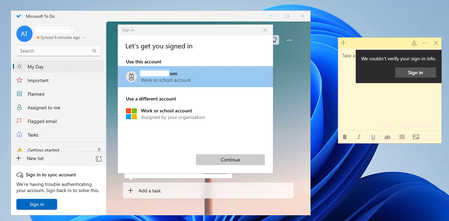
Hi, What is the state of play with Built-in Appx applications and FSLogix? We have a customer who we migrated to Windows 11 Multi-Session, EntraID only, Intune and Cloud Kerberos for FSLogix profiles. They have a strange issue that they use some of the built-in Appx applications, The Microsoft To Do app and Sticky Notes. When they open the app for the first time it logs in straight away, no issues. They close it and load it, all fine. Come to log off the session host and log back on, load the appx app, it struggles to auto sign in, both apps have the same issue, you can click a few times and it logs in, but does this every time. If we disable FSLogix, and use local profiles, it works. If we enable Roam Identity, it works (We have disabled this as I know we cannot use it) I have built a brand new session host, Removed all Intune polices apart from setting FSlogix settings, same issue, Latest FSLogix, Taken away ODFC and reset profile, same issue. Are Built-in Appx supposed to work. Just seems to be really bad at this stage if they don't, Latest FSLogix, set InstallAppxPackages to 1, (default anyway) Am I missing anything, is this supposed to work now? I would have thought this would be fine? If anyone is able to provide any assistance would be greatly appeciated. Thanks.73Views0likes1CommentRestoring a user to Azure API Management instance who had registered using Azure B2C
I am trying to restore a Azure API Management user account that I had backed up and has identity.provider and intentity.id backed up. When I restore this user using the ARM endpoint using URI similar to one below, the user gets restored but has both "AadB2c" and "Basic" as the auth type:- "https://management.azure.com/subscriptions/${subscriptionId}/resourceGroups/${resourceGroup}/providers/Microsoft.ApiManagement/service/${apimName}/users/${userId}?api-version=2024-05-01" Why is Basic being added as the value because the backup had "AadB2c" as the Auth Type? And is there a way to avoid that and only have "AadB2C" as the Auth type.66Views1like3CommentsWhich Azure certification are you currently preparing for, or planning to take next?
I recently started exploring Microsoft Azure training and certifications, and I can clearly see how valuable they are for building cloud skills and growing a career in technology. Azure certifications help professionals learn real-world cloud concepts, improve technical knowledge, and stay updated with technologies like AI, Security, DevOps, and Data Engineering. Some of the most popular certifications are: AZ-900 – Azure Fundamentals AZ-104 – Azure Administrator AZ-204 – Azure Developer AZ-500 – Azure Security Engineer Microsoft Learn also provides free learning paths and hands-on content, which makes it easier for beginners and experienced professionals to learn at their own pace.60Views1like1Comment




Events
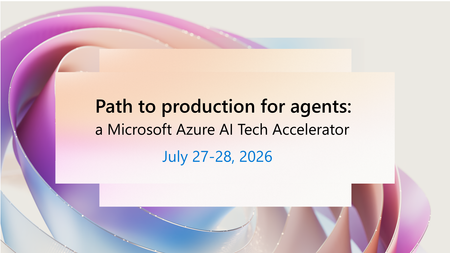
Move AI agents from experimentation to production with trusted architecture, governance, and operations. Many organizations have made progress with AI prototypes, but struggle to turn early success i...
Monday, Jul 27, 2026, 08:00 AM PDTOnline
0likes
152Attendees
0Comments
AI governance and Center of Excellence (CoE) strategies are key to scaling trusted AI. Too many AI initiatives stall in the proof of concept graveyard—not because of lack of innovation, but because t...
Monday, Jul 27, 2026, 08:00 AM PDTOnline
0likes
57Attendees
0Comments
Recent Blogs
- Enterprises move through three phases of AI adoption: evaluating models, building apps and agents, and operationalizing them in production. The first two are easier to accelerate. The third is where ...Jul 13, 2026138Views0likes0Comments
- Reliability is easy to reduce to a single number. You find the SLA, you put it on a slide, and you move on. But a service-level agreement describes an outcome, not the set of decisions that produce i...Jul 13, 202621Views0likes0Comments