Recent Discussions
Azure Architecture Best Practices for Enterprise Applications
As businesses continue to modernize their IT infrastructure, Microsoft Azure has become one of the leading cloud platforms for building enterprise-grade applications. Organizations of all sizes rely on Azure to improve scalability, strengthen security, reduce operational costs, and accelerate digital transformation. However, simply moving an application to the cloud does not guarantee success. A well-designed Azure architecture is the foundation of a secure, reliable, and high-performing enterprise application. https://dellenny.com/azure-architecture-best-practices-for-enterprise-applications/26Views0likes0Comments
Question for OAuth setting for "Try me" function in APIM developer portal
I am working on a APIM deployment that will have developer portal available to developers. Login to portal will only allow Azure B2C accounts and thus will have OAuth already performed. On the APIM instance settings in Azure portal the "OAuth 2.0 + OpenID Connect" section has a option to create OAuth server for B2C, which then can be used for each API. The "try me" function for that API in the developer portal can then use this OAuth server to perform OAuth and use the token. As we have already performed OAuth for developer portal login itself, so I don't want users to perform OAuth twice for better user experience. But one thing I am unsure off is if either there is a global jwt token validation policy or a API specify jwt policy requiring OAuth tokens, then if I don't set the OAuth for "Try me" function, will that succeed or fail? And are there any other security/general concerns if we don't set the OAuth for "Try me" function in developer portal.35Views0likes3Comments
Azure App Service secure hostname
Hey Everyone, I see a new change in app service deployment related to the secure hostname. Is it now mandatory to have a secure hostname, because I don't see the option to toggle between the secure hostname and just the format for appservicename.azurewebsites.net ? I wasn't able to find any update notification to verify this change.154Views0likes4CommentsAzure Logic Apps Workflow Templates (Preview): Issues with Updates, Expressions, and Designer UI.
Hi Azure Logic Apps team, if someone from the team is monitoring this community, I would like to report a few issues I have encountered with the Logic Apps Workflow Templates (Preview) feature. These issues are impacting the user experience and require attention. Workflow Template name update issue I created a workflow template that was working correctly. However, when I try to edit the template and change its name, the update either fails or the new name is not saved. Other changes appear to work, but renaming the template is consistently problematic. Expression update issue with Base64 output When using the expression: base64(body('Create_CSV_table')) each time the email action is updated, the expression automatically changes back to: body('Create_CSV_table') This causes an Internal Server Error and requires manually fixing the expression every time the workflow is updated. This becomes very frustrating when managing multiple workflows. Logic Apps designer responsiveness issue The Logic Apps designer page is not fully responsive across different screen sizes. On my laptop screen, the Add Expression option disappears and is only visible when using a larger monitor. The designer should support different screen resolutions and provide a consistent user experience. Thank you for looking into these issues. Logic Apps Workflow Templates is a very useful feature, and addressing these problems would greatly improve usability for developers and users.Solved22Views0likes1Comment
AKS Architecture: Mitigating Pod Latency and Request Bottlenecks
Hello team, While optimizing our production workloads on Azure Kubernetes Service (AKS), our engineering squad hit a specific architectural performance challenge that I wanted to document here, along with how we resolved the runtime bottleneck. As our concurrent API query spikes scaled past normal operational baselines, our application pods running decoupled microservices containers began experiencing noticeable synchronization latency. Initially, we looked into scaling up our cluster sizing or adjusting standard load balancing layers, but telemetry data revealed that the core issue was database connection pooling and microservices processing delays under sudden traffic spikes. Here is the strategic checklist we implemented to stabilize our Azure cloud environment: 1. Transitioning to Asynchronous Container Configurations Monolithic data pipelines often create heavy thread blockages under peak loads. We shifted our core backend workflows into isolated AKS containers managed via automated Azure DevOps pipelines. This granular separation allowed independent loops to process concurrently, successfully preserving our 99.9% operational runtime resilience. 2. Managing Infrastructure Sourcing & Tech Overheads Designing, tuning, and monitoring these decoupled distributed systems is an intensive task that demands advanced architecture experience. Trying to orchestrate multi-cluster routing without deep domain expertise often leads to configuration drift, cloud budget bloating, and unnecessary performance gaps. For enterprise teams planning to bridge this talent gap, it is highly efficient to onboard specialized cloud developers and backend optimization experts on demand. If you want to review structured execution timelines, technical developer vetting checklists, and enterprise pricing models, you can inspect this guide to https://www.decipherzone.com/hire-developer. 3. Offloading Heavy Automation Pipelines To protect our user-facing request paths, we separated our backend traditional logic from our heavy data workflows. We configured self-healing internal pods to handle background automation scripts completely outside the main client-side execution path. Enforcing TLS 1.3 encryption across endpoints and performing routine peer-level compliance audits finally stabilized our cluster velocity. How are you currently managing microservices synchronization loops inside your AKS clusters? Are you relying on custom stateful sets or advanced service meshes to curb cross-pod latency? Let’s share some insights below!26Views0likes1Comment
Windows App iOS RemoteApp Won't Reconnect
We are building a RemoteApp environment using AVD for the session hosts. On iOS, what happens is the screen powers off/device goes to sleep. When a user logs back into the iPad, the RemoteApp was still the focus, so they see buttons to reconnect or disconnect. If we press reconnect, it will either spin endlessly OR it will report an error on reconnection attempt. If we then close the error OR if we press disconnect where it drops us into the Windows App, then reopen the exact same Windows App it immediately reconnects. This does not happen in Windows at all, we have no Android deployments to test, and are trying iOS deployments on iPad and troubleshooting with iPhones. Both device types experience the issue. To troubleshoot, I've tried multiple iOS devices by multiple users; same problem. Those same users connecting to our AVD desktops, not RemoteApps, reconnect without issue. Our AVD and RemoteApp session hosts all use the same Group Policies and are, at this point, only domain joined, not Entra or Hybrid. Any thoughts on why this happens? Would logs be helpful?31Views0likes3CommentsWindows App expands auto logoff support to managed Android devices (Public Preview)
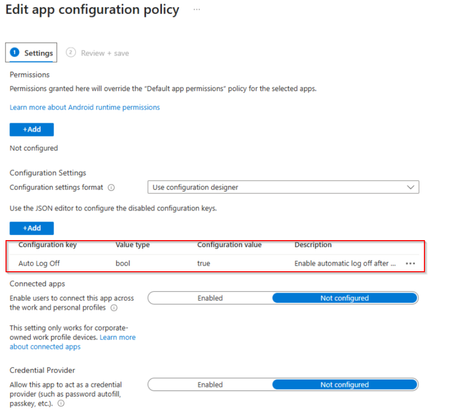
We're excited to announce that Windows App auto logoff on Android is now in public preview, giving administrators a simple, Mobile Device Management (MDM)–configured way to keep shared devices clean between sessions. Already available on Windows, auto logoff now extends to MDM-enrolled Android devices, a key step toward enabling frontline and shared-device scenarios on Android hardware. What is auto logoff? Windows App auto logoff on Android is an admin-configured setting that signs the user out of Windows App and removes locally stored app data when the app is closed, disconnected, or left inactive for a configured period. By removing locally stored app data, auto logoff helps ensure that every session starts with a clean state when users sign in with their own credentials. It's designed for operational convenience and device hygiene — not as a security boundary — and it does not interrupt active Azure Virtual Desktop or Windows 365 sessions. Only the local Windows App state is reset. Why it matters for shared devices Auto logoff is ideal for shared-device deployments where Windows App is the primary app users interact with to access Azure Virtual Desktop or Windows 365: Clean handoffs: when one worker finishes and closes the app, the next person signs in fresh Local Windows App data is removed automatically: cached app data is cleared when configured logoff conditions occur (app close, disconnect, or inactivity) Streamlined re-entry: an optional setting skips the onboarding and privacy screens after logoff, so shared agreements are accepted once per device rather than by every user Flexible triggers: reset on app close, sign-out, remote-session disconnect, or after a defined period of inactivity How to configure it Windows App auto logoff on Android is set from your MDM admin console (for example, Microsoft Intune) via a managed app configuration profile assigned to Windows App. Core settings include: Enable auto logoff: the master switch (off by default) Inactivity timeout: minutes of idle time (with the screen locked) before Windows App signs out and resets; set to 0 to rely only on close/disconnect triggers Skip first-run experience: recommended for shared devices so users aren't re-prompted through setup The setting names and value types are the same across MDM providers, only the admin UI differs. Prerequisites Windows App version 11.0.0.113 or later on a supported Android device The device enrolled in your MDM, with Windows App installed as a managed app Admin access to a supported MDM provider that can deliver app configuration to Windows App Note: Inactivity-based auto logoff depends on the Android device’s screen lock setting. If a device is configured never to lock, the inactivity timer won't fire (close, sign-out, and disconnect triggers still work). Learn more For the full setup walkthrough, configuration examples, and known limitations, see Configure auto logoff for Windows App on Microsoft Learn. We'd love to hear how you're using auto logoff for your shared-device and frontline deployments, drop a comment below and let us know what scenarios you'd like to see us light up next.65Views0likes1CommentBuilding Resilient Cloud Architectures with Azure’s Agentic Agents
Cloud computing has evolved far beyond simply moving workloads from on-premises servers to virtual machines. Organizations today expect their cloud environments to be intelligent, resilient, secure, and capable of adapting to changing business demands with minimal human intervention. As artificial intelligence continues to reshape enterprise technology, Microsoft Azure is introducing a new generation of AI-powered capabilities through Agentic AI. https://dellenny.com/building-resilient-cloud-architectures-with-azures-agentic-agents-migration-observability-and-optimization/72Views1like0Comments
Looking for guidance on designing an Azure data analytics pipeline for reporting
I’m working on modernizing an old reporting workflow that currently runs on a few on-premises databases and scheduled scripts. The current process collects operational data from multiple systems, performs some basic transformation and aggregation, and then generates reports for different business teams. As the data volume is growing, the existing setup is becoming difficult to maintain and slow to refresh. I’m looking for an Azure-based architecture that can ingest data from different sources, store both raw and processed data, run scheduled transformations, and make the final datasets available for reporting tools like Power BI. Would appreciate any suggestions on the recommended architecture, especially around data storage, transformation, refresh performance, and cost control. Thanks65Views0likes3CommentsWhich Azure service do you find yourself using the most, and why?
Whether it's Virtual Machines, Storage Accounts, App Services, Azure SQL, Key Vault, Azure Monitor, or something else, I'm curious to know which service has become essential in your day-to-day work. Share your experience, tips, or lessons learned.38Views0likes1CommentEntra ID logins to Azure VMs.
Hello everyone. I've posted a much longer, more detailed question about this on the Azure support forums, but I'm trying to get more people to look at this. Basically, I'm trying to set up Entra accounts that can log into an Azure-based Windows VM, using the instructions Microsoft have put here: https://learn.microsoft.com/en-us/entra/identity/devices/howto-vm-sign-in-azure-ad-windows I've treated the Microsoft instructions as a checklist, in order to be as precise as possible. My own notes and records from 2024 seem to indicate I built a similar system then, following the same instructions. I was surprised that it didn't work as easily this time. Does anyone know of changes that were made to Entra ID since 2024 (or 9 months ago, when most of the newest YouTube tutorials were made) to make it much harder to use? In addition to Microsoft's instructions, I have also experimented with alternative configurations (a lot of them) detailed on YouTube, none of which worked. My VM (and Entra itself) both seem to indicate that my Entra accounts are valid, and that the VMs are correctly joined to Entra. I am still able to log into the VMs with local accounts, so the VMs are correctly connected to Azure. I've tried both with and without a Bastion, with the same results. Local accounts work, but Entra doesn't. I've so far been unable to log the Entra accounts in at all, as the passwords (all of them valid, and double-checked) have been rejected. I think if I could find one method of using the Entra accounts which worked, I would settle on it, but so far I haven't found a single configuration that works. Does anyone have a theory of what's blocking me? I do have more test data, but I don't want to flood this post. Thanks.112Views0likes8Comments
Azure Event Grid with ASB
Hi, we need to push Event Grid events for blob creation to an Azure Service Bis queue to deduplicate as the EG guarantee "At least one delivery" pattern, but the problem is that we need to deduplicate with blob name as "MessageId" on ASB side. The problem is that the blob name is not present in the event data. we have only "subject" with the full url that can exceed 128 characters, the limit of ASb Messageid. In some duplicate events I found that the filed "data/storageDiagnostics/batchId" is the same for duplicated events. I'm wonderring if this batchId will be always the same for duplicate events, I can use it as "MessagesId" in "Delivery properties"48Views0likes2Comments
FPGA vs ASIC for AI at the Edge: What factors influence your hardware choice?
As AI continues to move closer to edge devices, choosing the right hardware platform has become an important design decision. While both FPGAs and ASICs have their strengths, the best choice often depends on the application's requirements. Here are some of the key factors that engineering teams typically evaluate: Performance and latency requirements Power efficiency Development cost and NRE Time-to-market Production volume Need for future hardware updates FPGAs offer flexibility for rapid prototyping and evolving workloads, making them well-suited for early-stage development. ASICs, on the other hand, can provide significant advantages in performance, power consumption, and cost efficiency for high-volume production. I recently came across a technical article that explains these trade-offs in a structured way and found it useful as a reference: https://www.signoffsemiconductors.com/asic-vs-fpga/ I'd be interested to hear how others approach this decision. Have you migrated a design from FPGA to ASIC? What factors influenced your choice? Are there workloads where you would always choose one over the other?64Views0likes1CommentPortable Azure topology and documentation snapshots with OSIRIS JSON
Ciao everyone, I’m working on https://github.com/osirisjson/osiris, a vendor-neutral specification for describing infrastructure resources and their relationships as portable point-in-time snapshots. To proof that the specification could work in real-scenarios I already built an initial https://osirisjson.org/en/docs/producers/hyperscalers/microsoft-azure in Go. You run on-premise and it connects through the Azure CLI, reads Azure subscriptions and emits an OSIRIS JSON document that can be used for documentation, topology diagrams, audits, configuration drift analysis, CMDB/IPAM/DCIM workflows, or controlled AI/context workflows without giving those platforms/tools direct access to Azure. The producer currently covers several Azure areas, including networking, compute, storage, identity, databases, containers, integration, observability, backup, automation, management groups, and cross-resource dependency edges such as Private Endpoint to PaaS targets, App Service to Application Insights / Log Analytics, AKS to subnets and node pools, and backup vault relationships. It supports two output purposes: documentation: minimal high-level projection for diagrams, inventory dashboards, and architectural documentation audit: deeper projection with readable properties and extensions after sensitive-field redaction This is not intended to replace Azure tooling, Azure Resource Graph, IaC, Azure Policy, or any existing governance/control-plane workflow. OSIRIS JSON is simply a read-only external producer that generates a vendor-neutral snapshot of the observed Azure environment. I would really appreciate feedback from Azure architects, cloud engineers, and governance practitioners on the mapping model: Which Azure resources and relationships are the most important for documentation and topology generation? Are the current connection types useful for real-world architecture views? What should be prioritized in next releases? Would a documentation/audit split be useful in enterprise environments? You find the current Azure producer documentation here: https://osirisjson.org/en/docs/producers/hyperscalers/microsoft-azure I would really appreciate any feedback, suggestions, edge cases, or ideas from people who operate, document, audit, or govern Azure environments and I also welcome anyone who want to participate on development. Ciao from Italy, Tia86Views0likes2Comments
How to recover global admin access to tenant
I have already tried posting this to the general Microsoft Q&A forums and received no response. We are desperate to figure something out so if this is not the correct line of communication, please direct me to where I should go. My company is in a bit of a bind right now, and I am at my wit's end after almost a week of trying to get in contact with anyone who could help. We have multiple directories in Azure that belong to us, but they are all independent of each other. As such, some directories have multiple global admins (and thus are not an issue); others -- and quite frankly, the most important ones -- only have one global admin, and it was our DevOps person, who is no longer employed with us. We have no way of accessing his account, and thus no way of accessing a global admin account for these directories/tenants. Access to these directories is critical to our operations. We were informed last Friday by someone from the data protection team that they could not give us access to these tenants we pay thousands of dollars a month for because: Our former DevOps person registered all other users as guests/external users, and DPT "can't give external users admin permissions", and To reset the MFA of the current global admin account, the owner of the account (who no longer works for our company) would need to contact them and verify their identity What options do we have here? We have blobs full of user-uploaded files in these tenants. Starting over from scratch is a doomsday scenario we are trying everything we can to avoid. Surely there has to be something that can be done?90Views0likes2CommentsPassed Microsoft Applied Skills: Developing Agents in Microsoft Foundry
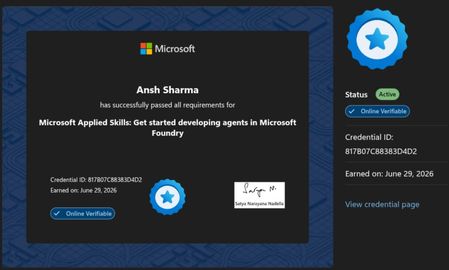
I recently completed the Microsoft Applied Skills: Get Started Developing Agents in Microsoft Foundry credential. It was a great hands-on experience with Azure AI Foundry, including deploying models, building AI agents, using Code Interpreter, and publishing an agent. If you're interested in Azure AI or Generative AI, these official Microsoft resources are a great place to start: 🔹 Microsoft Copilot https://learn.microsoft.com/copilot?wt.mc_id=studentamb_530495 🔹 Azure AI Foundry https://azure.microsoft.com/products/ai-foundry?wt.mc_id=studentamb_530495 🔹 Azure for Students https://azure.microsoft.com/free/students?wt.mc_id=studentamb_530495 🔹 Azure Free Account https://azure.microsoft.com/free?wt.mc_id=studentamb_530495 🔹 Microsoft Learn – Azure AI Training https://learn.microsoft.com/training/azure-ai/?wt.mc_id=studentamb_530495 A small request: I'm currently working toward the Microsoft Learn Student Ambassadors Community Influencer requirements. If any of these resources are relevant to you, I'd genuinely appreciate you taking a look. I hope you discover something useful for your own learning journey as well. Thank you, and happy learning!51Views0likes1CommentDeveloper SKU of Azure APIM deployed in a VNET not sending welcome email on user signup
I am deploying a internal APIM in a subnet with Application gateway in front of it with listeners for portal.domain.com, management.domain.com and api.domain.com(gateway) configured on the application gateway. I am then able to successfully browser the developer portal and publish it. But then if I try to sign up to the developer portal with test email address, the signup succeeds and I can see the user in the user list on APIM (inactive status) but the welcome email does not arrive in the test mailbox. APIM and Application gateway are in 2 different subnets but n same VNet and have their own NSGs. I setup a log analytics workspace and setup diagnostic settings on the APIM instance to send all logs to Log analytics workspace. But seems like no logs from APIM get sent to Log analytics workspace and it only receives app gateway logs as it is also configured to send logs to Log Analytics Workspace. I am using the Bicep mentioned in this article to deploy these resources:- https://learn.microsoft.com/en-us/samples/azure/azure-quickstart-templates/private-webapp-with-app-gateway-and-apim/ What could be the cause and how can I troubleshoot it.59Views0likes2CommentsDeep Dive: Implementing Retrieval-Augmented Generation (RAG) with Azure AI Search
Artificial Intelligence has changed the way businesses handle information, automate tasks, and interact with users. Large Language Models (LLMs) such as GPT-based systems can generate impressive responses, but they have one major limitation: they do not automatically know your private business data, internal documents, or the latest information. https://dellenny.com/deep-dive-implementing-retrieval-augmented-generation-rag-with-azure-ai-search/102Views0likes1Comment




Events
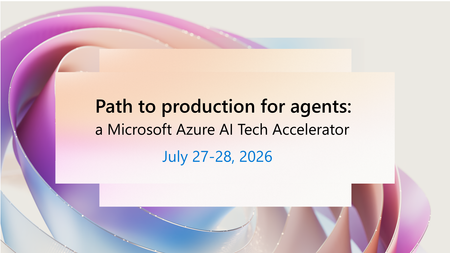
Move AI agents from experimentation to production with trusted architecture, governance, and operations. Many organizations have made progress with AI prototypes, but struggle to turn early success i...
Monday, Jul 27, 2026, 08:00 AM PDTOnline
0likes
223Attendees
0Comments
AI governance and Center of Excellence (CoE) strategies are key to scaling trusted AI. Too many AI initiatives stall in the proof of concept graveyard—not because of lack of innovation, but because t...
Monday, Jul 27, 2026, 08:00 AM PDTOnline
0likes
84Attendees
0Comments
Recent Blogs
- For automotive retailers, most customer relationships don't begin and end with a vehicle purchase. A customer might browse inventory online, visit a dealership weeks later, return for service months ...Jul 21, 202626Views0likes0Comments
- Introduction Traditional High-Performance Computing (HPC) is central to most scientific computing and engineering applications. These systems are based on well tested, repeatable, and scalable comp...Jul 21, 202641Views0likes0Comments