gateway
2 Topics
Help ! - Hub Spoke Architecture and Routing via NVA
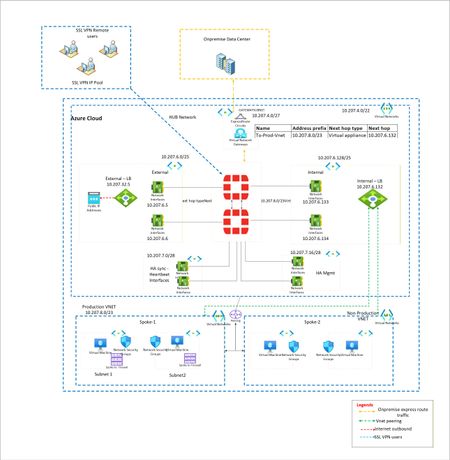
I have a classic example of routing. I want to force all traffic via Fortigate firewalls. EastWest and NorthSouth. However when large Supernet of Azure Vnet is used to route and force the traffic via UDR at gateway subnet, its not working. Because Routes learned at Hub Vnet via Vnet peering is taking precedence. To isolate, i have created multiple small subnet routes for Gateway subnet. Each pointing to spoke vnet and next hop as Fortigate firewall. However this is working, i want to make solution solid. Means if someone creates new vnet in future and peer with Hub, it should not get direct traffic. Is that possible? Or this is typical shortcoming of Azure where routing works with preference to vnet peeering.? Below is architecture -Solved637Views0likes3Comments
WVD Gateway Performance Issues?
Hey Everyone, We have been chugging along just fine with our WVD installation. All of our users are remote at this point, due to COVID-19 and everything had been fine. This morning, around 9:30, we started seeing performance issues with connection to the desktop. By performance issues I mean, slow mouse movements, slow to scroll through a website or email and the like. There are no indicators of performance issues on the WVD Hosts themselves - Disk / CPU / Memory all fine. I have used Horizon View and XenDesktop in the past pretty extensively, and this felt like a scenario where bandwidth to the gateway/connection broker is saturated or is seeing high latency/packet loss. I would blame this on an individual's home internet connection or coffee shop wifi, but, it is all of my users (including myself). I wish there were some way to see or manage the performance of the WVD connection broker...but I am not aware of any. Is anyone else seeing this? I did see the thread about drops and what not, but this is not related, I do not believe.10KViews3likes15Comments