
Forum Widgets
Latest Discussions

Windows 11 Random Restarts During Installation and OOBE. Stable in Linux and Windows Desktop
System Specs Motherboard: ASRock B450M Pro4-F (BIOS P10.43 Beta, AGESA ComboAM4v2 1.2.0.F) CPU: AMD Ryzen 5 5500 GPU: NVIDIA GeForce RTX 3060 RAM: 2x 16GB (tested and verified stable, no errors) Storage: Samsung 970 EVO 1TB NVMe OS: Windows 11 Pro 25H2 Problem This PC previously ran Windows without issues for 5-6 years. I recently decided to do a fresh Windows 11 install, and my system randomly restarts during Windows 11 (and Windows 10) installation at various stages. Sometimes at 15%, sometimes at 48%, sometimes during the OOBE setup when clicking "Next." There is no BSOD, no error message. The screen just goes black and the system reboots. The system is completely stable when idle at OOBE screens (it can sit for hours without issue), and it is fully stable once Windows is actually running on the desktop. Linux (Zorin OS) runs perfectly stable in every scenario: live USB, installation, and normal use. No crashes whatsoever. What I've Tested and Ruled Out Hardware RAM: Ran memory diagnostics, no errors found. Also tried using each stick individually (1 stick at a time), same issue with both. SSD: SMART health check shows no issues Multiple GPUs tested: Tried a different GPU, same random restarts during installation Multiple USB drives: Tried different USB drives for installation media, same result CMOS battery: Considered but system clock is accurate and BIOS settings persist BIOS Updated BIOS from P7.40 to P8.01 to P10.43 Beta (latest available with AGESA ComboAM4v2 1.2.0.F and updated fTPM) Disabled fTPM (Advanced > CPU Configuration > AMD fTPM Switch > Disabled), no change Tested multiple BIOS versions, restarts occur on all of them Software Tried both Windows 10 and Windows 11 installation, both experience the same random restarts Tried different Windows 11 ISOs, same behavior Linux is completely stable. Zorin OS runs without any issues, which rules out fundamental hardware failure Workaround That Got Windows Installed Since the Windows installer (Windows PE) kept crashing, I bypassed it entirely by applying the Windows image directly from Linux using wimlib: Booted Zorin OS live USB Partitioned the NVMe drive (GPT: 512MB EFI, 16MB MSR, 930GB NTFS) Used wimapply to apply install.wim (Index 6, Pro) directly to the NTFS partition Copied the EFI bootloader files manually Created BCD store from a Windows PE command prompt using bcdboot Windows booted successfully, but OOBE still caused random restarts when progressing through setup. I used Ctrl+Shift+F3 to enter Audit Mode, installed GPU and chipset drivers, and created a local user account manually via command line. Current State Windows 11 Pro is installed and the desktop is functional, but I'm stuck in Audit Mode with broken UWP/AppX app provisioning: Start Menu opens but taskbar icon clicks don't work Windows Search doesn't work Notification panel doesn't open Built-in apps like Notepad don't launch Creating a new user profile doesn't fix it (system-level issue) sfc /scannow finds no integrity violations DISM /RestoreHealth fails with error 0x800f0915 even with the ISO as source (version mismatch, Windows Update patched the system past the base ISO build) Re-registering AppX packages produces errors about missing paths Cannot run in-place repair upgrade because setup.exe refuses to run in Audit Mode Cannot fully exit Audit Mode. Registry values are set correctly but Windows keeps booting into Audit Mode (ImageState was IMAGE_STATE_SPECIALIZE_RESEAL_TO_AUDIT, changed to IMAGE_STATE_COMPLETE but Audit Mode persists) Sysprep /oobe /reboot triggers OOBE which crashes again with random restarts No unattend.xml files found on the system Key Observation The random restarts happen exclusively in: Windows PE (the installer environment) Windows OOBE (first-time setup screens, specifically when advancing through steps) The system is completely stable in: Linux (any distribution, any scenario) Windows desktop (Audit Mode, normal use) Windows OOBE when idle (sitting on a screen without clicking) This pattern suggests a driver or ACPI compatibility issue specific to the Windows pre-boot/setup environment on the B450 + Ryzen 5500 combination, not a hardware defect. Questions Has anyone experienced similar random restarts specifically during Windows installation/OOBE on B450 boards with Ryzen 5000 series CPUs? Is there a known incompatibility between Windows PE/OOBE and certain B450 + Zen 3 configurations? Is there a way to force Windows out of Audit Mode when all registry approaches have failed and OOBE causes crashes?retro21Apr 04, 2026Copper Contributor163Views0likes2Comments
Screen dimming problem on Lenovo Yoga Running Windows 11
How do i stop my laptop from dimming the screen if i don't do anything for several minutes ? I have the screensaver set for 20 minutes. I have Lenovo Yoga 7 x64 based system for Windows 11 Home.noah88Apr 04, 2026Brass Contributor52Views0likes2CommentsHow to Secure Your Windows 11 PC (Complete Guide)
If you’re using Windows 11 daily—whether for work, gaming, or personal tasks security should never be an afterthought. As someone who has worked extensively with Windows systems, I can confidently say that Windows 11 is one of the most secure operating systems Microsoft has released. But here’s the catch: out-of-the-box security is only the starting point. To truly protect your PC, you need to actively configure and maintain it. https://dellenny.com/how-to-secure-your-windows-11-pc-complete-guide/27Views0likes0Comments
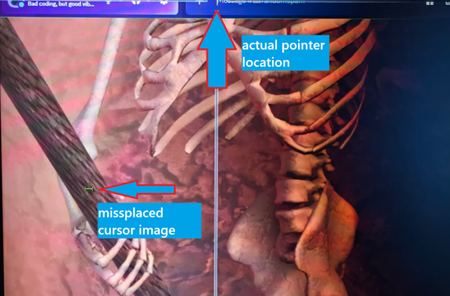
The mouse cursor is not positioned correctly when rotating the screen in Windows 11
On Windows 11 Canary 28020.1362, the text cursor is misplaced on my rotated portrait monitor. The position doesn’t match my real mouse pointer. Drivers and system are up to date. Anyone has a fix?GordonyApr 03, 2026Iron Contributor31Views0likes1Comment
Windows 11 What is this logo used for?
I saw an unknown logo on Windows 11 and would like to know what it is for.KevinHarveyApr 03, 2026Iron Contributor23Views0likes1Comment
PC Manager is one of the best and most reliable products Microsoft has developed
I'm having trouble with PC Manager, a tool that I rely on for my computer's maintenance and optimization. Despite its reputation as a reliable and trustworthy product, I'm experiencing issues that are preventing me from using it effectively, and I'm hoping to find a solution or guidance from the community on how to resolve these problems.JakarimomApr 03, 2026Brass Contributor62Views0likes3Comments
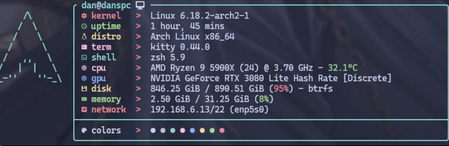
Finally got sick of Windows 11 Bloatware and got RAM usage down to 2.5GiB...
By switching to Linux (Arch btw). Seriously the lengths I see people go though to Make their Windows Experience slightly less bad are getting absurd. Linux is RIGHT there and it plays probably 99% of the games you own. If you are going to spend tens of hours learning how to disable whatever MS is shoving in their OS these days you CAN learn Linux and have skills that will last longer than Microsoft's next patch cycle. I am cringe but I am free! Edit: This is a joke. I even flared it as a meme. I run Linux because I hate what Microsoft is doing. Y'all free to use your PC however you want.BrondamApr 03, 2026Copper Contributor56Views0likes3Comments




Tags
- Features2,054 Topics
- configuration1,927 Topics
- device management1,324 Topics
- Update management1,034 Topics
- Application Management900 Topics
- security804 Topics
- deployment566 Topics
- community459 Topics
- accessibility292 Topics
- licensing242 Topics