User Profile

hoyty76
Steel Contributor
Joined Sep 03, 2016


User Widgets
Recent Discussions
Re: Can't install Azure ARC on multiple Server 2025 devices
I downloaded from that link on March 19 and got 95 MB file. I downloaded again today and 107 MB. They definitely replaced the file in last two weeks. The new installer gets farther but still doesn't seem to complete?248Views0likes0CommentsCan't install Azure ARC on multiple Server 2025 devices
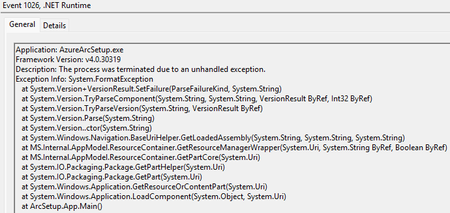
I have multiple Server 2025 devices that when I click "Launch Azure Arc Setup" button on taskbar icon or "Azure Arc Setup" on start menu nothing happens. I then tried to download arcsetup.exe and it never advanced beyond the initializing Windows Installer screen. I got it to work on one server and 4-5 all have the same problem. Both physical and VM. Below are errors in the event log.692Views1like6CommentsUsing MCC via DNS / DHCP before policy applies
Is there a way to direct traffic to local MCC for devices during setup phase or before the policy has been applied? During initial setup phase the first round of updates up to a feature update is downloaded and it would be great to utilize MCC at that step.Trying to install to Windows Server + WSL error
I am trying to deploy to a Windows Server running WSL. I built a new Server 2025 VM and then enabled nested virtualization and installed WSL. I ran the provisioning script and am getting an error message. Successfully imported MCC Ubuntu Image into WSL Validating imported MCC Ubuntu Image : Ubuntu-22.04-Mcc-Base is running as expected in WSL... Failure: WSL MCC install failed with exception during installation, Return Code: 13631495 System.Management.Automation.RuntimeException: ScriptHalted [2024-12-10] [11:53:55 AM] WSL MCC install failed (ReturnCode: ) [2024-12-10] [11:53:55 AM] Setting InvocationEndTime Setting InvocationState Installer return code 0 Any hints on what is going wrong?SolvedSeveral computers stuck on 26100.710
We deployed about 20 laptops in June with the ISO preview release available in late May / early June. Most of them have properly updated to 26100.1742 now. 4 are stuck at 710 though. They don't show any pending updates. My only idea is to forcefully install 2024-09 Cumulative Update for Windows 11 Version 24H2 for x64-based Systems (KB5043080). Not sure what else to do?288Views0likes1CommentSSMS 19 and 20 connection delay or timeout
I connect to one Azure SQL database hosted on "site".database.windows.net. Ever since installing SSMS 19 and continuing with 20 I have a problem where the database connection seems to timeout or drop. When this happens SSMS hangs for 5 minutes. It happens after I open an Edit connection and let it idle View connections don't cause the problem. I can go back to 18 and the problem doesn't happen. It seems like the connection drops and then takes 300 seconds to timeout and retry. Then it works again until it idles again. It is super frustrating.445Views0likes0CommentsWindows Store App install failed - 80240066 error code?
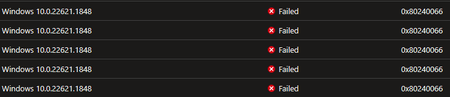
We have made the transition from Store for Edu to new deployment method. It is working for everything except the Surface app on some devices. We are getting this error code which I am not having any luck with finding documented.578Views0likes0CommentsRe: App Assignment failing maybe because of group type?
My working theory now that I would really appreciate confirmation on is that you have to use either Security groups or M365 groups that are SecurityEnabled as basis for assignments in Intune. By default, M365 groups are not SecurityEnabled, they can be changed. My issue is I am attempting to use groups with hidden membership, and they cannot be SecurityEnabled. Thus, I have to create new groups.1.2KViews0likes0CommentsApp Assignment failing maybe because of group type?
I am trying to assign an IOS or Windows app to a group of users. I am using a M365 group for this purpose. However, no one is being targeted for the app to be installed. The only difference I can see in my targeting is I am either targeting devices directly or I am using a security group instead of M365 group. Does app targeting need to only be done to Security groups?1.2KViews0likes1CommenteDiscovery of Teams group chat?
We had a user use the new feature of deleting chats in Teams and I am trying to recover. I can see in audit log they were deleted. When I run an eDiscovery and choose Type of Instant messages I only see 1-1 Teams chat and no group chats. I am doing something wrong, but not sure what. Any suggestions?4.6KViews0likes3CommentsOneDrive client issue with users with same MSA + AAD account introduced in recent versions
I am tracking an issue that has appeared since OneDrive client version 22.121.0605.0002 and is confirmed to be in 22.141.0703.0002. We set a policy from GP and Intune to silently configure OneDrive for users. If a user has both a MSA and AAD account with same username. With the current version OneDrive is unable to configure and can't be managed manually. After a rollback to older version the autoconfiguration works and then it updates can continues to work after the upgrade. I have filed feedback on this but trying to see who I can get to and have this bug fixed.1.2KViews0likes2CommentsRe: Hybrid Ex2010 to 2019 via 2016 and failing Prerequisite Check for 2016 install?
The Solution: Add the following registry key on the Exchange Server to disable the hybrid detection check Path: HKEY_LOCAL_MACHINE\SOFTWARE\Microsoft\ExchangeServer\v15\Setup Type: REG_SZ Name: RunHybridDetection Value: 1 Then the setup would progress and tell me other pre-requisites missing and complete.1.7KViews0likes0CommentsHybrid Ex2010 to 2019 via 2016 and failing Prerequisite Check for 2016 install?
I have an old Ex2010 server that I want to get to 2019. All of our in use mailboxes are in M365 now, I have a few archive mailboxes and need to manage accounts with AAD Connect. I am trying to install Ex2016CU23 on clean built WS2016 server. I cleaned up old Ex2000 or 2003 stuff, got RSAT and .Net installed. I downloaded the tenant config from M365 site. Still can't get through the process. I saw a mention of bypassing Prerequisite Check but can't find a way to do that. If I run GUI installer it tells me my user/password for verifying hybrid configuration is bad. I am trying to do it via command line instead. Setup.exe /PrepareAD /TenantOrganizationConfig c:\Users\administrator.FASPS\Documents\MyTenantOrganizationConfig.xml /IAcceptExchangeServerLicenseTerms_DiagnosticDataON When I run I that I get: Performing Microsoft Exchange Server Prerequisite Check Prerequisite Analysis 100% Setup will prepare the organization for Exchange Server 2016 by using 'Setup /PrepareAD'. No Exchange Server 2013 roles have been detected in this topology. After this operation, you will not be able to install any Exchange Server 2013 roles. For more information, visit: https://docs.microsoft.com/Exchange/plan-and-deploy/deployment-ref/readiness-checks?view=exchserver-2016 The tenant is currently being upgraded from Exchange 14. For more information, visit: http://technet.microsoft.com/library(EXCHG.150)/ms.exch.setupreadiness.DidTenantSettingCreatedAnException.aspx The Exchange Server setup operation didn't complete. More details can be found in ExchangeSetup.log located in the :\ExchangeSetupLogs folder. I am attaching the log in hopes someone can help me out. I renamed to .csv since you can't upload .log or .txtSolved1.7KViews0likes1Comment
Recent Blog Articles
No content to show