User Profile

FCatalano
Brass Contributor
Joined May 19, 2020


User Widgets
Recent Discussions
Unable to share in multi-screen mode
Good morning everyone. It amazes me that today a universal product like Teams still "lacks" a feature that allows multiple users to project their screen at the same time, leaving connected users the possibility of looking at a particular screen or multiple screens in puzzle mode . It would be enough to use the same technique used to project the video stream acquired via the webcam and the problem would be solved! Unfortunately, the absence of this functionality (which perhaps would be superfluous for the majority of users) prevents us from being able to use this application effectively when, for example, it is necessary to carry out an end to end test which requires verification of multiple applications in the same instant (it is necessary to verify the effect of an action simultaneously on multiple applications used by multiple users and therefore on multiple screens at the same time). What does Microsoft say about this??? Thank you Greetings1.5KViews0likes2CommentsProcess holes in Microsoft Excel and Microsoft Access
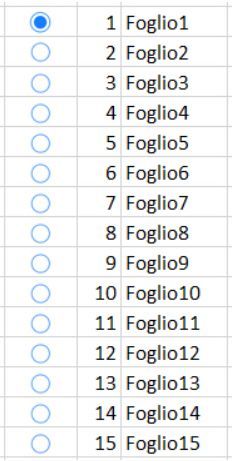
Goodmorning everyone. I would like to report two "important" process holes on two Microsoft products that are very popular worldwide! I state that I am amazed that, although these products have been on the market for several years, they do not yet have these important features (I do not think I am the first in the world to complain of their shortage). The first process hole concerns Microsoft Excel: there is no (or I do not know despite my laborious searches on the web) any type of functionality that allows me to access a "simple" list of worksheets contained in a folder. I better explain the need! If there are 15 sheets in the workbook, to move "quickly" from one sheet to another, I am forced to click on the scroll arrows between sheets or to navigate between the sheets using the shortcut keys CTRL + PageDown or CTRL + PageUp. But if I wanted to switch from the current sheet (example sheet 1) to sheet number 11, how can I do it? There is no functionality (to my knowledge) 😞 A drop-down list of the following type would suffice: that allows me to quickly switch to the desired sheet. The second process hole concerns Microsoft Access: there is no (or I do not know despite my laborious searches on the web) any type of functionality that allows me to format the text in the "Visual Basic" (VBA) section. This would be fundamental for those who develop frequently as it is of fundamental importance for example to make common some sections of the code in order to associate them mnemonically and then quickly identify them in case of revision of the code itself (it would be enough to implement the highlighting of the text with color) . I ask the experts if I made two requests that are impossible to implement (or can I hope for a future release that contains these two features)? Thanks for your attention! Regards624Views0likes0CommentsMeeting invitations no longer manageable in Outlook.
Good morning to the whole community. I have a problem that is driving me crazy (and I don't think I'm the only one). Since there was Covid in the world, all companies have organized themselves for the use of videoconferencing software, allowing their people to be able to continue to meet remotely through the planning of videoconferences. The very serious problem that I highlight concerns above all Micosoft Outlook and let me explain better. In an integrated suite like that of Microsoft Office 365, calls are scheduled with Outlook connected to Teams and invitations to recipients are sent via Outlook. Too bad that since we are in a remote meeting all day and therefore do not have time to accept or decline an invitation, those who book a meeting and see availability in the calendar, do so without any worries. In this way it occurs that at the end of the day, when there is time to check the invitations received, you often find yourself in the condition of having received multiple simultaneous invitations for the same date / time slot and for this reason it becomes complicated to have to refuse one. or the other invitation without having to justify the refusal. I had found an effective method by changing the Outlook settings, setting the automatic meeting acceptance flag but this creates another problem: I no longer see the invitation messages in Outlook because by accepting them automatically the software deletes them, inserting a notification in sent mail. After having highlighted the problem abundantly, I will be very brief in the request: is there the possibility of automatically accepting meetings, leaving the invitation intact in the "inbox"? In this way we would have two advantages: 1) those who try to invite to a meeting see the busy calendar and schedule the meeting correctly in a free slot 2) those who receive the invitations still have the possibility to see the invitations received at the end of the day and maintain the possibility of rejecting them where necessary If this possibility does not exist, I "strongly" suggest introducing it because due to Covid and remote meetings we have lost our peace of mind (also due to these deficiencies on the systems).524Views0likes0CommentsRe: ALERT: network shares not visible in file explorer
Harm_Veenstra Thanks, I finally solved it. The useful solution for me is this which I report below (taken from your link): Detail to configure the EnableLinkedConnections registry entry In Registry Editor, locate and then click the following registry subkey: HKEY_LOCAL_MACHINE \ SOFTWARE \ Microsoft \ Windows \ CurrentVersion \ Policies \ System Right-click Configuration, select New, and then select DWORD (32-bit) Value. Name the new registry entry as EnableLinkedConnections. Double-click the EnableLinkedConnections registry entry. In the Edit DWORD Value dialog box, type 1 in the Value data field, and then select OK. Exit Registry Editor, and then restart the computer.6.5KViews1like1CommentALERT: network shares not visible in file explorer
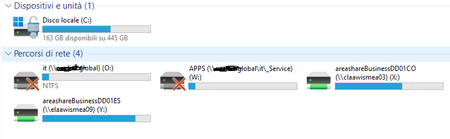
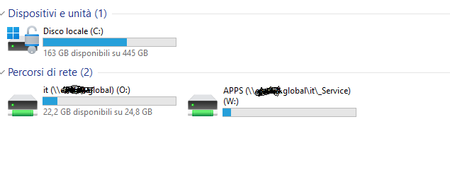
In WIndows11 I cannot see network shares in file explorer. If I create a new network share associated with a letter (X for example), in the list of disks and shares in file explorer I don't see the X drive to be able to access it quickly. Unfortunately, I am forced to access through the DOS window by entering commands from the DOS command prompt. How can I solve?Solved6.8KViews0likes7CommentsRe: WRONG the CTRL + down arrow key combination
FCatalano FOUND IT... On closer inspection I found that it was software installed for an external keyboard that conflicted with the CTRL + arrow key combinations I thank the whole community and I apologize for not having identified the problem in a more timely manner. Greetings8.8KViews1like3CommentsRe: WRONG the CTRL + down arrow key combination
NikolinoDE The scroll lock is activated (NONE) An Excel add-in conflict is causing the problem (i don't have Excel add-in) Corrupted add-in or add-in conflict (NONE) In the event of a Sticky Keys error, the scroll lock will remain on (NONE) Freeze Panes has blocked the visible area of the sheet (NONE) Excel table is protected (NONE) Complex formulas are processed (NONE) Excel is in formula entry mode (NONE) unfortunately I had already done most of these tests without success7.8KViews0likes0CommentsWRONG the CTRL + down arrow key combination
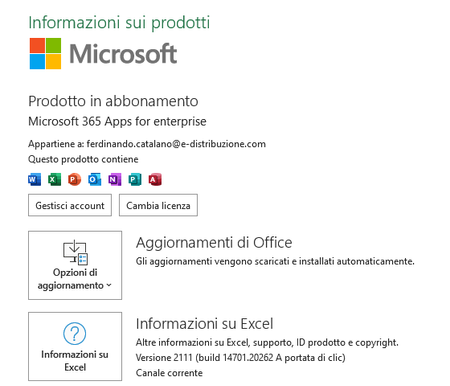
Please help me! I have a problem with Excel for a few days. The CTRL + down arrow key combination no longer works correctly for me. Instead of bringing the focus to the last line of the sheet, I am moved to the last line of the page. How do I fix this **bleep** problem? Thanks for your help.Solved9.2KViews0likes15CommentsRe: Help me for Lenovo IdeaPad S540 Windows Update
Deleted Too late (I couldn't wait any longer ...) 😞 Unfortunately I had to format to my extreme disappointment. However, I believe that the problem could be due to an incorrect configuration of the factory boot partitions (partitions created by Lenovo during the first installation of windows 10). Thanks everyone for the help.3.9KViews0likes2CommentsRe: Help me for Lenovo IdeaPad S540 Windows Update
Thanks to all of you for the suggestions but unfortunately also the test to disable the WIFI was not successful 😞 The problem is always the same: black screen on startup. After canceling the changes, the pc displays the following error message: 0xC1900101 - 0x30017 The installation failed in the FIRST_BOOT phase with an error during the BOOT operation3.9KViews1like4Comments
Recent Blog Articles
No content to show