User Profile

AnthonyLP
Brass Contributor
Joined Aug 01, 2019


User Widgets
Recent Discussions
MRT Layout Custom - how to become crazy 😭
Hi community, I'm currently trying to customize the search result layout in SharePoint. The JSON layout I created works correctly for SharePoint pages, but I would like to use the exact same layout for files, especially for: all files tagged as “procédures”, or files coming from a specific document library. Here are my current settings: The issue is not related to mapped properties. The refinable properties are working, and my verticals return the correct results when using this query. The problem is only with the layout, which does not apply to file results. Has anyone already faced this limitation or knows what might block the layout from rendering on file results? Thanks for your help!35Views0likes0CommentsRe: Unable to Create a Rule on a Library with Contribute Permission
Thank you for the reply grant_jenkins. Grrrr 🤬the 15-rule limit per library is still there. I remember seeing this limitation when rules were first introduced about four years ago, and I assumed it would be lifted over time — clearly, that’s not the case. What’s even more frustrating is that, starting in September, users won’t be able to create alerts in SharePoint anymore. So what’s the plan, Microsoft? I now tell end users to create a Power Automate flow instead… but honestly, I’m not a big fan of this workaround. Alerts were simple to set up and easy to maintain. Rules are a promising feature, but still not ready for real adoption. Really disappointed.178Views1like0CommentsUnable to Create a Rule on a Library with Contribute Permission
Hi the community, I tried to create a rule on a document library where I have Contribute permission. However, when I click on "Create a rule", I get a blank window. Strangely, with the same permission level on a list, it works as expected. Do you know if this is a known limitation? Do you have any workaround to suggest? Thanks in advance.Solved356Views0likes3CommentsVisio : Embed a visio that contains pmany pages into visio
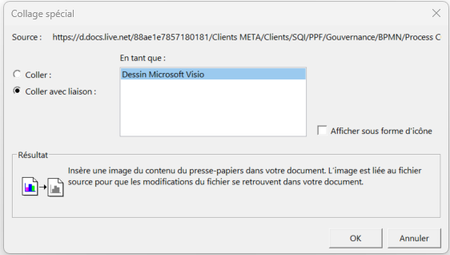
Hi, I'm not sure is my title is talking to you. Let me explain what i want to do 1 have one visio that is called Processes 1 have an another visio that contains many pages. . I would like to create a big visio that contains all my process. So i tried to page my 2nd visio diagram in the first visio with special paste and paste with link The past works but i lose all links that i added on shapes. Is this possible to keep links ? Or is there a better way to do this ?963Views0likes2Comments

Recent Blog Articles
No content to show