User Profile

Alon_iGlobe
Iron Contributor
Joined Jul 17, 2016


User Widgets
Recent Discussions
Re: Eligible Microsoft Marketplace partners with MCA customers now to benefit from accelerated payouts
Hi Marketplace team, I've been selling apps through the marketplace for years. Monthly payouts work best for us, but Microsoft's accelerated daily payouts have increased our costs and bookkeeping workload. Recent payouts have been very small ($59, $117), and after currency conversion fees, little remains. Is there a way to revert to monthly payouts or set a minimum payout amount? You guys should at least have a minimum amount before you send it. Thank you60Views0likes0CommentsCritical! SaaS App review and rating synchronized with the wrong AppSource App!
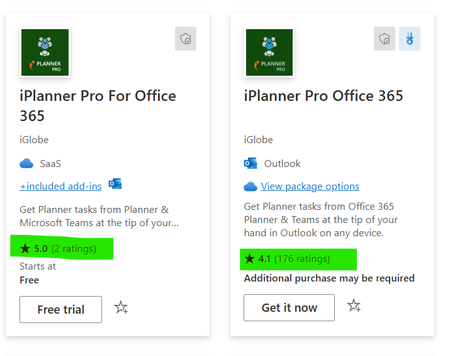
First of all. THANK YOU SO MUCH for finally making a synchronization between the SaaS App and the corresponding App in AppSource. HOWEVER! the SaaS app is synchronizing with the wrong App in AppSource. This is critical, I don't have time for support to first acknowledge it and then find time to make the fix. I need this to be done immediately. Can a responsible please take action. The problem. In AppSource I have a free version - iPlanner Free - that only offers 20% of the App that is purchased using the SaaS App - iPlanner Pro. The free version have pure ratings in compare to the Pro version. I of course don't want customer to use the free I want them to purchase the Pro with the SaaS App. In my Marketplace listening I am connecting the SaaS App to iPlanner Pro in AppSource. For that reason it is odd why you guys synchronizing with the wrong app. The problem is taking the review and rating to the SaaS app makes my subscribed based app look very bad. This is highly critical and is also very wrong. The reviews shown on the SaaS app comes from the wrong app. I would appreciate if this can be fixed asap. I am sure you guys can see that it is critical. Thank you and happy holydays to all in the community.A story about our journey on the marketplace. I hope it will inspire and help on your journey
I would like to share my experience with publishing transactable apps on the Microsoft commercial marketplace, the Microsoft 365 App Certification Program, Marketplace Rewards, and certified software designations. Starting with publishing our apps on to the marketplace: We have several apps that operate within the context of Microsoft 365, including apps for Outlook, Microsoft Teams, Copilot Agent, Office, and SharePoint. We have been in AppSource for many years and have customers worldwide. We developed an in-house license application to manage our customers' licenses. Before the commercial marketplace, we managed all invoicing and license management manually. Now, everything has become much easier. We have published monetized SaaS apps connected to the AppSource apps. Using the SaaS Fulfillment API, we integrated the purchasing process with our in-house license application. We have gained numerous benefits, including: Significant time savings in the invoicing and billing process, as purchasing, adding, removing, or cancelling licenses is automated and managed by Microsoft Customers appreciate the ability to manage licenses themselves, finding it easier Improved market awareness due to promotion in the marketplace And new customers are joining regularly. It is also important to mention Marketplace Rewards, which offer various benefits. For example, customer case stories can be published through Marketplace Rewards on Microsoft customer case stories. Here is a link to our latest story:https://customers.microsoft.com/en-us/story/1820562770190814501-designforleisure-excel-retailers-en-germany. Additionally, the Transact & Grow Incentive Campaign has provided us with financial incentives through marketplace sales, as well as Azure sponsorship credits to offset deployment costs. Considering these advantages, there is potential to make the apps CSP Ready as well: https://aka.ms/P2PeBook. Equally important is obtaining the https://learn.microsoft.com/en-us/microsoft-365-app-certification/docs/certification. Certification confirms that an app solution is compatible with Microsoft technologies, compliant with cloud app security best practices, and supported by Microsoft. This is significant because: It provides certification from Microsoft, confirming app security and compliance It saves time in the sales process, as security and compliance are already verified It makes the app easier to find on AppSource, the Commercial Marketplace, and in the Teams App admin portal, where it will be listed in a special category Achieving sales in the marketplace, having customer case stories, and obtaining the Microsoft 365 App Certification provides the foundation to obtain https://aka.ms/CertifiedsoftwarepartnerFAQ, which come with additional benefits and opportunities for co-selling with Microsoft. Today two of our apps have achieved the Certified Software Designation for Modern Work. Soon iPlanner Pro for Teams that includes a Copilot Agent will follow as well. I share this story not to boast but to inspire and motivate others. There is nothing exceptional about us or our experience here – it can be completely replicated by leveraging the resources that Microsoft provides. Was it all very easy…. No. Is it doable? Yes!Graph API to the New Planner
Using the graph api we are able to get tasks from a premium plan (new Planner). However, that's about it. We are not able to make any updates to a task from a premium plan. My question is when can we expect to get access to a graph API that will allow us to fully integrate to the New Planner. Thank you661Views0likes1CommentRe: Teams App & Marketplace Offer Rating
jba33 A comment. It is very important for me to say that this is not only regarding Teams App. This is the case for all Apps that are published through AppSource (old term - Office Apps). Outlook, Office (Word, Excel and PowerPoint), Teams and SharePoint. If we want to monetize and sell our Apps the only option, we have is to make a transactable SaaS App for the AppSource App. As I see it, we have a challenge on M365 Apps with a 1-to-1 SaaS-to-App. I also agree on your second note . And I also don't think we are ready for a big change. What you guys have done is great - and thank you for that. However, there are still several areas of improvement, and we can take them step by step with no rushing. That is also why at the moment I am only looking at the rating and reviews. And I do believe a synchronization would be the easiest model as it is a backend change and process. The SaaS Apps that are connected to an AppSource App all have the App ID of the AppSource App. Technically it seems that you guys have what you need to made the sync. Thank you.870Views2likes0CommentsRe: Teams App & Marketplace Offer Rating
@KyleCallahan @SeleneSuau I would also like to add another big challenge we have in regards of Ratings and reviews. This can only be done by the person that made the actual purchase or deployment. The person with permission to make the purchase will in most cases not be the same as the users of the App. When I am sending a link to users then cannot make a review! They will get the following message. "To submit your rating and review, first get the app and let us know about your experience" So, the organization made a purchase and deployed the app, but the users that are using the app are not allowed the make the review and rate the App. I hope you can see that something here is problematic Thank you981Views2likes1CommentRe: Teams App & Marketplace Offer Rating
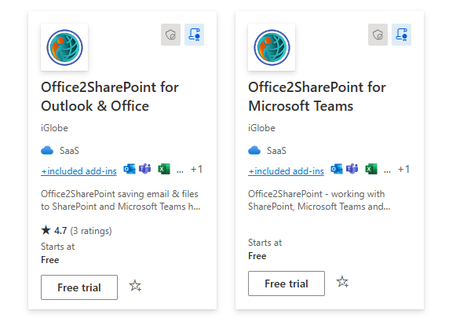
KyleCallahan I understand what you are saying and I know that we have been talking about this before. That is also why I believe it is about time something is done here. We have multiple challenges, and they are growing. You guys are using the SaaS app more and more for different incentives and qualifications. Let me try to give you 3 examples of why ratings are done on the AppSource App. When you guys send a link to customers to make the review of an App you are sending to the AppSource App and not to the SaaS App. I know because I have tested it myself several times. Another challenge is, that in our case many are downloading the AppSource App first and after a trial make a purchase. This again means they will make the rating on the AppSource App and not the SaaS App. When customers relate to the app, they are thinking of the AppSource App. When deploying and managing the app it is the AppSource App. When talking about the App they always refer to the apps under integrated apps in the admin center. For customers this is app. Hence it is natural that this is the app they will rate. You are welcome to look at our Apps. 95% of the ratings are done by customers on the AppSource App. Point is, this is how the real-life situation is. And it has been for a long time. it is at least 2 years ago since I change all my Store references to the SaaS App. However, that still didn't make any change in the way customers are behaving. Below is an example. Anyway, this is my situation, of course I can't be sure others are having the same problems. The reason for taking this up again is because I have successfully become IP Co-sell Eligible and in the Incentive program. In addition, I can see that I have all that is required to be Certified software for Modern Work. BUT! this is where the review and ratings come in again. You guys are only looking at reviews and ratings on the SaaS app and not at the AppSource App. Finally, I know for a fact that this is very confusing for customers. That is why I have been talking about this for a long time. On many occasions I am asked if it is the same App. Customers are confused and ask if one is a light version and the other a full version. Why is there such a big difference in ratings and review? One is "Starts at Free" one is "Additional purchase may be required." Point is customers are confused. This is a problem for all apps that must be published in AppSource (Outlook, Office, Teams, SharePoint, Copilot) that we want to make transactable. The only way we can do that is by making a SaaS App in addition to the actual app in AppSource. OK that was a very long explanation Anyway, I am just trying to be particle. The SaaS app has a reference to the AppSource App. So perhaps that can be used as a key to synchronize the ratings and review between the Apps1KViews2likes0CommentsRe: Teams App & Marketplace Offer Rating
It is as follows. The Teams app is published as an app in AppSource. The transactable monitored app for the AppSource App is published as a SaaS app in Commercial Marketplace. This is due to the design you guys made 😉 the app in AppSource and monetized app in commercial marketplace. However they are one and the same app. I will be happy to take a Team’s call 😉1.2KViews1like1CommentRe: Teams App & Marketplace Offer Rating
We have the exact same challenge. It is a must that ratings and reviews are synchronized between the two Apps. As it is now, it must be very confusing for customers. They are questioning if they are the same app. The only logical thing to do is to make sure the ratings and reviews are synced. Beside the fact that it is confusing for customer's it is also a problem when we as a partner want to get the App Certified software designations for solution areas. A part of it is Customer satisfaction. When 95% or the rating and reviews are done by customers on the AppSource App and the certification is using the Marketplace offer we have a problem!1.2KViews1like7CommentsRe: Error when trying to deploy spfx package to Apps catalog From SharePoint Store
Hi I tried that. When I do it tells me that it has been enabled successfully. However, the status remains "Disabled" and the App is not available on any sites. As mentioned, I also tried both sideloading and from AppSource. Same result 😞 The user I am using it primary Admin on the App catalog and is even global admin. Should that be sufficient? Thank you1.9KViews1like1CommentError when trying to deploy spfx package to Apps catalog From SharePoint Store
I have an SPFX App in AppSource that is working perfectly on existing deployment. The App was approved by the validation team May this year. So, the App is quite newly updated. I am working on a new deployment for a new customer. However, I am not able to deploy the App from the Store now? The user I am using is primary admin on the App catalog site. I have tried deploying from the Store and also to upload directly but I keep running into the same issue. The deployment seems to be ok. However, the status keeps being “Disabled”, that even if I try to enable the App. Question is if this is a general error or has there been made updates since May that we need to make to the spfx package? Thank you2.1KViews0likes3CommentsRe: Major update of Outlook Add-in iPlanner Pro for Office 365 Planner
Diana_De_Rosa I am on Teams now. You can find can you access this meeting link - https://teams.microsoft.com/l/meetup-join/19%3ameeting_MmVmYjYwZWQtODhlOS00MjY4LWI4YmEtOGRkYjhiOThkOWM1%40thread.v2/0?context=%7b%22Tid%22%3a%22d11df2a9-bb65-4736-bdbc-3c7169a04250%22%2c%22Oid%22%3a%2242d98754-602e-4038-80f7-4789e10af55d%22%7d1.4KViews0likes1CommentRe: Major update of Outlook Add-in iPlanner Pro for Office 365 Planner
Diana_De_Rosa Hi Diana. If you deployed iPlanner Pro in Outlook you will be able to see tasks assigned to you in iPlanner Pro in Outlook. You can look at these video on our youtube channel About iPlanner Pro on https://www.youtube.com/playlist?list=PLKPkfe6HNVv-GgwPE_8g1bXxmkB6rcSTU iPlanner Pro Users guide on https://www.youtube.com/playlist?list=PLKPkfe6HNVv8oTlovBwuIEYa9F3T5XmBo I will also be happy to give you a demo. Thnak you1.5KViews0likes5CommentsProblem updating list items with new team site using CSOM
We have a SharePoint provided hosted App with a WCF service hosted in azure. From the service we need to do some list CRUD operation in the App. We use an access token to prepare the SharePoint context. We generate the access token using ADAL and set delegate permission in active directory app in azure. Apparently, there is a difference in the permission in the “old” classic Team Site and the new SharePoint Team site, that is based on O365 Group. We are getting an access denied error when the app is running on the new SharePoint Team site. We are getting the error when we try to update list items using CSOM. I am not sure if we need to change the permission in the active directory app or need to activate any new feature in new team site. Basically all works when we use the classic Team site and we get an access error using the new Team sites.1KViews0likes0CommentsUse SPFx wepart in an iFrame
We have a SharePoint App where we can add web parts and content using an iFrame. According to the below link, it should be possible to use a SPFx as a web part in an iFrame by making a small change to setting of isDomainIsolated property in thepackage-solution.json file tp true. We can't get this to work ? Any ideas? besides that, When can we expect it to go GA? https://github.com/SharePoint/sp-dev-docs/wiki/SharePoint-Framework-v1.7-release-notes#domain-isolated-webparts-developer-preview Finally when will we be able to use SPFx in SharePoint Apps. This is what we want to do.5KViews0likes3CommentsRe: Plans from Planner are not showing in Flow or third party Add-ins
Hi Pavel Yes this was solved a long time ago. Please try to reset the Add-in. You can do it from iPlanner menu. Sign in with your Office 365 account. If you want to be 100% sure that nothing is cached. Open your browser clear the browser cache, open your web mail and reset the add-in. You aer welcome to contact me directly if the problem continues. Alon5KViews0likes2Comments
Recent Blog Articles
No content to show