isv success
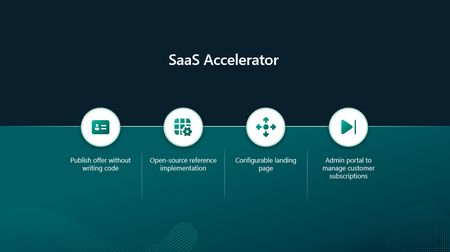
257 TopicsBuild your SaaS offer with the modernized SaaS Accelerator to sell on Marketplace
Build your SaaS offer for Microsoft Marketplace with coding agent guidance and the modernized SaaS Accelerator. Explore resources that help simplify Marketplace integration and move from development to publishing faster.135Views4likes0CommentsHow software companies can reach more SMB customers through Microsoft Marketplace in the age of AI
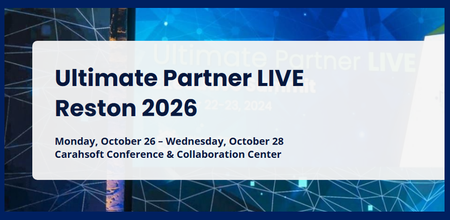
Publishing an offer on Microsoft Marketplace creates a starting point for reaching more customers and scaling growth; the opportunity goes well beyond getting listed. For software companies, Marketplace can create a path to reach more customers and scale revenue, particularly in the SMB market. Micro, small, and medium enterprises (MSMEs) account for 90% of companies globally and 70% of the world’s employment, according to World Bank Group and International Finance Corporation (IFC) data. 1 For software companies, this creates a significant opportunity to serve small and medium businesses with solutions that fit how they operate. These businesses often have lean teams, limited procurement resources, and a preference for self-service experiences that help them evaluate, purchase, and deploy technology efficiently. The age of AI is accelerating the opportunity for software companies to reach and serve SMBs. Software companies are moving beyond a simple Marketplace listing, building AI-powered products designed for how SMBs buy, deploy, and scale today. Founded in 2002, Ntegral was a traditional systems integrator, deploying client technology solutions one contract at a time. In 2021, the company began shifting its business model from primarily delivering services to bringing its own software solutions to market through Microsoft Marketplace. At UP LIVE Reston, Ntegral’s President and CTO, Dexter Hardy, will share more about what that shift meant in practice, including how Ntegral adapted its approach to products, sales, and growth. The change expanded Ntegral’s reach. Dexter has called Microsoft Marketplace "a real game changer" for the company, which now offers 300+ enterprise solutions with deployments in more than 150 countries. 2 Dexter described Marketplace as an important part of Ntegral’s growth strategy, helping the company expand its reach while, in his words, allowing Ntegral “to stay lean, focus on our expertise,” as it entered new markets. 🎯A session worth your time Scaling reach and opportunity for SMBs Ntegral Inc.’s President and CTO, Dexter Hardy, will be onstage at Ultimate Partner LIVE Reston. The session will explore practical ways SMBs can build on their Marketplace presence to support customer reach and revenue growth. Hardy will share Ntegral’s journey from a regional systems integrator to a software company focused on developing its own solutions and reaching customers globally through Marketplace. 💡Ntegral's point of view: Marketplace adoption in the age of AI Ntegral sees Marketplace as an important part of scaling its business, alongside a product strategy designed around the needs of SMB customers. Ntegral recently introduced Akili, its AI-powered platform designed for SMBs and consultants. Akili brings access to AI models and agent capabilities into one workspace, giving small teams and solo operators a way to use these capabilities without managing separate subscriptions. For Ntegral, that product strategy is closely connected to how the company approaches Microsoft Marketplace. Ntegral sees AI adoption and Marketplace as complementary parts of its growth strategy: developing products around the needs of small businesses while using Marketplace to reach customers and support transactions at scale. For Ntegral, Marketplace is part of a broader commercial strategy that connects product innovation with customer reach and scalable sales. At UP LIVE Reston, Dexter brings that same directness to the stage. The focus is on practical mechanics: how software companies can build on their Marketplace presence to reach more customers and develop more pipeline, how AI fits into that strategy, and what Ntegral changed operationally as its business evolved. Learn more about Akili. __________________________________________________________________________________________________________________________________________________________________ 📅 Attend UP LIVE Reston · October 26–28, 2026 Carahsoft Conference & Collaboration Center, Reston, VA 👉 Register for UP LIVE Reston 1 World Bank Group / IFC MSME Finance Factsheet 2 Ntegral | Empowering Digital and Cloud Transformations | Ntegral152Views1like0Comments
Getting first customers after publishing what actually worked for you?
I published two transactable SaaS offers earlier this month (Microsoft 365 security and compliance assessment). The technical side went fine, with good support from the ISV team. Getting the offers in front of customers is where I'm stuck. So far I've reached Rewards Tier 3 and activated the listing optimisation benefit. I understand customer references are the gate to co-sell readiness, which feels like a chicken-and-egg problem when you have none yet. For publishers further along than me: what actually produced your first few customers? Was it private offers to targeted tenants, co-sell once you had references, the Marketplace Rewards activities, or something outside the marketplace entirely? I'd rather spend my limited time on what works than keep guessing.101Views0likes0CommentsMicrosoft Marketplace Partner Digest - September 2026
Marketplace innovations are simplifying every stage of the customer journey. Microsoft Marketplace continues to make it easier for customers to discover, purchase, and manage the solutions that power their businesses. This month, we're highlighting new AI-powered discovery experiences that help customers find and evaluate solutions faster, innovative healthcare opportunities through Dragon Copilot Physician apps and agents, and new capabilities that support procurement, billing, and subscription management at scale. Together, these investments help reduce friction across the customer journey while creating new opportunities for partners to grow through Marketplace. ✨ Find the right solutions faster with intelligent discovery What's new Microsoft Marketplace now includes intelligent discovery, an AI-powered experience that helps customers discover, compare, and evaluate solutions using natural language rather than traditional keyword searches. Customers can describe their business needs in everyday language and receive tailored recommendations, side-by-side product comparisons, and deeper product analysis to support purchasing decisions. Key capabilities include: Use natural language to describe requirements and business goals Automatically identify relevant filters and narrow results Compare solutions side-by-side based on Marketplace metadata Explore solution details using AI-assisted product analysis Move from discovery to evaluation with greater confidence Why it matters Customers increasingly expect AI-assisted buying experiences. Intelligent discovery helps buyers navigate a growing Marketplace catalog more efficiently, reducing the time required to find relevant solutions and evaluate alternatives. This can help partners improve visibility, attract more qualified prospects, and create stronger pathways from discovery to purchase. Marketplace AI offerings continue to grow rapidly, with more than 6,500 AI apps and agents now available in the catalog. Recommended action Review your Marketplace listings to ensure product descriptions, categories, industries, use cases, and solution metadata accurately reflect the problems your solution solves. High-quality Marketplace content helps intelligent discovery surface your offerings to the right customers. 🔎 Learn more about searching and comparing products with intelligent discovery in Microsoft Marketplace ⚡ Help customers align Marketplace purchases of your products with their internal procurement and financial processes What’s new Purchase order management and spend mapping capabilities are now generally available in Microsoft Marketplace, helping organizations associate Marketplace purchases with internal procurement identifiers and financial reporting requirements. These capabilities help customers connect Marketplace transactions to purchase orders, cost centers, departments, business units, and other financial controls. Key capabilities include: Associate Marketplace purchases with purchase orders Map Marketplace spend to internal financial identifiers Improve chargeback and allocation reporting Support invoice reconciliation and procurement processes Increase visibility into Marketplace spending against budgets Why it matters Customers consistently identify invoicing, procurement integration, spend visibility, and financial governance as important considerations when scaling Marketplace purchasing. Helping customers align Marketplace transactions with existing procurement workflows can reduce operational friction and support broader Marketplace adoption. Recommended action Review customer-facing sales materials and deployment discussions to understand how purchase orders, spend mapping, and financial governance capabilities may support procurement, finance, and FinOps stakeholders during the buying process. 📍Learn more about purchase orders and allocating Marketplace spend in Azure portal 🐉Reach healthcare customers through Dragon Copilot What's new Microsoft Marketplace now supports Dragon Copilot Physician Apps and Agents, the first offer type in a planned family of Dragon Copilot offers. Available in the United States, these partner solutions can be discovered and purchased through Microsoft Marketplace, configured through the Dragon Admin Center, and surfaced directly within physician workflows in Dragon Copilot. Key capabilities include: Publish healthcare-focused apps and agents through a dedicated Marketplace offer type Reach healthcare organizations adopting Dragon Copilot and deliver capabilities directly within clinician workflows Utilize Microsoft Marketplace for commerce, discovery, and fulfillment Why it matters Healthcare organizations are looking for AI solutions that fit naturally into existing clinical workflows. Dragon Copilot Physician apps and agents give partners a scalable route to market: solutions can be purchased through Microsoft Marketplace, configured through the Dragon Admin Center, and made available directly within clinical workflows. Recommended action Evaluate whether your healthcare solution could benefit from integration with Dragon Copilot and explore the new Marketplace offer type for physician apps and agents. Learn more about Dragon Copilot Physician apps and agents Events Recent events Announcing Frontier Accelerate for Marketplace Frontier Accelerate for Marketplace is an upcoming Microsoft AI Cloud Partner Program offering that guides software development companies to build AI-powered solutions, monetize through Microsoft Marketplace, and scale revenue through Microsoft expertise, skilling, and investments. 📺 Watch the briefing now 🔗 Learn more: aka.ms/FA-for-Marketplace How leading partners drive co-sell success with Marketplace Learn how successful software companies use Microsoft Marketplace to expand reach, strengthen co-sell relationships, and drive repeatable revenue growth. Join Reis Barrie of Carve Partners for insights into building Marketplace momentum and creating co-sell opportunities across the Microsoft partner ecosystem. Watch on-demand Evaluate and buy solutions with Microsoft Marketplace Help customers evaluate and buy solutions with greater confidence. This Microsoft Marketplace session explores intelligent discovery, free trials, private offer requests, flexible contract durations, and practical ways partners and sellers can create purchasing arrangements aligned to customer priorities. Watch on-demand Upcoming events New monthly partner skilling series 📆Beginning Sept. 23, 2026, 8:00 AM and 5:00 PM PDT Microsoft is launching Partnering for Success Together, a new monthly partner skilling series designed to help partners stay up to date on Microsoft's latest investments, go-to-market priorities, and customer opportunities. Hosted through the Microsoft Partner Skilling Hub, each session provides guidance and updates across Microsoft's commercial solution areas, helping partners understand what's new and how to translate announcements into customer impact. Two live sessions will be provided at different times to accommodate global audiences. Register for the first event scheduled September 23 and add future monthly skilling events to your development plan. Register now on the Microsoft Partner Skilling Hub Microsoft co-sell playbook: From co-sell ready to close-won 📆 Wednesday, Oct 07, 2026, 8:30 AM PDT Join this partner-focused session to learn how successful organizations turn co-sell opportunities into closed-won business. Kevin Flitcroft of Spektra Systems shares proven strategies for stakeholder alignment, commercial readiness, Microsoft Marketplace positioning, and customer-focused sales execution. Get the details and add to your calendar Next steps Position your solution for AI-powered discovery The Marketplace experience continues to evolve to help customers discover, evaluate, and purchase solutions more efficiently. By improving how your solution is represented in Marketplace and taking advantage of new Marketplace capabilities, you can increase visibility, engage more qualified buyers, and accelerate growth through Microsoft's commercial ecosystem. Not sure where to start? Get guidance and recommendations through App Advisor.457Views1like0Comments
Are Shopify merchants using Dynamics 365 and Microsoft 365 Copilot a meaningful market segment?
Hi Marketplace community, We are testing a market assumption before investing further in a Microsoft 365 Copilot solution for retail loyalty operations. The solution, Loyalty Manager Copilot AI, helps teams review loyalty-program health and take bounded, reviewable actions, such as approving a win-back reward, from within a Copilot conversation. Some merchants we encounter use Shopify or Shopify Plus for the storefront, while Microsoft systems support parts of the back office. Readers who want to understand or try the current app can https://marketplace.microsoft.com/en-us/product/WA200010024. We know the technical pattern exists: Shopify at the storefront, with Dynamics 365 Business Central or other Microsoft business applications behind it. What We are trying to understand is whether the user and buying pattern is large enough to matter. For retailers using Shopify together with Dynamics 365 and Microsoft 365: Are loyalty, CRM, or marketing users working in Teams and Microsoft 365 Copilot regularly? Is Copilot adoption reaching these business roles, or is it still concentrated in IT, finance, and administration? Who usually evaluates or sponsors a cross-platform loyalty solution: the merchant, a Microsoft partner, a Shopify partner, or another stakeholder? Would an AppSource solution connecting loyalty operations to Copilot fit an established workflow, or would it require creating a new behavior? We would especially value firsthand observations from merchants, ISVs, system integrators, and Microsoft partners. We are not looking for a product pitch. We are trying to determine whether this represents a meaningful audience or a narrow edge case.Marketplace Publishing - Email with the Certification Team
Greetings partners, fellows, and friends, Standards Core is a 2nd year ISV - we currently have 1 SaaS and 2 Office add-in listings, now working on our first Apps and agents for Microsoft 365 and Copilot ... we have submitted our first publish, can currently working to address certification details. Why am I posting this? Well, after the 1st submission, in addition to the certification report on Marketplace, we also received an email - thereafter questions/iterations were immediately interactive with very quick and clearly attentive responses. So I wanted to mention that we really appreciate that!! Previous submissions that I have experienced were through the submissions portal only - the personalized email interaction was a pleasant surprise, and made the process feel much warmer than the previous "formal" portal-only interaction. Thank you [certification team], and looking forward to re-submit shortly. Thanks again, Leon, CTO/Standards Core LLCDecember 2025
Microsoft Ignite 2025 - Marketplace highlights Microsoft Ignite was packed with announcements and insights for Marketplace partners. From new commerce capabilities to AI-driven innovations, here are some key takeaways: Global expansion of Microsoft Marketplace - Microsoft announced that the reimagined Microsoft Marketplace, which launched in the U.S. earlier this year, is now globally available. This expansion includes new APIs for distribution partners, enabling them to link their own cloud marketplace with Microsoft’s, opening significant opportunities for software companies in SMB and mid-market segments. 🎬 Watch a recorded webinar with TD SYNNEX on the power of distribution to accelerate SMB marketplace sales. Global availability of Resale Enabled Offers - This capability allows software development companies to and channel partners to resell software solutions directly through Marketplace, simplifying transactions, expanding reach, and scaling revenue. 👉 Read more about this announcement and get started Introducing App Accelerate - A unified offer that brings together incentives, benefits, and co-sell support across the Microsoft Cloud. App Accelerate provides end-to-end technical guidance, developer tools, and go-to-market resources so software development companies can innovate and scale. Previews are beginning now, with full availability planned for 2026. ✅ Sign up to receive updates Enhanced Partner Marketing Center - Discover, customize, and launch campaigns faster with intelligent search and AI-powered tools—all on one connected platform. The current Partner Marketing Center will remain available as the new and enhanced Marketing Center platform launches in early 2026 with 24 campaigns-in-a-box, aligned to FY26 solution plays. ✨ Get ready for the new era of partner marketing Frontier Partner badge – New customer-facing badges recognize top services, channel, and software development company partners that are driving AI transformation with customers and offer them an opportunity to differentiate themselves from the competition. 🛡️Differentiate your AI-first leadership Catch up on Microsoft Ignite sessions Ignite 2025 delivered powerful insights and announcements for Marketplace partners, and now you can catch up on the sessions you missed. Explore these recorded keynotes to learn about new capabilities, partner programs, and strategies to accelerate growth through Microsoft’s ecosystem. Ignite opening keynote Ignite partner keynote: Powering Frontier Partnerships Additionally, we’ve compiled recordings of relevant Marketplace partner and customer sessions so you can watch on-demand. Revisit Marketplace-focused sessions and resources. Just look for the ✨ icon below. Partner sessions: PBRK415 Grow your business with Microsoft AI Cloud Partner Program Find out how the Microsoft AI Cloud Partner Program helps you grow with new benefits, designations, and skilling opportunities. This session covers updates like the Frontier Partner Badge, Copilot specialization, and streamlined Marketplace engagement—all designed to accelerate your AI transformation journey. PBRK416 Accelerate Growth through Partner Incentives Explore how Microsoft is boosting partner growth with streamlined incentives, AI-first strategies, and new designations like Frontier Distributor. This session covers expanded investments in Azure Accelerate, Copilot solutions, and security practices—plus insights on how to capitalize on evolving programs and co-sell opportunities. PBRK417 Partner: Connect, Plan, Win – Enhancing Co-sell Engagement Discover how to enhance collaboration, optimize joint efforts, and drive success in shared initiatives. Gain insights into improving interactions with Microsoft sellers and leveraging opportunities, along with guidance on proactive co-selling to align your goals with Microsoft's for sustained growth. PBRK418 Partner: Benefits for Accelerating Software Company Success Learn about the resources and benefits available for software development companies across all stages of the build, publish and grow journey in MAICPP. Whether you’re developing a new agent solution or working toward a certified software designation, there are targeted skilling opportunities, technical resources, and GTM benefits to help. Tap into new investments for AI apps and agents and hear from your peers on how they’ve used rewards such as customer propensity scores and Azure sponsorship. PBRK419 SI & Advisory Partner Readiness: Accelerating the Journey to Frontier Understand how Microsoft is empowering our SI and advisory partners to accelerate frontier firm readiness for our Enterprise customers by driving AI transformation with agentic solutions and services. ✨PBRK420 Executing on the channel-led marketplace opportunity for partners See how Microsoft’s unified Marketplace drives partner growth with resale-enabled offers, creating scalable channel sales and co-sell opportunities. This session shares practical steps to build a sustainable Marketplace practice and leverage the partner ecosystem for greater reach and profitability. PBRK421 Enabling a thriving partner ecosystem: New CSP Authorization Criteria Dive into what’s new for Cloud Solution Providers, including updated authorization requirements and designations that help you stand out. This session covers steps to choose the right tier, build trust as a customer advisor, and prepare for growth with AI-driven solutions and Copilot offerings. PBRK422 The Future of Partner Support: Customer + Partner + Microsoft Discover ‘Unified for Partners,’ Microsoft’s new support model designed for CSP partners to deliver customer success at scale. This session introduces the Support Services designation, offering faster response times, financial incentives, and integrated tools to strengthen your support capabilities. PBRK423 Partner Execution at Scale with SME&C Explore growth opportunities in the high-potential SME&C segment. This session highlights investments in co-selling, AI-first strategies, and what it means to become ‘customer zero,’ with examples of frontier firms driving innovation at scale. ✨PBRK424 Marketplace Success for Partners—from SMB to Enterprise Learn how to build, publish, and monetize AI-powered solutions through Microsoft Marketplace. This session shares a proven approach to align your Marketplace strategy with your sales motion and unlock new revenue opportunities. PBRK272 Accelerate Secure AI: Microsoft’s Security Advantage for Partners Explore Microsoft’s integrated security solutions and learn how to help customers strengthen their defenses in the AI era. This session highlights partner opportunities, resources to grow your security practice, and what it takes to lead as a next-generation security partner. Customer Sessions: ✨Microsoft Marketplace: Your trusted source for cloud solutions, AI apps, and agents | STUDIO47 Hear from Cyril Belikoff, VP of Commercial Cloud & AI Marketing, sharing the reimagined Microsoft Marketplace—the gateway to thousands of AI-powered apps, agents and cloud solutions—all built to accelerate innovation and drive business outcomes. Discover how customers benefit from faster deployment, seamless integration with Microsoft tools, and trusted solutions, and how partners can scale their reach, accelerate sales, and tap into Microsoft’s global ecosystem. Azure Accelerate in action: Confidently migrate, modernize, and build faster Join Cyril Belikoff for a rapid Q&A that spotlights real-world customer success and the transformative impact of Azure Accelerate. Hear how customers like Thomson Reuters achieved breakthrough results with our powerful offering that provides access to Microsoft experts and investments throughout your Azure and AI journey. ✨BRK213 Microsoft Marketplace: Your trusted source for cloud and AI solutions Discover how the reimagined Microsoft Marketplace is reshaping the future of cloud and AI innovation. In this session, we’ll explore how Microsoft Marketplace—unifying Azure Marketplace and Microsoft AppSource—empowers organizations to become Frontier Firms by streamlining the discovery, purchase, and deployment of tens of thousands of cloud solutions, AI apps, and agents. ✨BRK215 Boost cloud and AI ROI using Microsoft Marketplace As organizations embrace an AI-first future, cloud adoption is accelerating to drive innovation and efficiency. This session explores practical strategies to optimize cloud investments—balancing performance, scalability, and cost control. Learn how Microsoft Marketplace enables rapid solution deployment while maintaining governance, compliance, and budget discipline. Build a resilient, cost-effective cloud foundation that supports AI and beyond. Community Recap Partner of the Year Award Winners Congratulations to the winners and finalists of the 2025 Microsoft Partner of the Year Awards in the Marketplace category! 🏆 Explore all winners and finalists Fivetran earned the top honor as Marketplace Partner of the Year for its innovation in automating data movement on Microsoft Azure, enabling enterprises to accelerate AI and analytics initiatives. Varonis Systems Inc. and Bytes Software Services were recognized as finalists for delivering exceptional solutions and driving customer success through Marketplace. What’s Coming Up AI-powered acceleration: Scale faster in Microsoft Marketplace 📆 Thursday, December 04, 2025, at 9:00 AM PST Microsoft Marketplace is no longer just a procurement convenience; it’s a strategic revenue engine. Dive into operational readiness, CRM-native automation, seller engagement, trust signals, and AI-enabled acceleration. Whether you're just getting started or looking to optimize your Marketplace motion, this session will provide you with information that will turn your first sale into a repeatable growth engine. Scale smarter: Discover how resale enabled offers drive growth 📆 Friday, December 05, 2025, from 11:00 - 12:00 PM GTM+1 Discover how resale enabled offers help software development companies to scale through the Microsoft Marketplace by simplifying transactions, expanding reach and accelerating co-sell opportunities. Chart your AI app and agent strategy with Microsoft Marketplace 📆 Thursday, December 11, 2025, from 8:30 - 9:30 AM PST Organizations exploring AI apps and agents face a critical choice: build, buy, or blend. There’s no one-size-fits-all—each approach offers unique benefits and trade-offs. Tune in for insights into the pros and cons of each approach and explore how the Microsoft Marketplace simplifies adoption by providing a single source for trusted AI apps, agents, and models. Office hours for partners: Marketplace resale-enabled offers 📆 Thursday, December 18, 2025, at 8:30 AM PST Tune in to explore resale enabled offers through Microsoft Marketplace. This recently announced capability enables software companies to expand into new markets globally, at scale, and without additional operational overhead. Dive deep into the workflow and requirements for these deals. Learn about reporting and best practices from those that are already selling globally with resale enabled offers. Microsoft Ignite will return to San Francisco next year 📆 November 17-20, 2026 Sign up now to join the Microsoft Ignite early-access list and be eligible to receive limited‑edition swag at the event. 💬 Share Your Feedback! We truly appreciate your feedback and want to ensure these Partner Digests deliver the information you need to succeed in the marketplace. If you have any feedback or suggestions on how we can continue to improve the content to best support you, we’d love to hear from you in the comments below!513Views3likes0CommentsAuto Activation for SaaS Private Offers is a Game Changer!
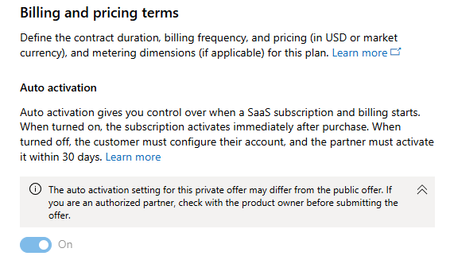
Shout out to Microsoft Marketplace for launching AUTO ACTIVATION for SaaS private offers. This has simplified our sales operations for Microsoft Marketplace private offers, as well as dramatically improved our seller and customer experience with by eliminating the #1 reason we've historically seen block customers from completing Marketplace SaaS private offer procurement. Auto activation for private offers allows customers to skip the step of going to our SaaS landing page and activate Marketplace SaaS billing by having to SSO with their AAD. The problem with this step is that most of our customers are in regulated industries, and their AAD admins do not allow SSO on SaaS landing pages without enabling profile sharing, which requires a Global Admin to enable. We've encountered far too many times where our customer is scrambling to find their Global Admin so that they can complete the final steps to finish the steps to activate Marketplace SaaS billing. This also puts our sellers in the awkward position of having to help customers diagnose and troubleshoot the situation, which as a rule they are not equipped to, or find a Microsoft resource to help. Now, with this new feature the whole SSO to our SaaS landing page and associated problems are eliminated. Ever since we started using it our customers' procurement experience has been faster and smoother. I'm looking forward to more improvements to the Marketplace experience! Here is the feature: https://learn.microsoft.com/en-us/partner-center/marketplace-offers/create-new-saas-offer-plans#configure-auto-activationA Short Story: Why Transact in Marketplace?
For anyone who is undecided a) if building a transactable offer is worth the effort or b) if leading with Marketplace is superior to legacy procurement processes: Last night while I slept, we closed an enterprise deal in Australia. Yesterday, I created a custom private offer for the customer and sent them the acceptance link with a link to the Microsoft Learn page with instructions on how they accept the offer. Woke up this morning to a Partner Center-generated message confirming the deal was won and done. Yes, we had given them a demo; and yes, we had to get stakeholder commitment . . . but: Zero haggling on price. Zero contract redlines. Zero delays with traditional vendor onboarding etc. Even better, we leveraged our Marketplace Rewards (bar none my favorite GTM program!) to amplify customer value by providing Azure Sponsorship credits to offset the deployment cost. Even more better, this deal hits three of the levers in the FY24 Transact & Grow Incentive Campaign - meaning sometime in the next ~60 days Microsoft is going to send us $40k in free money. 🙂 I share this story not to boast but to inspire and motivate. Nothing's special about us or what we did here - you can 100% replicate this experience simply by taking advantage of the resources Microsoft wants to give you. #MarketplaceChampions #SponsoredSolved2.4KViews22likes6CommentsDesign observability for AI apps and agents selling through Microsoft Marketplace
In the last post, API resilience and reliability patterns for AI apps and agents, we focused on what happens when AI systems encounter failure—and how resilient execution paths keep that failure contained. Timeouts fire with intent. Retries stay bounded. Circuit breakers provide overload protection. When resilience is designed well, your system continues to function even as conditions change, forming the foundation of AI reliability engineering. You can always get curated step-by-step guidance through building, publishing and selling apps for Marketplace through App Advisor. This post is part of a series on building and publishing well-architected AI apps and agents in Microsoft Marketplace. The series focuses on AI apps and agents that are architected, hosted, and operated on Azure, with guidance aligned to building and selling solutions through Microsoft Marketplace. Observability for AI systems AI apps and agents are shifting traditional observability, which was designed for systems based on simple assumptions, where requests followed linear paths and workloads behaved predictably. Execution in AI systems consumes tokens at a highly variable rate rather than fixed compute units. Requests unfold across multiple reasoning steps. Agents perform work that spans APIs, models, retrieval layers, and applications. A single interaction may pause, branch, retry, or exit early depending on inferred intent, context, and constraints. Instead of asking whether services are running, observability for AI systems asks: what is the system doing right now—and why? Is an agent spending its time reasoning, waiting on dependencies, retrying tool calls, or exiting early due to enforced limits? Is cost increasing because value is increasing, or because execution paths are expanding without progress? AI observability requirements shift the focus in the following subtle, but critical ways: From resource availability to workflow state From performance metrics to signals From incidents to patterns Core observability dimensions for AI apps and agents Once observability shifts toward understanding behavior, clarity comes from tracking state across the agents in the workflow. For AI apps and agents, observable indicators, such as those detailed below, show how work unfolds and changes during real usage—especially in trials and early adoption: Execution flow shows how a request moves through agents, tools, and workflows. This highlights where execution progresses smoothly, where it slows, and where it concludes early. This makes agent outcomes explainable and keeps behavior consistent across tenants. Cost and token behavior reveals how execution translates into consumption. Token usage per request, per agent step, and per retry shows where value is being delivered and where execution paths expand without proportional benefit. This insight connects runtime behavior directly to Marketplace billing expectations and evaluations. Latency and wait states distinguish active processing from time spent waiting on dependencies. Seeing where time is consumed helps explain slow experiences and guides decisions about optimization, caching, or resilience improvements. Failure classification provides structure when systems degrade and supports effective AI incident management. Separating tool failures from planning failures, and transient issues from terminal exits, keeps investigations focused and prevents protective behavior from being misread as instability. Tenant‑level patterns surface how behavior repeats at scale. Uneven load, and recurring degradation often appear first during trials and shape the customer's perception. Together, these dimensions turn telemetry into understanding—supporting clearer conversations, faster triage, and predictable execution as usage grows. Why observability matters By this point in the journey, your AI app or agent has implemented bounded execution paths, cost controls, and quality of service safeguards. As a result, failure degrades gracefully instead of spreading. These resilience techniques determine how your solution behaves under pressure. The data gathered from observability platforms like Application Insights and Azure Monitor explains why it behaves that way. For AI and agentic systems, infrastructure health alone rarely answers the questions that matter. Services can be up, CPUs can be idle, and queues can look healthy while agents loop inefficiently, retries quietly expand cost, or workflows exit early without delivering value. From the customer’s perspective, the experience feels inconsistent even though the platform appears stable. AI app observability closes this gap by revealing system behavior rather than system status. It shows how requests move, where work concentrates, and how constraints shape outcomes. At Marketplace scale, these patterns repeat across tenants and trials. What appears once during an evaluation often appears again as adoption grows. Observability connects runtime behavior back to the design choices introduced in earlier posts: Usage‑based billing introduced variability in consumption Performance optimization introduced tradeoffs among latency, quality, and cost Resilience patterns introduced controlled failure and bounded execution Observability allows you to explain outcomes during trials, validate assumptions as usage grows, and support post-launch AI operations confidence across customers and environments. Without this visibility, teams react to symptoms. With it, they recognize patterns. From execution paths to behavioral signals Observability begins at the same place resilience begins—API boundaries. These boundaries define where responsibility shifts and where behavior becomes visible. Observability focuses on signals that explain decisions made by the system as it executes instead of relying on raw logs that describe isolated events. Every resilience mechanism emits behavioral signals. Viewed together, these signals provide far more value than logs alone. Logs answer whether something happened. Behavioral signals explain why it happened and how the system responded. Circuit breakers change state as load builds and recedes. Retry loops show whether failures resolve quickly or exhaust their limits. Timeout enforcement reveals where dependencies slow execution. Fallback paths and early terminations show how the system protects itself while preserving outcomes for customers. This perspective matters most for agents. Agent execution unfolds as a series of choices—plan, call a tool, retry, exit early—rather than a single request‑response cycle, which requires monitoring AI agent behavior to remain understandable and consistent at scale. Observability that tracks these decisions makes agent behavior understandable, consistent, and defensible as usage grows across customer tenants. Observability at the agent layer As AI systems become more agent‑driven, observability needs to move closer to where decisions are made. Agents introduce variability by design. They plan, adapt, and choose workflow paths dynamically. Without first‑class visibility into that behavior, execution can appear unpredictable even when the underlying system is healthy. Observability at the agent layer acts as the feedback loop that keeps execution safely bounded. It shows how agents use the freedom you give them—and where that freedom begins to stretch into inefficiency. Observability follows how the agent did its job instead of treating the agent’s interaction as a single outcome. Several indicators help make agent behavior understandable. Step count per request reveals how much reasoning effort a prompt requires. Planning iterations show whether an agent converges quickly or cycles through alternatives. Tool invocation frequency highlights when agents rely heavily on external systems. Early exits compared to full completion explain whether limits and fallbacks activate as designed. Taken together, these indicators help distinguish healthy exploration from inefficient reasoning and degraded execution. An agent exploring briefly before converging adds value. An agent looping through tools without progress signals pressure, uncertainty, or dependency issues. This distinction reinforces a core principle of agentic systems: models reason probabilistically, adapting to context as it changes. Your system observes deterministically—measuring execution, enforcing boundaries, and clarifying outcomes. When those roles stay separate and well‑instrumented, agent behavior becomes transparent, predictable, and ready for Marketplace scale. Observability across environments The type of Marketplace offer you choose shapes what observability customers expect and how responsibility is shared. For SaaS offers, publishers typically own end‑to‑end execution. Observability centers on agent behavior, workflow completion, token usage, latency, and dependency impact across tenants. Publishers rely on consistent signals—often surfaced through tools like Azure Monitor, Application Insights, and Microsoft AI Foundry—to explain how requests behave as scale and load increase. For container‑based offers and Azure Managed Applications, observability expectations are more distributed. Publishers expose clear execution outcomes, limits, and failure signals at application boundaries. Customers, in turn, observe infrastructure health, scaling behavior, and downstream systems within their own environments. This separation ensures each party has visibility into what they control without creating ambiguity. Learn more about Choosing your marketplace offer type for AI Apps and agents. Execution behavior differs across environments for predictable reasons. Scale increases, tenant mix broadens, and external dependencies behave differently under real load. What must stay consistent is how behavior is interpreted. Signal definitions, thresholds, and failure classification should mean the same thing in Dev, Stage, and Prod. Learn more about designing a reliable environment strategy for Microsoft Marketplace AI apps and agents. Staging environments are where this consistency is validated. Observing retries, timeouts, and graceful degradation before production prepares you for Marketplace evaluations, which often resemble production conditions. Observability gaps tend to appear first during customer evaluation—when clarity matters most. Publisher and customer visibility boundaries Purpose: Parallel Post #13 responsibility clarity, now for observability As observability matures across environments, clarity around responsibility becomes essential. For Marketplace solutions, trust grows when publishers and customers each see what they own—and understand where that visibility ends. Publishers are responsible for instrumenting execution paths end to end. That means making workflows traceable, limits visible, and failure modes explainable. Observability should surface behavior—how requests progressed, where execution concluded, and why—rather than exposing raw internal errors that require insider knowledge to interpret. Customers focus their observability on what they control. This includes monitoring downstream systems, infrastructure behavior, and environment‑level alerts within their own estate. When visibility aligns with ownership, teams can act quickly and decisively. Exposing too much internal detail can overwhelm customers and blur accountability. Observing too little behavior creates friction, especially when issues cross boundaries and lack context. Clear visibility enables faster triage, sharper ownership boundaries, and fewer escalations rooted in ambiguity. Observability as an enabler for scale, billing, and trust From a customer’s perspective, observability answers two fundamental questions: Can I understand what happened? and Can I trust this at scale? When the answer to both is clear, observability becomes part of the value your Marketplace offering delivers. When system behavior is visible and explainable, customers gain confidence that adoption and growth will remain predictable. Observability directly supports usage‑based billing by tying execution behavior to measured consumption. Clear visibility into token usage, retries, and execution paths helps validate how usage is calculated and supports transparent billing conversations. It also enables ongoing performance tuning and caching strategies by showing where latency accumulates, where work repeats, and where optimization delivers measurable impact. Observability reinforces confidence in resilience mechanisms, confirming that limits, fallbacks, and degradation paths activate as designed under real‑world conditions. Beyond validation, observability creates a continuous feedback loop. Execution data informs pricing adjustments, guides changes to limits, and helps refine default configurations as customer behavior evolves. What’s next in the journey With execution behavior observable and explainable, the focus shifts to how AI systems are operated safely as change accelerates. The upcoming posts will discuss deployment strategies, CI/CD pipelines for agents, and progressive rollouts build on this foundation—ensuring AI apps evolve confidently as usage and expectations grow. Key Resources See curated, step-by-step guidance to help you build, publish, or sell your app or agent (no matter where you start) in App Advisor Quick-Start Development Toolkit can connect you with code templates for AI solution patterns Microsoft AI Envisioning Day Events How to build and publish AI apps and agents for Microsoft Marketplace Get over $126K USD in benefits and technical consultations to help you replicate and publish your app with ISV Success369Views1like0Comments