Forum Widgets
Latest Discussions

Sentinel SOAR migration to Unified portal: what broke? anyone evaluated the AI playbook generator?
I want to open a conversation specifically focused on the automation and SOAR side of the migration, because this is the area where problems most commonly surface after onboarding rather than during it. A quick orientation: the Unified portal introduces a specific constraint that catches teams by surprise. Alert-triggered automation for alerts created by Microsoft Defender XDR is not available in the Defender portal. The main use case for alert-triggered automation in this context is responding to alerts from analytics rules where incident creation is disabled. If you had alert-triggered playbooks firing on Defender XDR signals, those need to be re-evaluated against the incident trigger model. This is documented by Microsoft, but it is easy to miss in the volume of migration guidance. The automation failure mode I have seen most consistently: automation rules built around incident title conditions. The Defender XDR correlation engine assigns its own incident names, so any condition keyed to "if incident title contains X" stops matching without throwing an error. The rule is still active, the automation is still enabled, and everything looks fine until someone notices a class of enrichment or response has gone quiet. Microsoft's recommendation is to use Analytic rule name as the condition instead. There is also a firm near-term deadline separate from the March 2027 portal retirement: queries and automation need to be updated by July 1, 2026 for standardised account entity naming. The Name field will consistently hold only the UPN prefix from that date. Any automation comparing AccountName against a full UPN will break. A few specific questions for practitioners: When you onboarded or reviewed your automation post-onboarding, what broke silently versus what produced a visible error? Silent failures are the dangerous ones and sharing specific patterns would be genuinely useful for the community. Has anyone evaluated the new AI playbook generator in the Defender portal? It requires Security Copilot with SCUs available and generates Python-based automation coauthored with Cline in an embedded VS Code environment. Interested in real-world comparisons against existing Logic Apps workflows for the same use case. For those who have migrated alert-triggered playbooks to automation rule invocation: did you find edge cases in the migration, particularly around playbooks used by multiple analytics rules simultaneously? Writing this up as Part 4 of the migration series. Sharing the article link once it is live for anyone who wants the full detail.AnthonyPorterMay 18, 2026Brass Contributor56Views0likes1Comment
XdrLogRaider Defender XDR portal telemetry
A Microsoft Sentinel custom data connector that ingests Microsoft Defender XDR portal-only telemetry — configuration, compliance, drift, exposure, governance — that public Microsoft APIs (Graph Security, Microsoft 365 Defender, MDE) don't expose. https://github.com/akefallonitis/xdrlograider— Defender XDR portal telemetry Happy Hunting 🥳 🎉alkefallonitisMay 08, 2026Copper Contributor63Views0likes2CommentsSentinel RBAC in the Unified portal: who has activated Unified RBAC, and how did it go?
Following the RSAC 2026 announcements last month, I have been working through the full permission picture for the Unified portal and wanted to open a discussion here given how much has shifted in a short period. A quick framing of where things stand. The baseline is still that Azure RBAC carries across for Sentinel SIEM access when you onboard, no changes required. But there are now two significant additions in public preview: Unified RBAC for Sentinel SIEM itself (extending the Defender Unified RBAC model to cover Sentinel directly), and a new Defender-native GDAP model for non-CSP organisations managing delegated access across tenants. The GDAP piece in particular is worth discussing carefully, because I want to be precise about what has and has not changed. The existing limitation from Microsoft's onboarding documentation, that GDAP with Azure Lighthouse is not supported for Sentinel data in the Defender portal, has not changed. What is new is a separate, Defender-portal-native GDAP mechanism announced at RSAC, which is a different thing. These are not the same capability. If you were using Entra B2B as the interim path based on earlier guidance, that guidance was correct and that path remains the generally available option today. A few things I would genuinely like to hear from practitioners: For those who have activated Unified RBAC for a Sentinel workspace in the Defender portal: what did the migration from Azure RBAC roles look like in practice? Did the import function bring roles across cleanly, or did you find gaps particularly around custom roles? For environments using Playbook Operator, Automation Contributor, or Workbook Contributor role assignments: how are you handling the fact those three roles are not yet in Unified RBAC and still require Azure portal management? Is the dual-management posture creating operational friction? For MSSPs evaluating the new Defender-native GDAP model against their existing Entra B2B setup: what factors are driving the decision either way at your scale? Writing this up as Part 3 of the migration series and the community experience here is directly useful for making sure the practitioner angle is grounded.SolvedAnthonyPorterMay 06, 2026Brass Contributor188Views0likes3CommentsHow to integrate Beyond Trust Logs With Sentinel
Hi All, How to integrate Beyond Trust Logs With Sentinel, do we have a data connector? As checked, there is not data connector for this. please let me know and also what are the logging level required at beyond trust side.Sand_Sentinel87May 06, 2026Copper Contributor1.3KViews0likes5CommentsSentinel Foundry - MCP Server (Preview) (Github Community Release)
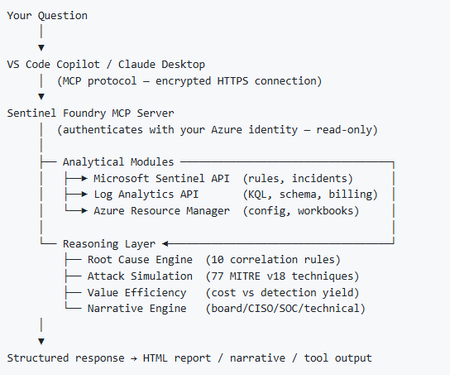
I’ve been cooking something that a lot of people in SOC have been struggling with — especially on the engineering side of Microsoft Sentinel. Thanks to the Microsoft Security team for shaping the capabilities of Sentinel even better with Sentinel Data Lake & Modern SecOps. Today’s the day I can finally share it. Note: This is not an official Microsoft product, but it is designed to make the Sentinel Build even better (complement) with much more intelligence. 🚀 Sentinel Foundry is now in public preview with 43 tools. (Sentinel Foundry - MCP Server) It’s an MCP server built to act like the brain of a strong Sentinel engineer — helping make building, improving, and operating Sentinel far more practical, faster, and honestly more enjoyable. For a lot of teams, the challenge is not understanding what Sentinel can do. The hard part is the engineering work around it: -> Deciding what data should actually be ingested -> Building a clean, scalable Sentinel foundation -> Writing useful detections instead of noisy ones -> Balancing security value with cost -> Turning ideas into deployable engineering outputs That is exactly why I built Sentinel Foundry to help communities grow stronger. It helps with the real engineering tasks behind Sentinel — from architecture thinking to detection design, deployment planning, ingestion strategy, automation ideas, and many of the workflows outlined in the GitHub project. How does it work? Here’s one of the flagship prompts I ran with it: “Give me a complete security posture report for our workspace. Score each pillar and tell me what to prioritise.” And within seconds, it produced a structured engineering blueprint that would normally take a lot longer to pull together manually. You can see the example prompts here in what it can do: https://github.com/prabhukiranveesam/Sentinel-Foundry#what-can-it-do I want building Sentinel to feel less like repetitive engineering overhead — and more like real security engineering that is fast, creative, and enjoyable. If you work with Sentinel as a SOC L2 analyst, engineer, detection engineer, consultant, or architect, I’d genuinely love for you to try it and tell me what you think. 🔗 Public Preview: https://github.com/prabhukiranveesam/Sentinel-Foundry This is just the start of an AI era — and I’m excited to keep shaping it with more powerful features over the coming days. This is very easy to set up and will be available to all of you at no cost during this month as part of the public preview, and your feedback is extremely valuable to shape this as a powerful solution.285Views0likes0CommentsYour Sentinel AMA Logs & Queries Are Public by Default — AMPLS Architectures to Fix That
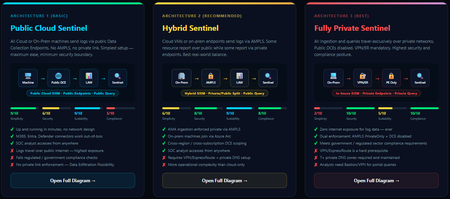
When you deploy Microsoft Sentinel, security log ingestion travels over public Azure Data Collection Endpoints by default. The connection is encrypted, and the data arrives correctly — but the endpoint is publicly reachable, and so is the workspace itself, queryable from any browser on any network. For many organisations, that trade-off is fine. For others — regulated industries, healthcare, financial services, critical infrastructure — it is the exact problem they need to solve. Azure Monitor Private Link Scope (AMPLS) is how you solve it. What AMPLS Actually Does AMPLS is a single Azure resource that wraps your monitoring pipeline and controls two settings: Where logs are allowed to go (ingestion mode: Open or PrivateOnly) Where analysts are allowed to query from (query mode: Open or PrivateOnly) Change those two settings and you fundamentally change the security posture — not as a policy recommendation, but as a hard platform enforcement. Set ingestion to PrivateOnly and the public endpoint stops working. It does not fall back gracefully. It returns an error. That is the point. It is not a firewall rule someone can bypass or a policy someone can override. Control is baked in at the infrastructure level. Three Patterns — One Spectrum There is no universally correct answer. The right architecture depends on your organisation's risk appetite, existing network infrastructure, and how much operational complexity your team can realistically manage. These three patterns cover the full range: Architecture 1 — Open / Public (Basic) No AMPLS. Logs travel to public Data Collection Endpoints over the internet. The workspace is open to queries from anywhere. This is the default — operational in minutes with zero network setup. Cloud service connectors (Microsoft 365, Defender, third-party) work immediately because they are server-side/API/Graph pulls and are unaffected by AMPLS. Azure Monitor Agents and Azure Arc agents handle ingestion from cloud or on-prem machines via public network. Simplicity: 9/10 | Security: 6/10 Good for: Dev environments, teams getting started, low-sensitivity workloads Architecture 2 — Hybrid: Private Ingestion, Open Queries (Recommended for most) AMPLS is in place. Ingestion is locked to PrivateOnly — logs from virtual machines travel through a Private Endpoint inside your own network, never touching a public route. On-premises or hybrid machines connect through Azure Arc over VPN or a dedicated circuit and feed into the same private pipeline. Query access stays open, so analysts can work from anywhere without needing a VPN/Jumpbox to reach the Sentinel portal — the investigation workflow stays flexible, but the log ingestion path is fully ring-fenced. You can also split ingestion mode per DCE if you need some sources public and some private. This is the architecture most organisations land on as their steady state. Simplicity: 6/10 | Security: 8/10 Good for: Organisations with mixed cloud and on-premises estates that need private ingestion without restricting analyst access Architecture 3 — Fully Private (Maximum Control) Infrastructure is essentially identical to Architecture 2 — AMPLS, Private Endpoints, Private DNS zones, VPN or dedicated circuit, Azure Arc for on-premises machines. The single difference: query mode is also set to PrivateOnly. Analysts can only reach Sentinel from inside the private network. VPN or Jumpbox required to access the portal. Both the pipe that carries logs in and the channel analysts use to read them are fully contained within the defined boundary. This is the right choice when your organisation needs to demonstrate — not just claim — that security data never moves outside a defined network perimeter. Simplicity: 2/10 | Security: 10/10 Good for: Organisations with strict data boundary requirements (regulated industries, audit, compliance mandates) Quick Reference — Which Pattern Fits? Scenario Architecture Getting started / low-sensitivity workloads Arch 1 — No network setup, public endpoints accepted Private log ingestion, analysts work anywhere Arch 2 — AMPLS PrivateOnly ingestion, query mode open Both ingestion and queries must be fully private Arch 3 — Same as Arch 2 + query mode set to PrivateOnly One thing all three share: Microsoft 365, Entra ID, and Defender connectors work in every pattern — they are server-side pulls by Sentinel and are not affected by your network posture. Please feel free to reach out if you have any questions regarding the information provided.217Views1like1Comment
Understand New Sentinel Pricing Model with Sentinel Data Lake Tier
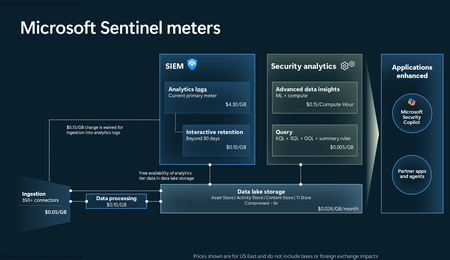
Introduction on Sentinel and its New Pricing Model Microsoft Sentinel is a cloud-native Security Information and Event Management (SIEM) and Security Orchestration, Automation, and Response (SOAR) platform that collects, analyzes, and correlates security data from across your environment to detect threats and automate response. Traditionally, Sentinel stored all ingested data in the Analytics tier (Log Analytics workspace), which is powerful but expensive for high-volume logs. To reduce cost and enable customers to retain all security data without compromise, Microsoft introduced a new dual-tier pricing model consisting of the Analytics tier and the Data Lake tier. The Analytics tier continues to support fast, real-time querying and analytics for core security scenarios, while the new Data Lake tier provides very low-cost storage for long-term retention and high-volume datasets. Customers can now choose where each data type lands—analytics for high-value detections and investigations, and data lake for large or archival types—allowing organizations to significantly lower cost while still retaining all their security data for analytics, compliance, and hunting. Please flow diagram depicts new sentinel pricing model: Now let's understand this new pricing model with below scenarios: Scenario 1A (PAY GO) Scenario 1B (Usage Commitment) Scenario 2 (Data Lake Tier Only) Scenario 1A (PAY GO) Requirement Suppose you need to ingest 10 GB of data per day, and you must retain that data for 2 years. However, you will only frequently use, query, and analyze the data for the first 6 months. Solution To optimize cost, you can ingest the data into the Analytics tier and retain it there for the first 6 months, where active querying and investigation happen. After that period, the remaining 18 months of retention can be shifted to the Data Lake tier, which provides low-cost storage for compliance and auditing needs. But you will be charged separately for data lake tier querying and analytics which depicted as Compute (D) in pricing flow diagram. Pricing Flow / Notes The first 10 GB/day ingested into the Analytics tier is free for 31 days under the Analytics logs plan. All data ingested into the Analytics tier is automatically mirrored to the Data Lake tier at no additional ingestion or retention cost. For the first 6 months, you pay only for Analytics tier ingestion and retention, excluding any free capacity. For the next 18 months, you pay only for Data Lake tier retention, which is significantly cheaper. Azure Pricing Calculator Equivalent Assuming no data is queried or analyzed during the 18-month Data Lake tier retention period: Although the Analytics tier retention is set to 6 months, the first 3 months of retention fall under the free retention limit, so retention charges apply only for the remaining 3 months of the analytics retention window. Azure pricing calculator will adjust accordingly. Scenario 1B (Usage Commitment) Now, suppose you are ingesting 100 GB per day. If you follow the same pay-as-you-go pricing model described above, your estimated cost would be approximately $15,204 per month. However, you can reduce this cost by choosing a Commitment Tier, where Analytics tier ingestion is billed at a discounted rate. Note that the discount applies only to Analytics tier ingestion—it does not apply to Analytics tier retention costs or to any Data Lake tier–related charges. Please refer to the pricing flow and the equivalent pricing calculator results shown below. Monthly cost savings: $15,204 – $11,184 = $4,020 per month Now the question is: What happens if your usage reaches 150 GB per day? Will the additional 50 GB be billed at the Pay-As-You-Go rate? No. The entire 150 GB/day will still be billed at the discounted rate associated with the 100 GB/day commitment tier bucket. Azure Pricing Calculator Equivalent (100 GB/ Day) Azure Pricing Calculator Equivalent (150 GB/ Day) Scenario 2 (Data Lake Tier Only) Requirement Suppose you need to store certain audit or compliance logs amounting to 10 GB per day. These logs are not used for querying, analytics, or investigations on a regular basis, but must be retained for 2 years as per your organization’s compliance or forensic policies. Solution Since these logs are not actively analyzed, you should avoid ingesting them into the Analytics tier, which is more expensive and optimized for active querying. Instead, send them directly to the Data Lake tier, where they can be retained cost-effectively for future audit, compliance, or forensic needs. Pricing Flow Because the data is ingested directly into the Data Lake tier, you pay both ingestion and retention costs there for the entire 2-year period. If, at any point in the future, you need to perform advanced analytics, querying, or search, you will incur additional compute charges, based on actual usage. Even with occasional compute charges, the cost remains significantly lower than storing the same data in the Analytics tier. Realized Savings Scenario Cost per Month Scenario 1: 10 GB/day in Analytics tier $1,520.40 Scenario 2: 10 GB/day directly into Data Lake tier $202.20 (without compute) $257.20 (with sample compute price) Savings with no compute activity: $1,520.40 – $202.20 = $1,318.20 per month Savings with some compute activity (sample value): $1,520.40 – $257.20 = $1,263.20 per month Azure calculator equivalent without compute Azure calculator equivalent with Sample Compute Conclusion The combination of the Analytics tier and the Data Lake tier in Microsoft Sentinel enables organizations to optimize cost based on how their security data is used. High-value logs that require frequent querying, real-time analytics, and investigation can be stored in the Analytics tier, which provides powerful search performance and built-in detection capabilities. At the same time, large-volume or infrequently accessed logs—such as audit, compliance, or long-term retention data—can be directed to the Data Lake tier, which offers dramatically lower storage and ingestion costs. Because all Analytics tier data is automatically mirrored to the Data Lake tier at no extra cost, customers can use the Analytics tier only for the period they actively query data, and rely on the Data Lake tier for the remaining retention. This tiered model allows different scenarios—active investigation, archival storage, compliance retention, or large-scale telemetry ingestion—to be handled at the most cost-effective layer, ultimately delivering substantial savings without sacrificing visibility, retention, or future analytical capabilities.Solved2.6KViews2likes6CommentsCrowdStrike API Data Connector (via Codeless Connector Framework) (Preview)
API scopes created. Added to Connector however only streams observed are from Alerts and Hosts. Detections is not logging? Anyone experiencing this issue? Github has post about it apears to be escalated for feature request. CrowdStrikeDetections. not ingested Anyone have this setup and working?logger2115Apr 09, 2026Brass Contributor515Views0likes2CommentsHow Should a Fresher Learn Microsoft Sentinel Properly?
Hello everyone, I am a fresher interested in learning Microsoft Sentinel and preparing for SOC roles. Since Sentinel is a cloud-native enterprise tool and usually used inside organizations, I am unsure how individuals without company access are expected to gain real hands-on experience. I would like to hear from professionals who actively use Sentinel: - How do freshers typically learn and practice Sentinel? - What learning resources or environments are commonly used by beginners? - What level of hands-on experience is realistically expected at entry level? I am looking for guidance based on real industry practice. Thank you for your time.Arjun34Apr 08, 2026Copper Contributor233Views0likes2Comments
Issue connecting Azure Sentinel GitHub app to Sentinel Instance when IP allow list is enabled
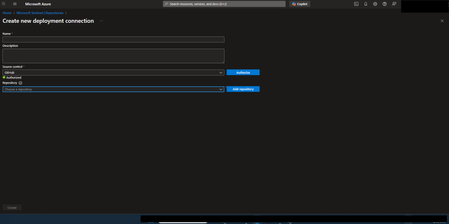
Hi everyone, I’m running into an issue connecting the Azure Sentinel GitHub app to my Sentinel workspace in order to create our CI/CD pipelines for our detection rules, and I’m hoping someone can point me in the right direction. Symptoms: When configuring the GitHub connection in Sentinel, the repository dropdown does not populate. There are no explicit errors, but the connection clearly isn’t completing. If I disable my organization’s IP allow list, everything works as expected and the repos appear immediately. I’ve seen that some GitHub Apps automatically add the IP ranges they require to an organization’s allow list. However, from what I can tell, the Azure Sentinel GitHub app does not seem to have this capability, and requires manual allow listing instead. What I’ve tried / researched: Reviewed Microsoft documentation for Sentinel ↔ GitHub integrations Looked through Azure IP range and Service Tag documentation I’ve seen recommendations to allow list the IP ranges published at //api.github.com/meta, as many GitHub apps rely on these ranges I’ve already tried allow listing multiple ranges from the GitHub meta endpoint, but the issue persists My questions: Does anyone know which IP ranges are used by the Azure Sentinel GitHub app specifically? Is there an official or recommended approach for using this integration in environments with strict IP allow lists? Has anyone successfully configured this integration without fully disabling IP restrictions? Any insight, references, or firsthand experience would be greatly appreciated. Thanks in advance!JingleDingleApr 08, 2026Copper Contributor199Views0likes1Comment

Tags
- siem449 Topics
- KQL308 Topics
- data collection246 Topics
- Log Data226 Topics
- analytics165 Topics
- azure159 Topics
- automation148 Topics
- integration141 Topics
- alerts127 Topics
- kusto126 Topics