soar
112 Topics
The Hidden Reason Your Sentinel Playbook Won't Show Up in Automation Rules (It's Not RBAC)
If a Logic App using the native Microsoft Sentinel incident trigger doesn't show up in the "Run playbook" picker of an Automation Rule — even though permissions, region, and connection are all correct — check the internal action name of the trigger in the JSON code view. If the Logic App was created while the Azure portal was set to a non-English language, the designer may generate a localized action name instead of the expected Microsoft_Sentinel_incident, and the playbook won't be picked up. Environment Microsoft Sentinel (Log Analytics workspace) Logic Apps (Consumption plan) Trigger: native Microsoft Sentinel connector, "Incident" trigger (/incident-creation path) Authentication: system-assigned Managed Identity Same subscription, resource group, and region as the Sentinel workspace Problem Two Logic Apps, both triggered by the native Microsoft Sentinel incident trigger, both using a system-assigned managed identity with the Microsoft Sentinel Responder role granted on the workspace. Same subscription, same resource group, same region. Only one of the two appeared in the "Run playbook" dropdown when configuring an Automation Rule in Sentinel. The other was simply absent — no error message, no warning, nothing in the run history to explain it. Investigation The usual suspects were checked and ruled out one by one: API connection health — one azuresentinel connection was indeed in an "Error" state, but it turned out not to be the one referenced by the affected trigger. Managed identity RBAC — the Microsoft Sentinel Responder role was correctly assigned to the Logic App's managed identity on the Sentinel workspace. User's own RBAC/PIM role — the Logic App Contributor role (required for the account configuring the Automation Rule to even see the resource) was active via PIM at the time of testing. Region/subscription/resource group — identical for both Logic Apps. Trigger type — both used the native "Incident in Microsoft Sentinel" trigger added through the visual designer, not a generic HTTP trigger or a deprecated connector. Every documented requirement was met. The playbook was still invisible. Root Cause Comparing the raw JSON (Logic app > Development tools > Code view) revealed the actual difference. Working Logic App (visible in the picker): "triggers": { "Microsoft_Sentinel_incident": { "type": "ApiConnectionWebhook", "inputs": { "body": { "callback_url": "@{listCallbackUrl()}" }, "path": "/incident-creation" } } } Broken Logic App (invisible in the picker): "triggers": { "Incident_dans_Microsoft_Sentinel": { "type": "ApiConnectionWebhook", "inputs": { "body": { "callback_url": "@listCallbackUrl()" }, "path": "/incident-creation" } } } The connector type and the path (/incident-creation) are identical. The one meaningful structural difference is the trigger's action name: Microsoft_Sentinel_incident versus Incident_dans_Microsoft_Sentinel. The second Logic App's trigger had been added while the Azure portal was set to French. The designer generated a localized action name instead of the canonical English one. Everything points to Sentinel's playbook discovery mechanism scanning Logic App definitions for that exact canonical action name (Microsoft_Sentinel_incident) to identify a resource as a valid Sentinel playbook — rather than relying solely on the connector type or the webhook path, as one would reasonably expect. Fix Renaming the trigger's action key in the JSON to the canonical name was enough: "triggers": { "Microsoft_Sentinel_incident": { ... } } No permission, connection, or region change was required — only this rename. Takeaways The Sentinel Automation Rule playbook picker appears to depend on the exact trigger action name, not just its type or functional behavior — a dependency that isn't documented anywhere in the official Microsoft docs as of this writing. The Azure portal's display language at the time a trigger is added has a direct impact on that Logic App's compatibility with Sentinel Automation Rules. A playbook can be fully functional (running without errors when triggered manually or through an older automation mechanism) while still being invisible in the newer Automation Rule selector — which makes this particular issue easy to miss, since nothing explicitly flags it. Recommendations Temporarily switch the Azure portal to English (Portal settings > Language and region) before adding a Sentinel trigger to a Logic App, if your team usually works in another language. If an existing Logic App won't show up despite an otherwise correct configuration, check the trigger's action name in the JSON code view first — it's a 30-second check that can save hours of RBAC/connection troubleshooting. Document this in your internal runbooks if your team works in a localized portal — this kind of detail is easy to lose and can cost significant troubleshooting time down the line. Has anyone else run into similar localization-related quirks in Sentinel or Logic Apps? Would be curious to hear about other cases in the comments.202Views0likes0CommentsThe Hidden Reason Your Sentinel Playbook Won't Show Up in Automation Rules (It's Not RBAC)
If a Logic App using the native Microsoft Sentinel incident trigger doesn't show up in the "Run playbook" picker of an Automation Rule — even though permissions, region, and connection are all correct — check the internal action name of the trigger in the JSON code view. If the Logic App was created while the Azure portal was set to a non-English language, the designer may generate a localized action name instead of the expected Microsoft_Sentinel_incident, and the playbook won't be picked up. Environment Microsoft Sentinel (Log Analytics workspace) Logic Apps (Consumption plan) Trigger: native Microsoft Sentinel connector, "Incident" trigger (/incident-creation path) Authentication: system-assigned Managed Identity Same subscription, resource group, and region as the Sentinel workspace Problem Two Logic Apps, both triggered by the native Microsoft Sentinel incident trigger, both using a system-assigned managed identity with the Microsoft Sentinel Responder role granted on the workspace. Same subscription, same resource group, same region. Only one of the two appeared in the "Run playbook" dropdown when configuring an Automation Rule in Sentinel. The other was simply absent — no error message, no warning, nothing in the run history to explain it. Investigation The usual suspects were checked and ruled out one by one: API connection health — one azuresentinel connection was indeed in an "Error" state, but it turned out not to be the one referenced by the affected trigger. Managed identity RBAC — the Microsoft Sentinel Responder role was correctly assigned to the Logic App's managed identity on the Sentinel workspace. User's own RBAC/PIM role — the Logic App Contributor role (required for the account configuring the Automation Rule to even see the resource) was active via PIM at the time of testing. Region/subscription/resource group — identical for both Logic Apps. Trigger type — both used the native "Incident in Microsoft Sentinel" trigger added through the visual designer, not a generic HTTP trigger or a deprecated connector. Every documented requirement was met. The playbook was still invisible. Root Cause Comparing the raw JSON (Logic app > Development tools > Code view) revealed the actual difference. Working Logic App (visible in the picker): "triggers": { "Microsoft_Sentinel_incident": { "type": "ApiConnectionWebhook", "inputs": { "body": { "callback_url": "@{listCallbackUrl()}" }, "path": "/incident-creation" } } } Broken Logic App (invisible in the picker): "triggers": { "Incident_dans_Microsoft_Sentinel": { "type": "ApiConnectionWebhook", "inputs": { "body": { "callback_url": "@listCallbackUrl()" }, "path": "/incident-creation" } } } The connector type and the path (/incident-creation) are217Views0likes0CommentsSentinel Foundry - MCP Server (Github Community Release)
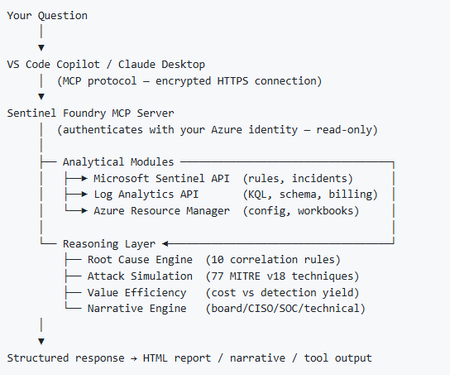
I’ve been cooking something that a lot of people in SOC have been struggling with — especially on the engineering side of Microsoft Sentinel. Thanks to the Microsoft Security team for shaping the capabilities of Sentinel even better with Sentinel Data Lake & Modern SecOps. Today’s the day I can finally share it. Note: This is not an official Microsoft product, but it is designed to make the Sentinel Build even better (complement) with much more intelligence. 🚀 Sentinel Foundry is now in public preview with 43 tools. (Sentinel Foundry - MCP Server) It’s an MCP server built to act like the brain of a strong Sentinel engineer — helping make building, improving, and operating Sentinel far more practical, faster, and honestly more enjoyable. For a lot of teams, the challenge is not understanding what Sentinel can do. The hard part is the engineering work around it: -> Deciding what data should actually be ingested -> Building a clean, scalable Sentinel foundation -> Writing useful detections instead of noisy ones -> Balancing security value with cost -> Turning ideas into deployable engineering outputs That is exactly why I built Sentinel Foundry to help communities grow stronger. It helps with the real engineering tasks behind Sentinel — from architecture thinking to detection design, deployment planning, ingestion strategy, automation ideas, and many of the workflows outlined in the GitHub project. How does it work? Here’s one of the flagship prompts I ran with it: “Give me a complete security posture report for our workspace. Score each pillar and tell me what to prioritise.” And within seconds, it produced a structured engineering blueprint that would normally take a lot longer to pull together manually. You can see the example prompts here in what it can do: https://github.com/prabhukiranveesam/Sentinel-Foundry#what-can-it-do I want building Sentinel to feel less like repetitive engineering overhead — and more like real security engineering that is fast, creative, and enjoyable. If you work with Sentinel as a SOC L2 analyst, engineer, detection engineer, consultant, or architect, I’d genuinely love for you to try it and tell me what you think. 🔗 Public Preview: https://github.com/prabhukiranveesam/Sentinel-Foundry This is just the start of an AI era — and I’m excited to keep shaping it with more powerful features over the coming days. This is very easy to set up and will be available to all of you at no cost during this month as part of the public preview, and your feedback is extremely valuable to shape this as a powerful solution.1.2KViews0likes2Comments
MSSP migration to Unified portal: how are you sequencing your customer portfolio?
Following the automation and SOAR discussion, I wanted to open a conversation specifically focused on the MSSP and multi-tenant side of the migration, because this is where the coordination challenges are an order of magnitude higher than the technical ones. A few things I am working through before writing this up as Part 5 of the migration series. On Workspace Manager: Microsoft's own documentation now points you away from Workspace Manager at the point of onboarding to the Defender portal, directing you to Microsoft Defender multitenant management instead. For MSSPs who built their operating model around Workspace Manager, this is a significant structural change. For those implementing now, the recommendation is to go straight to the multitenant portal. I am interested in what the transition has looked like in practice for teams who were mid-flight on Workspace Manager when this became clear. On access delegation: one of the more honest framings I want to include in the article is around the GDAP plus Unified RBAC gap. A Microsoft employee confirmed in the RSAC 2026 thread that Unified RBAC support for GDAP in the Defender portal is on the roadmap with no firm date. MSSPs choosing between Entra B2B and the governance relationships model today are making an architectural call that is difficult to reverse. I want to present this accurately, and real experience from practitioners will sharpen that framing. On the connector deployment constraint: you cannot deploy connectors from a managed workspace configured with Azure Lighthouse alone, you also need GDAP. This makes a layered delegation architecture, Lighthouse plus GDAP plus B2B or governance relationships, necessary rather than optional. I am curious whether MSSPs are already running this layered model or whether most are still trying to make Lighthouse work as a single mechanism. On migration sequencing: the question I want to ask specifically is how teams are structuring their customer portfolio migration. Are you running waves based on customer complexity, based on contract renewal timing, based on customer risk appetite, or some other factor? And when something goes wrong in one tenant's migration, how are you containing the impact on the rest of the programme? Sharing the full article once it is written. Happy to discuss anything above in more detail in the thread.480Views0likes1CommentSentinel SOAR migration to Unified portal: what broke? anyone evaluated the AI playbook generator?
I want to open a conversation specifically focused on the automation and SOAR side of the migration, because this is the area where problems most commonly surface after onboarding rather than during it. A quick orientation: the Unified portal introduces a specific constraint that catches teams by surprise. Alert-triggered automation for alerts created by Microsoft Defender XDR is not available in the Defender portal. The main use case for alert-triggered automation in this context is responding to alerts from analytics rules where incident creation is disabled. If you had alert-triggered playbooks firing on Defender XDR signals, those need to be re-evaluated against the incident trigger model. This is documented by Microsoft, but it is easy to miss in the volume of migration guidance. The automation failure mode I have seen most consistently: automation rules built around incident title conditions. The Defender XDR correlation engine assigns its own incident names, so any condition keyed to "if incident title contains X" stops matching without throwing an error. The rule is still active, the automation is still enabled, and everything looks fine until someone notices a class of enrichment or response has gone quiet. Microsoft's recommendation is to use Analytic rule name as the condition instead. There is also a firm near-term deadline separate from the March 2027 portal retirement: queries and automation need to be updated by July 1, 2026 for standardised account entity naming. The Name field will consistently hold only the UPN prefix from that date. Any automation comparing AccountName against a full UPN will break. A few specific questions for practitioners: When you onboarded or reviewed your automation post-onboarding, what broke silently versus what produced a visible error? Silent failures are the dangerous ones and sharing specific patterns would be genuinely useful for the community. Has anyone evaluated the new AI playbook generator in the Defender portal? It requires Security Copilot with SCUs available and generates Python-based automation coauthored with Cline in an embedded VS Code environment. Interested in real-world comparisons against existing Logic Apps workflows for the same use case. For those who have migrated alert-triggered playbooks to automation rule invocation: did you find edge cases in the migration, particularly around playbooks used by multiple analytics rules simultaneously? Writing this up as Part 4 of the migration series. Sharing the article link once it is live for anyone who wants the full detail.461Views0likes2CommentsSentinel RBAC in the Unified portal: who has activated Unified RBAC, and how did it go?
Following the RSAC 2026 announcements last month, I have been working through the full permission picture for the Unified portal and wanted to open a discussion here given how much has shifted in a short period. A quick framing of where things stand. The baseline is still that Azure RBAC carries across for Sentinel SIEM access when you onboard, no changes required. But there are now two significant additions in public preview: Unified RBAC for Sentinel SIEM itself (extending the Defender Unified RBAC model to cover Sentinel directly), and a new Defender-native GDAP model for non-CSP organisations managing delegated access across tenants. The GDAP piece in particular is worth discussing carefully, because I want to be precise about what has and has not changed. The existing limitation from Microsoft's onboarding documentation, that GDAP with Azure Lighthouse is not supported for Sentinel data in the Defender portal, has not changed. What is new is a separate, Defender-portal-native GDAP mechanism announced at RSAC, which is a different thing. These are not the same capability. If you were using Entra B2B as the interim path based on earlier guidance, that guidance was correct and that path remains the generally available option today. A few things I would genuinely like to hear from practitioners: For those who have activated Unified RBAC for a Sentinel workspace in the Defender portal: what did the migration from Azure RBAC roles look like in practice? Did the import function bring roles across cleanly, or did you find gaps particularly around custom roles? For environments using Playbook Operator, Automation Contributor, or Workbook Contributor role assignments: how are you handling the fact those three roles are not yet in Unified RBAC and still require Azure portal management? Is the dual-management posture creating operational friction? For MSSPs evaluating the new Defender-native GDAP model against their existing Entra B2B setup: what factors are driving the decision either way at your scale? Writing this up as Part 3 of the migration series and the community experience here is directly useful for making sure the practitioner angle is grounded.Solved803Views0likes3Comments
Understand New Sentinel Pricing Model with Sentinel Data Lake Tier
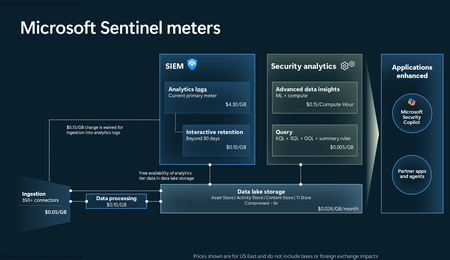
Introduction on Sentinel and its New Pricing Model Microsoft Sentinel is a cloud-native Security Information and Event Management (SIEM) and Security Orchestration, Automation, and Response (SOAR) platform that collects, analyzes, and correlates security data from across your environment to detect threats and automate response. Traditionally, Sentinel stored all ingested data in the Analytics tier (Log Analytics workspace), which is powerful but expensive for high-volume logs. To reduce cost and enable customers to retain all security data without compromise, Microsoft introduced a new dual-tier pricing model consisting of the Analytics tier and the Data Lake tier. The Analytics tier continues to support fast, real-time querying and analytics for core security scenarios, while the new Data Lake tier provides very low-cost storage for long-term retention and high-volume datasets. Customers can now choose where each data type lands—analytics for high-value detections and investigations, and data lake for large or archival types—allowing organizations to significantly lower cost while still retaining all their security data for analytics, compliance, and hunting. Please flow diagram depicts new sentinel pricing model: Now let's understand this new pricing model with below scenarios: Scenario 1A (PAY GO) Scenario 1B (Usage Commitment) Scenario 2 (Data Lake Tier Only) Scenario 1A (PAY GO) Requirement Suppose you need to ingest 10 GB of data per day, and you must retain that data for 2 years. However, you will only frequently use, query, and analyze the data for the first 6 months. Solution To optimize cost, you can ingest the data into the Analytics tier and retain it there for the first 6 months, where active querying and investigation happen. After that period, the remaining 18 months of retention can be shifted to the Data Lake tier, which provides low-cost storage for compliance and auditing needs. But you will be charged separately for data lake tier querying and analytics which depicted as Compute (D) in pricing flow diagram. Pricing Flow / Notes The first 10 GB/day ingested into the Analytics tier is free for 31 days under the Analytics logs plan. All data ingested into the Analytics tier is automatically mirrored to the Data Lake tier at no additional ingestion or retention cost. For the first 6 months, you pay only for Analytics tier ingestion and retention, excluding any free capacity. For the next 18 months, you pay only for Data Lake tier retention, which is significantly cheaper. Azure Pricing Calculator Equivalent Assuming no data is queried or analyzed during the 18-month Data Lake tier retention period: Although the Analytics tier retention is set to 6 months, the first 3 months of retention fall under the free retention limit, so retention charges apply only for the remaining 3 months of the analytics retention window. Azure pricing calculator will adjust accordingly. Scenario 1B (Usage Commitment) Now, suppose you are ingesting 100 GB per day. If you follow the same pay-as-you-go pricing model described above, your estimated cost would be approximately $15,204 per month. However, you can reduce this cost by choosing a Commitment Tier, where Analytics tier ingestion is billed at a discounted rate. Note that the discount applies only to Analytics tier ingestion—it does not apply to Analytics tier retention costs or to any Data Lake tier–related charges. Please refer to the pricing flow and the equivalent pricing calculator results shown below. Monthly cost savings: $15,204 – $11,184 = $4,020 per month Now the question is: What happens if your usage reaches 150 GB per day? Will the additional 50 GB be billed at the Pay-As-You-Go rate? No. The entire 150 GB/day will still be billed at the discounted rate associated with the 100 GB/day commitment tier bucket. Azure Pricing Calculator Equivalent (100 GB/ Day) Azure Pricing Calculator Equivalent (150 GB/ Day) Scenario 2 (Data Lake Tier Only) Requirement Suppose you need to store certain audit or compliance logs amounting to 10 GB per day. These logs are not used for querying, analytics, or investigations on a regular basis, but must be retained for 2 years as per your organization’s compliance or forensic policies. Solution Since these logs are not actively analyzed, you should avoid ingesting them into the Analytics tier, which is more expensive and optimized for active querying. Instead, send them directly to the Data Lake tier, where they can be retained cost-effectively for future audit, compliance, or forensic needs. Pricing Flow Because the data is ingested directly into the Data Lake tier, you pay both ingestion and retention costs there for the entire 2-year period. If, at any point in the future, you need to perform advanced analytics, querying, or search, you will incur additional compute charges, based on actual usage. Even with occasional compute charges, the cost remains significantly lower than storing the same data in the Analytics tier. Realized Savings Scenario Cost per Month Scenario 1: 10 GB/day in Analytics tier $1,520.40 Scenario 2: 10 GB/day directly into Data Lake tier $202.20 (without compute) $257.20 (with sample compute price) Savings with no compute activity: $1,520.40 – $202.20 = $1,318.20 per month Savings with some compute activity (sample value): $1,520.40 – $257.20 = $1,263.20 per month Azure calculator equivalent without compute Azure calculator equivalent with Sample Compute Conclusion The combination of the Analytics tier and the Data Lake tier in Microsoft Sentinel enables organizations to optimize cost based on how their security data is used. High-value logs that require frequent querying, real-time analytics, and investigation can be stored in the Analytics tier, which provides powerful search performance and built-in detection capabilities. At the same time, large-volume or infrequently accessed logs—such as audit, compliance, or long-term retention data—can be directed to the Data Lake tier, which offers dramatically lower storage and ingestion costs. Because all Analytics tier data is automatically mirrored to the Data Lake tier at no extra cost, customers can use the Analytics tier only for the period they actively query data, and rely on the Data Lake tier for the remaining retention. This tiered model allows different scenarios—active investigation, archival storage, compliance retention, or large-scale telemetry ingestion—to be handled at the most cost-effective layer, ultimately delivering substantial savings without sacrificing visibility, retention, or future analytical capabilities.Solved3.8KViews2likes6CommentsWhat caught you off guard when onboarding Sentinel to the Defender portal?
Following on from a previous discussion around what actually changes versus what doesn't in the Sentinel to Defender portal migration, I wanted to open a more specific conversation around the onboarding moment itself. One thing I have been writing about is how much happens automatically the moment you connect your workspace. The Defender XDR connector enables on its own, a bi-directional sync starts immediately, and if your Microsoft incident creation rules are still active across Defender for Endpoint, Identity, Office 365, Cloud Apps, and Entra ID Protection, you are going to see duplicate incidents before you have had a chance to do anything about it. That is one of the reasons I keep coming back to the inventory phase as the most underestimated part of this migration. Most of the painful post-migration experiences I hear about trace back to things that could have been caught in a pre-migration audit: analytics rules with incident title dependencies, automation conditions that assumed stable incident naming, RBAC gaps that only become visible when someone tries to access the data lake for the first time. A few things I would genuinely love to hear from practitioners who have been through this: - When you onboarded, what was the first thing that behaved unexpectedly that you had not anticipated from the documentation? - For those who have reviewed automation rules post-onboarding: did you find conditions relying on incident title matching that broke, and how did you remediate them? - For anyone managing access across multiple tenants: how are you currently handling the GDAP gap while Microsoft completes that capability? I am writing up a detailed pre-migration inventory framework covering all four areas and the community experience here is genuinely useful for making sure the practitioner angle covers the right ground. Happy to discuss anything above in more detail.Solved474Views2likes3CommentsRSAC 2026: What the Sentinel Playbook Generator actually means for SOC automation
RSAC 2026 brought a wave of Sentinel announcements, but the one I keep coming back to is the playbook generator. Not because it's the flashiest, but because it touches something that's been a real operational pain point for years: the gap between what SOC teams need to automate and what they can realistically build and maintain. I want to unpack what this actually changes from an operational perspective, because I think the implications go further than "you can now vibe-code a playbook." The problem it solves If you've built and maintained Logic Apps playbooks in Sentinel at any scale, you know the friction. You need a connector for every integration. If there isn't one, you're writing custom HTTP actions with authentication handling, pagination, error handling - all inside a visual designer that wasn't built for complex branching logic. Debugging is painful. Version control is an afterthought. And when something breaks at 2am, the person on call needs to understand both the Logic Apps runtime AND the security workflow to fix it. The result in most environments I've seen: teams build a handful of playbooks for the obvious use cases (isolate host, disable account, post to Teams) and then stop. The long tail of automation - the enrichment workflows, the cross-tool correlation, the conditional response chains - stays manual because building it is too expensive relative to the time saved. What's actually different now The playbook generator produces Python. Not Logic Apps JSON, not ARM templates - actual Python code with documentation and a visual flowchart. You describe the workflow in natural language, the system proposes a plan, asks clarifying questions, and then generates the code once you approve. The Integration Profile concept is where this gets interesting. Instead of relying on predefined connectors, you define a base URL, auth method, and credentials for any service - and the generator creates dynamic API calls against it. This means you can automate against ServiceNow, Jira, Slack, your internal CMDB, or any REST API without waiting for Microsoft or a partner to ship a connector. The embedded VS Code experience with plan mode and act mode is a deliberate design choice. Plan mode lets you iterate on the workflow before any code is generated. Act mode produces the implementation. You can then validate against real alerts and refine through conversation or direct code edits. This is a meaningful improvement over the "deploy and pray" cycle most of us have with Logic Apps. Where I see the real impact For environments running Sentinel at scale, the playbook generator could unlock the automation long tail I mentioned above. The workflows that were never worth the Logic Apps development effort might now be worth a 15-minute conversation with the generator. Think: enrichment chains that pull context from three different tools before deciding on a response path, or conditional escalation workflows that factor in asset criticality, time of day, and analyst availability. There's also an interesting angle for teams that operate across Microsoft and non-Microsoft tooling. If your SOC uses Sentinel for SIEM but has Palo Alto, CrowdStrike, or other vendors in the stack, the Integration Profile approach means you can build cross-vendor response playbooks without middleware. The questions I'd genuinely like to hear about A few things that aren't clear from the documentation and that I think matter for production use: Security Copilot dependency: The prerequisites require a Security Copilot workspace with EU or US capacity. Someone in the blog comments already flagged this as a potential blocker for organizations that have Sentinel but not Security Copilot. Is this a hard requirement going forward, or will there be a path for Sentinel-only customers? Code lifecycle management: The generated Python runs... where exactly? What's the execution runtime? How do you version control, test, and promote these playbooks across dev/staging/prod? Logic Apps had ARM templates and CI/CD patterns. What's the equivalent here? Integration Profile security: You're storing credentials for potentially every tool in your security stack inside these profiles. What's the credential storage model? Is this backed by Key Vault? How do you rotate credentials without breaking running playbooks? Debugging in production: When a generated playbook fails at 2am, what does the troubleshooting experience look like? Do you get structured logs, execution traces, retry telemetry? Or are you reading Python stack traces? Coexistence with Logic Apps: Most environments won't rip and replace overnight. What's the intended coexistence model between generated Python playbooks and existing Logic Apps automation rules? I'm genuinely optimistic about this direction. Moving from a low-code visual designer to an AI-assisted coding model with transparent, editable output feels like the right architectural bet for where SOC automation needs to go. But the operational details around lifecycle, security, and debugging will determine whether this becomes a production staple or stays a demo-only feature. Would be interested to hear from anyone who's been in the preview - what's the reality like compared to the pitch?Solved383Views0likes1CommentUpdate content package Metadata
Hello Sentinel community and Microsoft. Ive been working on a script where i use this command: https://learn.microsoft.com/en-us/rest/api/securityinsights/content-package/install?view=rest-securityinsights-2024-09-01&tabs=HTTP Ive managed to successfully create everything from retrieving whats installed, uninstalling, reinstalling and lastly updating (updating needed to be "list, delete, install" however :'), there was no flag for "update available"). However, now to my issue. As this work like a charm through powershell, the metadata and hyperlinking is not being deployed - at all. So i have my 40 content packages successfully installed through the REST-api, but then i have to visit the content hub in sentinel in the GUI, filter for "installed" and mark them all, then press "install". When i do this the metadata and hyperlinking is created. (Its most noticeable that the analytic rules for the content hubs are not available under analytic rules -> Rule templates after installing through the rest api). But once you press install button in the GUI, they appear. So i looked in to the request that is made when pressing the button. It uses another API version, fine, i can add that to my script. But it also uses 2 variables that are not documented and encrypted-data. they are called c and t: Im also located in EU and it makes a request to SentinelUS. im OK with that, also as mentioned, another API version (2020-06-01) while the REST APi to install content packages above has 2024-09-01. NP. But i can not simulate this last request as the variables are encrypted and not available through the install rest api. They are also not possible to simulate. it ONLY works in the GUI when pressing install. Lastly i get another API version back when it successfully ran through install in GUI, so in total its 3 api versions. Here is my code snippet i tried (it is basically a mimic of the post request in the network tab of the browser then pressing "install" on the package in content hub, after i successfully installed it through the official rest api). function Refresh-WorkspaceMetadata { param ( [Parameter(Mandatory = $true)] [string]$SubscriptionId, [Parameter(Mandatory = $true)] [string]$ResourceGroup, [Parameter(Mandatory = $true)] [string]$WorkspaceName, [Parameter(Mandatory = $true)] [string]$AccessToken ) # Use the API version from the portal sample $apiVeri = "?api-version=" $RefreshapiVersion = "2020-06-01" # Build the batch endpoint URL with the query string on the batch URI $batchUri = "https://management.azure.com/\$batch$apiVeri$RefreshapiVersion" # Construct a relative URL for the workspace resource. # Append dummy t and c parameters to mimic the portal's request. $workspaceUrl = "/subscriptions/$SubscriptionId/resourceGroups/$ResourceGroup/providers/Microsoft.OperationalInsights/workspaces/$WorkspaceName$apiVeri$RefreshapiVersion&t=123456789&c=dummy" # Create a batch payload with several GET requests $requests = @() for ($i = 0; $i -lt 5; $i++) { $requests += @{ httpMethod = "GET" name = [guid]::NewGuid().ToString() requestHeaderDetails = @{ commandName = "Microsoft_Azure_SentinelUS.ContenthubWorkspaceClient/get" } url = $workspaceUrl } } $body = @{ requests = $requests } | ConvertTo-Json -Depth 5 try { $response = Invoke-RestMethod -Uri $batchUri -Method Post -Headers @{ "Authorization" = "Bearer $AccessToken" "Content-Type" = "application/json" } -Body $body Write-Host "[+] Workspace metadata refresh triggered successfully." -ForegroundColor Green } catch { Write-Host "[!] Failed to trigger workspace metadata refresh. Error: $_" -ForegroundColor Red } } Refresh-WorkspaceMetadata -SubscriptionId $subscriptionId -ResourceGroup $resourceGroup -WorkspaceName $workspaceName -AccessToken $accessToken (note: i have variables higher up in my script for subscriptionid, resourcegroup, workspacename and token etc). Ive tried with and without mimicing the T and C variable. none works. So for me, currently, installing content hub packages for sentinel is always: Install through script to get all 40 packages Visit webpage, filter for 'Installed', mark them and press 'Install' You now have all metadata and hyperlinking available to you in your Sentinel (such as hunting rules, analytic rules, workbooks, playbooks -templates). Anyone else manage to get around this or is it "GUI" gated ? Greatly appreciated.Solved762Views1like6Comments