apis
71 TopicsYour Sentinel AMA Logs & Queries Are Public by Default - AMPLS Architectures to Fix That
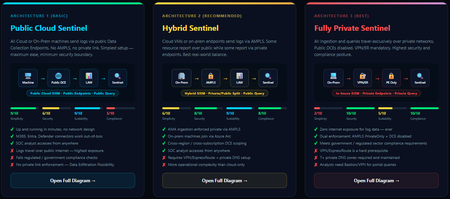
When you deploy Microsoft Sentinel, security log ingestion travels over public Azure Data Collection Endpoints by default. The connection is encrypted, and the data arrives correctly — but the endpoint is publicly reachable, and so is the workspace itself, queryable from any browser on any network. For many organisations, that trade-off is fine. For others — regulated industries, healthcare, financial services, critical infrastructure — it is the exact problem they need to solve. Azure Monitor Private Link Scope (AMPLS) is how you solve it. What AMPLS Actually Does AMPLS is a single Azure resource that wraps your monitoring pipeline and controls two settings: Where logs are allowed to go (ingestion mode: Open or PrivateOnly) Where analysts are allowed to query from (query mode: Open or PrivateOnly) Change those two settings and you fundamentally change the security posture — not as a policy recommendation, but as a hard platform enforcement. Set ingestion to PrivateOnly and the public endpoint stops working. It does not fall back gracefully. It returns an error. That is the point. It is not a firewall rule someone can bypass or a policy someone can override. Control is baked in at the infrastructure level. Three Patterns — One Spectrum There is no universally correct answer. The right architecture depends on your organisation's risk appetite, existing network infrastructure, and how much operational complexity your team can realistically manage. These three patterns cover the full range: Architecture 1 — Open / Public (Basic) No AMPLS. Logs travel to public Data Collection Endpoints over the internet. The workspace is open to queries from anywhere. This is the default — operational in minutes with zero network setup. Cloud service connectors (Microsoft 365, Defender, third-party) work immediately because they are server-side/API/Graph pulls and are unaffected by AMPLS. Azure Monitor Agents and Azure Arc agents handle ingestion from cloud or on-prem machines via public network. Simplicity: 9/10 | Security: 6/10 Good for: Dev environments, teams getting started, low-sensitivity workloads Architecture 2 — Hybrid: Private Ingestion, Open Queries (Recommended for most) AMPLS is in place. Ingestion is locked to PrivateOnly — logs from virtual machines travel through a Private Endpoint inside your own network, never touching a public route. On-premises or hybrid machines connect through Azure Arc over VPN or a dedicated circuit and feed into the same private pipeline. Query access stays open, so analysts can work from anywhere without needing a VPN/Jumpbox to reach the Sentinel portal — the investigation workflow stays flexible, but the log ingestion path is fully ring-fenced. You can also split ingestion mode per DCE if you need some sources public and some private. This is the architecture most organisations land on as their steady state. Simplicity: 6/10 | Security: 8/10 Good for: Organisations with mixed cloud and on-premises estates that need private ingestion without restricting analyst access Architecture 3 — Fully Private (Maximum Control) Infrastructure is essentially identical to Architecture 2 — AMPLS, Private Endpoints, Private DNS zones, VPN or dedicated circuit, Azure Arc for on-premises machines. The single difference: query mode is also set to PrivateOnly. Analysts can only reach Sentinel from inside the private network. VPN or Jumpbox required to access the portal. Both the pipe that carries logs in and the channel analysts use to read them are fully contained within the defined boundary. This is the right choice when your organisation needs to demonstrate — not just claim — that security data never moves outside a defined network perimeter. Simplicity: 2/10 | Security: 10/10 Good for: Organisations with strict data boundary requirements (regulated industries, audit, compliance mandates) Quick Reference — Which Pattern Fits? Scenario Architecture Getting started / low-sensitivity workloads Arch 1 — No network setup, public endpoints accepted Private log ingestion, analysts work anywhere Arch 2 — AMPLS PrivateOnly ingestion, query mode open Both ingestion and queries must be fully private Arch 3 — Same as Arch 2 + query mode set to PrivateOnly One thing all three share: Microsoft 365, Entra ID, and Defender connectors work in every pattern — they are server-side pulls by Sentinel and are not affected by your network posture. Please feel free to reach out if you have any questions regarding the information provided.903Views3likes2Comments
Microsoft Sentinel UEBA – AWS CloudTrail data source fails to connect with HTTP 500
Hi everyone, I am currently testing the newer UEBA capabilities in Microsoft Sentinel through the Microsoft Defender Unified SecOps portal and I am facing an issue while trying to enable AWS CloudTrail as a UEBA data source. I wanted to share the troubleshooting steps I have already completed in case anyone has seen something similar. 1. Verified AWS CloudTrail ingestion AWS CloudTrail is already connected to Microsoft Sentinel and the AWSCloudTrail table is receiving data normally. There is no issue with the AWS connector or the existing log ingestion. 2. Verified the CloudTrail data I checked the CloudTrail data specifically for the events used by UEBA. The required ConsoleLogin events are present, with: - EventSource = signin.amazonaws.com - UserIdentityPrincipalId populated for the majority of events - Other relevant identity and source information available So the source data appears to meet the documented AWS CloudTrail UEBA requirements. 3. Verified permissions The required Microsoft Entra and Azure RBAC permissions were checked. The user also has permission to perform the Sentinel UEBA settings update. Other UEBA data sources have already been enabled successfully from the same environment. 4. Checked resource locks and other settings The Sentinel workspace was checked for Azure resource locks and none were found. The UEBA anomaly detection setting is also enabled. 5. Checked the backend operation When AWS CloudTrail is selected from the UEBA settings and I try to connect it, the operation fails with: InternalServerError – HTTP 500 The Azure Activity Log shows the operation as: Microsoft.SecurityInsights/settings/write with the final status: Failed – InternalServerError (HTTP Status Code: 500) There is no AuthorizationFailed or RequestDisallowedByPolicy error. 6. Tested the API directly I also checked the current UEBA configuration through the Microsoft SecurityInsights API. The GET request works and returns the existing UEBA configuration. As an additional test, I attempted to update the same existing UEBA configuration without adding AWS CloudTrail. That update also returned HTTP 500. This makes me think the issue may not be related specifically to AWS CloudTrail or the AWS data itself, but potentially to the UEBA settings update or backend service. My questions Has anyone recently experienced UEBA settings returning HTTP 500 when updating data sources, particularly in the new Microsoft Defender/Unified SecOps portal? If anyone from the Microsoft Sentinel team can confirm whether there is a known issue or additional prerequisite for enabling AWS CloudTrail UEBA, that would be very helpful. Thanks.487Views0likes1Comment
Extend sentinel/LAW table schema
Hi, we are working on migrating from a SIEM solution to sentinel and for users to migrate easily, we want to have some custom fields to LAW/Sentinel tables (eg) a filed named brand_CF needs to be added to common security log, syslog, etc tables … we can do vi a UI, but just wondering if it can be done via api/terraform , as we want to put it in code than UI… did anyone created custom columns via API? Further not all tables visible via UI under tables in LAW..Solved661Views0likes3CommentsData Connectors Storage Account and Function App
Several data connectors downloaded via Content Hub has ARM deployment templates which is default OOB experience. If we need to customize we could however I wanted to ask community how do you go about addressing some of the infrastructure issues where these connectors deploy storage accounts with insecure configurations like infrastructure key requirement, vnet intergration, cmk, front door etc... Storage and Function Apps. It appears default configuration basically provisions all required services to get streams going but posture configuration seems to be dismissing security standards around hardening these services.341Views0likes1Comment
Issue connecting Azure Sentinel GitHub app to Sentinel Instance when IP allow list is enabled
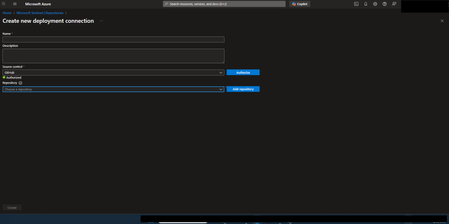
Hi everyone, I’m running into an issue connecting the Azure Sentinel GitHub app to my Sentinel workspace in order to create our CI/CD pipelines for our detection rules, and I’m hoping someone can point me in the right direction. Symptoms: When configuring the GitHub connection in Sentinel, the repository dropdown does not populate. There are no explicit errors, but the connection clearly isn’t completing. If I disable my organization’s IP allow list, everything works as expected and the repos appear immediately. I’ve seen that some GitHub Apps automatically add the IP ranges they require to an organization’s allow list. However, from what I can tell, the Azure Sentinel GitHub app does not seem to have this capability, and requires manual allow listing instead. What I’ve tried / researched: Reviewed Microsoft documentation for Sentinel ↔ GitHub integrations Looked through Azure IP range and Service Tag documentation I’ve seen recommendations to allow list the IP ranges published at //api.github.com/meta, as many GitHub apps rely on these ranges I’ve already tried allow listing multiple ranges from the GitHub meta endpoint, but the issue persists My questions: Does anyone know which IP ranges are used by the Azure Sentinel GitHub app specifically? Is there an official or recommended approach for using this integration in environments with strict IP allow lists? Has anyone successfully configured this integration without fully disabling IP restrictions? Any insight, references, or firsthand experience would be greatly appreciated. Thanks in advance!359Views0likes1Comment
Missing details in Azure Activity Logs – MICROSOFT.SECURITYINSIGHTS/ENTITIES/ACTION
The Azure Activity Logs are crucial for tracking access and actions within Sentinel. However, I’m encountering a significant lack of documentation and clarity regarding some specific operation types. Resources consulted: https://learn.microsoft.com/en-us/azure/sentinel/audit-sentinel-data https://learn.microsoft.com/en-us/rest/api/securityinsights/entities?view=rest-securityinsights-2024-01-01-preview https://learn.microsoft.com/en-us/rest/api/securityinsights/operations/list?view=rest-securityinsights-2024-09-01&tabs=HTTP My issue: I observed unauthorized activity on our Sentinel workspace. The Azure Activity Logs clearly indicate the user involved, the resource, and the operation type: "MICROSOFT.SECURITYINSIGHTS/ENTITIES/ACTION" But that’s it. No detail about what the action was, what entity it targeted, or how it was triggered. This makes auditing extremely difficult. It's clear the person was in Sentinel and perform an activity through it, from search, KQL, logs to find an entity from a KQL query. But, that's all... Strangely, this operation is not even listed in the official Sentinel Operations documentation linked above. My question: Has anyone encountered this and found a way to interpret this operation type properly? Any insight into how to retrieve more meaningful details (action context, target entity, etc.) from these events would be greatly appreciated.560Views0likes3Comments
Update content package Metadata
Hello Sentinel community and Microsoft. Ive been working on a script where i use this command: https://learn.microsoft.com/en-us/rest/api/securityinsights/content-package/install?view=rest-securityinsights-2024-09-01&tabs=HTTP Ive managed to successfully create everything from retrieving whats installed, uninstalling, reinstalling and lastly updating (updating needed to be "list, delete, install" however :'), there was no flag for "update available"). However, now to my issue. As this work like a charm through powershell, the metadata and hyperlinking is not being deployed - at all. So i have my 40 content packages successfully installed through the REST-api, but then i have to visit the content hub in sentinel in the GUI, filter for "installed" and mark them all, then press "install". When i do this the metadata and hyperlinking is created. (Its most noticeable that the analytic rules for the content hubs are not available under analytic rules -> Rule templates after installing through the rest api). But once you press install button in the GUI, they appear. So i looked in to the request that is made when pressing the button. It uses another API version, fine, i can add that to my script. But it also uses 2 variables that are not documented and encrypted-data. they are called c and t: Im also located in EU and it makes a request to SentinelUS. im OK with that, also as mentioned, another API version (2020-06-01) while the REST APi to install content packages above has 2024-09-01. NP. But i can not simulate this last request as the variables are encrypted and not available through the install rest api. They are also not possible to simulate. it ONLY works in the GUI when pressing install. Lastly i get another API version back when it successfully ran through install in GUI, so in total its 3 api versions. Here is my code snippet i tried (it is basically a mimic of the post request in the network tab of the browser then pressing "install" on the package in content hub, after i successfully installed it through the official rest api). function Refresh-WorkspaceMetadata { param ( [Parameter(Mandatory = $true)] [string]$SubscriptionId, [Parameter(Mandatory = $true)] [string]$ResourceGroup, [Parameter(Mandatory = $true)] [string]$WorkspaceName, [Parameter(Mandatory = $true)] [string]$AccessToken ) # Use the API version from the portal sample $apiVeri = "?api-version=" $RefreshapiVersion = "2020-06-01" # Build the batch endpoint URL with the query string on the batch URI $batchUri = "https://management.azure.com/\$batch$apiVeri$RefreshapiVersion" # Construct a relative URL for the workspace resource. # Append dummy t and c parameters to mimic the portal's request. $workspaceUrl = "/subscriptions/$SubscriptionId/resourceGroups/$ResourceGroup/providers/Microsoft.OperationalInsights/workspaces/$WorkspaceName$apiVeri$RefreshapiVersion&t=123456789&c=dummy" # Create a batch payload with several GET requests $requests = @() for ($i = 0; $i -lt 5; $i++) { $requests += @{ httpMethod = "GET" name = [guid]::NewGuid().ToString() requestHeaderDetails = @{ commandName = "Microsoft_Azure_SentinelUS.ContenthubWorkspaceClient/get" } url = $workspaceUrl } } $body = @{ requests = $requests } | ConvertTo-Json -Depth 5 try { $response = Invoke-RestMethod -Uri $batchUri -Method Post -Headers @{ "Authorization" = "Bearer $AccessToken" "Content-Type" = "application/json" } -Body $body Write-Host "[+] Workspace metadata refresh triggered successfully." -ForegroundColor Green } catch { Write-Host "[!] Failed to trigger workspace metadata refresh. Error: $_" -ForegroundColor Red } } Refresh-WorkspaceMetadata -SubscriptionId $subscriptionId -ResourceGroup $resourceGroup -WorkspaceName $workspaceName -AccessToken $accessToken (note: i have variables higher up in my script for subscriptionid, resourcegroup, workspacename and token etc). Ive tried with and without mimicing the T and C variable. none works. So for me, currently, installing content hub packages for sentinel is always: Install through script to get all 40 packages Visit webpage, filter for 'Installed', mark them and press 'Install' You now have all metadata and hyperlinking available to you in your Sentinel (such as hunting rules, analytic rules, workbooks, playbooks -templates). Anyone else manage to get around this or is it "GUI" gated ? Greatly appreciated.Solved758Views1like6Comments[DevOps] dps.sentinel.azure.com no longer responds
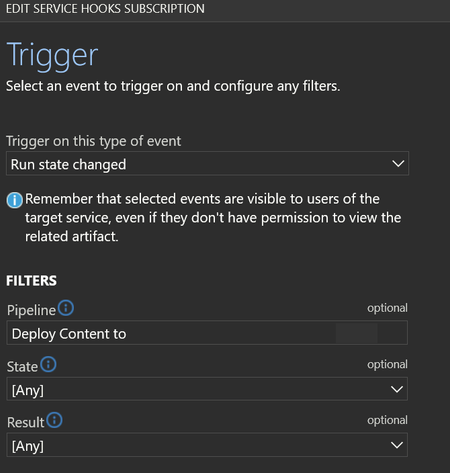
Hello, Ive been using Repository connections in sentinel to a central DevOps for almost two years now. Today i got my first automated email on error for a webhook related to my last commit from the central repo to my Sentinel intances. Its a webhook that is automticly created in connections that are made the last year (the once from 2 years ago dont have this webhook automaticly created). The hook is found in devops -> service hooks -> webhooks "run state change" for each connected sentinel However, after todays run (which was successfull, all content deployed) this hook generates alerts. It says it cant reach: (EU in my case) eu.prod.dps.sentinel.azure.com full url: https://eu.prod.dps.sentinel.azure.com/webhooks/ado/workspaces/[REDACTED]/sourceControls/[REDACTED] So, what happened to this domain? why is it no longer responding and when was it going offline? I THINK this is the hook that sets the status under Sentinel -> Repositories in the GUI. this success status in screenshoot is from 2025/02/06, no new success has been registered in the receiving Sentinel instance. For the Sentinel that is 2 year old and dont have a hook in my DevOps that last deployment status says "Unknown" - so im fairly sure thats what the webhook is doing. So a second question would be, how can i set up a new webhook ? (it want ID and password of the "Azure Sentinel Content Deployment App" - i will never know that password....) so i cant manually add ieather (if the URL ever comes back online or if a new one exists?). please let me know.349Views2likes3Comments
Issue while deploying Sentienl Rules
I know that when deleting a Sentinel rule, you need to wait a specific amount of time before it can be redeployed. However, in this tenant, we've been waiting for almost a month and are still getting the same deployment error ('was recently deleted. You need to allow some time before re-using the same ID. Please try again later. Click here for details'). I still want to use the same ID ect. Does anyone have any idea or similar issue why it's still not possible after waiting for about a month?843Views1like4Comments
Playbook when incident trigger is not working
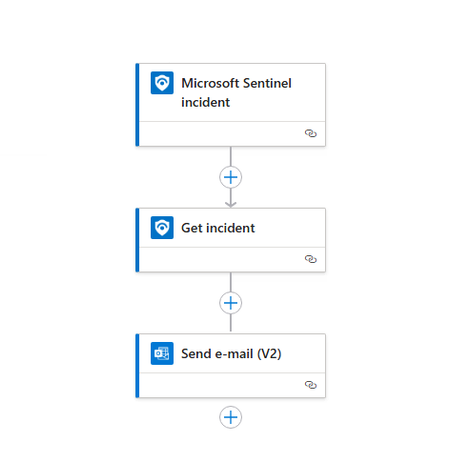
Hi I want to create a playbook to automatically revoke session user when incident with specifics title or gravity is created. But after some test the playbook is'nt run autimacally, it work when I run it manually. I did'nt find what I do wrong. See the image and the code bellow. Thanks in advance! { "definition": { "$schema": "https://schema.management.azure.com/providers/Microsoft.Logic/schemas/2016-06-01/workflowdefinition.json#", "contentVersion": "1.0.0.0", "triggers": { "Microsoft_Sentinel_incident": { "type": "ApiConnectionWebhook", "inputs": { "host": { "connection": { "name": "@parameters('$connections')['azuresentinel']['connectionId']" } }, "body": { "callback_url": "@{listCallbackUrl()}" }, "path": "/incident-creation" } } }, "actions": { "Get_incident": { "type": "ApiConnection", "inputs": { "host": { "connection": { "name": "@parameters('$connections')['azuresentinel-1']['connectionId']" } }, "method": "post", "body": { "incidentArmId": "@triggerBody()?['object']?['id']" }, "path": "/Incidents" }, "runAfter": {} }, "Send_e-mail_(V2)": { "type": "ApiConnection", "inputs": { "host": { "connection": { "name": "@parameters('$connections')['office365']['connectionId']" } }, "method": "post", "body": { "To": "email address removed for privacy reasons", "Subject": "Ceci est un test", "Body": "</p> <p class="\"editor-paragraph\"">@{body('Get_incident')?['id']}</p> <p class="\"editor-paragraph\"">@{body('Get_incident')?['properties']?['description']}</p> <p class="\"editor-paragraph\"">@{body('Get_incident')?['properties']?['incidentNumber']}</p> <p>", "Importance": "Normal" }, "path": "/v2/Mail" }, "runAfter": { "Get_incident": [ "Succeeded" ] } } }, "outputs": {}, "parameters": { "$connections": { "type": "Object", "defaultValue": {} } } }, "parameters": { "$connections": { "type": "Object", "value": { "azuresentinel": { "id": "/subscriptions/xxxx/providers/Microsoft.Web/locations/xxxxx/managedApis/xxxxxxx", "connectionId": "/subscriptions/xxxxxxx/resourceGroups/xxxxxx/providers/Microsoft.Web/connections/azuresentinel-Revoke-RiskySessions1", "connectionName": "azuresentinel-Revoke-RiskySessions1", "connectionProperties": { "authentication": { "type": "ManagedServiceIdentity" } } }, "azuresentinel-1": { "id": "/subscriptions/xxxxxx/providers/Microsoft.Web/locations/xxxx/managedApis/xxx", "connectionId": "/subscriptions/xxxxxxx/resourceGroups/xxxxx/providers/Microsoft.Web/connections/xxxx", "connectionName": "xxxxxx", "connectionProperties": { "authentication": { "type": "ManagedServiceIdentity" } } }, "office365": { "id": "/subscriptions/xxxxxx/providers/Microsoft.Web/locations/xxxxx/managedApis/office365", "connectionId": "/subscriptions/xxxxx/resourceGroups/xxxxxx/providers/Microsoft.Web/connections/o365-Test_Send-email-incident-to-xxxx", "connectionName": "o365-Test_Send-email-incident-to-xxxxx" } } } } }Solved2.4KViews0likes2Comments