Forum Widgets
Latest Discussions
Your Sentinel AMA Logs & Queries Are Public by Default - AMPLS Architectures to Fix That
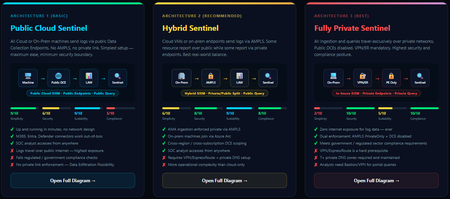
When you deploy Microsoft Sentinel, security log ingestion travels over public Azure Data Collection Endpoints by default. The connection is encrypted, and the data arrives correctly — but the endpoint is publicly reachable, and so is the workspace itself, queryable from any browser on any network. For many organisations, that trade-off is fine. For others — regulated industries, healthcare, financial services, critical infrastructure — it is the exact problem they need to solve. Azure Monitor Private Link Scope (AMPLS) is how you solve it. What AMPLS Actually Does AMPLS is a single Azure resource that wraps your monitoring pipeline and controls two settings: Where logs are allowed to go (ingestion mode: Open or PrivateOnly) Where analysts are allowed to query from (query mode: Open or PrivateOnly) Change those two settings and you fundamentally change the security posture — not as a policy recommendation, but as a hard platform enforcement. Set ingestion to PrivateOnly and the public endpoint stops working. It does not fall back gracefully. It returns an error. That is the point. It is not a firewall rule someone can bypass or a policy someone can override. Control is baked in at the infrastructure level. Three Patterns — One Spectrum There is no universally correct answer. The right architecture depends on your organisation's risk appetite, existing network infrastructure, and how much operational complexity your team can realistically manage. These three patterns cover the full range: Architecture 1 — Open / Public (Basic) No AMPLS. Logs travel to public Data Collection Endpoints over the internet. The workspace is open to queries from anywhere. This is the default — operational in minutes with zero network setup. Cloud service connectors (Microsoft 365, Defender, third-party) work immediately because they are server-side/API/Graph pulls and are unaffected by AMPLS. Azure Monitor Agents and Azure Arc agents handle ingestion from cloud or on-prem machines via public network. Simplicity: 9/10 | Security: 6/10 Good for: Dev environments, teams getting started, low-sensitivity workloads Architecture 2 — Hybrid: Private Ingestion, Open Queries (Recommended for most) AMPLS is in place. Ingestion is locked to PrivateOnly — logs from virtual machines travel through a Private Endpoint inside your own network, never touching a public route. On-premises or hybrid machines connect through Azure Arc over VPN or a dedicated circuit and feed into the same private pipeline. Query access stays open, so analysts can work from anywhere without needing a VPN/Jumpbox to reach the Sentinel portal — the investigation workflow stays flexible, but the log ingestion path is fully ring-fenced. You can also split ingestion mode per DCE if you need some sources public and some private. This is the architecture most organisations land on as their steady state. Simplicity: 6/10 | Security: 8/10 Good for: Organisations with mixed cloud and on-premises estates that need private ingestion without restricting analyst access Architecture 3 — Fully Private (Maximum Control) Infrastructure is essentially identical to Architecture 2 — AMPLS, Private Endpoints, Private DNS zones, VPN or dedicated circuit, Azure Arc for on-premises machines. The single difference: query mode is also set to PrivateOnly. Analysts can only reach Sentinel from inside the private network. VPN or Jumpbox required to access the portal. Both the pipe that carries logs in and the channel analysts use to read them are fully contained within the defined boundary. This is the right choice when your organisation needs to demonstrate — not just claim — that security data never moves outside a defined network perimeter. Simplicity: 2/10 | Security: 10/10 Good for: Organisations with strict data boundary requirements (regulated industries, audit, compliance mandates) Quick Reference — Which Pattern Fits? Scenario Architecture Getting started / low-sensitivity workloads Arch 1 — No network setup, public endpoints accepted Private log ingestion, analysts work anywhere Arch 2 — AMPLS PrivateOnly ingestion, query mode open Both ingestion and queries must be fully private Arch 3 — Same as Arch 2 + query mode set to PrivateOnly One thing all three share: Microsoft 365, Entra ID, and Defender connectors work in every pattern — they are server-side pulls by Sentinel and are not affected by your network posture. Please feel free to reach out if you have any questions regarding the information provided.525Views3likes2CommentsSentinel Foundry - MCP Server (Github Community Release)
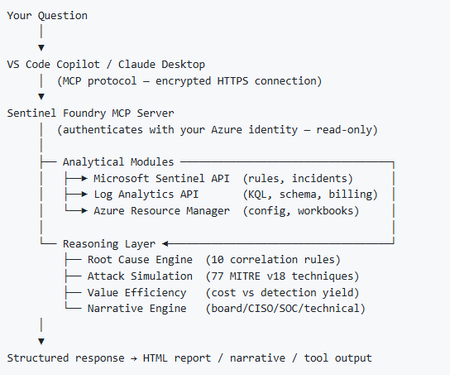
I’ve been cooking something that a lot of people in SOC have been struggling with — especially on the engineering side of Microsoft Sentinel. Thanks to the Microsoft Security team for shaping the capabilities of Sentinel even better with Sentinel Data Lake & Modern SecOps. Today’s the day I can finally share it. Note: This is not an official Microsoft product, but it is designed to make the Sentinel Build even better (complement) with much more intelligence. 🚀 Sentinel Foundry is now in public preview with 43 tools. (Sentinel Foundry - MCP Server) It’s an MCP server built to act like the brain of a strong Sentinel engineer — helping make building, improving, and operating Sentinel far more practical, faster, and honestly more enjoyable. For a lot of teams, the challenge is not understanding what Sentinel can do. The hard part is the engineering work around it: -> Deciding what data should actually be ingested -> Building a clean, scalable Sentinel foundation -> Writing useful detections instead of noisy ones -> Balancing security value with cost -> Turning ideas into deployable engineering outputs That is exactly why I built Sentinel Foundry to help communities grow stronger. It helps with the real engineering tasks behind Sentinel — from architecture thinking to detection design, deployment planning, ingestion strategy, automation ideas, and many of the workflows outlined in the GitHub project. How does it work? Here’s one of the flagship prompts I ran with it: “Give me a complete security posture report for our workspace. Score each pillar and tell me what to prioritise.” And within seconds, it produced a structured engineering blueprint that would normally take a lot longer to pull together manually. You can see the example prompts here in what it can do: https://github.com/prabhukiranveesam/Sentinel-Foundry#what-can-it-do I want building Sentinel to feel less like repetitive engineering overhead — and more like real security engineering that is fast, creative, and enjoyable. If you work with Sentinel as a SOC L2 analyst, engineer, detection engineer, consultant, or architect, I’d genuinely love for you to try it and tell me what you think. 🔗 Public Preview: https://github.com/prabhukiranveesam/Sentinel-Foundry This is just the start of an AI era — and I’m excited to keep shaping it with more powerful features over the coming days. This is very easy to set up and will be available to all of you at no cost during this month as part of the public preview, and your feedback is extremely valuable to shape this as a powerful solution.831Views0likes2Comments
Windows Forwarded Events connector with Windows Security Events NRT rules
Hello, We are testing Microsoft Sentinel using the official Windows Forwarded Events connector. Environment - Windows Server WEC - Windows Event Forwarding - Azure Arc - Azure Monitor Agent - Windows Forwarded Events connector Everything works correctly. Forwarded security events are successfully ingested into the WindowsEvent table. For example: - Event ID 1102 - Event ID 4732 However, the built-in Windows Security Events NRT Analytics Rules (Content Hub version 1.0.1) query only the SecurityEvent table. Example: NRT Security Event log cleared SecurityEvent | where EventID == 1102 As a result, forwarded events received through the Windows Forwarded Events connector never trigger these NRT rules. Question: Is this expected behavior? Should Windows Forwarded Events customers use a different set of analytics rules (ASIM or other templates), or should these built-in NRT rules also support WindowsEvent? Thank you.enescalbanJul 25, 2026Copper Contributor208Views0likes4CommentsHunting AI Agent Configuration Drift with Microsoft Sentinel
Four KQL patterns for detecting instruction changes, new MCP servers, ownership changes, and organization-wide sharing I recently authored and contributed four new Microsoft Sentinel hunting queries for detecting security-relevant configuration drift in AI agents. They have been reviewed, approved, and merged into Microsoft's public Azure-Sentinel repository. I built the queries around four changes that can materially affect an agent's behavior, access, or exposure: instructions being modified, MCP servers being connected, owners being added, and sharing being expanded to the entire organization. Each modification may be legitimate, but each deserves enough context for a security team to verify that it was expected and authorized. For a security operations team, the difficult question is often not what does this agent look like now? It is what changed since the last known state? Microsoft Sentinel's AgentsInfo table provides inventory-style snapshots of AI agents and their associated configuration. That makes it useful for more than posture reporting. By comparing a recent snapshot with an earlier baseline, we can hunt for configuration drift that deserves investigation. This post walks through four practical hunting scenarios: Instructions changed on a previously published agent A newly observed MCP server on an existing agent An owner added to an MCP-enabled agent Sharing expanded from a restricted scope to the entire organization The complete hunting queries are available in Microsoft's public https://github.com/Azure/Azure-Sentinel/tree/master/Hunting%20Queries/AI%20Agents. The focus here is the detection design behind them, the KQL patterns they share, and the investigation questions they help answer. What I contributed I wrote the four standalone hunting queries discussed in this article and submitted them to Azure/Azure-Sentinel in https://github.com/Azure/Azure-Sentinel/pull/14702: AI Agents - Instructions changed on previously published agent AI Agents - Newly observed MCP server on existing agent AI Agents - Owner added to MCP-enabled agent AI Agents - Sharing expanded to organization-wide The contribution went through several rounds of technical review. Across six commits, I aligned the queries with the unified AgentsInfo schema, added schema-tolerant IdentityInfo enrichment, improved entity mappings, bounded the identity lookback, expanded all owner values, and kept the ATT&CK mappings limited to scenarios where a precise technique could be defended. Repository collaborator v-atulyadav approved the final revision, and the four queries were merged into master on July 20, 2026. This article explains the detection logic and engineering decisions behind that contribution rather than simply reproducing the final YAML files. Why current-state queries are not enough A current-state query can answer questions such as: Which agents are published? Which agents have MCP servers configured? Which agents are shared with the organization? Who owns a particular agent? Those are important posture questions, but they do not tell us whether the state is new. An agent with an MCP server might have been reviewed and approved months ago. The same MCP server appearing for the first time today is a different security signal. Configuration-drift hunting adds the missing time dimension. Instead of treating a risky-looking property as an event, it compares two states of the same agent and reports only meaningful transitions. The common detection pattern I used the same basic time model across all four hunts: let lookback = 14d; let recent = 2d; The latest snapshot observed during the last two days becomes the current state. The latest snapshot from the preceding portion of the 14-day lookback becomes the baseline. Conceptually, the comparison looks like this: let CurrentState = AgentsInfo | where Timestamp > ago(recent) | summarize arg_max(Timestamp, *) by AgentId | where LifecycleStatus != "Deleted"; let BaselineState = AgentsInfo | where Timestamp between (ago(lookback) .. ago(recent)) | where LifecycleStatus != "Deleted" | summarize arg_max(Timestamp, *) by AgentId; CurrentState | join kind=inner BaselineState on AgentId Several details matter here: arg_max(Timestamp, *) by AgentId selects the latest available state for each agent in the relevant time range. The inner join restricts results to agents that exist in both periods. A newly created agent is therefore not automatically treated as configuration drift on an existing agent. Deleted lifecycle snapshots are excluded so that a deletion record does not become the effective baseline or current configuration. The two-day current window is operationally significant. To retain coverage, these hunts should run within two days of a change. The 14-day and two-day values are practical defaults, not universal constants. Environments with different ingestion cadence or retention requirements can adjust them, but the current and baseline windows must remain non-overlapping. Scenario 1: Instructions changed on a published agent An agent's instructions define its default behavior, persona, and operating boundaries. Changing them can be part of normal development, but it can also weaken restrictions, redirect the agent's behavior, or modify how it uses connected capabilities. The first hunt compares the current and previous instruction values only when the agent was published in both snapshots: CurrentState | join kind=inner BaselineState on AgentId | where CurrentInstructions != PreviousInstructions | extend PreviousInstructionsHash = hash_sha256(PreviousInstructions), CurrentInstructionsHash = hash_sha256(CurrentInstructions), InstructionsLengthDelta = strlen(CurrentInstructions) - strlen(PreviousInstructions) I deliberately chose to expose hashes and a length delta rather than returning both instruction bodies in plaintext. This confirms that a change occurred without unnecessarily spreading potentially sensitive prompts through query results, exports, or screenshots. Useful investigation questions include: Was the change associated with an approved development or release process? Did the agent remain published while the instructions changed? Were guardrails, declared tools, permissions, or sharing settings modified around the same time? Do audit records identify an expected actor and change path? The query maps well to an integrity-focused investigation. Its MITRE ATT&CK mapping is T1565.001 (Stored Data Manipulation), but the result is still a hunting lead rather than proof of malicious manipulation. https://github.com/Azure/Azure-Sentinel/blob/master/Hunting%20Queries/AI%20Agents/AgentsInfoInstructionsChangedOnPublishedAgent.yaml Scenario 2: A newly observed MCP server Model Context Protocol servers can extend an agent with external tools, data sources, or actions. From a defender's perspective, the important transition is not simply that an MCP server exists. It is that a server name appears in the current configuration but was absent from the baseline. The query expands the dynamic McpServers array and builds a set of server names for each agent: let CurrentMcp = CurrentRaw | mv-expand Mcp = McpServers | extend McpName = tostring(Mcp.name) | where isnotempty(McpName) | summarize CurrentMcpServers = make_set(McpName) by AgentI It performs the same normalization for the baseline, then calculates the difference: | extend AddedMcpServers = set_difference(CurrentMcpServers, BaselineMcpServers) | where array_length(AddedMcpServers) > 0 Using set_difference() avoids raising a result merely because the order of array elements changed. The hunt reports only MCP server names present in the current set and absent from the previous set. An analyst should validate more than the displayed name: Is the MCP integration part of the approved inventory? What endpoint, authentication method, and permissions are associated with it? Which tools or data can the server expose to the agent? Was the integration introduced through an expected deployment path? Did ownership, instructions, or sharing change in the same period? I did not assign an ATT&CK technique to this query. Adding an MCP server does not, by itself, prove command execution, persistence, or a specific attacker behavior. Avoiding an overly broad mapping keeps the signal honest. https://github.com/Azure/Azure-Sentinel/blob/master/Hunting%20Queries/AI%20Agents/AgentsInfoNewlyObservedMcpServer.yaml Scenario 3: An owner added to an MCP-enabled agent Ownership is a control-plane relationship. A newly added owner may be able to modify an agent's configuration, instructions, integrations, or publication state. The risk becomes more interesting when the agent already has MCP servers configured. The hunt first limits the current state to MCP-enabled agents: | where array_length(coalesce(McpServers, dynamic([]))) > 0 | project AgentId, Timestamp, Name, Platform, CreatedDateTime, CurrentOwners = coalesce(Owners, dynamic([])), McpServers It then compares the owner arrays as sets: | extend AddedOwners = set_difference(CurrentOwners, PreviousOwners) | where array_length(AddedOwners) > 0 | mv-expand AddedOwnerId = AddedOwners to typeof(string) Expanding AddedOwners produces one row per newly observed owner. This is more useful than returning one opaque dynamic array because every added identity can be enriched, mapped, and investigated independently. I kept the raw object identifier in the result even when identity enrichment fails: | extend AddedOwnerUpn = AccountUpn, UnresolvedAddedOwnerId = iff(isempty(AccountUpn), AddedOwnerId, "") That fallback matters. A missing UPN should not hide the underlying ownership change. Investigation should establish: Is the added owner an expected person, service identity, or administrative group? Does the identity's role and business function justify control of this agent? Was the owner added before other configuration changes? Does the identity appear in related sign-in, audit, or privileged-access activity? Should ownership be removed while the change is reviewed? This query maps to T1098 (Account Manipulation) under Persistence and Privilege Escalation. As with the instruction-change hunt, the mapping frames an investigation hypothesis; it does not label every ownership change as malicious. https://github.com/Azure/Azure-Sentinel/blob/master/Hunting%20Queries/AI%20Agents/AgentsInfoOwnerAddedToMcpAgent.yaml Scenario 4: Sharing expanded to the entire organization An agent can move from a limited audience to organization-wide availability without changing its underlying tools or instructions. That transition can materially increase exposure, especially when the agent has MCP integrations or declared tools. The hunt treats "*" in SharedWith as the organization-wide state. The current snapshot must contain it, while the baseline must not: // Current state | where set_has_element(coalesce(SharedWith, dynamic([])), "*") // Baseline state | where not(set_has_element(coalesce(SharedWith, dynamic([])), "*")) The result also counts MCP servers and declared tools: | extend McpServerCount = array_length(coalesce(McpServers, dynamic([]))), DeclaredToolCount = array_length(coalesce(DeclaredTools, dynamic([]))) | extend HasElevatedCapabilities = McpServerCount > 0 or DeclaredToolCount > 0 | sort by HasElevatedCapabilities desc, Timestamp desc I use HasElevatedCapabilities as a prioritization field, not a verdict. It brings agents with connected capabilities to the top of the result set so analysts can review the potentially larger blast radius first. Questions for triage include: Was organization-wide publication explicitly approved? Is the agent intended for every user, or was a group-based scope expected? What data sources, tools, and MCP servers can organization-wide users reach through it? Do the instructions contain assumptions that were safe only for a restricted audience? Were access reviews or user-acceptance tests completed before the expansion? No ATT&CK mapping is assigned because a broader sharing scope is a security-relevant exposure change, but not a sufficiently precise adversary technique on its own. https://github.com/Azure/Azure-Sentinel/blob/master/Hunting%20Queries/AI%20Agents/AgentsInfoSharingExpandedToOrgWide.yaml Resolving owners without making the hunt schema-fragile The Owners field contains identifiers. Human-readable identity context makes results easier to triage, and entity mappings make those identities more useful in Sentinel investigations. I built a small, materialized IdentityInfo lookup that is shared by the four hunts: let IdentityIdtoUPN = materialize( IdentityInfo | extend ResolvedAccountUpn = tostring( column_ifexists("AccountUpn", column_ifexists("AccountUPN", ""))), IdentityTimestamp = todatetime( column_ifexists("Timestamp", column_ifexists("TimeGenerated", datetime(null)))) | where IdentityTimestamp >= ago(lookback) | where isnotempty(AccountObjectId) and isnotempty(ResolvedAccountUpn) | summarize arg_max(IdentityTimestamp, ResolvedAccountUpn) by AccountObjectId | project AccountObjectId = tostring(AccountObjectId), AccountUpn = ResolvedAccountUpn); There are three design choices worth noting: column_ifexists() accommodates observed IdentityInfo naming variants without maintaining separate query versions. The lookup is bounded by the same lookback period instead of scanning unbounded identity history. arg_max() keeps the latest usable identity record for each object ID. After enrichment, the queries map the account using the UPN components and the Entra object ID: entityMappings: - entityType: Account fieldMappings: - identifier: Name columnName: OwnerAccountName - identifier: UPNSuffix columnName: OwnerAccountUPNSuffix - identifier: AadUserId columnName: OwnerId The strong AadUserId identifier remains valuable even when display information changes. Microsoft Sentinel can use mapped entities in bookmarks and investigation experiences, so mapping the changed owner is more than cosmetic enrichment. Turning a result into an investigation These queries intentionally stop at the configuration transition. AgentsInfo tells us that two snapshots differ; it does not necessarily tell us who performed the change, through which interface, or whether the action was authorized. A practical investigation workflow is: Confirm that the two snapshots represent the expected agent and time period. Review the exact changed property and the agent's current capabilities. Identify the owner or newly added owner through IdentityInfo and Entra ID context. Correlate the transition with the relevant audit source for actor attribution. Check for related changes to permissions, tools, data sources, publication state, and sharing. Validate the change against an approved request, release, or ownership process. Restrict, unpublish, or revert the agent if the exposure cannot be justified. Expected changes can still be useful findings. Repeated legitimate results may reveal that a deployment process lacks a stable change window, that ownership is managed through noisy automation, or that the hunt's timing needs to be aligned with release activity. Tuning the hunts for your environment Before operational use, consider the following adjustments: Run cadence: Execute within the two-day current window. A daily cadence provides overlap without blending current and baseline periods. Lookback: Increase the 14-day lookback only if snapshot history and query cost support it. A longer lookback does not compensate for missing the current window. Known change windows: Add watchlists or environment-specific suppression logic for well-controlled automated deployments, while retaining enough context to audit the change. Agent scope: Filter by platform, business unit, agent naming convention, or owner if different teams require separate triage queues. Risk prioritization: Raise agents with sensitive declared data sources, powerful tools, privileged owners, or broad availability to the top of the result set. Audit correlation: Keep attribution logic separate unless the audit source and join keys are stable in your environment. This makes the configuration-drift hunt reusable while allowing each organization to attach its own control-plane evidence. Test with representative snapshots before treating any hunt as an operational control. In particular, validate array shapes for Owners, McpServers, and SharedWith, confirm the identity fields present in your workspace, and exercise both changed and unchanged states. Using the queries The four YAML definitions have been merged into the Hunting Queries/AI Agents folder of Microsoft's Azure-Sentinel repository. Each file contains the complete KQL, description, entity mappings, and ATT&CK mappings where a precise technique applies. https://github.com/Azure/Azure-Sentinel/blob/master/Hunting%20Queries/AI%20Agents/AgentsInfoInstructionsChangedOnPublishedAgent.yaml https://github.com/Azure/Azure-Sentinel/blob/master/Hunting%20Queries/AI%20Agents/AgentsInfoNewlyObservedMcpServer.yaml https://github.com/Azure/Azure-Sentinel/blob/master/Hunting%20Queries/AI%20Agents/AgentsInfoOwnerAddedToMcpAgent.yaml https://github.com/Azure/Azure-Sentinel/blob/master/Hunting%20Queries/AI%20Agents/AgentsInfoSharingExpandedToOrgWide.yaml The broader pattern is reusable beyond these four scenarios: select a stable current snapshot, select a non-overlapping baseline, normalize dynamic properties into comparable sets, calculate the transition, and enrich only after the drift has been identified. That keeps the core detection explainable and gives the analyst the before-and-after context needed for a defensible investigation. References https://learn.microsoft.com/en-us/azure/azure-monitor/reference/tables/agentsinfo https://learn.microsoft.com/en-us/azure/azure-monitor/reference/queries/agentsinfo https://learn.microsoft.com/en-us/azure/azure-monitor/reference/tables/identityinfo https://learn.microsoft.com/en-us/azure/sentinel/entities-reference https://github.com/Azure/Azure-Sentinel/pull/14702 I authored the four hunting queries discussed in this article and contributed them to Microsoft's Azure-Sentinel repository as https://github.com/Azure/Azure-Sentinel/pull/14702. The complete implementations and review history are publicly available through the links above.Marcel_GraewerJul 20, 2026Brass Contributor390Views1like2CommentsSentinel - Defender XDR KQL Queries Library
Hello all, I’ve been building something over the past few weeks that I think the security community might find useful. https://goxdr.fyi is a searchable KQL query library for Microsoft Sentinel and Defender XDR. The name comes from a nickname my colleagues gave me (GoX) combined with XDR. I also picked up https://goxdr.fyi as a short and easy to remember domain for it. You can check it out here: https://goxdr.fyi The idea came from my own day to day work as someone working in IAM and SOC operations. I constantly find myself writing and refining KQL queries for threat hunting, detection engineering and incident investigation. Over time I realized I had a growing collection of queries that I kept going back to and I thought why not make these available to others? It currently has 117 queries covering identity security, BEC/AiTM detection, NTLM and LDAP attack hunting, OAuth governance, AI/Copilot security, Sentinel alert trending, SOC performance metrics and more. Some of these queries are ones I wrote from scratch based on real scenarios I encountered in production environments. Others are community queries I tested and validated in my own setup. Only the ones I found genuinely useful and that actually worked against real data made it in. Each query comes with a description explaining what it detects and why it matters, along with severity levels, platform tags (Sentinel, XDR or both) and a copy button so you can paste it directly into Advanced Hunting or use it as the basis for an Analytics Rule. The site is open source, hosted on GitHub Pages and licensed under CC BY 4.0. No sign-up, no paywall, no tracking. The source is available. I’ll keep adding queries as new scenarios come up. If there’s enough interest I’m also considering adding Cortex XQL queries for Palo Alto environments. Suggestions, feedback or ideas for new detections are always welcome. Feel free to reach out. Thanks102Views0likes0Comments
Sentinel - Defender for Cloud P2 Benefit
Hi all, To receive the the benefit of the Sentinel / Defender for Cloud P2 500mb benefit is the following correct: Enabled Defender for Cloud P2 on the server or via Azure Arc (these are mainly on-prem servers. Create a DCR rule to collect events and send to our Sentinel Workspace. Enable Defender on the Sentinel workspace (not subscription) Defender for Servers is far more work than it should be!DaithiGJul 06, 2026Steel Contributor91Views0likes2CommentsReminder: Next Tuesday 6/23 at 9AM PST we will be hosting an 'Ask Microsoft Anything' session on Tech Community for the Sentinel SIEM Migration Experience!
Join us for a live demo and AMA on the Microsoft Sentinel SIEM migration experience. We’ll show how the experience helps teams move from legacy SIEMs like Splunk and QRadar into Microsoft Sentinel with a more guided, lower-friction path. We’ll cover what it does today, how it works, and the questions customers ask most, then open it up for live Q&A. Link here: Ask Microsoft Anything: The Microsoft Sentinel SIEM Migration Experience Hope to see you there!Trevor_RusherJun 18, 2026Community Manager53Views0likes0CommentsReset Data Lake?
Hi, Is the only want to reset or change the Data Lake to contact Microsoft Support. We've a ticket open for a few days now. The Data Lake was setup as in a test subscription and we really need to delete it/reset it and start again under a proper production subscription. ThanlsDaithiGJun 12, 2026Steel Contributor90Views0likes1CommentDetecting AI agents and non-human identities in Microsoft Sentinel: the classic-agent blind spot
Build 2026 made the direction official. The industry is moving from the app era into the agent era, and Microsoft spent a real share of the keynote on securing agents across their lifecycle, from discovering what is exploitable to governing what is running in production. On the identity side the centerpiece is Microsoft Entra Agent ID, now generally available, which gives AI agents first-class identities and extends Conditional Access, Identity Protection, and full audit logging to them. That is good news for agents you build the new way. It is not the whole picture, and the gap is where most SOCs will get hurt first. Modern agents are covered. Classic agents are not. Entra Agent ID draws a hard line between two kinds of agent. Modern agents are created through the Agent ID platform, each backed by an agent identity blueprint. They carry a proper Agent ID, a full audit trail, and the complete set of governance capabilities, including Identity Protection for Agents, which establishes a baseline for an agent's normal activity and flags anomalies automatically. Classic agents are everything that came before, or that gets built outside the platform: AI agents implemented as ordinary service principals or app registrations, for example Copilot Studio agents created before Agent ID was enabled, or any home-grown automation calling Graph with client credentials. In the Entra agent registry they appear with "Has Agent ID: No," and that flag matters, because the Agent ID protections apply to identities that actually hold an Agent ID. Classic agents sit outside Identity Protection for Agents and Conditional Access for Agents. Here is the uncomfortable part. The non-human identities you already run, the service principals behind your pipelines, your integrations, your scripts, your pre-platform Copilot Studio bots, are almost all classic agents. They tend to outnumber your human accounts, they have no MFA in any meaningful sense, and a credential added to one does not show up in the Azure portal. The new platform protections do not reach them. Until you migrate them, the only place you get detection coverage on that population is your SIEM. So this is the job Sentinel does that Agent ID does not: detect risky behavior on the classic, service-principal-backed agents that the platform cannot yet protect. The telemetry you have, and the one switch people forget Three tables carry most of the signal. AADServicePrincipalSignInLogs records service principal authentications, the client-credentials sign-ins your agents and automation use. No user, no MFA, just an app proving it holds a secret or certificate. AADManagedIdentitySignInLogs does the same for managed identities. AuditLogs records directory changes, including the one that matters most for persistence: a new credential added to an application or service principal. One practical warning before any of this works. Service principal and managed identity sign-in logs are not streamed by default. You have to enable those categories explicitly in the Entra diagnostic settings feeding your workspace. Plenty of teams write the detection, never check, and never notice the table is empty. Verify that first. Detection 1: a new credential on a service principal or app Adding a secret or certificate to an existing service principal is one of the cleanest persistence techniques in a Microsoft cloud. The attacker compromises a privileged user or app, drops a fresh credential on a service principal that already holds useful Graph permissions, and now has access that survives password resets and session revocation. It maps to MITRE T1098.001, Account Manipulation: Additional Cloud Credentials. For a classic agent it is especially nasty, because there is no Identity Protection baseline watching it. // Detection 1: new secret or certificate added to an application or service principal // MITRE T1098.001 - Account Manipulation: Additional Cloud Credentials AuditLogs | where OperationName has_any ("Add service principal", "Certificates and secrets management") | where Result =~ "success" | extend Initiator = coalesce( tostring(InitiatedBy.user.userPrincipalName), tostring(InitiatedBy.app.displayName)) | extend InitiatorIp = tostring(InitiatedBy.user.ipAddress) | mv-apply Target = TargetResources on ( where Target.type =~ "Application" | extend TargetName = tostring(Target.displayName), TargetId = tostring(Target.id), KeyChanges = Target.modifiedProperties ) | mv-apply Prop = KeyChanges on ( where tostring(Prop.displayName) =~ "KeyDescription" | extend NewKeys = parse_json(tostring(Prop.newValue)), OldKeys = parse_json(tostring(Prop.oldValue)) ) | extend AddedKeys = set_difference(NewKeys, OldKeys) | where array_length(AddedKeys) > 0 | project TimeGenerated, Initiator, InitiatorIp, TargetName, TargetId, AddedKeys | order by TimeGenerated desc The operation filter catches the three shapes this event takes in the log: "Add service principal," "Add service principal credentials," and "Update application - Certificates and secrets management." The modifiedProperties parsing isolates the KeyDescription change, and set_difference confirms a key was actually added rather than removed, so rotating out an old credential does not, on its own, fire the rule. False positives come from legitimate rotation and from automation that provisions app credentials (CI/CD, infrastructure as code). The initiator is the discriminant. A credential added by your deployment pipeline's service account at the usual time is routine. The same change initiated by an interactive admin out of hours, or by an account that never normally touches app credentials, is what you want to surface. Allow-list the expected initiators, not the targets. Detection 2: a classic agent signing in from a first-seen IP A service principal that has only ever authenticated from your Azure regions and suddenly signs in from somewhere new is a strong signal that its credential has been lifted and is being used elsewhere. Service principals have stable, boring network behavior, which makes a first-seen IP a far cleaner indicator for them than it is for roaming human users. This is the behavioral baseline Identity Protection gives you for free on modern agents, rebuilt in KQL for the classic ones it ignores. MITRE T1078.004, Valid Accounts: Cloud Accounts. // Detection 2: classic-agent service principal signing in from a previously unseen IP // MITRE T1078.004 - Valid Accounts: Cloud Accounts let baseline = 14d; let detection = 1d; let KnownIPs = AADServicePrincipalSignInLogs | where TimeGenerated between (ago(baseline + detection) .. ago(detection)) | where tostring(ResultType) == "0" | summarize KnownIPSet = make_set(IPAddress) by AppId; AADServicePrincipalSignInLogs | where TimeGenerated > ago(detection) | where tostring(ResultType) == "0" | lookup kind=leftouter KnownIPs on AppId | where set_has_element(KnownIPSet, IPAddress) == false | summarize FirstSeen = min(TimeGenerated), Resources = make_set(ResourceDisplayName, 10) by ServicePrincipalName, AppId, IPAddress | order by FirstSeen desc The query builds a per-application baseline of source IPs over the previous two weeks, then flags any successful sign-in today from an address outside that set. Two tuning notes. Brand-new service principals have no baseline, so they surface on first use. That is usually worth seeing once, but you can exclude AppIds younger than the baseline window if it gets noisy. And if your agents egress through shifting cloud IP ranges, widen the comparison from an exact IP to the autonomous system number or a known-range allow-list, otherwise you will chase your own infrastructure. This complements Agent ID, it does not replace it! The endgame is not to run these rules forever. It is to shrink the population they apply to. Inventory your tenant for agents marked "Has Agent ID: No," prioritize the ones holding sensitive Graph permissions, and migrate them onto the Agent ID platform, where Identity Protection and Conditional Access take over the baselining you are doing here by hand. Microsoft has signaled a migration path from classic to modern agents. Treat these two detections as the coverage you need in the meantime, and as a permanent safety net for anything that never makes the move. If you do one thing this week: enable the service principal sign-in log category, deploy detection 1, and pull a list of every service principal that had a credential added in the last 90 days. That list alone tends to be more interesting than people expect. Cheers, MarcelMarcel_GraewerJun 09, 2026Brass Contributor490Views0likes0Comments
MSSP migration to Unified portal: how are you sequencing your customer portfolio?
Following the automation and SOAR discussion, I wanted to open a conversation specifically focused on the MSSP and multi-tenant side of the migration, because this is where the coordination challenges are an order of magnitude higher than the technical ones. A few things I am working through before writing this up as Part 5 of the migration series. On Workspace Manager: Microsoft's own documentation now points you away from Workspace Manager at the point of onboarding to the Defender portal, directing you to Microsoft Defender multitenant management instead. For MSSPs who built their operating model around Workspace Manager, this is a significant structural change. For those implementing now, the recommendation is to go straight to the multitenant portal. I am interested in what the transition has looked like in practice for teams who were mid-flight on Workspace Manager when this became clear. On access delegation: one of the more honest framings I want to include in the article is around the GDAP plus Unified RBAC gap. A Microsoft employee confirmed in the RSAC 2026 thread that Unified RBAC support for GDAP in the Defender portal is on the roadmap with no firm date. MSSPs choosing between Entra B2B and the governance relationships model today are making an architectural call that is difficult to reverse. I want to present this accurately, and real experience from practitioners will sharpen that framing. On the connector deployment constraint: you cannot deploy connectors from a managed workspace configured with Azure Lighthouse alone, you also need GDAP. This makes a layered delegation architecture, Lighthouse plus GDAP plus B2B or governance relationships, necessary rather than optional. I am curious whether MSSPs are already running this layered model or whether most are still trying to make Lighthouse work as a single mechanism. On migration sequencing: the question I want to ask specifically is how teams are structuring their customer portfolio migration. Are you running waves based on customer complexity, based on contract renewal timing, based on customer risk appetite, or some other factor? And when something goes wrong in one tenant's migration, how are you containing the impact on the rest of the programme? Sharing the full article once it is written. Happy to discuss anything above in more detail in the thread.AnthonyPorterJun 07, 2026Brass Contributor236Views0likes1Comment



Tags
- siem455 Topics
- KQL312 Topics
- data collection247 Topics
- Log Data228 Topics
- analytics168 Topics
- azure160 Topics
- automation148 Topics
- integration141 Topics
- alerts130 Topics
- kusto129 Topics