Forum Widgets
Latest Discussions
Join Our Azure Sentinel Community
Visit Our Blog Now that we have announced Azure Sentinel, we'd like to invite you to speak directly to our engineering team. We believe that the best way to improve our products is by having no barrier between you and the people that create them. That's why we need your participation in our community. As part of our community you can influence our products and get early access to changes by participating in private previews, giving feedback, requesting features, reviewing product roadmaps, joining conference call discussions, or attending in-person events. To try out Azure Sentinel, log into your Azure Portal and then click here to join the preview. Join Us To join our community, click here, and then click the join button and the heart icon for Azure Sentinel, as pictured below. Stay Updated via our Blog To keep up-to-date on all our major announcements, please visit our blog at https://aka.ms/AzureSentinelBlog. Check Out our GitHub Repository We have queries, detections, playbooks, and more on our GitHub repository at https://aka.ms/AzureSentinel/GitHub and we'll be investing significant efforts developing this content. We welcome contributions and hope you benefit from the shared expertise of our entire community. Additional Security Groups Here's a list of other security-related groups you may want to join. Azure Azure Security Center Azure Security and Identity Enterprise Mobility + Security Azure Advanced Threat Protection and ATA Azure Information Protection Microsoft Cloud App Security Microsoft Graph Security API Security, Privacy & Compliance. Windows Defender Advanced Threat Protection Find us on LinkedIn We have a general discussion group on LinkedIn called the Microsoft Security Community, where I announce highlights from this site. Please join the group and feel free to connect with me. Webinars and Private Preview Calls We hold regular webinars and calls where we provide technical training, preview forthcoming features, gather feedback, and host discussions. Many of these allow you to join private previews. Meeting invitations for the calls are posted here in this group, so please check back regularly. Our latest Azure Sentinel webinar can be found at https://aka.ms/AzureSentinelWebinar. We hope to hear from you soon!SolvedRyan HeffernanFeb 22, 2019Microsoft27KViews44likes28CommentsEverything Azure Sentinel connectors
Hi Everyone, I have finalized my blog series on ingesting data to Azure Sentinel and thought you might find a summary useful. Even if you don't find the event, or enrichment, source in one of the built-in connectors, good chances that Sentinel does support it, and if not, Sentinel has a broad array of tools to create custom connectors. Here are the relevant blog posts to guide you to find your connector or develop a custom one: Using the agent to collect telemetry from on-prem and IaaS server Collecting Azure PaaS services logs The Syslog and CEF source configuration grand list Creating Custom Connectors ~ OferOfer_ShezafSep 19, 2019Microsoft4KViews6likes3CommentsPrivate preview for automated playbook activation on an alert
Hi Everyone, Encountered this? I am happy to announce that we have started private for automated playbook activation. If you would like to fire up a playbook when an alert rule triggers, contact me to be included in the preview. Thanks ~ OferOfer_ShezafMay 08, 2019Microsoft1.4KViews6likes3CommentsTime Series analysis and visualization in Azure Sentinel
I have posted couple of blogs around Time Series analysis and visualization on security event log data sources in Azure Sentinel Blog 1: Introduction to Time Series, Step by step guide on compiling queries, configure alerts and investigate the results. Data Source : Windows Event Log - Process Execution Data https://techcommunity.microsoft.com/t5/Azure-Sentinel/Looking-for-unknown-anomalies-what-is-normal-Time-Series/ba-p/555052 Blog 2: Visualization and interpreting Time Series Data. Data Source- Palo Alto Network Traffic Logs https://techcommunity.microsoft.com/t5/Azure-Sentinel/Time-Series-visualization-of-Palo-Alto-logs-to-detect-data/ba-p/666344 As always, Feedbacks or questions are welcome.Ashwin_PatilJun 10, 2019Microsoft3KViews5likes1CommentPublic Preview: Improved Data Connector
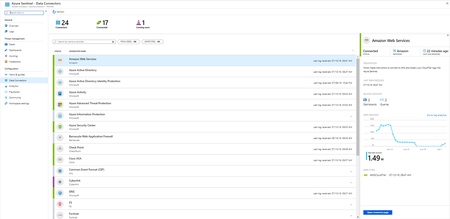
We’ve improved the data connector for Azure Sentinel and we’d like you to try it out. You can participate in the public preview by visiting the Azure Sentinel “Data connectors” page. Screenshots, explanations, and other details can be found in our documentation at https://docs.microsoft.com/en-us/azure/sentinel/connect-data-sources. The data connector’s new interface includes better visualization for status and permissions, improved search, and better instructions. We’d love to get your feedback at https://aka.ms/ASDCvNext.Ryan HeffernanJul 16, 2019Microsoft2.6KViews4likes3Comments
Detailed Email Alerts
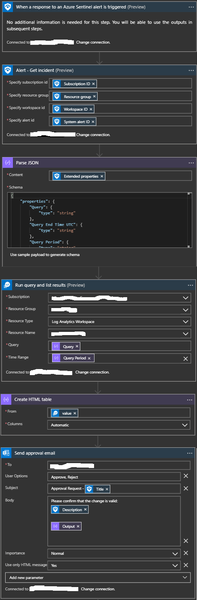
One area that I haven't seen covered is how to get more detail into email alerts that may be generated as the result of a playbook execution. You can get basic alert information but no information on the event data. I configured this playbook which will run the query that is part of the analytic rule and send those in an email formatted as an HTML table. This is the JSON schema: { "properties": { "Query": { "type": "string" }, "Query End Time UTC": { "type": "string" }, "Query Period": { "type": "string" }, "Query Results Aggregation Kind": { "type": "string" }, "Query Start Time UTC": { "type": "string" }, "Search Query Results Overall Count": { "type": "string" }, "Total Account Entities": { "type": "string" }, "Total Host Entities": { "type": "string" }, "Total URL Entities": { "type": "string" }, "Trigger Operator": { "type": "string" }, "Trigger Threshold": { "type": "string" } }, "type": "object" } Hope this is helpful for some of you.mperrottaApr 15, 2020Brass Contributor6.2KViews4likes7CommentsAzure Sentinel: Webinar Recordings
All the recordings of the past webinars have moved to a new location: https://aka.ms/SecurityWebinarsValon_KolicaSep 09, 2019Former Employee13KViews3likes11CommentsUsing Jupyter Notebooks for CyberSecurity Hunting
We've start a blog companion to the #AzureSentinel Community. I've recently posted 2 articles on using Jupter Notebooks in Azure Sentinel for hunting and investigation. Security Investigation with Azure Sentinel and Jupyter Notebooks – Part 1 Security Investigation with Azure Sentinel and Jupyter Notebooks – Part 2 (3rd and final part coming shortly). Also check out this article if Jupyter is new to you Why Use Jupyter for Security Investigations? Also check out shainw's article on Azure Sentinel: Performing Additional Security Monitoring of High-Value Accounts. Feedback (including requests for future subjects) is very much welcome. IanianhelleApr 26, 2019Microsoft2.8KViews3likes1CommentYour Sentinel AMA Logs & Queries Are Public by Default - AMPLS Architectures to Fix That
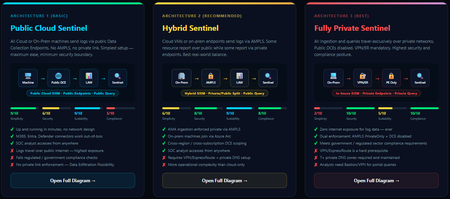
When you deploy Microsoft Sentinel, security log ingestion travels over public Azure Data Collection Endpoints by default. The connection is encrypted, and the data arrives correctly — but the endpoint is publicly reachable, and so is the workspace itself, queryable from any browser on any network. For many organisations, that trade-off is fine. For others — regulated industries, healthcare, financial services, critical infrastructure — it is the exact problem they need to solve. Azure Monitor Private Link Scope (AMPLS) is how you solve it. What AMPLS Actually Does AMPLS is a single Azure resource that wraps your monitoring pipeline and controls two settings: Where logs are allowed to go (ingestion mode: Open or PrivateOnly) Where analysts are allowed to query from (query mode: Open or PrivateOnly) Change those two settings and you fundamentally change the security posture — not as a policy recommendation, but as a hard platform enforcement. Set ingestion to PrivateOnly and the public endpoint stops working. It does not fall back gracefully. It returns an error. That is the point. It is not a firewall rule someone can bypass or a policy someone can override. Control is baked in at the infrastructure level. Three Patterns — One Spectrum There is no universally correct answer. The right architecture depends on your organisation's risk appetite, existing network infrastructure, and how much operational complexity your team can realistically manage. These three patterns cover the full range: Architecture 1 — Open / Public (Basic) No AMPLS. Logs travel to public Data Collection Endpoints over the internet. The workspace is open to queries from anywhere. This is the default — operational in minutes with zero network setup. Cloud service connectors (Microsoft 365, Defender, third-party) work immediately because they are server-side/API/Graph pulls and are unaffected by AMPLS. Azure Monitor Agents and Azure Arc agents handle ingestion from cloud or on-prem machines via public network. Simplicity: 9/10 | Security: 6/10 Good for: Dev environments, teams getting started, low-sensitivity workloads Architecture 2 — Hybrid: Private Ingestion, Open Queries (Recommended for most) AMPLS is in place. Ingestion is locked to PrivateOnly — logs from virtual machines travel through a Private Endpoint inside your own network, never touching a public route. On-premises or hybrid machines connect through Azure Arc over VPN or a dedicated circuit and feed into the same private pipeline. Query access stays open, so analysts can work from anywhere without needing a VPN/Jumpbox to reach the Sentinel portal — the investigation workflow stays flexible, but the log ingestion path is fully ring-fenced. You can also split ingestion mode per DCE if you need some sources public and some private. This is the architecture most organisations land on as their steady state. Simplicity: 6/10 | Security: 8/10 Good for: Organisations with mixed cloud and on-premises estates that need private ingestion without restricting analyst access Architecture 3 — Fully Private (Maximum Control) Infrastructure is essentially identical to Architecture 2 — AMPLS, Private Endpoints, Private DNS zones, VPN or dedicated circuit, Azure Arc for on-premises machines. The single difference: query mode is also set to PrivateOnly. Analysts can only reach Sentinel from inside the private network. VPN or Jumpbox required to access the portal. Both the pipe that carries logs in and the channel analysts use to read them are fully contained within the defined boundary. This is the right choice when your organisation needs to demonstrate — not just claim — that security data never moves outside a defined network perimeter. Simplicity: 2/10 | Security: 10/10 Good for: Organisations with strict data boundary requirements (regulated industries, audit, compliance mandates) Quick Reference — Which Pattern Fits? Scenario Architecture Getting started / low-sensitivity workloads Arch 1 — No network setup, public endpoints accepted Private log ingestion, analysts work anywhere Arch 2 — AMPLS PrivateOnly ingestion, query mode open Both ingestion and queries must be fully private Arch 3 — Same as Arch 2 + query mode set to PrivateOnly One thing all three share: Microsoft 365, Entra ID, and Defender connectors work in every pattern — they are server-side pulls by Sentinel and are not affected by your network posture. Please feel free to reach out if you have any questions regarding the information provided.527Views3likes2Comments





Tags
- siem455 Topics
- KQL312 Topics
- data collection247 Topics
- Log Data228 Topics
- analytics168 Topics
- azure160 Topics
- automation148 Topics
- integration141 Topics
- alerts130 Topics
- kusto129 Topics