migration
25 Topics
Extend sentinel/LAW table schema
Hi, we are working on migrating from a SIEM solution to sentinel and for users to migrate easily, we want to have some custom fields to LAW/Sentinel tables (eg) a filed named brand_CF needs to be added to common security log, syslog, etc tables … we can do vi a UI, but just wondering if it can be done via api/terraform , as we want to put it in code than UI… did anyone created custom columns via API? Further not all tables visible via UI under tables in LAW..Solved660Views0likes3Comments
MSSP migration to Unified portal: how are you sequencing your customer portfolio?
Following the automation and SOAR discussion, I wanted to open a conversation specifically focused on the MSSP and multi-tenant side of the migration, because this is where the coordination challenges are an order of magnitude higher than the technical ones. A few things I am working through before writing this up as Part 5 of the migration series. On Workspace Manager: Microsoft's own documentation now points you away from Workspace Manager at the point of onboarding to the Defender portal, directing you to Microsoft Defender multitenant management instead. For MSSPs who built their operating model around Workspace Manager, this is a significant structural change. For those implementing now, the recommendation is to go straight to the multitenant portal. I am interested in what the transition has looked like in practice for teams who were mid-flight on Workspace Manager when this became clear. On access delegation: one of the more honest framings I want to include in the article is around the GDAP plus Unified RBAC gap. A Microsoft employee confirmed in the RSAC 2026 thread that Unified RBAC support for GDAP in the Defender portal is on the roadmap with no firm date. MSSPs choosing between Entra B2B and the governance relationships model today are making an architectural call that is difficult to reverse. I want to present this accurately, and real experience from practitioners will sharpen that framing. On the connector deployment constraint: you cannot deploy connectors from a managed workspace configured with Azure Lighthouse alone, you also need GDAP. This makes a layered delegation architecture, Lighthouse plus GDAP plus B2B or governance relationships, necessary rather than optional. I am curious whether MSSPs are already running this layered model or whether most are still trying to make Lighthouse work as a single mechanism. On migration sequencing: the question I want to ask specifically is how teams are structuring their customer portfolio migration. Are you running waves based on customer complexity, based on contract renewal timing, based on customer risk appetite, or some other factor? And when something goes wrong in one tenant's migration, how are you containing the impact on the rest of the programme? Sharing the full article once it is written. Happy to discuss anything above in more detail in the thread.457Views0likes1CommentThe Sentinel migration mental model question: what's actually retiring vs what isn't?
Something I keep seeing come up in conversations with other Sentinel operators lately, and I think it's worth surfacing here as a proper discussion. There's a consistent gap in how the migration to the Defender portal is being understood, and I think it's causing some teams to either over-scope their effort or under-prepare. The gap is this: the Microsoft comms have consistently told us *what* is happening (Azure portal experience retires March 31, 2027), but the question that actually drives migration planning, what is architecturally changing versus what is just moving to a different screen, doesn't have a clean answer anywhere in the community right now. The framing I've been working with, which I'd genuinely like to get other practitioners to poke holes in: What's retiring: The Azure portal UI experience for Sentinel operations. Incident management, analytics rule configuration, hunting, automation management: all of that moves to the Defender portal. What isn't changing: The Log Analytics workspace, all ingested data, your KQL rules, connectors, retention config, billing. None of that moves. The Defender XDR data lake is a separate Microsoft-managed layer, not a replacement for your workspace. Where it gets genuinely complex: MSSP/multi-tenant setups, teams with meaningful SOAR investments, and anyone who's built tooling against the SecurityInsights API for incident management (which now needs to shift to Microsoft Graph for unified incidents). The deadline extension from July 2026 to March 2027 tells its own story. Microsoft acknowledged that scale operators needed more time and capabilities. If you're in that camp, that extra runway is for proper planning, not deferral. A few questions I'd genuinely love to hear about from people who've started the migration or are actively scoping it: For those who've done the onboarding already: what was the thing that caught you most off guard that isn't well-documented? For anyone running Sentinel across multiple tenants: how are you approaching the GDAP gap while Microsoft completes that capability? Are you using B2B authentication as the interim path, or Azure Lighthouse for cross-workspace querying? I've been writing up a more detailed breakdown of this, covering the RBAC transition, automation review, and the MSSP-specific path, and the community discussion here is genuinely useful for making sure the practitioner perspective covers the right edge cases. Happy to share more context on anything above if useful.Solved740Views2likes7CommentsSentinel SOAR migration to Unified portal: what broke? anyone evaluated the AI playbook generator?
I want to open a conversation specifically focused on the automation and SOAR side of the migration, because this is the area where problems most commonly surface after onboarding rather than during it. A quick orientation: the Unified portal introduces a specific constraint that catches teams by surprise. Alert-triggered automation for alerts created by Microsoft Defender XDR is not available in the Defender portal. The main use case for alert-triggered automation in this context is responding to alerts from analytics rules where incident creation is disabled. If you had alert-triggered playbooks firing on Defender XDR signals, those need to be re-evaluated against the incident trigger model. This is documented by Microsoft, but it is easy to miss in the volume of migration guidance. The automation failure mode I have seen most consistently: automation rules built around incident title conditions. The Defender XDR correlation engine assigns its own incident names, so any condition keyed to "if incident title contains X" stops matching without throwing an error. The rule is still active, the automation is still enabled, and everything looks fine until someone notices a class of enrichment or response has gone quiet. Microsoft's recommendation is to use Analytic rule name as the condition instead. There is also a firm near-term deadline separate from the March 2027 portal retirement: queries and automation need to be updated by July 1, 2026 for standardised account entity naming. The Name field will consistently hold only the UPN prefix from that date. Any automation comparing AccountName against a full UPN will break. A few specific questions for practitioners: When you onboarded or reviewed your automation post-onboarding, what broke silently versus what produced a visible error? Silent failures are the dangerous ones and sharing specific patterns would be genuinely useful for the community. Has anyone evaluated the new AI playbook generator in the Defender portal? It requires Security Copilot with SCUs available and generates Python-based automation coauthored with Cline in an embedded VS Code environment. Interested in real-world comparisons against existing Logic Apps workflows for the same use case. For those who have migrated alert-triggered playbooks to automation rule invocation: did you find edge cases in the migration, particularly around playbooks used by multiple analytics rules simultaneously? Writing this up as Part 4 of the migration series. Sharing the article link once it is live for anyone who wants the full detail.447Views0likes2CommentsSentinel RBAC in the Unified portal: who has activated Unified RBAC, and how did it go?
Following the RSAC 2026 announcements last month, I have been working through the full permission picture for the Unified portal and wanted to open a discussion here given how much has shifted in a short period. A quick framing of where things stand. The baseline is still that Azure RBAC carries across for Sentinel SIEM access when you onboard, no changes required. But there are now two significant additions in public preview: Unified RBAC for Sentinel SIEM itself (extending the Defender Unified RBAC model to cover Sentinel directly), and a new Defender-native GDAP model for non-CSP organisations managing delegated access across tenants. The GDAP piece in particular is worth discussing carefully, because I want to be precise about what has and has not changed. The existing limitation from Microsoft's onboarding documentation, that GDAP with Azure Lighthouse is not supported for Sentinel data in the Defender portal, has not changed. What is new is a separate, Defender-portal-native GDAP mechanism announced at RSAC, which is a different thing. These are not the same capability. If you were using Entra B2B as the interim path based on earlier guidance, that guidance was correct and that path remains the generally available option today. A few things I would genuinely like to hear from practitioners: For those who have activated Unified RBAC for a Sentinel workspace in the Defender portal: what did the migration from Azure RBAC roles look like in practice? Did the import function bring roles across cleanly, or did you find gaps particularly around custom roles? For environments using Playbook Operator, Automation Contributor, or Workbook Contributor role assignments: how are you handling the fact those three roles are not yet in Unified RBAC and still require Azure portal management? Is the dual-management posture creating operational friction? For MSSPs evaluating the new Defender-native GDAP model against their existing Entra B2B setup: what factors are driving the decision either way at your scale? Writing this up as Part 3 of the migration series and the community experience here is directly useful for making sure the practitioner angle is grounded.Solved768Views0likes3CommentsWhat caught you off guard when onboarding Sentinel to the Defender portal?
Following on from a previous discussion around what actually changes versus what doesn't in the Sentinel to Defender portal migration, I wanted to open a more specific conversation around the onboarding moment itself. One thing I have been writing about is how much happens automatically the moment you connect your workspace. The Defender XDR connector enables on its own, a bi-directional sync starts immediately, and if your Microsoft incident creation rules are still active across Defender for Endpoint, Identity, Office 365, Cloud Apps, and Entra ID Protection, you are going to see duplicate incidents before you have had a chance to do anything about it. That is one of the reasons I keep coming back to the inventory phase as the most underestimated part of this migration. Most of the painful post-migration experiences I hear about trace back to things that could have been caught in a pre-migration audit: analytics rules with incident title dependencies, automation conditions that assumed stable incident naming, RBAC gaps that only become visible when someone tries to access the data lake for the first time. A few things I would genuinely love to hear from practitioners who have been through this: - When you onboarded, what was the first thing that behaved unexpectedly that you had not anticipated from the documentation? - For those who have reviewed automation rules post-onboarding: did you find conditions relying on incident title matching that broke, and how did you remediate them? - For anyone managing access across multiple tenants: how are you currently handling the GDAP gap while Microsoft completes that capability? I am writing up a detailed pre-migration inventory framework covering all four areas and the community experience here is genuinely useful for making sure the practitioner angle covers the right ground. Happy to discuss anything above in more detail.Solved454Views2likes3Comments
Issue when ingesting Defender XDR table in Sentinel
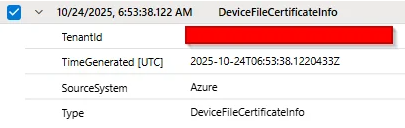
Hello, We are migrating our on-premises SIEM solution to Microsoft Sentinel since we have E5 licences for all our users. The integration between Defender XDR and Sentinel convinced us to make the move. We have a limited budget for Sentinel, and we found out that the Auxiliary/Data Lake feature is sufficient for verbose log sources such as network logs. We would like to retain Defender XDR data for more than 30 days (the default retention period). We implemented the solution described in this blog post: https://jeffreyappel.nl/how-to-store-defender-xdr-data-for-years-in-sentinel-data-lake-without-expensive-ingestion-cost/ However, we are facing an issue with 2 tables: DeviceImageLoadEvents and DeviceFileCertificateInfo. The table forwarded by Defender to Sentinel are empty like this row: We created a support ticket but so far, we haven't received any solution. If anyone has experienced this issue, we would appreciate your feedback. Lucas394Views0likes1CommentSentinel to Defender webinar series CANCELLED, will be rescheduled at a later date.
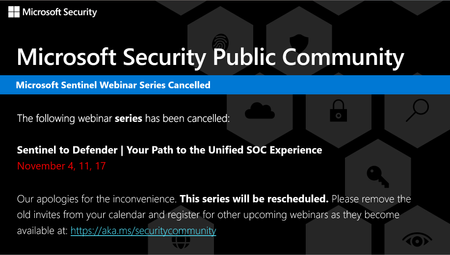
The Sentinel to Defender webinar series has been cancelled. Please visit aka.ms/securitycommunity to sign up for upcoming Microsoft Security webinars and to join the mailing list to be notified of future sessions. We apologize for any inconvenience.1KViews0likes0Comments
Unified SecOps XDR
Hi, I am reaching out to community to seek understanding regarding Unified SecOps XDR portal for Multi-tenant Multi-workspace. Our organization already has a Azure lighthouse setup. My question is if M365 lighthouse license also required for the Multi-tenant Multi-workspace in unified SecOps XDR portal?432Views2likes4Comments