

Forum Widgets
Latest Discussions
Controlling Excel Add-ins and Microsoft Store App Installations
We have a requirement to block users from adding add-ins to Excel and Installing certain application directly which utilize Microsoft Store apps. Below are the two scenarios we need to address. I would appreciate any guidance or recommendations on how to implement these controls. 1) Blocking Excel Add-ins from Microsoft Store Users are currently able to add add-ins such as “Claude by Anthropic in Excel” directly from the Microsoft Store apps. For example, if a user accesses the URL: https://marketplace.microsoft.com/en-us/product/saas/wa200009404?tab=overview they can proceed to add the add-in to Excel. So, We need a method to prevent users from adding Office add-ins from the Microsoft Marketplace or external sources. 2) Blocking Installation of Microsoft Store Apps (e.g., WhatsApp) We are currently blocking Microsoft Store apps on OS level. However, users can still download and install applications such as WhatsApp directly from the vendor website, which utilize Microsoft store apps in backend: https://www.whatsapp.com/download We are considering configuring the Intune policy “Only Private Store is enabled.” However, we noticed that enabling this setting prevents users from accessing certain built-in applications (e.g., Notepad). Is there any other way to block access Microsoft Store apps directly? Thank you in advance for your assistance. Dilan78Views0likes1CommentReplacing Complex GPO Item-Level Targeting with Intune
Hi All, I’m looking for some advice on the best way to handle this scenario. We’re running a hybrid environment and currently have a GPO that creates 1,000+ registry entries across 150+ user groups using item-level targeting with security groups. Now we need to move this over to Intune, and that’s where things get tricky. Intune doesn’t really offer the same item-level targeting flexibility as GPO. So far, the only workable option seems to be creating 150+ platform scripts or Proactive Remediation scripts, which obviously isn’t ideal from a management perspective. I’m thinking it might be much easier long-term to create one large PowerShell script that checks the logged-in user’s group membership and then applies the appropriate registry settings dynamically. Has anyone dealt with something similar? Is there a cleaner or more scalable approach in Intune? Thanks in advance! Dilan62Views0likes1Comment
Intune - ASR Rules - exclusion
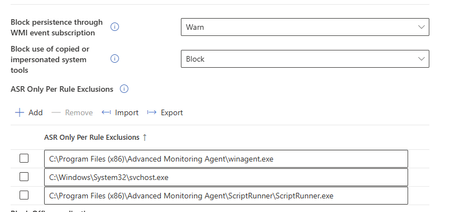
Hello, please can anybody give me an advice about Intune exception? We are using N-Able client for computer management and Intune ASR is blocking it. I tried to add exception in rule setting but it has not helped so far. I am getting defender popup with info that risky action blocked Your admin blocker this action. Blocked app or process - winagent.exe Blocked by - surface attack reduction Rule - Block using of copied or personified system tools. There is my exception but it did not helped. Thank you.JendislavFeb 24, 2026Copper Contributor158Views0likes2Comments
What are the system requirements for hardware-accelerated BitLocker announced in ignite 2025?
Microsoft has recently announced hardware-accelerated Bitlocker (Ref. Link: https://techcommunity.microsoft.com/blog/windows-itpro-blog/announcing-hardware-accelerated-bitlocker/4474609) I would like to know system requirements (Specifically Hardware) that supports this functionality. The article also says below "Coordinate with your suppliers and keep an eye on listings from us and other vendors as PCs become available on the market." But I am unable to find any link for the listing from Microsoft. Does it support all the devices that has TPM 2.0 or does it require any other hardware?120Views0likes1Comment
Unable to deploy out of band update 26200.7628
Hello, I need to deploy OOB 26200.7628 on our computers. We use deployment rings. The 2026.1 OOB update appeared in Releases on January 24. I created an expedite policy with a group of users I want to target with this update (with a restart within 0 days). But nothing has happened since Monday, everyone is still on 26200.7623. Where am I going wrong? Thank you.SolvedMartas133Feb 20, 2026Copper Contributor860Views1like6CommentsWill Intune device-only subscription get additional value in FY27
Will the Intune device-only subscription (Microsoft Intune announces device-only subscription for shared resources | Microsoft Community Hub) get the additional features which Intune P1 will get in FY27 (Microsoft 365 adds advanced Microsoft Intune solutions at scale - Microsoft Intune Blog), Intune Remote Help, Intune Advanced Analytics and Intune P2? This would have a huge impact of our planning how to manage special purpose devices in production environments without any user affinity. Deploying security and configuration settings, Windows Autopilot for Windows IoT Enterprise LTSC kiosk deployment, Windows Autopatch (servicing), Remote Help and FOTA for Zebra devices would be drivers to add these production devices to Intune.
Cannot enroll azure vm(windows 24H2) in Microsoft company portal
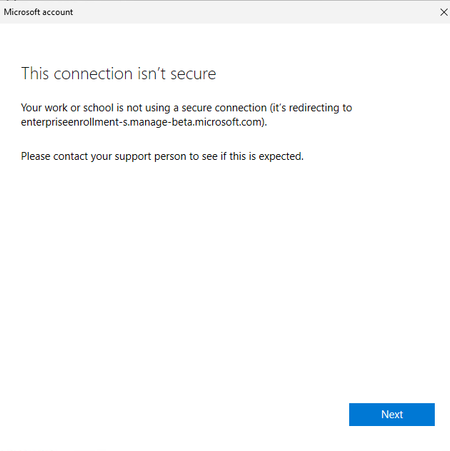
I created a windows VM in Azure. To access company resources on this machine, I attempted to enroll the device through the Company Portal. However, the enrollment failed while setting up the work or school account, with the error message “This connection isn’t secure.” How should I fix this issue?yanxxuFeb 18, 2026Microsoft110Views0likes6Comments
How to Disable Self-Service Passcode Reset for Standard Users in Microsoft Intune
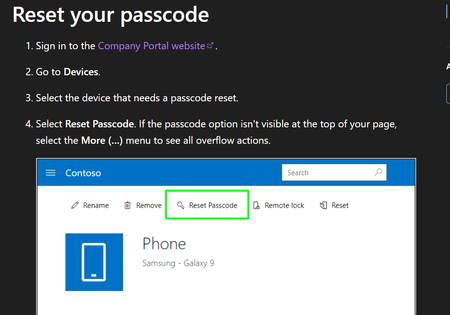
Hi, We are using Microsoft Intune to manage Android corporate-owned devices. Currently, standard users can reset their own device passcode remotely. The problem is: Users reset the passcode themselves Then they get confused They call IT saying they cannot open their phone We want to prevent users from doing self-service passcode reset. Only admin should be able to reset the device passcode. I already checked configuration profiles and compliance policies in Intune, but I cannot find any setting to disable this. Has anyone successfully disabled this feature? Thank you.tarunograa29Feb 17, 2026Occasional Reader25Views0likes0CommentsEntra Shared Mode - Force App Stop
Hi All I hope you are well. Anyway, I was asked this yesterday and think I already might know the answer, but here goes. We had an instance of Microsoft Excel stuck in "getting things ready" on an Android Entra Shared Mode Device. Technical Support wondered if there was a way to Force Stop Excel or clear the app data. We had a look in Exit Kiosk Mode, Android Settings, and the Force Stop of Excel said "Action not allowed" and the clear the app data said "Unable to delete data for app" So, my question(s) would be, is going into Exit Kiosk Mode and even trying to force stop / clear data on apps even a valid option, or is this by design? Would adding Excel to this setting help? Any help or confirmation would be greatly appreciated. StuartStuartK73Feb 17, 2026Steel Contributor97Views0likes2CommentsHelp creating Device groups
Hi, I'm new to using Intune on a day to day basis, after adding our devices to Intune via our On-prem Active Directory. What's the best practice for organizing our Devices, such as Staff devices and Student devices? I want to create a group for all staff devices and another for student devices. Also, is there any way to auto enroll these pcs in to the correct groups once they're new ones added via our on Prem AD and Entra?MaxReboFeb 17, 2026Copper Contributor48Views0likes1Comment




Tags
- Intune4,295 Topics
- mobile device management (mdm)2,305 Topics
- Mobile Application Management (MAM)843 Topics
- Software Management470 Topics
- Conditional Access455 Topics
- Graph API250 Topics
- Azure Friday166 Topics
- Autopilot116 Topics
- android75 Topics
- ios59 Topics