Forum Widgets
Latest Discussions
How Do I Target the Azure VPN Client in a Conditional Access Policy?
I am using the Azure VPN Client to connect users to an Azure VPN Gateway using their Entra ID credentials to authenticate. I want to target this application with a CA policy that requires MFA every time it connects. The problem is that I don't see the applications in my Enterprise Apps and all of my searching says that it won't appear because it was "pre-certified" by Microsoft. In the Gateway setup I used the Audience GUID of c632b3df-fb67-4d84-bdcf-b95ad541b5c8. And this is working as expected. The only solution that I have found for targeting the Azure VPN Client app is to create a Service Principal using that Audience GUID. This seems like a bit of a hack, so I am posting here to see if there are any other methods that I am missing to target this app when it doesn't appear in my Enterprise Apps list.cmiarshvacJan 19, 2026Brass Contributor60Views0likes3CommentsHybrid Identity Admin Questions
Hi All I hope you are well. Anyway, we are migrating our Entra Connect Sync server to it's own dedicated server. With regards to the Hybrid Identity admin role, do we: Include MFA on this account Configure as Eligible or Permanent in PIM Info appreciated StuartStuartK73Jan 18, 2026Iron Contributor31Views0likes2Comments
Hacked Live account
Hello, On of our customers accounts was hacked. This is a Live account linked to his own emailadres (not hotmail) from his Internet Provider. A few weeks ago someone gained access to this account. They changed the recovery email address and the phone number. The customer has a paid Office 36 family account, which is paid for with his MasterCard and he can provide the invoice from the last years.. We tried the account recovery Form multiple times, opened a case with CDOC Case Management. We simply got the reply that they could not do anything but to suspend the account. I Think this is crazy, is there no solution to this ? Thanks,Wim BartelsDec 31, 2025Copper Contributor77Views0likes2Comments
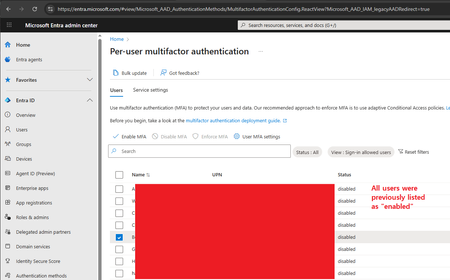
In "Per-user multifactor authentication" I disabled MFA for one user; All got disabled
Hi, I'm the 365 admin for our org. Today I had a user that got a new phone and became stuck in a MS Authenticator app loop. (The app required MFA to login to the app, but they can't login to the app because they aren't logged into the app. This happened once before, and is a ridiculous Kafkaesque situation; but I digress.) To solve it, I went to disable MFA on their account, allowing them to login to the app. Then MFA could be re-enabled. Problem solved. And indeed that did work. However, on the admin side (per the screenshot) I checked off their user account (the user starting with the letter "B") and hit the "Disable MFA" link. A confirmation appeared asking me if I wanted to disable MFA for all selected users. Because I'm the careful sort, I could still see that only that one user was checked off as the popover div didn't cover that much of the screen. Hence I confirmed that I wanted to disable MFA for the selected users (i.e. that one user). I then refreshed the page, and all users are now shown as having MFA disabled. I'm 100% sure only that one user was selected, not everyone in my org. That would've been foolish. Trying to figure out what's wrong with this portion of the admin site.126Views0likes2Comments
Graph http 449 throttled
We are experiencing a lot of Microsoft Graph trolling errors from some of our applications that are hosted in Azure Web App Services and other third party such as Front App to name one. I am trying to find an approach or strategy to figure out and narrow down what may be causing so many of these events. Whether I can narrow down by application or process, I am not sure yet. We enforce MFA on all our users, but of course, on Azure Enterprise Applications, we don't, which are used extensively in our ecosystem of apps. Any help is much appreciated here.RazTheOneDec 22, 2025Copper Contributor65Views0likes1Comment
Case 2512040040001886 - Cannot Access Account
Since the 4th of December we have been patiently waiting on MS Tech support to assist on resolving our Case with no success endless calls and endless promises with no luck. How do you proceed in using Microsoft for a Business if they don't deliver on the support. My business is taking the brunt of it. I suppose another call holding for hours and another Support person promise a solution. No other methods to log complaints as you cannot log into your Account Portal.StephenDuPlessisDec 19, 2025Copper Contributor51Views0likes1Comment
Someone changed my email but i still have access to my account
My microsoft account got hacked but the hacker didn't change my password, now i'm stuck with this weird email account from russia and dont know what to do... I tried the Recovery form but i tried too many times and now doesn't let me try anymore. What can i do? I'm scared for my accountJuan3Dec 18, 2025Copper Contributor47Views0likes1Comment
microsoft authenticator
hello I would like to ask for help because in the application since I reset the password it no longer lets me log in telling me that my user name and password are incorrect, I no longer know how to access, can someone help me? Thank youflamadmax77Dec 11, 2025Copper Contributor59Views0likes1CommentJourney to Passwordless Authentication Might Include Some Bumps
Microsoft recommends passwordless authentication to help secure Microsoft 365 tenants. The latest is synced passkeys, something that apparently leads to “syncability,” whatever that might mean. In any case, after some struggles, I managed to enable synched passkeys for my iPhone and then started to consider how to remediate user accounts that are flagged with a high-risk (compromised) status when they can’t simply update their password. https://office365itpros.com/2025/12/04/passwordless-authentication/50Views0likes0CommentsMicrosoft authenticator
Good day. I’d like to ask how to solve a problem with Microsoft Authenticator. A Microsoft Authenticator suddenly appeared on my account out of nowhere, and I can’t remove it because I’ve lost access to the account. Logging in with a password doesn’t work, it can’t send an SMS to my phone, and the account is logged out everywhere. As far as I remember, I never set up Microsoft Authenticator.Feofilov_vDec 02, 2025Copper Contributor55Views0likes1Comment



Resources
Tags
- Authentication352 Topics
- office 365216 Topics
- security161 Topics
- Identity69 Topics
- admin65 Topics
- multi-factor authentication59 Topics
- Azure AD52 Topics
- Authenticator app46 Topics
- exchange43 Topics
- microsoft 365 apps39 Topics