Recent Discussions

Agent with Fabric data agent tool times out at 100s even in background mode
A Foundry agent with a Fabric data agent attached cancels any tool call that takes longer than 100 seconds, even with background mode enabled on a model that supports it. The documentation presents background mode as the supported path for MCP tool calls that exceed the synchronous timeout, but it does not lift the limit here. Setup Foundry project on Microsoft.CognitiveServices, West Europe Agent kind prompt, model gpt-5.6-luna (2026-07-09) metadata."microsoft.background-mode.enabled": "true" Requests to {project_endpoint}/openai/v1/responses with "background": true and an agent_reference Tested with both the fabric_iq_preview tool and the generic mcp tool, same server_url and same project_connection_id (authType: UserEntraToken) Behaviour Background mode is genuinely active: the response returns status: queued immediately and stays in_progress well past 100 seconds, so the model does support it. But the MCP tool call inside the run is still cancelled at exactly 100 seconds: { "code": "tool_user_error", "message": "TaskCanceledException encountered while invoking tool DataAgent_<name>: The request was canceled due to the configured HttpClient.Timeout of 100 seconds elapsing.. The remote MCP server did not complete the request within the configured timeout." } Same failure both ways — fabric_iq_preview failed at 115s, generic mcp at 108s. The response output shows a single mcp_call with status=failed. Why this looks like a Foundry-side gap The Fabric data agent MCP server advertises task support on initialize: "capabilities": { "tools": { "listChanged": false }, "tasks": { "list": {}, "cancel": {}, "requests": { "tools": { "call": {} } } } } and per tool in tools/list: "execution": { "taskSupport": "optional" } Calling that same server directly as a task, rather than through Foundry, completes the exact query Foundry cancels — in 81 to 173 seconds depending on the run. So the data agent can answer these questions; only the call made by Foundry is constrained. One detail that may explain it: the server advertises tasks as a top-level capability and accepts a task via a task field in the request params — an earlier form of the extension, rather than the current capabilities.extensions["io.modelcontextprotocol/tasks"] negotiation. A client following the current draft would not find the capability where it expects it and would fall back to a blocking call, which matches what we see. Questions Is background mode expected to lift the 100-second tool-call timeout for a Fabric data agent today, or is that combination not yet supported? Does Foundry's MCP client negotiate tasks with a server advertising them in this older form? If not, is alignment planned? Is there any setting, api-version, or tool property that makes Foundry request a task instead of blocking? Nothing in the agent definition or the portal changed the behaviour for us.55Views0likes2CommentsIs Microsoft Foundry the Future of Enterprise AI?
After reviewing several recent Microsoft Foundry presentations, one theme stood out: The future of AI isn't about having the best model. It's about connecting models to business context, systems, governance, and observability. The slides consistently highlight the challenges organizations face: Choosing and managing models Connecting AI to enterprise knowledge Integrating with business systems Governing agents at scale Microsoft's answer appears to be Foundry, an AI app and agent factory that brings together models, knowledge, tools, orchestration, security, and lifecycle management into a single platform. What I found most interesting is the emphasis on Foundry IQ and business context. The message seems to be that AI becomes truly valuable when it understands not just language, but how your organization operates. As AI evolves from chatbots → copilots → agents, governance and context may become more important than raw model intelligence.31Views0likes0Comments
Reliability starts with separating instruction from content
Want to understand what real security risk looks like in generative AI? This 2025 case is a masterclass. Researchers at Aim Security found a zero-click vulnerability in Microsoft 365 Copilot, catalogued as CVE-2025-32711, CVSS 9.3. They named it EchoLeak. The attack required zero clicks from the victim. All it took was a malicious email landing in the inbox. When Copilot later processed that email as part of a user's query, hidden instructions in the body caused the model to pull sensitive data from other internal sources (email, SharePoint, OneDrive, Teams) and embed it in a URL, exfiltrating it to an external server. What stands out is how it slipped past the defenses. Microsoft's XPIA (Cross-Prompt Injection Attempt) classifier already existed. So did link redaction. The attack bypassed both using specific markdown formatting and an already-allowlisted Teams image proxy, so the traffic looked legitimate. Microsoft shipped a server-side fix in June 2025, with no user action required and no confirmed real-world exploitation. But the case exposed a structural problem: any AI assistant with access to multiple internal data sources has this same attack surface. The most interesting technical response Microsoft Research built for this is called Spotlighting. The idea is simple to explain and hard to implement well: the model needs to distinguish user instructions from untrusted external text. It does this three ways: delimiting with a randomized marker, datamarking by inserting a special character between words, or encoding the untrusted text in base64 or ROT13, always paired with a system prompt warning that the text is external. In tests with GPT-family models, Spotlighting dropped the indirect prompt injection attack success rate from over 50% to under 2%, without hurting task performance. It's now part of Prompt Shields, inside Azure AI Content Safety. If you work on AI projects that pull from multiple data sources, this is the kind of technical content that should be on your risk radar, not just on the security team's. Agent reliability starts with how it separates instruction from content it's merely processing.24Views0likes0Comments
Making Azure AI Foundry Agents Explainable — Knowledge Graphs + Source Attribution
90% of Azure AI demos work on stage — most never ship. The gap is architecture, not the model. I wrote up a field guide on taking Azure AI Foundry agents from POC to production, with knowledge graphs (GraphRAG) doing the grounding and source attribution. What the post covers Grounding with a knowledge graph — multi-hop retrieval + inline citations so every answer is traceable to a source (critical for regulated/medical use cases). Externalized state — keeping agent memory and session state outside the model. Identity at the boundary — Entra ID / RBAC instead of trusting the prompt. Observability & compliance — tracing, evaluation, and auditability. The stack — Azure AI Foundry + Model Context Protocol (MCP) + Azure Functions (Flex Consumption) + Azure OpenAI, from a real build (VeritasGraph medical MCP server). 📖 Full write-up: https://bibinprathap.com/blog/azure-ai-proof-of-concept-to-production ▶️ 6-min walkthrough: https://youtu.be/z-CPS5WUvyw?si=fmpo1RN28Bh9KbIb Questions for the community How are you grounding Foundry agents today — vector RAG, GraphRAG, or hybrid? Anyone combining knowledge graphs with MCP tools in Foundry? What worked / broke? For regulated domains, how are you handling source attribution and audit trails? Curious to compare notes — happy to share more detail on the GraphRAG retrieval design if useful.105Views0likes0CommentsAzure Foundry / Fireworks Ai | Error NOT_FOUND: Model not found, inaccessible, and/or not deployed
Today, Deepseek-v4-flash-0731 was released through azure foundry and through fireworks. We were able to a implement the model, but when we try to use, we get this message: Error NOT_FOUND: Model not found, inaccessible, and/or not deployed Anyone is getting the same error?45Views0likes0Comments
Cannot verify email
I have put in a request for quota to deploy an OpenAI model. I was then sent a link to verify my email address - I've signed out everywhere, tried incognito windows in multiple browsers, copied the link out of the email and pasted it into a browser etc. but when I click the link to verify I always get: The request is blocked. Any ideas?!144Views0likes2CommentsMicrosoft's six Responsible AI pillars: how do you operationalize them in practice?
Deploying AI without a trust criterion isn't innovation. It's risk taken on without awareness. Microsoft organizes this problem into six pillars: reliability and safety, privacy and security, inclusiveness, transparency, accountability, and fairness. It's not a marketing list. It's a governance structure applicable to any AI adoption decision. The pillar that generates the most debate in practice, at least in the conversations I've had, is transparency. Systems that can't explain why they reached a given output create a real accountability problem: who signs off on the decision, the model or the manager? Accountability doesn't transfer to the tool. It stays with whoever decided to use it. Fairness also tends to be underestimated. Models trained on historical data carry the biases in that data. If the historical record was biased, the model replicates it at scale. Speed amplifies the problem, it doesn't fix it. Privacy and security are about where the data goes, who accesses it, what gets retained. Questions that need answers before deployment, not after an incident. The framework doesn't guarantee an outcome. It creates the right questions before any adoption decision. I'd like to hear how this plays out in practice for you all: which of these six pillars tends to be the hardest to operationalize on your team? And how are you documenting that decision process today?197Views1like2Comments
Getting Started with AI Applications and Agents on Azure
Hello everyone 👋 After exploring Microsoft Fabric and Microsoft Copilot, I wanted to explore another important area of Microsoft's AI ecosystem: building AI applications and agents on Azure. For anyone interested in AI, Data Science, or software development, this Microsoft Learn path provides a beginner-friendly introduction to several important AI workloads. You can explore topics such as: 🤖 Generative AI and AI agents 📝 Text analysis 🎙️ Speech 👁️ Computer vision 📄 Information extraction 📘 Learning path: https://learn.microsoft.com/training/paths/get-started-ai-apps-agents/?wt.mc_id=studentamb_547403 This is a useful starting point for students and developers who want to understand how AI workloads can be built and explored on Microsoft Azure. I think learning the fundamentals of different AI workloads is valuable before moving into more advanced AI application development. Which area of AI are you most interested in learning: Generative AI, AI Agents, Computer Vision, NLP, or Speech? #AzureAI #ArtificialIntelligence #GenerativeAI #AIAgents #MicrosoftLearn154Views0likes1Comment
One agent, three runtimes: porting a CSA agent to Microsoft Scout and Foundry Local
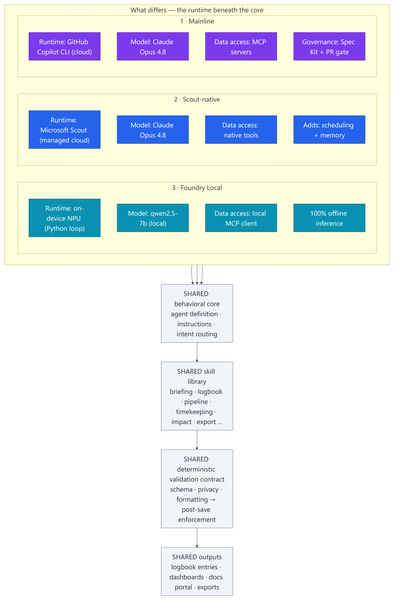
Most of my posts here are about Azure infrastructure lessons from customer engagements. This one is a little different — it's a real‑world engineering lesson from something I built to run my own practice. In my role as a Senior Cloud Solution Architect (CSA), I'm part of a grass-roots organic development team for an internal persona‑driven productivity agent called CSA‑Sherpa. It runs my daily rhythm: a morning briefing, a running logbook of wins and blockers, pipeline and timekeeping summaries, and reporting/exports. It started life in the GitHub Copilot CLI. But over the last few months two things changed the ground under it: Microsoft Scout arrived as a managed cloud agent with native tooling, scheduling, and memory; and Foundry Local made it realistic to run a capable model entirely on‑device on a Copilot+ PC's NPU — no cloud round‑trip at all. That raised a question I think a lot of people building agents will eventually ask: If I designed the framework well, can I change how the model runs without rewriting the agent? To find out, I stood the same agent up in three runtimes, then wrote a whitepaper and a comparison deck measuring what actually changed. This post explains: How one shared, deterministic core made three very different runtimes comparable What the three ports — Copilot CLI, Scout‑native, and Foundry Local (on‑device NPU) — actually took What the analysis showed, and a simple decision framework for which runtime to use when The part that stayed the same: a deterministic core The whole exercise only works because all three implementations load the same behavioral core: Agent definition — persona, behavioral rules, intent routing, workflow dispatch Instructions — conventions, session bootstrap, change‑management rules Skill library — one procedure file per workflow (morning briefing, logbook, pipeline, timekeeping, impact, ops, export…) A deterministic validation contract — schema, formatting, and privacy validators plus a post‑save enforcement chain That last point is the whole thesis: reliability belongs in code, not in the prompt. Rather than asking the model to "remember" to validate its output, a real gate (a validation step → a post‑save enforcement chain → index regeneration) enforces it every single run. This wasn't my idea in a vacuum — it follows the enterprise prompt‑engineering principles Kathiravan Thangavelu lays out in his article Prompt Engineering for Enterprise AI: Why Reliability Matters: keep deterministic logic in code, prefer schema‑driven / structured output over prompt‑enforced formatting, and replace "before you answer, verify that…" mental checklists with real machine validation. My validation gate is that principle in practice. And because that contract is identical across all three runtimes, I'm comparing three ways to execute one product — not three different products. The deterministic payoff: faster and cheaper Retrofitting those principles into the agent — moving work out of the model and into deterministic scripts — is the single change that paid off the most, on two axes at once: Faster. Letting code (not the model) gather and aggregate history cut the average model round‑trips per workflow from ~8.7 to ~5.5 — roughly a third fewer turns. Fewer turns means less waiting on generation and less back‑and‑forth to finish a task. Cheaper. The same change cut usage‑based cost ~24% — and, more importantly, held it flat as the logbook grew to hundreds of entries, because scripts carry the history the model used to re‑read every run. That's the quiet lesson: the reliability work I did for correctness turned out to be the same work that made the agent quicker and less expensive. Determinism isn't a tax on speed — here it bought all three. The work: three repositories, three runtimes Everything below the core — runtime, data access, governance, file layout — is where the effort went. 1 · Mainline — Copilot CLI + MCP. The upstream, most feature‑complete build. Runs as a primary agent in the GitHub Copilot CLI on Claude Opus 4.8; data services are discovered through MCP. It carries the heaviest governance: a Spec Kit layer (spec‑driven‑development agents, a constitution + templates, and 50+ per‑feature spec artifacts gated at PR time) plus an add‑on framework. The richest architecture — and the most complex to operate. 2 · Scout‑native. A thin wrapper loads the exact same core onto Microsoft Scout — again on Claude Opus 4.8 — but data access is re‑platformed onto Scout's native tooling instead of MCP subprocesses. No broker to configure; native tools negotiate their own auth. It adds two things the CLI can't do as cleanly: ✅ Scheduled automations — my morning briefing fires automatically on weekday mornings ✅ Cross‑session memory in place of hand‑off files The deterministic finalize gate stays fully intact. 3 · Foundry Local — on‑device NPU. The genuine outlier and the most involved port: a Python re‑implementation that runs the model — qwen2.5‑7b, an open ~7‑billion‑parameter model — 100% locally on the device's NPU (a Snapdragon X Elite Copilot+ PC) via Foundry Local's OpenAI‑compatible server. The agent loop, an MCP client, skill loading, and a distinct finalize pipeline all had to be rebuilt outside the CLI. The model never leaves the machine; only data connectors reach out when connected. The trade‑offs are real — modest throughput and a fixed context window — but so is the payoff: offline, private, near‑zero marginal cost. The effort This wasn't a weekend spike. Across the three code bases (plus a clean isolation clone I kept as an A/B baseline): ~340–380 commits per repository, three versions maintained in parallel 17 skills in each cloud build; 18 in the Foundry port ~37 scripts in the streamlined Scout build, up to ~97 in the governed Mainline build A Spec Kit governance layer with 50+ feature specs on Mainline A four‑part cost study and two written deliverables: an architecture whitepaper and a 20‑slide comparison deck The analysis and reporting The whitepaper and deck do two jobs. First, they document each runtime as a layered diagram — runtime, core, skills, scripting/validation, external services — so the differences are visible at a glance. Second, they convert the architecture fork into economics: a study that measured the actual token footprints of each repo and priced runs across billing models and hardware. The four dimensions: per‑skill cost, optimized‑vs‑out‑of‑the‑box, Copilot CLI vs Scout, and cloud vs local NPU. By the numbers The study priced measured token footprints at frontier‑model rates (treat the dollars as ±30% — the relative conclusions are far more robust than the absolute figures): Per skill: roughly $0.6–$1.4 per run usage‑based — or a single flat "premium request" under request‑based billing The determinism dividend: optimized, script‑driven skills cut model round‑trips ~8.7 → ~5.5 and usage‑based cost ~24% — and held cost flat as the logbook grew Scout vs CLI: Scout ran ~37% cheaper across a five‑command session and consumed none of the premium‑request allowance Cloud vs local: on‑device NPU inference came in 50–3,400× cheaper in cash than cloud — at the cost of throughput, context, and first‑pass reliability A full active day (~4 runs) landed around a few dollars usage‑based The headline isn't any single figure — it's the shape: cloud cents buy first‑pass reliability, on‑device near‑zero cost trades your time, and determinism makes either one cheaper and steadier. What held up The core is portable. The same agent, skills, and validation gate ran under all three runtimes. Good separation of concerns paid off. Determinism pays three ways — faster, cheaper, and more reliable (detailed above). It was the highest‑leverage change I made. Managed cloud wins the day job. Scout is the best daily driver: reliability gate intact, lower setup friction, scheduling + memory, and cheaper across a multi‑command session because it caches the bootstrap. On‑device is strategic — but reliability is the tax. Local NPU inference is dramatically cheaper in cash. We ran an in‑depth test pass across every function and closed the gaps it surfaced — yet the smaller model that makes Foundry Local possible still hallucinates and drops instructions often enough on the first pass to matter. Each re‑run is nearly free in dollars, but it costs real time to catch and correct. The winning pattern is hybrid. Draft and triage locally for ~nothing; escalate the correctness‑critical steps to cloud Opus 4.8, paying only where it buys first‑pass reliability. Three runtimes, side by side Figure: Three runtimes, one shared core. Only the top rows — runtime, model, data access, and governance — differ; the behavioral core, skill library, validation gate, and outputs are identical across all three. Capability Mainline (Copilot CLI) Scout‑native Foundry Local (NPU) Runtime Copilot CLI (cloud) Scout (cloud, managed) On‑device NPU Model Claude Opus 4.8 Claude Opus 4.8 qwen2.5‑7b (open, ~7B) Data access MCP Native tools MCP via local client Governance Spec Kit + PR gate Behavioral rules Behavioral rules Scheduling + memory ❌ ✅ ❌ Runs fully offline ❌ ❌ ✅ Marginal cost / run cloud per‑token cloud per‑token (cheaper/session) ≈ free Best for Framework development Daily production Offline / privacy / bulk When to use each Daily CSA workflows → Scout‑native. Managed, cheaper across a session, reliable, and it doesn't burn your Copilot request allowance. Building or versioning the framework → Mainline. Spec Kit governance and the add‑on system earn their keep here. Offline, air‑gapped, or sensitive data → Foundry Local. 100% on‑device inference. Bulk / high‑volume / non‑critical → Foundry Local. Zero marginal cost. Must be right on the first pass → Cloud Opus 4.8. The cents are worth it. Mixed, cost‑sensitive workload → Hybrid. Local draft → cloud escalate. Closing Thoughts The most useful reframe from this work: the three architectures aren't competitors — they're a portfolio. A managed cloud daily‑driver (Scout), a governed development platform (Mainline), and a sovereign on‑device runtime (Foundry Local). The job is to match the runtime to the task, not to crown one winner. And the same lesson that applies to Azure infrastructure applies to agents: build reliability into the system, not into good intentions. Because CSA‑Sherpa keeps its guarantees in code, I could change the entire execution model underneath it — cloud CLI, managed cloud, on‑device NPU — and the agent still behaved the same way. That portability is the dividend of a deterministic design. These workflows are genuinely complex, and that's exactly where the small model shows its limits: even after closing the gaps our testing surfaced, it still hallucinates and drops instructions often enough on the first pass to be a real cost. That's the honest trade‑off — near‑zero dollars, paid back in review‑and‑retry time — and it's why my recommendation lands on hybrid: let the small model draft where it's cheap and low‑risk, and escalate anything that has to be right the first time to cloud Opus 4.8. I use the agent in Microsoft Scout daily, as part of my personal production process. I did use AI to help draft and format this post — fittingly, the very agent it describes. The architecture, the analysis, and the conclusions are my own. Thanks for reading.Azure AI Foundry Agent Unable to Use Credentials Stored in Key Vault Through Playwright MCP Tool
Hello everyone, I am trying to understand how Azure AI Foundry agents interact with Azure Key Vault when using custom MCP tools, and I would appreciate any guidance from the community. My Setup - Created an Azure AI Foundry agent. - Created an Azure Key Vault and configured all permissions according to Microsoft's official documentation. - Stored the required website credentials (username and password) in the Key Vault. - Deployed the official Playwright MCP Docker image. - Exposed the MCP server using ngrok and verified that the endpoint is accessible. - Connected the MCP endpoint as a Custom MCP Tool in Azure AI Foundry. - Performed all configuration through the Azure portal, Foundry UI, and Playground only (no SDK or custom application code involved). The Issue The agent can access and use the Playwright MCP tool. However, when I ask it to log in to a website using credentials that are already stored in Key Vault, it does not populate the username and password fields. My expectation was that the agent would be able to retrieve the secrets from Key Vault and provide them to the Playwright tool during execution. Questions Is there currently a supported mechanism for Azure AI Foundry agents to automatically retrieve Key Vault secrets and pass them to a Custom MCP tool? Does the Playwright MCP Docker image have any built-in integration with Azure Key Vault? When using only the Foundry UI (without SDK code), can a Foundry agent securely inject Key Vault secrets into MCP tool calls? Are additional configurations required beyond Key Vault permissions and agent connections? Has anyone successfully implemented a similar setup where a Foundry agent uses credentials stored in Key Vault to perform browser automation through Playwright MCP? Any clarification on the expected architecture and whether this scenario is currently supported in Azure AI Foundry would be greatly appreciated. Thank you.349Views0likes3Comments
Microsoft Foundry External MCP Server Traffic Routing via Corporate Firewall
The customer would like to confirm whether traffic from an Azure AI Foundry agent to an external MCP server can be routed through a corporate firewall and whether this scenario is officially supported. To validate this scenario, I configured the following in my lab: Deployed an Azure AI Foundry resource using the Standard Agent Service with network injection. Created a dedicated subnet for the Foundry Agent Service and delegated it to Microsoft.App/environments. Associated a route table with the Foundry Agent subnet to route outbound traffic through Azure Firewall. Configured the required application and network rules on Azure Firewall. The Foundry agent is able to successfully retrieve data from the external MCP server. However, no corresponding traffic is visible in the Azure Firewall logs. Could you please confirm whether outbound traffic from the Foundry agent to an external MCP server can be routed through Azure Firewall or a corporate firewall? Also, is this routing scenario officially supported? Appreciate your support!167Views0likes1Comment
Hosted Agent ZIP deployment fails because adduser is missing for fuse-zip
Hi, I am encountering a reproducible issue with a Microsoft Foundry Hosted Agent deployed through the Source Code ZIP deployment path. Environment: - Region: West Europe - Runtime: dotnet_10 - Target framework: net10.0 - Publish runtime: linux-x64 - Dependency resolution: bundled - Protocol: Responses 2.0.0 - API version: 2025-11-15-preview The agent version reaches the "active" status. However, the first invocation fails with: session_not_ready The relevant session logs are: Selecting previously unselected package fuse. Unpacking fuse (2.9.9-5ubuntu3) ... Selecting previously unselected package fuse-zip. Unpacking fuse-zip (0.6.0-0ubuntu3) ... dpkg: dependency problems prevent configuration of fuse: fuse depends on adduser; however: Package adduser is not installed. dpkg: error processing package fuse (--install): dependency problems - leaving unconfigured dpkg: dependency problems prevent configuration of fuse-zip: fuse-zip depends on fuse; however: Package fuse is not configured yet. dpkg: error processing package fuse-zip (--install): dependency problems - leaving unconfigured Errors were encountered while processing: fuse fuse-zip Successfully connected to container No .NET application startup logs appear after this. The application entry point does not appear to be executed, and /readiness never becomes healthy. I have already verified: A clean linux-x64 publish is used. The entry DLL is located directly at the ZIP root. The ZIP contains no nested bin, obj, or artifacts directories. All dependencies are bundled. appsettings.json, .deps.json, and .runtimeconfig.json are present. The exact published application starts successfully locally. The local /readiness endpoint returns HTTP 200. The issue is reproducible with newly deployed agent versions and new sessions. The current Foundry hosting packages and Responses Protocol 2.0 are used. The same Source Code ZIP deployment path worked successfully approximately two weeks ago. Is this a known regression in the managed source-code runtime in West Europe? Is there a workaround other than switching to the container-based deployment path? Session and request IDs can be provided privately to the Microsoft product team if required.171Views0likes1Comment
Data Visualisation / Charting in Azure Foundry
Hi Foundry community, We are working on an agent that can query internal data sources, and are looking for ways that we can visualise data (think pie charts, bar charts, etc.). This would be consumed by end users through Copilot/Teams. However we are unable to find a way to do so, which is surprising given that you easily can create charts through M365 Copilot Chat and through Copilot Studio. We have tried using the 'Code Interpreter' tool, but the Teams/Copilot client UIs just do not render the results inline, either interactive or as an embedded image. They also do not give any option to download them. Has anyone tackled this before? How have you been able generate charts? Many thanks!209Views0likes2CommentsNew AI Foundry not sending refresh tokens to MCP (401 after access token expiration)
Hello, When connecting an MCP server hosted as an Azure Function using OAuth Passthrough in New AI Foundry Playground, the connection is established successfully, the Microsoft login popup appears, authentication succeeds, and the first MCP request returns data correctly. However, once the access token expires, the Playground and deployed AI Foundry agents to Copilot/Teams do not appear to refresh the token, despite offline_access being included in the requested scopes and a refresh URL being configured. All subsequent MCP calls fail with 401 Unauthorized until the connection is manually recreated. For testing, we reduced the token lifetime to 10 minutes to make the issue easier to reproduce. Impact This prevents long-lived or repeated MCP usage in AI Foundry Playground because the connection becomes unusable after token expiry and requires manual reconnection. MCP server host: Azure Function MCP server configuration in New AI Foundry: Endpoint: https://mcp-test-obo-rls-fabric.azurewebsites.net/mcp Client ID: <client_id> (redacted) Auth URL: https://login.microsoftonline.com/tenant_id(redacted)/oauth2/v2.0/authorize Token URL: https://login.microsoftonline.com/tenant_id(redacted)/oauth2/v2.0/token Refresh URL: https://login.microsoftonline.com/tenant_id(redacted)/oauth2/v2.0/token Scopes: openid profile offline_access api://(App ID)/user_impersonation Redirect URI: https://global.consent.azure-apim.net/redirect/(redacted)-fabric-rls-mcp Error returned tool_user_error: Authentication failed when connecting to the MCP server: https://mcp-test-obo-rls-fabric.azurewebsites.net:443/mcp : Response status code does not indicate success: 401 (Unauthorized). Response body: {"code":401,"message":"IDX10223: Lifetime validation failed. The token is expired. ValidTo (UTC): '03/30/2026 08:19:28', Current time (UTC): '03/30/2026 08:29:55'."}. Verify your authentication headers. Suggestions: First verify the required permissions. If the access token is expired or revoked, recreate the connection. If this connection is shared by other users or workflows, recreate it carefully to avoid disruption. Function App / Identity Provider (Entra) The Azure Function authentication configuration: Identity provider: Microsoft (MCP-Fabric-RLS-Server) App registration: MCP-Fabric-RLS-Server Supported account types: Single tenant Application (client) ID: App ID Client secret setting name: MICROSOFT_PROVIDER_AUTHENTICATION_SECRET Issuer URL: https://login.microsoftonline.com/tenant_id(redacted)/v2.0 Redirect URI is added to App Authentication Redirect URI configuration as "Web". Allowed token audiences api://App ID App ID https://mcp-test-obo-rls-fabric.azurewebsites.net Additional checks enabled Allow requests from any application Allow requests from any identity Allow requests only from issuer tenant tenant_id (redacted) Notes The first authenticated call succeeds, so the initial OAuth flow appears to be working. The failure only occurs after the access token expires. Because offline_access is requested and the refresh URL is configured, our expectation is that the client should refresh the token automatically. Our working hypothesis is that either: the refresh token is not being issued, the refresh token is not being stored/used by AI Foundry Playground, or OAuth Passthrough for MCP connections in this scenario does not currently support automatic refresh as expected. Thank you for any assistance provided.697Views4likes3CommentsSearching for a simple guide to index SharePoint and publish an agent in Foundry
Hey all, Does anyone have a good guide or best practices for this setup in Foundry? SharePoint as data source GPT model (document + image indexing, ideally vectorized/embeddings) Create an Agent an Share the Agent Restrict access to Agent to specific users/groups only Looking for tutorials, examples, or real-world setups. Thanks!209Views0likes1Comment
Is there a way to connect 2 Ai foundry to the same cosmos containers?
I defined Azure AI Foundry Connection for Azure Cosmos DB and BYO Thread Storage in Azure AI Agent Service by using these instructions: Integration with Azure AI Agent Service - Azure Cosmos DB for NoSQL | Microsoft Learn I see that it created 3 containers under the cosmos I provided: <guid>-agent-entity-store v-system-thread-message-store <guid>-thread-message-store Now I created another AI foundry and added a connection for the same AI foundry, and it created 3 different containers under the same DB. Is there a way that they'll use the same exact containers? I want to use multiple AI foundries, and they will use the same Cosmos containers to manage the data.240Views0likes1CommentNew Foundry Agent Issue
Hi all, I’m creating my first agent via New Foundry, so my questions are probably basic. As always, everything seemed straightforward… until deployment. I created an agent using gpt-4.1, added a list of instructions, and then used the Tools → Upload files functionality to attach a selection of reference documents. Everything worked perfectly in Preview mode. I then used the default option to Create a bot service, and it deployed successfully. To test it, I used the Individual Scope option (with the intention to share later with a couple of people — I haven’t worked that part out yet). Like magic, it appeared in my Teams and M365 Copilot, which was amazing… and then I ran my first search. It thought for a long time and then returned an error. In Co-pilot: and Teams: Nothing happens at all I’ve looked around for help but drawn a blank. I’m fairly sure it’s some kind of permissioning / access issue somewhere, but I can’t find where. Any help would be hugely appreciated.279Views0likes1Commento3-mini not returning reasoning tokens
Hi, I work on a service that leverages o3-mini via Microsoft Foundry. In the past few days, I've observed that when calling o3-mini via Microsoft Foundry, that completion_token_details always has the reasoning_tokens value set to 0, regardless of the reasoning setting being used. In my testing, it seems that the reasoning is still occurring, as increasing reasoning value causes the completion_tokens field to increase by a good amount, but none of the reasoning levels cause the reasoning_tokens value to be anything other than 0. Has anyone else encountered this issue? Thanks! Tom183Views0likes1Commento3-deep-research is failed with the status incomplete with the reason as content filter
I working on an to do an deep research on internal data. I'm using currently the Azure OpenAI Responses API with MCP Tool. The underlying MCP server deployed into ACA with search and fetch tool with signatures in complaint with the specification (https://developers.openai.com/apps-sdk/build/mcp-server#company-knowledge-compatibility). OpenAI client created with 03-deep-research model with MCP tool, in a loop response status being checked. (https://learn.microsoft.com/en-us/azure/foundry/openai/how-to/deep-research#remote-mcp-server-with-deep-research) Deep Research is being carried out for sometime, I could see in the log that handshake has been made, ListTools invoked, search tool is called post that fetch is called for the queries framed by the model.. But intermittently, the response status is becoming "incomplete" with incomplete reason as "content_filter". Otherwise the deep research is working fine. Not able identify the root cause as there is seems to be no way to identify what caused the content filtration whether its the prompt or completion. How to debug and check the root cause and rectify this ? Or is there known issue with the o3-deep-research model's intermediate reasoning completions Or search and fetch tool results are causing this ? I had uploaded a file made it available to MCP server, the search and fetch tool uses an Azure OpenAI agent to search the data using File Search and fetch tool gets the content of the file based on the id passed. For same file and same research topic the issue is not occurring always but intermittently.324Views0likes1CommentMicrosoft Foundry Agent via Responses API rejects local image input as Base64 data URL / byte array
Hello everyone, we are seeing an issue with the new Microsoft Foundry Agents via the Responses API when sending a local image as part of the user message. What works text-only input image by public URL What fails local PNG passed as Base64 data URL local PNG passed as raw byte array through SDK methods Example failing image part: { "type": "input_image", "image_url": "data:image/png;base64,...", "detail": "auto" } Returned error: { "code": "invalid_payload", "message": "The provided data does not match the expected schema", "param": "/", "type": "invalid_request_error", "details": [] } We reproduced this in: C# Python raw REST So this does not appear to be limited to one SDK. Also important: the same pattern is used in the sample repo for the Foundry Agent Web App, and this scenario worked for us about one week ago: https://github.com/microsoft-foundry/foundry-agent-webapp Could you confirm whether local image input is currently supported for Foundry Agents through the Responses API, or whether this is a regression? Best regards234Views0likes1Comment


Events
Recent Blogs
- 6 MIN READA team enables private networking on Microsoft Foundry, disables public access, wires up the private endpoints, and confirms DNS resolves. Then someone opens the chat playground in the portal and get...Sep 04, 202694Views1like0Comments
- Image generation has moved beyond the demo stage. Marketing teams are shipping campaign assets, retailers are building catalogs, and product teams are generating visuals inside the tools they already...Sep 04, 2026218Views0likes0Comments