Recent Discussions

Windows Server 2025 - Cannot Pin Tools and Apps on Start Menu
I am evaluating Windows Server 2025, Version 24H2 (OS Build 26100.32690) I am unable to pin Admin Tools or any other app on Start Menu. Taskbar pinning works well but not the Start Menu. Anyone experiencing the same ?13Views0likes0Comments
Phase 2 of Kerberos RC4 hardening begins with the April 2026 Windows security update
Windows updates released in April 2026 and later begin the second deployment phase of protections designed to address a Kerberos information disclosure vulnerability (CVE‑2026‑20833). This second phase continues the shift away from legacy encryption types such as RC4 by moving toward stronger default ticket behavior. After installing the April 2026 update, domain controllers default to supporting Advanced Encryption Standard (AES‑SHA1) encrypted tickets for accounts that do not have an explicit Kerberos encryption type configuration. If your organization relies on service accounts or applications that depend on RC4-based Kerberos service tickets, now is the time to address those dependencies to avoid authentication issues before the Enforcement phase begins in July 2026. Microsoft recommends continuing to monitor the System event log for Kerberos-related audit events and identify and address misconfigurations or remaining dependencies, then enabling enforcement when warning, blocking, or policy events are no longer logged. See How to manage Kerberos KDC usage of RC4 for service account ticket issuance changes related to CVE-2026-20833 and CVE‑2026‑20833 to learn more about the vulnerability, timelines, recommended preparation steps, and configuration options to ensure compliance before Enforcement mode begins in July 2026.496Views1like0Comments
Virtual printer in windows server 2019 standard is not shown after configuration
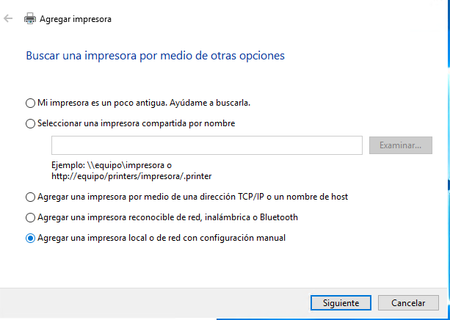
Hello, I am, trying to configure a virtual printer in a Windows server 2019 standard edition that is deployed in OCI cloud. This instance has windows server license included in the pricing. The problem comes when after ending the process of configuration this virtual printer is not displayed in "Devices and printers" any idea why is this happening? Regards, Ana18Views0likes0CommentsError al agregar Windows Server 2025 a dominio existente, nivel funcional 2016
Buenas a todos, Me dirijo a esta comunidad en busca de orientación para resolver un problema que se me está presentando al intentar integrar un nuevo servidor con Windows Server 2025 Standard a mi infraestructura de Active Directory existente. Descripción del entorno: Dominio de Active Directory activo con Windows Server 2019 Standard. Nivel funcional de dominio y bosque configurado en Windows Server 2016. Controladores de dominio actuales: server-dc01.impresoratec y server-ad2019.impresoratec. El nombre de dominio interno utilizado es impresoratec (nombre NetBIOS/dominio de etiqueta única, sin sufijo DNS completo tipo .local o .com). Problema: Al intentar agregar el nuevo servidor con Windows Server 2025 al dominio, el proceso falla y se presenta el siguiente mensaje de error: "Es posible que el nombre de dominio "impresoratec" sea un nombre de dominio NetBIOS. Si este es el caso, compruebe que el nombre de dominio está registrado correctamente con WINS. [...] La consulta se refería al registro SRV para _ldap._tcp.dc._msdcs.impresoratec. La consulta identificó los siguientes controladores de dominio: server-dc01.impresoratec y server-ad2019.impresoratec. Sin embargo, no se pudo contactar con ningún controlador de dominio." El mensaje sugiere que los registros de host (A) o (AAAA) pueden contener direcciones IP incorrectas o que los controladores de dominio no son accesibles desde el nuevo servidor. Lo que he verificado hasta ahora: Los controladores de dominio existentes están en línea y operativos. La replicación entre los DCs actuales funciona con normalidad. El nuevo servidor con 2025 tiene conectividad de red general, pero no logra localizar los DCs al momento de unirse al dominio. Mi consulta: ¿Alguien ha experimentado este comportamiento al incorporar un servidor con Windows Server 2025 a un dominio con nivel funcional 2016 y un nombre de dominio de etiqueta única (single-label domain)? ¿Existe algún requisito previo adicional —como la actualización del esquema de AD, ajustes en DNS o en WINS— que deba cumplirse antes de agregar el nuevo DC? Agradezco de antemano cualquier orientación o experiencia que puedan compartir.13Views0likes0CommentsWindows Server Datacenter: Azure Edition preview build 29558 now available in Azure
Hello Windows Server Insiders! We welcome you to try Windows Server vNext Datacenter: Azure Edition preview build 29558 in both Desktop experience and Core version on the Microsoft Server Operating Systems Preview offer in Azure. Azure Edition is optimized for operation in the Azure environment. For additional information, see Preview: Windows Server VNext Datacenter (Azure Edition) for Azure Automanage on Microsoft Docs. For more information about this build, see Announcing Windows Server vNext Preview Build 29558 | Microsoft Community Hub.
ntoskrnl.exe and build version not getting updated after applying KB5078740 on server 2025
I have installed the latest March patch kb5078740 on server 2025 which was upgraded from server 2022. the patch is showing installed but the ntoskrnl.exe and build version is still showing 10.0.26100.4652. Qualys is detecting it as patch not installed based on file version which should be 10.0.21600.32522. Please let me know how to fix this issue.275Views0likes0CommentsAnnouncing Windows Server vNext Preview Build 29558
Hello Windows Server Insiders! Today we are pleased to release a new build of the next Windows Server Long-Term Servicing Channel (LTSC) Preview that contains both the Desktop Experience and Server Core installation options for Datacenter and Standard editions and Azure Edition (for VM evaluation only). Branding remains Windows Server 2025 in this preview - when reporting issues please refer to Windows Server vNext preview. Build 29531 established a new Server preview baseline build. Please perform a clean install of Build 29531 (or later) using the installation media linked below. Please note: Upgrades from earlier Windows Server vNext preview builds older than 29531 are not supported. We encourage all Windows Server vNext preview users to perform a clean install using 29531 or later to successfully upgrade to future Windows Server vNext preview builds. While upgrades from earlier Windows Server previews (Build 26525 and older) are not technically blocked by setup.exe, a number of known issues have been identified related to upgrades necessitating the establishment of a new baseline build for our Server vNext Preview Program. The new baseline build (29531) will not be Flighted due to upgrade issues. Flighting support resumed with preview build 29550 or later. What's New NVMe-over-Fabrics (NVMe-oF) extends the NVMe protocol—originally designed for local PCIe-attached SSDs—across a network fabric. Instead of using legacy SCSI-based protocols such as iSCSI or Fibre Channel, NVMe-oF allows a host to communicate directly with remote NVMe controllers using the same NVMe command set used for local devices. In this Insider build, Windows Server supports: NVMe-oF over TCP (NVMe/TCP), allowing NVMe-oF to run over standard Ethernet networks without specialized hardware. NVMe-oF over RDMA (NVMe/RDMA), enabling low-latency, high-throughput NVMe access over RDMA-capable networks (for example, RoCE or iWARP) using supported RDMA NICs. For more information, please visit: Introducing the Windows NVMe-oF Initiator Preview in Windows Server Insiders Builds | Microsoft Community Hub ReFS Boot is enabled for Windows Server vNext preview builds. Known Limitations ReFS Boot systems create a minimum 2GB WinRE partition. When WinRE cannot be updated due to space constraints, the system may disable WinRE. Disabling WinRE does not remove the partition. If the WinRE partition is deleted and the boot volume is extended over it, this operation is unrecoverable without a clean install. For more information, please visit: Resilient File System (ReFS) overview | Microsoft Learn Feedback Hub app is available for Server Desktop users! The app should automatically update with the latest version, but if it does not, simply Check for updates in the app’s settings tab. Known Issues [NEW] Thin Provisioning fails on clean installs in this build (29558). Users selecting Thin Provisioning when attempting clean installs of this build may experience failures. This issue is understood and will be fixed in a future release. Upgrading from earlier builds of Windows Server vNext previews (26525 or older) are not supported. Please perform a clean install of build 29531 or later. Users may experience failures when attempting to upgrade from earlier previews (build 26525 and older). VMs may fail to upgrade or start after upgrade from older preview builds impacting live migration and failover cluster scenarios. Download Windows Server Insider Preview (microsoft.com) Flighting: The label for this flight may incorrectly reference Windows 11. However, when selected, the package installed is the Windows Server vNext update. Please ignore the label and proceed with installing your flight. This issue will be addressed in a future release. Available Downloads Downloads to certain countries may not be available. See Microsoft suspends new sales in Russia - Microsoft On the Issues. Windows Server Long-Term Servicing Channel Preview in ISO format in 18 languages, and in VHDX format in English only. Windows Server Datacenter Azure Edition Preview in ISO and VHDX format, English only. Microsoft Server Languages and Optional Features Preview Keys: Keys are valid for preview builds only Server Standard: MFY9F-XBN2F-TYFMP-CCV49-RMYVH Datacenter: 2KNJJ-33Y9H-2GXGX-KMQWH-G6H67 Azure Edition does not accept a key. Symbols: Available on the public symbol server – see Using the Microsoft Symbol Server. Expiration: This Windows Server Preview will expire September 15, 2026. How to Download Registered Insiders may navigate directly to the Windows Server Insider Preview download page. If you have not yet registered as an Insider, see GETTING STARTED WITH SERVER on the Windows Insiders for Business portal. We value your feedback! The most important part of the release cycle is to hear what's working and what needs to be improved, so your feedback is extremely valued. Please use the new Feedback Hub app for Windows Server if you are running a Desktop version of Server. If you are using a Core edition, or if you are unable to use the Feedback Hub app, you can use your registered Windows 10 or Windows 11 Insider device and use the Feedback Hub application. In the app, choose the Windows Server category and then the appropriate subcategory for your feedback. In the title of the Feedback, please indicate the build number you are providing feedback on as shown below to ensure that your issue is attributed to the right version: [Server #####] Title of my feedback See Give Feedback on Windows Server via Feedback Hub for specifics. The Windows Server Insiders space on the Microsoft Tech Communities supports preview builds of the next version of Windows Server. Use the forum to collaborate, share and learn from experts. For versions that have been released to general availability in market, try the Windows Server for IT Pro forum or contact Support for Business. Diagnostic and Usage Information Microsoft collects this information over the internet to help keep Windows secure and up to date, troubleshoot problems, and make product improvements. Microsoft server operating systems can be configured to turn diagnostic data off, send Required diagnostic data, or send Optional diagnostic data. During previews, Microsoft asks that you change the default setting to Optional to provide the best automatic feedback and help us improve the final product. Administrators can change the level of information collection through Settings. For details, see http://aka.ms/winserverdata. Also see the Microsoft Privacy Statement. Terms of Use This is pre-release software - it is provided for use "as-is" and is not supported in production environments. Users are responsible for installing any updates that may be made available from Windows Update. All pre-release software made available to you via the Windows Server Insider program is governed by the Insider Terms of Use.VMWARE ESXi and Winddows VM Licenses
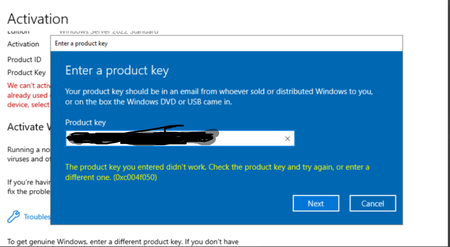
We have one VMware environment with 3 servers each with 2 CPUs, to be properly legal he acquired 6 Windows Server Datacenter Edition licenses, what happens is that when he is trying to activate the VMs that are in Windows Server Standard he gets the error that you see in the image. Licensing was carried out correctly as described in the Windows Server 2025 License Guide, in summary: all CPUs and Cores) in the virtualization cluster were licensed. can anyone advise the right way to use the Datacentre License in ESXi environment? thanks in advanced54Views0likes0Comments
Experiences Creating a CA with ML‑DSA Using Microsoft Smart Card Key Storage Provider (ADCS / PQC)
Hi all, I’m exploring the possibility of using post‑quantum cryptography within an Active Directory Certificate Services (ADCS) environment in the Insider release 29550. Specifically, I’m interested in creating a Certificate Authority (CA) where the CA’s key material is generated and stored using a Microsoft Smart Card Key Storage Provider (KSP) with support for ML‑DSA. This is an option selectable in the "Specify the cryptographic options". Has anyone in the community successfully done the following: Created a CA using ML‑DSA: Micosoft Smart Card KSP as the cryptographic provider? If so, what smart card or hardware token did you use that supports ML‑DSA via the Microsoft Smart Card KSP? (e.g., specific vendor and/or model that exposes ML‑DSA support correctly to Windows) Is it actually possible to create a CA using ML‑DSA as the cryptographic provider? If yes, what are the key steps or gotchas? What changes when ML‑DSA is used as the CA key provider compared to traditional providers like RSA/ECC? Any differences in certificate creation, enrollment, templates, compatibility with clients, etc.? Is there any official documentation for using ML‑DSA or PQC with ADCS? Are there other post‑quantum cryptographic (PQC) options already supported or coming soon in ADCS?153Views0likes0CommentsProblem in Windows Server 2022
Hello, I need help with the following: I had the video application installed and working on a VPS with Windows Server 2022, and suddenly it stopped working. It won't start, and it doesn't show any errors or events that I can analyze in the viewer. Does anyone have any idea what might be happening? I've already tried many AI recommendations, from uninstalling and reinstalling an older version of the application to uninstalling the latest server update, among other things. I also tried installing it on another VPS, and it shows the same problem.26Views0likes0CommentsAnnouncing Windows Server vNext Preview Build 29531
Hello Windows Server Insiders! Today we are pleased to release a new build of the next Windows Server Long-Term Servicing Channel (LTSC) Preview that contains both the Desktop Experience and Server Core installation options for Datacenter and Standard editions and Azure Edition (for VM evaluation only). Branding remains Windows Server 2025 in this preview - when reporting issues please refer to Windows Server vNext preview. Build 29531 establishes a new Server preview baseline build. Please perform a clean install of Build 29531 (or later) using the installation media linked below. Please note: Upgrades from earlier Windows Server vNext preview builds are not supported. We encourage all Windows Server vNext preview users to perform a clean install to reliably continue in the Windows Server vNext preview program. While upgrades from earlier Windows Server previews (Build 26525 and older) are not technically blocked by setup.exe, a number of known issues have been identified related to upgrades necessitating a release of a new baseline build for our Server vNext Preview Program. The new baseline build (29531) will not be Flighted due to upgrade issues. Flighting support will resume with future vNext preview releases. What's New [NEW] ReFS Boot is enabled for Windows Server vNext preview builds. Known Limitations ReFS Boot systems create a minimum 2GB WinRE partition. When WinRE cannot be updated due to space constraints, the system may disable WinRE. Disabling WinRE does not remove the partition. If the WinRE partition is deleted and the boot volume is extended over it, this operation is unrecoverable without a clean install. For more information, please visit: Resilient File System (ReFS) overview | Microsoft Learn [NEW] ReFS Boot is enabled for Windows Server vNext preview builds. NVMe-over-Fabrics (NVMe-oF) extends the NVMe protocol—originally designed for local PCIe-attached SSDs—across a network fabric. Instead of using legacy SCSI-based protocols such as iSCSI or Fibre Channel, NVMe-oF allows a host to communicate directly with remote NVMe controllers using the same NVMe command set used for local devices. In this Insider build, Windows Server supports: NVMe-oF over TCP (NVMe/TCP), allowing NVMe-oF to run over standard Ethernet networks without specialized hardware. NVMe-oF over RDMA (NVMe/RDMA), enabling low-latency, high-throughput NVMe access over RDMA-capable networks (for example, RoCE or iWARP) using supported RDMA NICs. For more information, please visit: Introducing the Windows NVMe-oF Initiator Preview in Windows Server Insiders Builds | Microsoft Community Hub Feedback Hub app is available for Server Desktop users! The app should automatically update with the latest version, but if it does not, simply Check for updates in the app’s settings tab. Known Issues Upgrading from earlier builds of Windows Server vNext previews (26525 or older) are not supported. Please perform a clean install of build 29531 or later. Users may experience failures when attempting to upgrade from earlier previews (build 26525 and older). VMs may fail to upgrade or start after upgrade from older preview builds impacting live migration and failover cluster scenarios. Download Windows Server Insider Preview (microsoft.com) Flighting: The label for this flight may incorrectly reference Windows 11. However, when selected, the package installed is the Windows Server update. Please ignore the label and proceed with installing your flight. This issue will be addressed in a future release. Available Downloads Downloads to certain countries may not be available. See Microsoft suspends new sales in Russia - Microsoft On the Issues. Windows Server Long-Term Servicing Channel Preview in ISO format in 18 languages, and in VHDX format in English only. Windows Server Datacenter Azure Edition Preview in ISO and VHDX format, English only. Microsoft Server Languages and Optional Features Preview Keys: Keys are valid for preview builds only Server Standard: MFY9F-XBN2F-TYFMP-CCV49-RMYVH Datacenter: 2KNJJ-33Y9H-2GXGX-KMQWH-G6H67 Azure Edition does not accept a key. Symbols: Available on the public symbol server – see Using the Microsoft Symbol Server. Expiration: This Windows Server Preview will expire September 15, 2026. How to Download Registered Insiders may navigate directly to the Windows Server Insider Preview download page. If you have not yet registered as an Insider, see GETTING STARTED WITH SERVER on the Windows Insiders for Business portal. We value your feedback! The most important part of the release cycle is to hear what's working and what needs to be improved, so your feedback is extremely valued. Please use the new Feedback Hub app for Windows Server if you are running a Desktop version of Server. If you are using a Core edition, or if you are unable to use the Feedback Hub app, you can use your registered Windows 10 or Windows 11 Insider device and use the Feedback Hub application. In the app, choose the Windows Server category and then the appropriate subcategory for your feedback. In the title of the Feedback, please indicate the build number you are providing feedback on as shown below to ensure that your issue is attributed to the right version: [Server #####] Title of my feedback See Give Feedback on Windows Server via Feedback Hub for specifics. The Windows Server Insiders space on the Microsoft Tech Communities supports preview builds of the next version of Windows Server. Use the forum to collaborate, share and learn from experts. For versions that have been released to general availability in market, try the Windows Server for IT Pro forum or contact Support for Business. Diagnostic and Usage Information Microsoft collects this information over the internet to help keep Windows secure and up to date, troubleshoot problems, and make product improvements. Microsoft server operating systems can be configured to turn diagnostic data off, send Required diagnostic data, or send Optional diagnostic data. During previews, Microsoft asks that you change the default setting to Optional to provide the best automatic feedback and help us improve the final product. Administrators can change the level of information collection through Settings. For details, see http://aka.ms/winserverdata. Also see the Microsoft Privacy Statement. Terms of Use This is pre-release software - it is provided for use "as-is" and is not supported in production environments. Users are responsible for installing any updates that may be made available from Windows Update. All pre-release software made available to you via the Windows Server Insider program is governed by the Insider Terms of Use. @Windows Server Developer Platform New Build3.1KViews5likes0CommentsBuild 29550 Bare Metal ReFS Boot: Server Roles installation fails with 0xc004000d and/or 0x800f0922
When installing Windows Server Build 29550 on Bare Metal with the OS drive (C:) formatted as ReFS, the installation of core Server Roles (DHCP, Hyper-V, DNS, Windows Server Backup) fails consistently. Error returned by PowerShell (Install-WindowsFeature) and/or Server Manager: 0xc004000d (One or several parent features are disabled). CBS.log shows TiWorker failing with [HRESULT = 0x800f0922 - CBS_E_INSTALLERS_FAILED]. Troubleshooting done: Same ISO on KVM (formatted as NTFS) works perfectly. Same hardware, formatted as ReFS on older Build 29531, worked perfectly. "Leaf" features like Media Foundation install fine, but complex roles fail. sfc /scannow did not find any integrity violation DISM RestoreHealth fails with 0x80004005 Conclusion: There is a CBS / Hard Link regression when reading the Component Store (WinSxS) on a ReFS boot drive in build 29550.43Views0likes0CommentsUpdated Failover Clustering API Documentation
Does anyone know when the Failover Cluster API documentation will be updated? Currently, in learn it only shows Server 2008 and 2012. https://learn.microsoft.com/en-us/previous-versions/windows/desktop/mscs/failover-cluster-apis-portal The same goes for storage spaces. Is there any updated documentation?28Views1like0CommentsWindows Server Datacenter: Azure Edition preview build 29550 now available in Azure
Hello Windows Server Insiders! We welcome you to try Windows Server vNext Datacenter: Azure Edition preview build 29550 in both Desktop experience and Core version on the Microsoft Server Operating Systems Preview offer in Azure. Azure Edition is optimized for operation in the Azure environment. For additional information, see Preview: Windows Server VNext Datacenter (Azure Edition) for Azure Automanage on Microsoft Docs. For more information about this build, see Announcing Windows Server vNext Preview Build 29550 | Microsoft Community Hub.93Views1like0CommentsCitrix Terminal Server Explorer (network drive) suddenly closes
Windows Explorer sessions on the Citrix terminal server that access a file server (Network Drive) close unexpectedly during file operations. Citrix Terminal Server (Windows 2022) File Server (Windows 2022) Have somebody an Idea? Kind Regards49Views0likes0CommentsBookmark the Secure Boot playbook for Windows Server
Secure Boot is a long‑standing security capability that works in conjunction with the Unified Extensible Firmware Interface (UEFI) to confirm that firmware and boot components are trusted before they are allowed to run. Microsoft is updating the Secure Boot certificates originally issued in 2011 to ensure Windows devices continue to verify trusted boot software. These older certificates begin expiring in June 2026. While Windows Server 2025 certified server platforms already include the 2023 certificates in firmware. For servers that do not, you will need to manually update the certificates. Unlike Windows PCs, which may receive the 2023 Secure Boot certificates through Controlled Feature Rollout (CFR) as part of the monthly update process, Windows Server requires manual action. Luckily, there is a step=by-step guide to help! With the Secure Boot Playbook for Windows Server, you'll find information on the tools and options available to help you update Secure Boot certificates on Windows Server. Check it out today!109Views0likes0CommentsCrowdStrike Secure Boot Lifecycle Management Content Pack
CrowdStrike has recently released the Secure Boot Lifecycle Management Content Pack. This new feature helps Falcon for IT module users manage Windows Secure Boot certificate updates ahead of these certificates’ expiration beginning in late June 2026. The dashboard provides an at‑a‑glance view of Secure Boot–enabled devices, showing which systems are already compliant with the updated 2023 Secure Boot certificate, which are in progress, and which are blocked or require opt‑in to a managed rollout. It also highlights certificate update failures that may require investigation. In addition, overall readiness is summarized through a compliance gauge, while a 30‑day trend shows how pass and fail counts change as remediation progresses. Filters by operating system, server edition, hostname, and update status help administrators quickly identify devices that need action to help ensure systems remain secure after the certificates expire. The feature also provides management options to opt devices into Microsoft's managed rollout for gradual, tested deployment, and to block updates on hardware with known compatibility issues to prevent boot failures. Note that this feature is available as part of CrowdStrike's Falcon for IT module. CrowdStrike Endpoint Detection and Response (EDR) customers who are not licensed for this module can enable a free trial from the CrowdStrike Store. To learn more about this feature, please see the content pack tutorial video.167Views0likes0Comments
PS script for moving clustered VMs to another node
Windows Server 2022, Hyper-V, Failover cluster We have a Hyper-V cluster where the hosts reboot once a month. If the host being rebooted has any number of VMs running on it the reboot can take hours. I've proven this by manually moving VM roles off of the host prior to reboot and the host reboots in less than an hour, usually around 15 minutes. Does anyone know of a powershell script that will detect clustered VMs running on the host and move them to another host within the cluster? I'd rather not reinvent this if someone's already done it.62Views0likes0CommentsWindows Server Datacenter: Azure Edition preview build 29531 now available in Azure
Hello Windows Server Insiders! We welcome you to try Windows Server vNext Datacenter: Azure Edition preview build 29531 in both Desktop experience and Core version on the Microsoft Server Operating Systems Preview offer in Azure. Azure Edition is optimized for operation in the Azure environment. For additional information, see Preview: Windows Server VNext Datacenter (Azure Edition) for Azure Automanage on Microsoft Docs. For more information about this build, see Announcing Windows Server vNext Preview Build 29531 | Microsoft Community Hub.119Views0likes0CommentsThe file Microsoft_Server_InsiderPreview_LangPack_FOD_29531.iso is missing language packs.
Is it difficult to put these language packs in Microsoft_Server_InsiderPreview_LangPack_FOD_29531.iso? WinRe.wim PackageName PackageState ReleaseType InstallTime WinPE-DismCmdlets-Package~31bf3856ad364e35~amd64~~10.0.29531.1000 Installed FeaturePack 2/7/2026 15:07 WinPE-DismCmdlets-Package~31bf3856ad364e35~amd64~en-US~10.0.29531.1000 Installed LanguagePack 2/7/2026 15:07 WinPE-PlatformId-Package~31bf3856ad364e35~amd64~~10.0.29531.1000 Installed FeaturePack 2/7/2026 15:06 WinPE-PlatformId-Package~31bf3856ad364e35~amd64~en-US~10.0.29531.1000 Installed LanguagePack 2/7/2026 15:06 WinPE-PowerShell-Package~31bf3856ad364e35~amd64~~10.0.29531.1000 Installed FeaturePack 2/7/2026 15:07 WinPE-PowerShell-Package~31bf3856ad364e35~amd64~en-US~10.0.29531.1000 Installed LanguagePack 2/7/2026 15:07 WinPE-SecureBootCmdlets-Package~31bf3856ad364e35~amd64~~10.0.29531.1000 Installed FeaturePack 2/7/2026 15:07 WinPE-SecureBootCmdlets-Package~31bf3856ad364e35~amd64~en-US~10.0.29531.1000 Installed LanguagePack 2/7/2026 15:07 WinPE-UpdateOrchestrator-Package~31bf3856ad364e35~amd64~~10.0.29531.1000 Installed FeaturePack 2/7/2026 15:08 WinPE-UpdateOrchestrator-Package~31bf3856ad364e35~amd64~en-US~10.0.29531.1000 Installed LanguagePack 2/7/2026 15:0996Views0likes0Comments




Events
Kick off Windows Server Summit 2026 with a forward-looking conversation led by the people shaping its future. Gain valuable insights as Windows Server product leaders come together to discuss the mom...
Monday, May 11, 2026, 07:00 AM PDTOnline
0likes
46Attendees
0Comments
The Windows Server Summit is back with real‑world architecture guidance, scenario-based deep dives, and actionable insights to help you take advantage of the latest and upcoming Windows Server capabi...
Monday, May 11, 2026, 07:00 AM PDTOnline
4likes
272Attendees
4Comments
Recent Blogs
- We are excited to announce the release candidate for Log Monitor v2.2.0, now available on GitHub: LogMonitor v2.2.0 Log Monitor is an open-source tool that enables Windows containers to surface log...Apr 15, 2026123Views0likes0Comments
- We’ve been walking you through Virtualization Mode’s “Add resource” wizard step-by-step, first with a adventurous overview, then a no-nonsense networking walkthrough, followed by a shagadelic storage...Apr 06, 2026511Views3likes2Comments