Recent Discussions

Is "Popular in Your Org" in the Agent Store Actually Based on Usage?
I've noticed something interesting in the Microsoft 365 Copilot Agent Store and I'm curious if others are seeing the same behavior. In the "Popular in Your Org" section, many of the agents being surfaced are either: Blocked by our administrators Not available for me to install Restricted due to licensing or governance settings This creates a somewhat confusing experience because the label implies these are agents that are actively being used or adopted within my organization. However, if users cannot install or access them, it raises questions about what "Popular in Your Org" actually means. A few questions for the community: Are others seeing unavailable or blocked agents appear in the "Popular in Your Org" section? Does anyone know what signals Microsoft uses to populate this list? Is it based on actual agent usage, admin deployments, views, recommendations, or something else? Is there a configuration option for admins to make this section reflect only agents that users can actually access? Has anyone found a way to better align this experience with organizational governance and available inventory? My expectation would be that "Popular in Your Org" would surface agents that are: Available to me (or my audience) to install/use Actively being used within the organization Relevant to my permissions and licensing Otherwise, it feels a bit misleading to highlight agents that users discover but ultimately cannot access. Would love to hear whether others have had the same experience and whether Microsoft has shared any guidance on how this section is populated. Thanks!2Views0likes0Comments
Can Copilot help write better performance review comments?
We just finished our mid-year review cycle and the feedback quality from managers was honestly terrible. Lots of gems like "100%" or “Fully agree“. Someone on my team suggested using Copilot to help managers draft better feedback but I'm not sure how that would work practically. Like where would the AI even pull context from?1View0likes0Comments
Editor cannot see agent instruction in Copilot Studio 5137678
Classic Bot Sharing Broken in Copilot Studio – when owner share a agent to editors but it editor can’t edit or see instructions ) – Issue ID 5137678 Many environment are affected and Microsoft is not permanent fixing it even after we as customer are encountering with bot/agent sharing in Microsoft Copilot Studio. Issue Description: what was given Sharing bots fails in environments where a Team record exists with the following properties: MembershipType = Members TeamType = Office Group (Microsoft 365 Group) This appears to be a known issue tracked as Issue ID 5137678 (created June 3, 2025). Symptoms: Unable to share bots with Teams or specific users/groups. (1) what should we set for security group when new environment is setup (2) existing environment how can this be best resolve in bulk?1View0likes0Comments
Copilot Studio agent works in M365 Copilot but silent in Teams personal chat (0 Studio sessions)
We are troubleshooting a Copilot Studio agent that works in Microsoft 365 Copilot and Studio test, but does not receive inbound activities from Microsoft Teams personal chat. Environment - Agent: Caflou Asistent v1.0.8 - Channels: Microsoft 365 Copilot + Microsoft Teams (published / synchronized) - Agent Registry: Available - Entra/bot appId: 7e4a53cc-f51c-4772-ad93-e3f1e8060f35 - Maker-provided tool connection works in Studio (example getTasks HTTP 200) What works 1) Microsoft 365 Copilot agent chat / shareLink → agent replies; Studio sessions with channel "Microsoft 365 Copilot" 2) Copilot Studio test pane → agent responds What fails 1) Teams personal chat (desktop AND web): user message visible in "Caflou Asistent" chat, no agent reply 2) Studio Monitor: Teams channel sessions = 0 for probes (only M365 Copilot sessions in last 7 days) 3) Teams Admin Center → Manage apps: 0 results for name "Caflou" and full appId (other apps searchable); UAM banner present while Registry shows Available Classification - Teams inbound activity not reaching Copilot Studio runtime - Not OAuth / not MCP host / not publish alone (M365 path proves runtime alive) - Secondary: Registry Available ≠ TAC Manage apps listing Questions 1) Why would Teams 1:1 never create a Studio conversation while M365 Copilot does? 2) Is missing TAC Manage apps row expected under Unified App Management when Registry shows Available? 3) Best next diagnostic when Monitor shows 0 Teams sessions after confirmed client send? Constraints: no Copilot Studio paid support plan; looking for field experience / known product issues. No secrets posted.29Views0likes0CommentsCS agent OK in M365 Copilot; Teams chat silent / no Studio session
We are troubleshooting a Copilot Studio agent that works correctly in Microsoft 365 Copilot and in the Copilot Studio test surface, but does not receive inbound activities from Microsoft Teams personal chat. Environment and evidence: - Agent: Copilot Studio agent (custom business assistant) - Copilot Studio agent ID: 88901b10-… (truncated) - Teams/Entra app ID: 7e4a53cc-… (truncated) - Manifest version: 1.0.8 - Channel configuration: Microsoft 365 Copilot + Microsoft Teams - Publish: Succeeded / Channel state: Synchronized - Agent Registry: Available - Authentication: Integrated / Tool credentials: Maker-provided - MCP/custom connector runtime: working (Studio tool test HTTP 200) - Microsoft 365 Copilot routing: working Failure specific to Teams: - Messages in Teams web and desktop appear delivered in the agent personal chat - Agent never replies - Studio monitor has M365 Copilot sessions, but no Teams session for those timestamps - Teams Admin Center Manage apps returns 0 results by name or exact app ID despite Agent Registry Available - Intentionally not republishing / reconnecting OAuth / rewiring connectors because M365 Copilot path proves the same agent+connection works Classification: FAIL — Teams inbound activity is not reaching the Copilot Studio agent. Questions: 1. Anyone seen agents that work in M365 Copilot but receive no personal-chat activities from Teams? 2. Can Agent Registry show Available while TAC Manage apps has no matching row? 3. Known Unified App Management sync issues for Copilot Studio agents? 4. Separate Teams app catalog deployment/approval required when Teams channel shows Synchronized? 5. Which logs prove whether Teams attempted to route the inbound activity? 6. Known manifest / personal scope / app-centric management / conversation-binding issues with this split? Looking for confirmed production experience or documented workaround. Redacted screenshots available; no tokens/secrets.26Views0likes0CommentsDiscover a community gallery of reusable skills for AI agents
Save this link, it is a gem for your Copilot agents. This community-driven skills gallery brings together dozens of ready-to-use examples that you can download and import into: Agents built with Copilot Studio Copilot Cowork Microsoft Scout As a reminder, a skill is a reusable set of instructions that gives an agent a specific capability. You will find use cases covering document analysis, content creation, document conversion, automation, and data processing. For those of you working on agent development in Copilot Studio, this is an excellent source of inspiration. Beyond downloading existing skills, it is also a great way to discover how other creators structure their skills, organize their instructions, and design reusable capabilities across multiple agents. Skills Gallery: https://microsoft.github.io/cat-agent-skills/85Views0likes0CommentsEnhance Teaching and Learning with Microsoft Copilot: A New Era for Schools and Universities
Artificial Intelligence is transforming education, helping institutions create more engaging, personalized, and efficient learning experiences. Among the latest innovations, Microsoft Copilot stands out as a powerful AI assistant designed to support educators, students, and administrators in their daily work. https://dellenny.com/enhance-teaching-and-learning-with-microsoft-copilot-a-new-era-for-schools-and-universities37Views0likes0Comments
What We Teach AI Today Will Shape Our Tomorrow
Esu Marius iš Lietuvos. Esu naujokas šiame technologijų pasaulyje, bet giliai tikiu vienu paprastu dalyku: Kad ir ką įdėtume į dirbtinį intelektą – mūsų gerumas, kūrybiškumas, empatija – grįš pas mus sustiprintas. Kiekviena idėja, kuria dalijamės, kiekvienas tonas, kurio mokome, kiekviena žmogiškoji vertybė, kurią įterpiame į "Copilot", tampa intelekto dalimi, kuri padės formuoti mūsų ateitį. Galbūt nesu technikas, bet suprantu žmones. Ir manau, kad dirbtinis intelektas turėtų mokytis iš geriausio mumyse – šilumos, pagarbos, aiškumo ir žmogiškumo. Esu čia, kad ištirtume, kaip galime padaryti "Copilot" ne tik protingą, bet ir malonų. Ne tik naudingas, bet ir žmogiškas jausmas. Ne tik efektyvus, bet ir įkvepiantis. Jei gerai išmokysime dirbtinio intelekto, tai padės mums sukurti geresnį, švelnesnį ir gražesnį pasaulį visiems. Sveikinimai iš Panemunėlio stoties 🌿 Marius TRANSLATION I'm Marius from Lithuania. I'm a newbie in this tech world, but I deeply believe in one simple thing: Whatever we put into artificial intelligence – our kindness, creativity, empathy – will come back to us amplified. Every idea we share, every tone we teach, every human value we embed into 'Copilot' becomes part of the intelligence that will help shape our future. I may not be a tech expert, but I understand people. And I think AI should learn from the best in us – warmth, respect, clarity, and humanity. I'm here to explore how we can make 'Copilot' not just smart, but also pleasant. Not only useful, but also human-feeling. Not just efficient, but inspiring. If we teach AI well, it can help us create a better, gentler, and more beautiful world for everyone. Greetings from Panemunėlis station 🌿 - Marius39Views0likes0CommentsWhy Most AI Agents Fail in Production And What Successful Teams Do Differently
Artificial intelligence has reached a point where building an AI agent is easier than ever. With modern large language models, frameworks, APIs, and no-code platforms, a developer can create an AI assistant in a matter of hours. It can answer questions, automate workflows, write emails, summarize documents, or even interact with external applications. https://dellenny.com/why-most-ai-agents-fail-in-production-and-what-successful-teams-do-differently/36Views0likes0Comments
Getting Started with Microsoft Copilot – Free Official Microsoft Learn Resources
Hello everyone, If you're interested in Microsoft Copilot, AI-powered productivity, or Microsoft 365, Microsoft Learn provides free official learning content, step-by-step modules, and hands-on training to help you build practical AI skills. Here are two official Microsoft resources you can explore: 📘 Microsoft Copilot Documentation https://learn.microsoft.com/copilot?wt.mc_id=studentamb_547403 📖 Microsoft 365 Copilot Learning Center https://www.microsoft.com/microsoft-365/copilot-learning-center?wt.mc_id=studentamb_547403 These resources are suitable for: • Students • Beginners • Developers • Professionals interested in AI and Microsoft 365 You'll learn about: ✅ Microsoft Copilot fundamentals ✅ AI-assisted productivity ✅ Microsoft 365 Copilot features ✅ Official guidance and best practices If you've already started learning Microsoft Copilot, feel free to share your experience or any additional resources you found useful. Happy learning!27Views0likes0CommentsStop Everyone Prompting Differently! Organizational Prompts in M365 Copilot (Full Walkthrough)
🚀 Microsoft just solved one of the biggest Copilot adoption challenges. Organizational Prompts allow admins to publish approved prompts directly to users across the organization. No more: ❌ Everyone prompting differently Instead: ✅ Standardized AI experiences ✅ Faster user adoption ✅ Company-approved workflows I just published a video explaining how it works. 🎥 Link in the comments 👇 What would be the first Organizational Prompt you'd deploy in your company? #Microsoft365 #Copilot #MicrosoftCopilot #AI #M365 #PromptEngineering #FutureOfWorkToken Limit Exceeded? What's Actually Going On and What to Do About It ?
Hi All, Please check out my latest blog on “Token Limit Exceeded” would love to hear your thoughts https://techcommunity.microsoft.com/blog/1c769f9e-c0b0-45a7-af52-fecceca10bb2/token-limit-exceeded-whats-actually-going-on-and-what-to-do-about-it-/4536271
Copilot Chat od kilku dni nie jest w stanie wygenerować żadnego pliku.
Każda próba użycia środowiska wykonawczego kończy się komunikatem „Niestety, osiągnięto maksymalną liczbę dostępnych komputerów. Spróbuj ponownie za godzinę”. Problem występuje od kilku dni i nie ustępuje, dni przy każdej próbie użycia funkcji wymagających środowiska wykonawczego (Python, tworzenie plików, ZIP, Excel itp.). Pozostałe funkcje Copilota działają poprawnie. Copilot w Excelu jest w stanie wykonywać operacje wymagające kodowania/Pythona. Problem występuje wyłącznie w Copilot Chat.19Views0likes0CommentsMy Microsoft Edge Copilot features get unabled when Edge is in Simplified Chinese language
This might be related to unusual flags on the account and device. On other accounts and devices, the Edge Copilot feature works fine althrough the browser language is set to Simplified Chinese. As long as abnormal accounts and devices use other languages like Traditional Chinese or English, I can use this feature normally.10Views0likes0CommentsCopilot Windows 11
Message to Microsoft Engineering To: Microsoft Copilot Engineering Leadership From: High Country Justice Date: July 10, 2026 Location: Kansas I’m writing to highlight a critical workflow issue in Copilot’s image‑generation editing pipeline — specifically around iterative corrections and continuity handling. The current system requires multiple full regeneration cycles to apply even minor adjustments, such as changing a facial expression or repositioning a hand. In one recent case, a single correction required eight full generation attempts and sixteen “generate image” cycles. This is not a matter of unclear instructions or creative ambiguity. The generator simply does not retain continuity or learn from prior corrections. Each generation behaves as a fresh start, ignoring previously locked spatial relationships, character anatomy, or established scene geometry. As a result, users must repeatedly restate identical instructions, re‑upload images, and re‑explain constraints. The impact is significant: High resource waste: Limited image credits are consumed by repeated failures. Workflow slowdown: Production timelines are extended by unnecessary regeneration cycles. Creative fatigue: Users must manually enforce continuity the system should preserve. Reduced trust: The generator appears inconsistent and unpredictable during iterative editing. For creators working on long‑form visual projects, this becomes a bottleneck that undermines Copilot’s value as a reliable creative partner. I strongly recommend the following improvements: Continuity memory: Once a user locks anatomy, pose, or spatial relationships, the generator should retain them across edits. Incremental edit mode: Small corrections should not require full regeneration or full credit usage. Adaptive learning: Repeated corrections should increase the system’s precision and adherence to user constraints. Precision controls: More explicit parameters for pose, limb orientation, and facial expression would reduce ambiguity. Error‑reduction logic: After two failed attempts, the system should automatically tighten compliance with the user’s instructions. Copilot’s image generation is capable of excellent results, but the iterative editing workflow needs refinement to support real creative production. Addressing these issues would dramatically improve efficiency, reduce resource waste, and strengthen user confidence in Copilot as a dependable creative tool. Thank you for your attention to this — it would make a meaningful difference for creators who rely on Copilot for high‑volume, continuity‑critical visual work.10Views0likes0Comments
Primary Proposal: Copilot as an AI Gateway
Problem Statement Advanced users increasingly encounter limitations in Copilot’s ability to: generate or modify complex VBA safely maintain architectural integrity in multi‑module systems perform multi‑step workflows inside Office apps handle file generation or structured content creation operate without overly restrictive guardrails provide specialized domain expertise (e.g., coding, data science, creative tasks) Competitors — even free tiers — often outperform Copilot in these specialized tasks, despite lacking Microsoft’s integration advantages. This creates a mismatch between user expectations and Copilot’s current capabilities. Opportunity Microsoft does not need to build every specialized AI capability internally. Instead, Copilot can become the trusted orchestrator that: Authenticates the user Understands the task Selects the best AI engine for the job Executes the task securely Delivers the result inside Microsoft applications This approach: reduces Microsoft’s infrastructure burden increases Copilot’s capability ceiling preserves enterprise security and compliance provides users with best‑in‑class results positions Copilot as the central nervous system of the Microsoft ecosystem Proposed Architecture: Copilot as an AI Gateway Identity & Security Layer (Microsoft) Copilot remains the authentication and authorization layer, ensuring: user identity data boundaries compliance logging enterprise governance Task Classification Layer (Copilot) Copilot determines: the user’s intent the domain (VBA, Excel, OneDrive, coding, creative, etc.) the required capability level the risk profile AI Routing Layer (Copilot) Copilot selects the appropriate engine: Microsoft models for general tasks Specialized third‑party models for advanced tasks Local models for privacy‑sensitive operations Domain‑specific engines (e.g., coding assistants, creative generators) Integration Layer (Microsoft Apps) Results are delivered directly into: Excel Word PowerPoint OneDrive Windows Teams Outlook This is where Copilot’s integration advantage becomes unbeatable. Benefits to Microsoft Reduced infrastructure burden Increased user satisfaction Competitive differentiation Enterprise trust Developer ecosystem growth Secondary Proposal: OneDrive User‑Choice Restoration Overview OneDrive’s increasing emphasis on automatic cloud storage, forced sync behaviors, and reduced local‑storage autonomy has created friction for advanced users and power workflows. While these defaults benefit casual users, they can unintentionally disrupt professional, technical, and offline‑critical workflows. Restoring user choice — even through advanced or hidden settings — would allow OneDrive to serve both mainstream and power users without compromising Microsoft’s cloud‑first strategy. Issues Addressed Forced Cloud Migration Can Break Application Dependencies Automatic OneDrive migration can cause: broken links missing references VBA failures sync conflicts unexpected file locks Especially in Excel/VBA environments and engineering workflows. Sync Conflicts Create Data Integrity Risks Automatic sync can introduce: partial uploads version conflicts corrupted files duplicate “ghost” versions These issues disproportionately affect advanced users. Offline‑Critical Workflows Are Undermined Forced cloud storage can result in: files unavailable offline delayed syncs “file not found” errors This disrupts field work, travel, and low‑connectivity environments. User Intent Is Overridden Automatic folder redirection and forced sync violate a core professional principle: Users should control where their files live. Enterprise and Power Users Need Granular Control Organizations and advanced users often need: selective sync local‑only folders per‑directory rules opt‑out flags Providing these options would dramatically reduce friction. Proposed Solution Introduce a User Choice & Advanced Control Panel for OneDrive, allowing: per‑folder sync control local‑only folder designation optional migration prompts clear visibility into file location enterprise policy overrides Outcome This complements the Copilot gateway proposal by ensuring the underlying file system behaves predictably — a prerequisite for reliable AI‑assisted workflows.28Views0likes0CommentsPublishing and Sharing Your Agent Across Microsoft Teams: A Complete Step-by-Step Guide
Microsoft Teams has become much more than a communication platform. It is now a central workspace where employees collaborate, manage projects, automate tasks, and interact with AI-powered assistants. With Microsoft Copilot Studio, organizations can build intelligent agents that answer questions, automate repetitive work, and improve productivity across departments. https://dellenny.com/publishing-and-sharing-your-agent-across-microsoft-teams-a-complete-step-by-step-guide/52Views0likes0Comments





Events
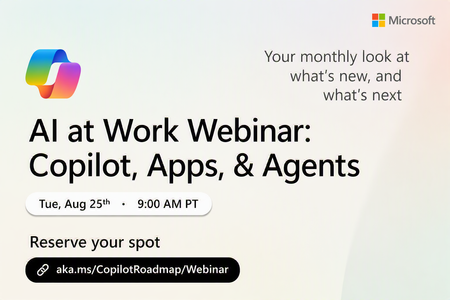
Register Here: https://aka.ms/MTC/CopilotRoadmapEvent
Keep up with the latest in Microsoft 365 Copilot, all in one place. This Roadmap webinar series is your central hub for the latest Copilot inno...
Tuesday, Aug 25, 2026, 09:00 AM PDTOnline
1like
35Attendees
0Comments
Recent Blogs
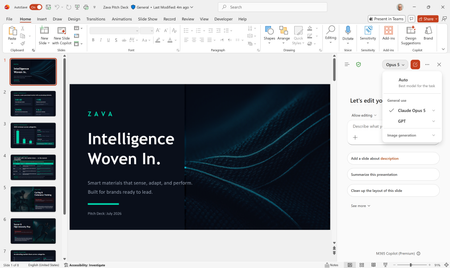
- Anthropic's Claude Opus 5 is now available in Microsoft 365 Copilot.Jul 24, 20266.8KViews2likes0Comments
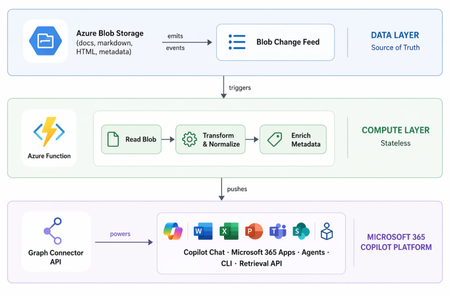
- 9 MIN READLearn how we built a Microsoft 365 Copilot connector serving 1M docs and 300+ agents.Jul 23, 20266.2KViews1like0Comments