Recent Discussions

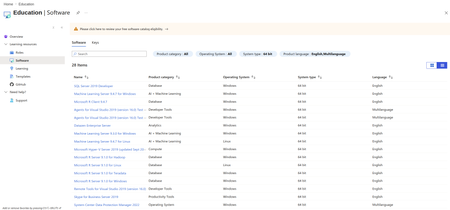
Microsoft Azure Education Problem
I've search online that my University is Eligible to have ADT4T access, but as you can see I only have 28 items available. I've contacted the admin on my University and with no solution at all, I've also been connected to my university active directory, but still no solution to this problem. Also as you can see in the screenshot there's an orange warning on top. Can anyone help me please?101Views1like0Comments
Unauthorized external user joining Class Team call
On one of our online school days, we had someone asking to join from the lobby with a changed display name with a swear word. We do not allow guest access on our platform. We do not have a log as the person was not admitted into the meeting. However everyone saw the message " so and so" is waiting in the lobby. also next to the name "External" appears. How can we stop this happening again? what should I advice our admin to set up as policies?172Views0likes0Comments
Guidance Needed: Using Azure Lab Services for AZ-104, AZ-700, AI & Cybersecurity Training
Hello everyone, I’m planning several upcoming training programs (AZ-104, AZ-700, and other AI and cybersecurity–related certifications), and I’m considering using Azure Lab Services for the student labs. I haven’t used Azure Lab Services before, so I’d really appreciate insights from anyone who has real experience with it. Specifically, I’d like to understand: - Does each student receive their own individual login and lab environment? - How much control does the instructor have over the virtual machines (start/stop, reset, limits, schedules)? Is Azure Lab Services limited to VMs only, or can students also work with other Azure resources such as load balancers, firewalls, VNets, etc.? - One of my key objectives is for students to learn how to build and deploy VMs themselves. Is this supported within Azure Lab Services, or is it more focused on pre-built lab environments? - Students also should work with Entra ID, So create and manage users with RBAC. Is it covered? From your experience, what is the approximate cost per student per month, and how manageable is cost control? Any additional guidance, best practices, or lessons learned would be greatly appreciated. Feel free to reply here or DM me if that’s easier. Thank you in advance for your support. Best regards, Ali M.139Views0likes0Comments
Assignments not accessible in Teams
The Assignment app has stopped accessibility from our classes in Teams. When student click on an new assignment, the notification that comes up is: Something went wrong - come back later ... and that has been for several months. The same goes for teachers who try to open the from the team. I can only make an assignment when I go to the global app in the Me space. And when I assign it, the students can't open it, and have to go to the Me space. Does anyone know how to fix it? We love the app, so we want it to work as smooth as possible. Thank you for any help151Views0likes0CommentsAI-powered Teach Module in M365 now rolled out to all educators!
Here is an end-to-end tutorial video on the new AI-powered "Teach" module in M365 Copilot. This is available today for ALL Microsoft 365 educators globally! Includes: 📘 Lesson plans 📊 Rubrics 📝 Quizzes 🌍 Standards grounding (35 countries) 🎯 Learning Activities ➕ Lots more YouTube 📺 https://youtu.be/WkXVukl62KU?si=UT3FzN5fqXQ7KlBd283Views4likes0Comments🌟Reimaging Renewal: My Digital Vision Board for 2025
As an educator and advocate for learner-centered support, I’ve always believed that clarity and emotional resonance can transform professional growth. This year, I created a digital vision board that blends intention, inspiration, and strategy—designed not just to motivate, but to guide my outreach, PD design, and documentation systems. Each image, quote, and layout reflects a core value: privacy-first automation, human-first instruction, and resilient systems that empower both educators and learners. I’m sharing it here to spark conversation, collaboration, and maybe even a few new ideas for your own journey. Let’s build something beautiful together—one vision, one workflow, one act of renewal at a time. https://parentsandteachers-my.sharepoint.com/:p:/g/personal/smtoth_americalearns_online/ET6B7VgkZNdBjBqOa5UkWEIB5HgO8sDn5txJQVn08mds2A 💬 I’d love to see what’s inspiring you this season. If you’ve created a vision board—digital or analog—drop a link or screenshot below. What themes are guiding your work? What visuals keep you grounded? Let’s build a gallery of renewal, one board at a time.156Views2likes0CommentsTeams Breakout rooms
As I'm new in this community, I don't know if this issue has been raised before, so forgive me if I'm repeating it: In our ELT school in Corinth, Greece, we have been using MSTeams since the covid pandemic and we haven't found a practical and well-functioning way to monitor all the breakout rooms at the same time. I hope there has been some improvement in this. I'd appreciate any suggestions. Thanks.150Views2likes0CommentsAI Agents in Free Copilot Chat.
Hi all! When Agents were first introduced into Copilot Chat for free, you used to be able to upload 20 knowledge resources. Now this has been cut back to 4 web URLS only, and each of these can only be 2 forward slashes deep - we are really struggling on using agents successfully. Based in the UK, all of the Department for Education content is more than // deep in their web. We can't upload docs from the PDF's and most other juicy web content is much deeper in the domains than 2 x // I would love to hear from other Copilot Chat Agent users in how you are working with the barriers of the free version in your setting. Paid licenses are just not an option on UK school budgets sadly. Thanks all!163Views1like0Comments
Classroom components missing
After completing SDS sync (no errors), activating the class, waiting overnight we are still having these issues with our SDS classroom teams. Issues reported: Can not attach file to an assignment (says try again, all file types from all locations) Classroom notebooks can not be created (says Retry) Students do not see assignments Assignments disappearing from team Student work folders are not created after an assignment has been added Issue #1 Issue #2 Anyone else experiencing these issues? For this 2025/2026 school startup we are experiencing issues with SDS Classroom teams not finishing all of the provisioning required. My feeling is that SDS is taking longer to finish the backend functions that happen after creating the security group, team, then classroom layer. This is eventually working on some teams but the experience is not consistent. This is only happening with SDS Classroom teams, all classroom teams created manually are working as expected. We typically have ~ 5000 SDS classroom teams / year.129Views0likes0Comments
Skype not working anymore
Good day, we are a business (https://www.walkspanishmadrid.com/) and have a Skype number to contact our clients and receive calls from them; we also had skype credit and now it seems we cant use it on Skype or Microsoft teams any suggestions on how educational companies are dealing with situations like this? Thank you92Views0likes0CommentsClass Team calendar doesn't show in the class startpage
I used to love the startpage app in class teams, but since the spring of 2025, the calendar is not imported to show in the startpage under teaching schedule. If I add a calendar to each class, it doesn't show either. The teaching schedule says the group doesn't exist any longer, maybe it has been deleted (no it has not been deleted). All I seem to be able to. The only way is by is to make all classes to M365 groups, but that shouldn't be necessary, or is it? Sad to lose the generel calendar in class teams. Thanks for any help or advise.133Views0likes0Comments
Assignmentanswers in Teams can be read by everyone
It turns out that the Excel-file that is generated for me to view the results of a Forms-test, given as an assignment in Teams, is placed in the Teams-library where Teams-members are granted editing rights by default. This, not only makes it possible for every Team-member, my students, to see everyone's result, but also to edit the answers. I know it is possible to alter the rights given to this library, but I don't like the idea of instructing every teacher in our school to do this. This Excel-file should NOT be placed in this library, but rather in my personal OneDrive as it is if I don't use the assignement-tool in Teams. Is there a way someone in Microsoft can fix this? Please? Best regards Oddgeir185Views0likes0CommentsDownload the submitted files related to an assignment
Some teachers still wants to evaluate a printed document and not just the digital one. I know they can download submitted files from the sharepoint-repository, but then they have to go through so many folders. Is there a way to download say, all word-documents submitted on the assignment "Whatever the assignment they where given"? So browsing the folders by assignment instead of by student I guess. Does anyone know? Regards Oddgeir202Views0likes0Comments'Hide' assignments
Hi I am new to the MS Teams Classroom and really like the way it looks so far. I teach a group that is self paced and want to be able to give access to assignments to individual students once the have completed the learning materials, is this possible? I find that when the assignments are available my students tend to go straight there skipping the learning materials.309Views2likes0CommentsWe're moving to Microsoft Q&A!
Come join us at Azure Lab Services - Microsoft Q&A! We will be moving away from this forum for community questions and start to focus our time on the central Microsoft Q & A platform. This forum will be archived in a couple of months, so please update your bookmarks to https://learn.microsoft.com/answers/tags/186/azure-lab-services. See you there! To get the latest updates, subscribe to the Azure Lab Services Blog. To read the documentation, visit the Azure Lab Services documentation. For retirement guidance, visit the Azure Lab Services retirement guide. Thanks, The Azure Lab Services Team509Views0likes0Comments







Events
Recent Blogs
- So the plan was simple. Leave the Bedrock configuration untouched, then wire Microsoft Foundry in behind it as a fallback, so Hermes always has somewhere else to go when the primary provider is not r...Aug 27, 202695Views0likes0Comments
- Welcome to our monthly update for Microsoft Education and thank you so much for being part of our growing community! Topics Teach in Microsoft Copilot updates Learning Zone updates Teams fo...Aug 25, 2026849Views4likes0Comments