url
33 Topics
Audio file embeds not working
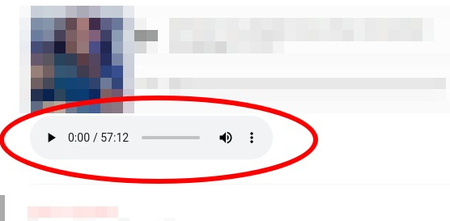
I have a site and a few audio files in my OneDrive account that I want to embed in said site using the HTML `<audio>` tag. I'm following https://stackoverflow.com/a/65415373's instructions and it works fine in my personal OneDrive account, which generates embed codes in the following format: <iframe src="https://onedrive.live.com/embed?resid=XXXXXXXX&authkey=YYYYYYYYYY" width="98" height="120" frameborder="0" scrolling="no"></iframe> (note the URL domain: https://onedrive.live.com) However, in my client's OneDrive account, embeds are generated using a shortened URL domain, like this: <iframe src="https://1drv.ms/u/s!XXXXXXXXXXXXXXX?embed=1" width="98" height="120" frameborder="0" scrolling="no"></iframe> Naturally, this URL format breaks embedding audio and I don't know how to circumvent this. I tried changing "embed=1" with "download=1" but it didn't work out. How can I make these "shortened" URLs work with the audio tag? Perhaps there's a way to disable URL shortening for embeds?? Thanks in advance639Views0likes0Comments
Major annoyance - BING converts search links to BING.COM redirect links.
I don't know if there's any way around this but BING converts every search result URL into a BING.COM redirect URL. While this may seem like a good idea to Microsoft since it records click-throughs, it falls apart on direct linked documents such as PDF, images, etc. The redirect prevents you from actually copying the real link and pasting it elsewhere. For example, something as simple as xyz.com/mydoc.pdf turns into bing.com/search=?q=blahblahblahblah and on for 50+ more random characters. And you can't simply click on the link and get it from the address bar because Edge will open the document in whatever external program handles that document type (like Acrobat Reader or MS Excel). I do a fair amount of online research and this behavior is really annoying when I want to capture and reference a link directly to a document. Note that Google does NOT do this as it preserves the actual destination link in the search results. And some of the other search engines I've tried (eg Freespoke, DuckDuckGo) don't do it either.2.7KViews3likes1Comment
Defaulting a lookup value on a page via URL
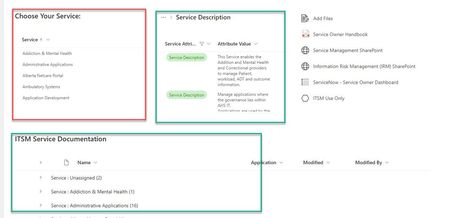
I have created a pretty standard page with a lookup list that users can choose the main value and the other lists adjust to show values associated with that choice. Users want to be able to default their choice. There is no list of users aligned with these choices and it is not feasible to create/maintain such a list. Is there a way I can provide users with a URL that automatically defaults a choice to a specific value. For example, if I want to set the default value and displayed items to be Risk Management, I just give them a Risk Management URL that defaults the choice. I don't care if they change their choice after. Screen shots below showing how it works. I don't want to create 80 pages, one for each choice cause you can't share widgets across pages. Updating 80 versions of the links section would be painful. Plus 80 different pages, one for each choice is very maintenance heavy.709Views0likes1Comment
Possible to change URL of Document Library link after created?
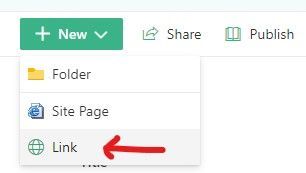
Once I create a link (.url) in a modern library. Is there any way to modify the URL? Not just delete it and create another one? I do not see a way to do this. I am trying to bypass the URL "preview" which doesn't exist and causes users an extra click to be taken to the page. URL Created in Library: URL Preview when clicked in webpart viewer: URL Editable Fields:1.9KViews0likes0CommentsOne drive does continue to sycronize a site if this one change the url?
Hi, recently we changed the main url of our sharepoint sites from xxxxxx.sharepoint.com/etc to yyyyyy.sharepoint.com/etc, at the moment there is the redirect to the new url for those who will still look for the old url so they can still reach the sites. We have seen at the moment that one drive is still working on everyone's computer, but after 90 days the redirect will be stopped from microsoft. Can this create an issue in the future? will onedrive continue to syncronize the old site on everyone's computer even after the ending of the redirect? thank you so much for the attention.1.9KViews0likes1Comment
Short URL to fit in a teams channel list
Hi Microsoft community, I am trying to create an inventory of questions raised in several teams channels in a list. However, when I create the list in a teams channel and try to copy the teams chat link I have an error - the URL exceeds the acceptable 255 characters. Do you know how can I have a list in teams that would allow me to copy several links from several teams channels? How can I shorten the URLs for them to be accepted in the teams channel list? Thanks in advance Regards, Ana1.5KViews0likes2Comments
How to switch domain name/URL of the sharepoint
Hello, So I already have a sharepoint, let's call it Sharepoint A. I'm creating a new sharepoint page, let's call it Sharepoint B. I would be able to replace Sharepoint A by Sharepoint B, keeping the same URL, so that people would not be confused by all the different sharepoints. How can I do that? Thank you in advance, Léa1.2KViews0likes2CommentsWeb Client URL Change
We received a notice that the Web Client URLs were changing. From the notice, it appears that URL forwarding will be in place starting 2022.04.18. The question is whether there is an end date on the forwarding. Notice: 2022-03-21T20:14:06Z You're receiving this notice because you currently use Azure Virtual Desktop. Beginning 18 April 2022, we're moving the Azure Virtual Desktop web client to a new URL. The new URL is available now and ready for use. Please transition to using the new URL before 18 April 2022. Azure Virtual Desktop Web Client: Old: https://rdweb.wvd.microsoft.com/arm/webclient/index.html Old: https://www.wvd.microsoft.com/arm/webclient/index.html New: https://client.wvd.microsoft.com/arm/webclient/index.html Azure Virtual Desktop Classic Web Client: Old: https://rdweb.wvd.microsoft.com/webclient/index.html Old: https://www.wvd.microsoft.com/webclient/index.html New: https://client.wvd.microsoft.com/webclient/index.html Why is this change happening?This change gives us greater flexibility and opportunity for more frequent web client releases. Recommended actionStarting today, configure the new URL with the same permissions and on the same allow lists as the current URL. Beginning 18 April 2022, end users accessing the old URL will be automatically redirected to the new URL. Some users will be redirected immediately. The rest will be redirected throughout the week.2.4KViews0likes0CommentsOpen links to SharePoint from SharePoint Teams Tab in Edge
I have a really specific scenario: In a Teams Channel I created a SharePoint tab which shows a SharePoint page. On this page I am linking to another page. If I click on this link it gets opened in the same tab in my Teams client. This happens for all SharePoint links -> Works as designed... What I need is a way to set a link on my first page which opens a the second SharePoint page in Edge instead of in the tab in my Teams client. Does someone has an idea how to implement this? The only solution I see so far is to use a webserver which forwards to the SharePoint page. I could link to this webserver and Teams would open it in Edge since it is not a SharePoint link.Solved983Views0likes1Comment