crash
59 Topics
Mac: OneDrive Couldn't Start: Please restart your computer and try again
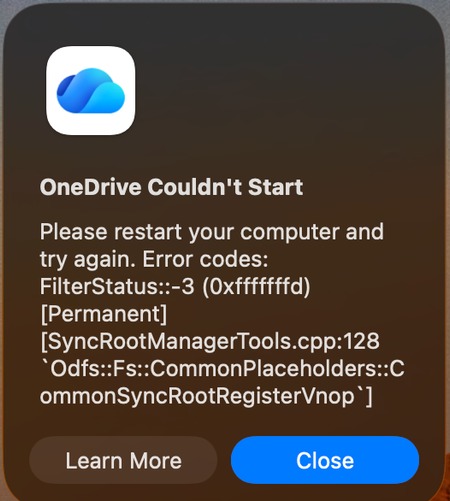
When OneDrive updated on 9/11, with build 26158.0816, I started to get this error: OneDrive Couldn't Start: Please restart your computer and try again. Error codes: FilterStatus::-3 (0xfffffffd) [Permanent] [SyncRootManagerTools.cpp:128 `Odfs::Fs::CommonPlaceholders::CommonSyncRootRegisterVnop`] I have powered off my Mac and rebooted. Restarting OneDrive does nothing. It keeps giving me this error and as a result, I also cannot live edit docs using the thick clients (Word, Excel, etc). Files I have modified with them are stuck on my Mac. I am looking for tips. Please do not ask me to unlink/de-register all of my Onedrive sync'd shares.5.6KViews12likes29Comments
Crash when submitting web page input fields with soft keyboard Enter
### Summary Microsoft Edge Canary for Android crashes when submitting web page input fields using the Android soft keyboard Enter key. GitHub search is one stable reproduction case, but this is not GitHub-specific. I have also reproduced similar crashes on other websites with text input/search fields. ### Environment - App: Microsoft Edge Canary for Android - Package: `com.microsoft.emmx.canary` - Version: `152.0.4142.0` - Version code: `414200023` - Device: vivo V2417A - Android SDK: 36 - ABI: arm64-v8a ### Reproduction case 1. Open Microsoft Edge Canary on Android. 2. Navigate to `https://github.com/`. 3. Tap the GitHub search box. 4. Type any text. 5. Press Enter on the Android soft keyboard. ### Expected behavior The input/search action should be submitted normally. ### Actual behavior Edge Canary crashes immediately after pressing Enter. ### Scope This does not appear to be specific to GitHub. The same type of crash can also be triggered on other websites when submitting text input/search fields using the Android soft keyboard Enter key. GitHub is used here as a minimal stable repro because it is easy to test. ### Crash information Exception: ```text java.lang.IndexOutOfBoundsException: Index 24 out of bounds for length 0 ``` Relevant stack trace: ```text java.util.ArrayList.get(ArrayList.java:434) android.view.ViewGroup.getAndVerifyPreorderedView(ViewGroup.java:3873) android.view.ViewGroup.gatherTransparentRegion(ViewGroup.java:7438) android.view.ViewRootImpl.performTraversals(ViewRootImpl.java:5207) android.view.Choreographer.doFrame(...) ``` ### Notes - Reproduced directly on the Android phone. - Trigger appears related to submitting web page input/search fields via the Android soft keyboard Enter key.278Views0likes3CommentsBug fixes in Microsoft Access - Current Channel Version 2605 (Build 16.0.20026.20118)
Bug Name Issue Fixed Edge Browser Control didn't render PDFs on some machines When the Edge Browser Control was used to display a PDF, on some machines the PDF would not render at all if the registry value "HKEY_CLASSES_ROOT\.pdf\Content Type" was missing. Access now provides the missing content type, so the Edge Browser Control can render the PDF. Export to SharePoint failed for tables with both lookup fields and attachment columns When exporting an Access table to a SharePoint list, if the table contained both a lookup field and an attachment column, the export could fail with an error. The export now handles this combination correctly, so the export completes successfully. Conditional Formatting color picker showed a reduced palette in Version 2604 A regression introduced in Version 2604 caused the Conditional Formatting color picker to display a smaller set of color choices than previous versions. The full legacy color palette has been restored. Some Unicode characters displayed incorrectly in objects exported to Excel When exporting an Access object whose name contained certain extended Unicode characters, the resulting file's sheet name displayed the characters incorrectly. These characters are now preserved correctly during export. Power BI Gateway couldn't refresh semantic models from .accdb files Refreshing a Power BI semantic model that connected to a .accdb file via the on-premises gateway could fail with "Unspecified error". Connection setup has been adjusted so the gateway can successfully refresh the model. Monaco SQL view: Ctrl+Z didn't undo Ctrl+Shift+K line deletion In the new Monaco-based SQL editor, pressing Ctrl+Shift+K to delete the current line removed the line, but a subsequent Ctrl+Z would not restore it. Undo now works correctly for this and similar editing operations. Document tab text didn't scale with Windows text-size setting When the Windows display setting for text size was increased, document tab labels and the record navigation bar continued to render at the standard size, while other Access UI scaled correctly. The document tabs and record navigation bar now honor the system text-size setting. Error when editing a Long Text field after a write conflict When a write conflict occurred on a record containing a Long Text field, subsequent attempts to edit the field could fail with an error. The data path now refreshes the cached field values correctly after a conflict so that further edits succeed. Access terminated unexpectedly when reading Edge Browser Control properties in form design view In form design view, retrieving the ReadyState or LocationUrl property on an Edge Browser Control could cause Access to terminate unexpectedly. Both properties now return safely in design view. "Copy" prefix was prepended instead of appended to copied object names When duplicating a database object, Access named the copy "Copy of Form1" instead of "Form1 - Copy". This made copies of related objects sort apart from their originals in the Navigation Pane. Copy-of names now append the suffix, so related objects stay together when sorted alphabetically.1KViews3likes8Comments
Windows App - RDP channel crashes when printing on a redirected canon printer
Hey team, I would like to know, if anyone else struggles with the following scenario: A canon printer is installed on a local client. The user is working in the AVD environment. The printers are redirected into the AVD-Session via "printer redirect". Since the users are migrating to the new "Windows App", the AVD session breaks as soon as the user is printing on a redirected Canon-Printer. When printing on another printer, there is no issue. Also: With the "Microsoft-Remotedesktop" Application, everything works as it should. A Microsoft ticket is already raised. I would like to know if there are other environments, which are encountering the same issue.2KViews1like10Comments
Edge browser crashes after file download / open
Hello, I am using Edge browser Version 142.0.3595.80 (Official build) (64-bit), on Linux. When downloading a file , and trying to open the downloaded file from wihin browser, it causes edge browser instances to close. I have been using other browsers to get around the problem. Is this a known problem, and are there a solution to this problem? Thanks, Jay838Views1like8Comments
Windows Themes no longer working...
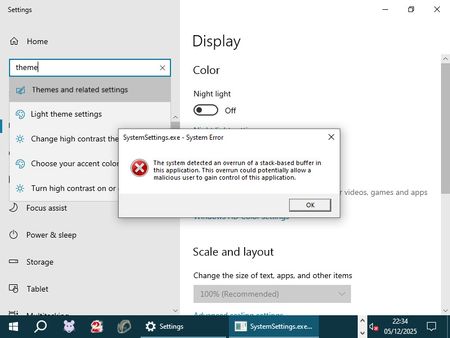
Hello folks, I hope someone here can help me out: My Windows Themes suddenly stopped working. I can select all other categories under "Personalize", but clicking on "Themes" results in the application crashing (i.e., the window closing) and a SystemSettings.exe dump file being created. Upon booting into Safe Mode, I got a direct error message that I screenshot: How can I easily fix this without resorting to unwanted measures such as a system restore or having to create a brandnew user profile? Thanks in advance. <3514Views0likes2CommentsScreen Sharing Causes System Shutdown on Surface Pro
Dear Microsoft Teams Support, We are encountering a persistent issue with one of our users involving Microsoft Teams on a Microsoft Surface Pro 2 device. Each time she attempts to initiate screen sharing, the computer abruptly shuts down. We have already performed extensive troubleshooting, including: Verified that all drivers are up to date. Closed all background applications before attempting screen sharing. Updated Microsoft Teams to the latest version. Cleared the Teams cache. Attempted both repair and reset of Teams via Windows Settings. Ran System File Checker (SFC) and DISM scans, both of which reported no issues. Uninstalled Teams and downloaded the latest installer, but reinstallation fails. Despite these efforts, the issue remains unresolved. We would appreciate your guidance on further steps or escalation to resolve this problem. Thank you for your support.284Views0likes1CommentAccess Releases 6 Issue Fixes in Version 2209 (Released September 26)
Our newest round of Access bug fixes was released on September 26. In this blog post, we are highlighting some of the fixed issues that our Access engineers released in the current monthly channel build 2209.7KViews4likes1CommentEdge Dev 139.0.3365.2 does not open / crashes
When clicking the Edge Dev Icon, a full screen window in light blue colour opens, with no text or any graphics (no title bar, no symbols..), after a few seconds, this window crashes. It is not possible to start Edge dev. I tried to repair it within "installed apps" in Win Settings, but with the same result. Restarting the Computer did not solve the problem. Starting an inprivate window does work (right click on icon - in private), but if I want to check the settings, Edge crashes immediately.Solved635Views0likes3Comments