crash
58 Topics
Edge browser 100% CPU, requires Force Quit (macOS Mojave and v91.0.864.48)
I'm reporting a problem I've experienced with Edge since I began using it six months ago. After using Edge for a few hours, it will begin using 100% CPU. According to the Task Manager, it is the "Browser" thread that is using this CPU. If I Quit the application, all the windows close but it doesn't fully quit; I have to do command-option-esc to open the Force Quit window (where it says "Microsoft Edge (not responding)" and then I'm able to Force Quit it. When I relaunch it and re-open the web pages I was using, it works fine (until later that day or the next day, when the process repeats). Does anyone know how I can troubleshoot this so I can file a useful bug report? This has happened many times over the past 6 months, over many different Edge versions (I'm always using the latest stable version). I'm not able to reproduce the issue when I want, but it happens regularly every or every-other day. I'm using macOS Mojave 10.14.6 on a 2015 MacBook Pro. Edit: It just happened again, so I took some screenshots and attached them below.18KViews6likes34Comments
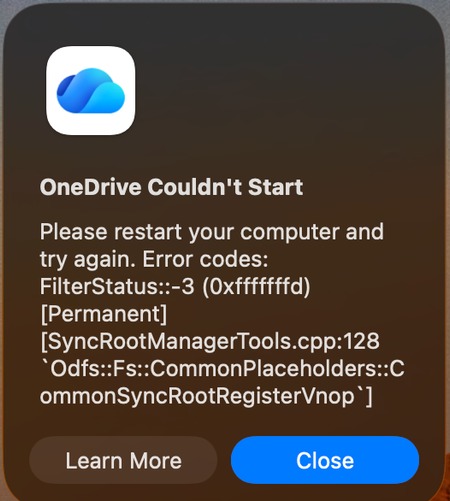
Mac: OneDrive Couldn't Start: Please restart your computer and try again
When OneDrive updated on 9/11, with build 26158.0816, I started to get this error: OneDrive Couldn't Start: Please restart your computer and try again. Error codes: FilterStatus::-3 (0xfffffffd) [Permanent] [SyncRootManagerTools.cpp:128 `Odfs::Fs::CommonPlaceholders::CommonSyncRootRegisterVnop`] I have powered off my Mac and rebooted. Restarting OneDrive does nothing. It keeps giving me this error and as a result, I also cannot live edit docs using the thick clients (Word, Excel, etc). Files I have modified with them are stuck on my Mac. I am looking for tips. Please do not ask me to unlink/de-register all of my Onedrive sync'd shares.1KViews5likes7CommentsEdge canary 115.0.1834.0 crashes on opening
My canary version 115.0.1834.0 crashes when opened, everytime. I have windows 10. When i rename the User Data folder to something else, the edge runs perfectly but without my user data 😭. There is some problem in Edge SxS>User Data > Default That Default folder has some problems. How am i supposed to fix this? Help meSolved6.7KViews4likes21CommentsAccess Releases 6 Issue Fixes in Version 2209 (Released September 26)
Our newest round of Access bug fixes was released on September 26. In this blog post, we are highlighting some of the fixed issues that our Access engineers released in the current monthly channel build 2209.6.9KViews4likes1CommentBug fixes in Microsoft Access - Current Channel Version 2605 (Build 16.0.20026.20118)
Bug Name Issue Fixed Edge Browser Control didn't render PDFs on some machines When the Edge Browser Control was used to display a PDF, on some machines the PDF would not render at all if the registry value "HKEY_CLASSES_ROOT\.pdf\Content Type" was missing. Access now provides the missing content type, so the Edge Browser Control can render the PDF. Export to SharePoint failed for tables with both lookup fields and attachment columns When exporting an Access table to a SharePoint list, if the table contained both a lookup field and an attachment column, the export could fail with an error. The export now handles this combination correctly, so the export completes successfully. Conditional Formatting color picker showed a reduced palette in Version 2604 A regression introduced in Version 2604 caused the Conditional Formatting color picker to display a smaller set of color choices than previous versions. The full legacy color palette has been restored. Some Unicode characters displayed incorrectly in objects exported to Excel When exporting an Access object whose name contained certain extended Unicode characters, the resulting file's sheet name displayed the characters incorrectly. These characters are now preserved correctly during export. Power BI Gateway couldn't refresh semantic models from .accdb files Refreshing a Power BI semantic model that connected to a .accdb file via the on-premises gateway could fail with "Unspecified error". Connection setup has been adjusted so the gateway can successfully refresh the model. Monaco SQL view: Ctrl+Z didn't undo Ctrl+Shift+K line deletion In the new Monaco-based SQL editor, pressing Ctrl+Shift+K to delete the current line removed the line, but a subsequent Ctrl+Z would not restore it. Undo now works correctly for this and similar editing operations. Document tab text didn't scale with Windows text-size setting When the Windows display setting for text size was increased, document tab labels and the record navigation bar continued to render at the standard size, while other Access UI scaled correctly. The document tabs and record navigation bar now honor the system text-size setting. Error when editing a Long Text field after a write conflict When a write conflict occurred on a record containing a Long Text field, subsequent attempts to edit the field could fail with an error. The data path now refreshes the cached field values correctly after a conflict so that further edits succeed. Access terminated unexpectedly when reading Edge Browser Control properties in form design view In form design view, retrieving the ReadyState or LocationUrl property on an Edge Browser Control could cause Access to terminate unexpectedly. Both properties now return safely in design view. "Copy" prefix was prepended instead of appended to copied object names When duplicating a database object, Access named the copy "Copy of Form1" instead of "Form1 - Copy". This made copies of related objects sort apart from their originals in the Navigation Pane. Copy-of names now append the suffix, so related objects stay together when sorted alphabetically.871Views3likes8CommentsAccess Releases 8 Issue Fixes in Version 2302 (Released February 28, 2023)
Our newest round of Access bug fixes was released on February 28, 2023. In this blog post, we are highlighting some of the fixed issues that our Access engineers released in the current monthly channel.6.9KViews3likes1CommentEdge crashes when pressing Windows+. (Emoji panel opens)
Version 90.0.789.1 (Official build) dev (64-bit) Edge immediately crashes when pressing Windows + . (when opening emoji panel). I have sent feedback. Is anyone experiencing this too? It happened on a post on https://community.windows.com/en-us/conversations (Windows Community). Thanks.2.1KViews2likes4Comments[FIXED] Edge insider crashing when clearing all browser data
Edge insider Version 81.0.370.0 (Official build) canary (64-bit) in edge://settings/clearBrowserData when I select all checkboxes and set time range to all time, to remove everything, after clicking on "clear now" button, Edge crashes. tried this 3 times in a row and same crash happened. Windows 10 latest version.Solved3.4KViews2likes10CommentsSharePoint Online Crashes with Breeze Theme
Hi, After a huge amount of testing and confusion, I have found that with this combination in SharePoint Online: Windows 7 IE11 Theme - Breeze User Access - more than 'read' IE will crash constantly. Doesn't happen on Chrome, or Windows 10, or if you have just 'read' access to the SPO site, or if the theme isn't Breeze. Something has changed in the last few days, as all our sites were configured on that theme. Mentioning in case anyone else is scratching their head with SPO sites crashing now. Edit: This has now been fixed at Microsoft's end.2.5KViews1like6Comments