admin
6477 TopicsTransfer MS Office 365 Business ownership from MSP to own MS Business account
Hello Everybody I need to transfer my clients MS Office 365 Business from current MSP to their own MS Business account. Current MSP very bad service. So, at the end they want to manage their Emails\Licenses on MS Admin Center. What are the steps on doing this?17Views0likes0Comments
[DataFormat.Error] We received a malformed web response and credentials issue
Hi team :) Happy Friday !! There is an excel spreadsheet being connected with data sources and shared with users. Upon, hitting data refreshes it asks every user to edit credentials every time they hit data refresh or shows dataformat.error with malformed web response. There is no data format error though. Can anyone please assist here or know how to solve this issue ?? Thanks Happy33Views0likes1Comment
Generic Resources - Team Assignment Pool Yes or No?
Our On-Prem Project Server environment was set up with Generic Resources marked "No" for Team Assignment Pool. It seems we would want this to be a "Yes", so that tasks assigned to a Generic resource would be visible by Project Server users with the same role, and those users could then self-assign those tasks and provide updates. Our generic resources are meant to represent a "pool" of people in different labor categories, so that we can look at potential areas of under or over utilization. It seems that marking them as a Team Assignment Pool would reflect our intended use. For most of our generic resources, we don't plan to replace them with a specific person (such as production work). However, for some resources such as engineers, we would like them to be able to self-assign tasks and give updates in Project Server. Is there a particular reason to keep our Generic Resources marked "No" for Team Assignment Pool? Does changing to "Yes" affect their capacity, availability, or Work/Cost values?20Views0likes1CommentAnnouncing the 2026 Microsoft 365 Community Conference Keynotes
The Microsoft 365 Community Conference returns to Orlando this April, bringing together thousands of builders, innovators, creators, communicators, admins, architects, MVPs, and product makers for three unforgettable days of learning and community. This year’s theme, “A Beacon for Builders, Innovators & Icons of Intelligent Work,” celebrates the people shaping the AI‑powered future — and the keynote lineup reflects exactly that. These leaders will set the tone for our biggest, boldest M365 Community Conference. Below is your first look at the official 2026 keynote order and what to expect from each session. Opening Keynote Jeff Teper — President, Microsoft 365 Collaborative Apps & Platforms Building for the future: Microsoft 365, Agents and AI, what's new and what's next Join Jeff Teper, to discover how AI-powered innovation across Copilot, Teams, and SharePoint is reshaping how people communicate, create, and work together. This session highlights what’s new, what’s fundamentally different, and why thoughtful design continues to matter. See the latest advances in AI and agents, gain insight into where collaboration is headed, and learn why Microsoft is the company to continue to bet on when it comes to building what’s next. Expect: New breakthroughs in collaboration powered by AI and agents Fresh innovations across Teams, Copilot, and SharePoint Practical guidance on how design continues to shape effective teamwork Real world demos that show how AI is transforming communication and content Insight into what is new, what is changing, and what is coming next Business Apps & Agents Keynote Ryan Cunningham — Corporate Vice President, Power Platform In this keynote, Ryan Cunningham will share how Microsoft 365 Copilot, Copilot Studio, Power Apps, and Agent 365 come together to help makers build powerful agents and help IT teams deploy and govern them at scale. We’ll share how organizations can design, extend, and govern a new model for the intelligent workplace – connecting data, workflows, and systems into intelligent agents that move work forward. Copilot, apps, and agents: the next platform shift for Microsoft 365 Microsoft 365 Copilot has changed how we interact with software. Now AI agents are changing how work gets done – moving from responding to prompts to taking action, across the tools and data your organization already relies on. Expect: A clear explanation of how to leverage and build with Copilot and agents How agents access data, use tools, and complete multi-step work A deeper look at the latest capabilities across Microsoft 365 Copilot, Copilot Studio, and Power Apps End-to-end demos of agents in action Security, Trust & Responsible AI Keynote Vasu Jakkal — Corporate Vice President, Microsoft Security & Rohan Kumar — Corporate Vice President, Microsoft Security, Purview & Trust In our third keynote, Vasu Jakkal and Rohan Kumar join forces to address one of the most urgent topics of the AI era: trust and security at scale. As organizations accelerate into AI‑powered work, safeguarding identities, data, compliance, and governance is mission‑critical. Securing AI: Building Trust in the Era of AI Join Vasu Jakkal and Rohan Kumar as they unveil Microsoft’s vision for securing the new frontier of AI—showing how frontier firms are protecting their data, identities, and models amid rapid AI adoption. This session highlights how Microsoft is embedding security and governance into every layer of our AI platforms and unifying Purview, Defender, Entra, and Security Copilot to defend against threats like prompt injection, model tampering, and shadow AI. You’ll see how built-in protections across Microsoft 365 enable responsible, compliant AI innovation, and gain practical guidance to strengthen your own security posture as AI transforms the way everyone works. Expect: Microsoft's unified approach to secure AI transformation Forward‑looking insights across Security, Purview & Trust Guidance for building safe, responsible AI environments How to protect innovation without slowing momentum Future of Work Fireside Keynote Dr. Jaime Teevan — Chief Scientist & Technical Fellow, Microsoft Dr. Jaime Teevan, one of the foremost thought leaders on AI, productivity, and how work is evolving. In this intimate fireside‑style session, she’ll share research, real‑world insights, and Microsoft’s learnings from being both the maker and the first customer of the AI‑powered workplace. Expect: Insights from decades of workplace research The human side of AI transformation Practical guidance for leaders, creators, and practitioners Why collaboration is essential to unlock the true potential of AI. Community Closer Keynote Karuana Gatimu - Director, Microsoft Customer Advocacy Group & Heather Cook - Principal PM, MIcrosoft Customer Advocacy Group From Momentum to Movement: Where Community Goes Next As the final moments of Microsoft 365 Community Conference come to a close, Heather Cook and Karuana Gatimu invite the community to pause, reflect, and look forward together. This Community Closer keynote connects the breakthroughs, conversations, and shared experiences of the week into a bigger story—one about people, purpose, and progress. Together, they’ll explore how community transforms technology into impact, how advocates and builders shape what’s next across Microsoft 365, and why this moment matters more than ever. More than a recap, this session is a call to action—challenging attendees to take the energy of the conference back to their teams, regions, and communities, and turn inspiration into sustained momentum. You’ll leave not just with ideas, but with clarity, confidence, and a renewed sense of belonging—because community doesn’t end when the conference does. It’s where the real work begins. More Than Keynotes: Why You’ll Want to Be in Orlando The M365 Community Conference brings together: 200+ sessions and breakouts 21 hands‑on workshops 200+ Microsoft engineers and product leaders onsite The Microsoft Innovation Hub Ask the Experts, Meet & Greets, and Community Studio Women in Tech & Allies Luncheon SharePoint’s 25th Anniversary Celebration And an epic attendee party at Universal’s Islands of Adventure Whether you create, deploy, secure, govern, design, or lead with Microsoft 365 — this is your community, and this is your moment. Join Us for the Microsoft 365 Community Conference April 21–23, 2026 Loews Sapphire Falls & Loews Royal Pacific 👉 Register now: https://aka.ms/M365Con26 Use the SAVE150 code for $150USD off current pricing Come be part of the global community building the future of intelligent work.3.5KViews3likes2CommentsMailbox for Service Account (exchange online)
Hi Our organisation isn't ready to move to Exchange Online yet, though we have Office 365 e3 licencing. I need to create a service account that can send emails via Outlook 365 for use In Power Automate. The documentation I have seen for adding a mailbox to an existing AAD user requires assigning an exchange licence to the account via the licence portal. I can't see any such licences though we do have e3 licencing which are visible that I assume covers this? Unfortunately the admin who did the original configuration has moved on and I don't have a global admin role so have to go through a support team that can't help me with my lack of knowledge in the area! Any advice would be very much appreciated as what ( i think) should be a simple task has taken a lot of time to try and get to the bottom of! Thanks, Dale.37KViews0likes3CommentsCopilot For Sales - Dynamics Environment Switching
Hello, We have 2 dynamics environments we've been using for the Copilot for Sales Roll-out (UAT and Production). We've currently deployed into Production and onboarded our Sales Team users. As an admin, I would like to switch my environment back to UAT to complete some customisation testing in our UAT environment, before I roll it out in Production. If I switch the environment from my account (as an Admin) from Prod to UAT. Is there any knock-on effect for other users? Will it affect the configuration I've already set-up? We currently have 2 full admins for Copilot for Sales, the other admin would stay in Production. Any guidance is appreciated. Kind regards, Adam
How best to apply extensive edits to a live page?
What are best practices for extensive editing of a live page? I've seen some cautions against working in a prolonged editing session of a live page without publishing it. Instead, some recommend making a working copy of the live page and then when the working copy is ready to publish, you would change the live page URL to something else, followed by changing the working page URL to the original live page's URL and then publishing. What are the pros and cons of this approach? Is there a better way?34Views0likes1CommentEmail Showing as Quarantined in a Message Trace, but Not Showing up in MS Defender
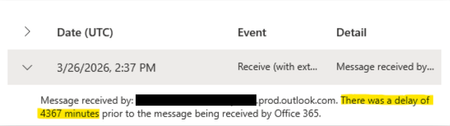
A customer of ours was waiting on an email to arrive and to help figure out where the email was or if it was sent yet we ran a message trace. The message trace showed that the email was sent to quarantine. With this information in mind, I went to MS Defender > Email & collaboration > Review > Quarantine but could not find the message. I modified some of the filters and could not get the quarantined message to appear. I triple checked the filters I created and made sure the information was correct. I also removed all filters and looked for the time period the email came in, but could not find it. Not sure if this is related, but this email had a significant delay likely coming from the sender. Any thoughts or ideas? Or anything that I am missing?103Views0likes5CommentsKerberos and the End of RC4: Protocol Hardening and Preparing for CVE‑2026‑20833
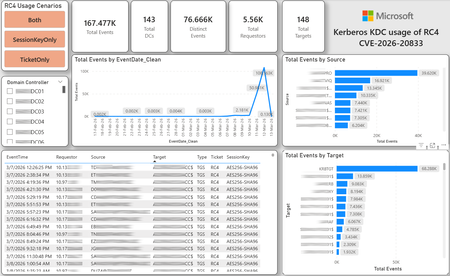
CVE-2026-20833 addresses the continued use of the RC4‑HMAC algorithm within the Kerberos protocol in Active Directory environments. Although RC4 has been retained for many years for compatibility with legacy systems, it is now considered cryptographically weak and unsuitable for modern authentication scenarios. As part of the security evolution of Kerberos, Microsoft has initiated a process of progressive protocol hardening, whose objective is to eliminate RC4 as an implicit fallback, establishing AES128 and AES256 as the default and recommended algorithms. This change should not be treated as optional or merely preventive. It represents a structural change in Kerberos behavior that will be progressively enforced through Windows security updates, culminating in a model where RC4 will no longer be implicitly accepted by the KDC. If Active Directory environments maintain service accounts, applications, or systems dependent on RC4, authentication failures may occur after the application of the updates planned for 2026, especially during the enforcement phases introduced starting in April and finalized in July 2026. For this reason, it is essential that organizations proactively identify and eliminate RC4 dependencies, ensuring that accounts, services, and applications are properly configured to use AES128 or AES256 before the definitive changes to Kerberos protocol behavior take effect. Official Microsoft References CVE-2026-25177 - Security Update Guide - Microsoft - Active Directory Domain Services Elevation of Privilege Vulnerability Microsoft Support – How to manage Kerberos KDC usage of RC4 for service account ticket issuance changes related to CVE-2026-20833 (KB 5073381) Microsoft Learn – Detect and Remediate RC4 Usage in Kerberos AskDS – What is going on with RC4 in Kerberos? Beyond RC4 for Windows authentication | Microsoft Windows Server Blog So, you think you’re ready for enforcing AES for Kerberos? | Microsoft Community Hub Risk Associated with the Vulnerability When RC4 is used in Kerberos tickets, an authenticated attacker can request Service Tickets (TGS) for valid SPNs, capture these tickets, and perform offline brute-force attacks, particularly Kerberoasting scenarios, with the goal of recovering service account passwords. Compared to AES, RC4 allows significantly faster cracking, especially for older accounts or accounts with weak passwords. Technical Overview of the Exploitation In simplified terms, the exploitation flow occurs as follows: The attacker requests a TGS for a valid SPN. The KDC issues the ticket using RC4, when that algorithm is still accepted. The ticket is captured and analyzed offline. The service account password is recovered. The compromised account is used for lateral movement or privilege escalation. Official Timeline Defined by Microsoft Important clarification on enforcement behavior Explicit account encryption type configurations continue to be honored even during enforcement mode. The Kerberos hardening associated with CVE‑2026‑20833 focuses on changing the default behavior of the KDC, enforcing AES-only encryption for TGS ticket issuance when no explicit configuration exists. This approach follows the same enforcement model previously applied to Kerberos session keys in earlier security updates (for example, KB5021131 related to CVE‑2022‑37966), representing another step in the progressive removal of RC4 as an implicit fallback. January 2026 – Audit Phase Starting in January 2026, Microsoft initiated the Audit Phase related to changes in RC4 usage within Kerberos, as described in the official guidance associated with CVE-2026-20833. The primary objective of this phase is to allow organizations to identify existing RC4 dependencies before enforcement changes are applied in later phases. During this phase, no functional breakage is expected, as RC4 is still permitted by the KDC. However, additional auditing mechanisms were introduced, providing greater visibility into how Kerberos tickets are issued in the environment. Analysis is primarily based on the following events recorded in the Security Log of Domain Controllers: Event ID 4768 – Kerberos Authentication Service (AS request / Ticket Granting Ticket) Event ID 4769 – Kerberos Service Ticket Operations (Ticket Granting Service – TGS) Additional events related to the KDCSVC service These events allow identification of: the account that requested authentication the requested service or SPN the source host of the request the encryption algorithm used for the ticket and session key This information is critical for detecting scenarios where RC4 is still being implicitly used, enabling operations teams to plan remediation ahead of the enforcement phase. If these events are not being logged on Domain Controllers, it is necessary to verify whether Kerberos auditing is properly enabled. For Kerberos authentication events to be recorded in the Security Log, the corresponding audit policies must be configured. The minimum recommended configuration is to enable Success auditing for the following subcategories: Kerberos Authentication Service Kerberos Service Ticket Operations Verification can be performed directly on a Domain Controller using the following commands: auditpol /get /subcategory:"Kerberos Service Ticket Operations" auditpol /get /subcategory:"Kerberos Authentication Service" In enterprise environments, the recommended approach is to apply this configuration via Group Policy, ensuring consistency across all Domain Controllers. The corresponding policy can be found at: Computer Configuration - Policies - Windows Settings - Security Settings - Advanced Audit Policy Configuration - Audit Policies - Account Logon Once enabled, these audits record events 4768 and 4769 in the Domain Controllers’ Security Log, allowing analysis tools—such as inventory scripts or SIEM/Log Analytics queries—to accurately identify where RC4 is still present in the Kerberos authentication flow. April 2026 – Enforcement with Manual Rollback With the April 2026 update, the KDC begins operating in AES-only mode (0x18) when the msDS-SupportedEncryptionTypes attribute is not defined. This means RC4 is no longer accepted as an implicit fallback. During this phase, applications, accounts, or computers that still implicitly depend on RC4 may start failing. Manual rollback remains possible via explicit configuration of the attribute in Active Directory. July 2026 – Final Enforcement Starting in July 2026, audit mode and rollback options are removed. RC4 will only function if explicitly configured—a practice that is strongly discouraged. This represents the point of no return in the hardening process. Official Monitoring Approach Microsoft provides official scripts in the repository: https://github.com/microsoft/Kerberos-Crypto/tree/main/scripts The two primary scripts used in this analysis are: Get-KerbEncryptionUsage.ps1 The Get-KerbEncryptionUsage.ps1 script, provided by Microsoft in the Kerberos‑Crypto repository, is designed to identify how Kerberos tickets are issued in the environment by analyzing authentication events recorded on Domain Controllers. Data collection is primarily based on: Event ID 4768 – Kerberos Authentication Service (AS‑REQ / TGT issuance) Event ID 4769 – Kerberos Service Ticket Operations (TGS issuance) From these events, the script extracts and consolidates several relevant fields for authentication flow analysis: Time – when the authentication occurred Requestor – IP address or host that initiated the request Source – account that requested the ticket Target – requested service or SPN Type – operation type (AS or TGS) Ticket – algorithm used to encrypt the ticket SessionKey – algorithm used to protect the session key Based on these fields, it becomes possible to objectively identify which algorithms are being used in the environment, both for ticket issuance and session establishment. This visibility is essential for detecting RC4 dependencies in the Kerberos authentication flow, enabling precise identification of which clients, services, or accounts still rely on this legacy algorithm. Example usage: .\Get-KerbEncryptionUsage.ps1 -Encryption RC4 -Searchscope AllKdcs | Export-Csv -Path .\KerbUsage_RC4_All_ThisDC.csv -NoTypeInformation -Encoding UTF8 Data Consolidation and Analysis In enterprise environments, where event volumes may be high, it is recommended to consolidate script results into analytical tools such as Power BI to facilitate visualization and investigation. The presented image illustrates an example dashboard built from collected results, enabling visibility into: Total events analyzed Number of Domain Controllers involved Number of requesting clients (Requestors) Most frequently involved services or SPNs (Targets) Temporal distribution of events RC4 usage scenarios (Ticket, SessionKey, or both) This type of visualization enables rapid identification of RC4 usage patterns, remediation prioritization, and progress tracking as dependencies are eliminated. Additionally, dashboards help answer key operational questions, such as: Which services still depend on RC4 Which clients are negotiating RC4 for sessions Which Domain Controllers are issuing these tickets Whether RC4 usage is decreasing over time This combined automated collection + analytical visualization approach is the recommended strategy to prepare environments for the Microsoft changes related to CVE‑2026‑20833 and the progressive removal of RC4 in Kerberos. Visualizing Results with Power BI To facilitate analysis and monitoring of RC4 usage in Kerberos, it is recommended to consolidate script results into a Power BI analytical dashboard. 1. Install Power BI Desktop Download and install Power BI Desktop from the official Microsoft website 2. Execute data collection After running the Get-KerbEncryptionUsage.ps1 script, save the generated CSV file to the following directory: C:\Temp\Kerberos_KDC_usage_of_RC4_Logs\KerbEncryptionUsage_RC4.csv 3. Open the dashboard in Power BI Open the file RC4-KerbEncryptionUsage-Dashboards.pbix using Power BI Desktop. If you are interested, please leave a comment on this post with your email address, and I will be happy to share with you. 4. Update the data source If the CSV file is located in a different directory, it will be necessary to adjust the data source path in Power BI. As illustrated, the dashboard uses a parameter named CsvFilePath, which defines the path to the collected CSV file. To adjust it: Open Transform Data in Power BI. Locate the CsvFilePath parameter in the list of Queries. Update the value to the directory where the CSV file was saved. Click Refresh Preview or Refresh to update the data. Click Home → Close & Apply. This approach allows rapid identification of RC4 dependencies, prioritization of remediation actions, and tracking of progress throughout the elimination process. List-AccountKeys.ps1 This script is used to identify which long-term keys are present on user, computer, and service accounts, enabling verification of whether RC4 is still required or whether AES128/AES256 keys are already available. Interpreting Observed Scenarios Microsoft recommends analyzing RC4 usage by jointly considering two key fields present in Kerberos events: Ticket Encryption Type Session Encryption Type Each combination represents a distinct Kerberos behavior, indicating the source of the issue, risk level, and remediation point in the environment. In addition to events 4768 and 4769, updates released starting January 13, 2026, introduce new Kdcsvc events in the System Event Log that assist in identifying RC4 dependencies ahead of enforcement. These events include: Event ID 201 – RC4 usage detected because the client advertises only RC4 and the service does not have msDS-SupportedEncryptionTypes defined. Event ID 202 – RC4 usage detected because the service account does not have AES keys and the msDS-SupportedEncryptionTypes attribute is not defined. Event ID 203 – RC4 usage blocked (enforcement phase) because the client advertises only RC4 and the service does not have msDS-SupportedEncryptionTypes defined. Event ID 204 – RC4 usage blocked (enforcement phase) because the service account does not have AES keys and msDS-SupportedEncryptionTypes is not defined. Event ID 205 – Detection of explicit enablement of insecure algorithms (such as RC4) in the domain policy DefaultDomainSupportedEncTypes. Event ID 206 – RC4 usage detected because the service accepts only AES, but the client does not advertise AES support. Event ID 207 – RC4 usage detected because the service is configured for AES, but the service account does not have AES keys. Event ID 208 – RC4 usage blocked (enforcement phase) because the service accepts only AES and the client does not advertise AES support. Event ID 209 – RC4 usage blocked (enforcement phase) because the service accepts only AES, but the service account does not have AES keys. https://support.microsoft.com/en-gb/topic/how-to-manage-kerberos-kdc-usage-of-rc4-for-service-account-ticket-issuance-changes-related-to-cve-2026-20833-1ebcda33-720a-4da8-93c1-b0496e1910dc They indicate situations where RC4 usage will be blocked in future phases, allowing early detection of configuration issues in clients, services, or accounts. These events are logged under: Log: System Source: Kdcsvc Below are the primary scenarios observed during the analysis of Kerberos authentication behavior, highlighting how RC4 usage manifests across different ticket and session encryption combinations. Each scenario represents a distinct risk profile and indicates specific remediation actions required to ensure compliance with the upcoming enforcement phases. Scenario A – RC4 / RC4 In this scenario, both the Kerberos ticket and the session key are issued using RC4. This is the worst possible scenario from a security and compatibility perspective, as it indicates full and explicit dependence on RC4 in the authentication flow. This condition significantly increases exposure to Kerberoasting attacks, since RC4‑encrypted tickets can be subjected to offline brute-force attacks to recover service account passwords. In addition, environments remaining in this state have a high probability of authentication failure after the April 2026 updates, when RC4 will no longer be accepted as an implicit fallback by the KDC. Events Associated with This Scenario During the Audit Phase, this scenario is typically associated with: Event ID 201 – Kdcsvc Indicates that: the client advertises only RC4 the service does not have msDS-SupportedEncryptionTypes defined the Domain Controller does not have DefaultDomainSupportedEncTypes defined This means RC4 is being used implicitly. This event indicates that the authentication will fail during the enforcement phase. Event ID 202 – Kdcsvc Indicates that: the service account does not have AES keys the service does not have msDS-SupportedEncryptionTypes defined This typically occurs when: legacy accounts have never had their passwords reset only RC4 keys exist in Active Directory Possible Causes Common causes include: the originating client (Requestor) advertises only RC4 the target service (Target) is not explicitly configured to support AES the account has only legacy RC4 keys the msDS-SupportedEncryptionTypes attribute is not defined Recommended Actions To remediate this scenario: Correctly identify the object involved in the authentication flow, typically: a service account (SPN) a computer account or a Domain Controller computer object Verify whether the object has AES keys available using analysis tools or scripts such as List-AccountKeys.ps1. If AES keys are not present, reset the account password, forcing generation of modern cryptographic keys (AES128 and AES256). Explicitly define the msDS-SupportedEncryptionTypes attribute to enable AES support. Recommended value for modern environments: 0x18 (AES128 + AES256) = 24 As illustrated below, this configuration can be applied directly to the msDS-SupportedEncryptionTypes attribute in Active Directory. AES can also be enabled via Active Directory Users and Computers by explicitly selecting: This account supports Kerberos AES 128 bit encryption This account supports Kerberos AES 256 bit encryption These options ensure that new Kerberos tickets are issued using AES algorithms instead of RC4. Temporary RC4 Usage (Controlled Rollback) In transitional scenarios—during migration or troubleshooting—it may be acceptable to temporarily use: 0x1C (RC4 + AES) = 28 This configuration allows the object to accept both RC4 and AES simultaneously, functioning as a controlled rollback while legacy dependencies are identified and corrected. However, the final objective must be to fully eliminate RC4 before the final enforcement phase in July 2026, ensuring the environment operates exclusively with AES128 and AES256. Scenario B – AES / RC4 In this case, the ticket is protected with AES, but the session is still negotiated using RC4. This typically indicates a client limitation, legacy configuration, or restricted advertisement of supported algorithms. Events Associated with This Scenario During the Audit Phase, this scenario may generate: Event ID 206 Indicates that: the service accepts only AES the client does not advertise AES in the Advertised Etypes In this case, the client is the issue. Recommended Action Investigate the Requestor Validate operating system, client type, and advertised algorithms Review legacy GPOs, hardening configurations, or settings that still force RC4 For Linux clients or third‑party applications, review krb5.conf, keytabs, and Kerberos libraries Scenario C – RC4 / AES Here, the session already uses AES, but the ticket is still issued using RC4. This indicates an implicit RC4 dependency on the Target or KDC side, and the environment may fail once enforcement begins. Events Associated with This Scenario This scenario may generate: Event ID 205 Indicates that the domain has explicit insecure algorithm configuration in: DefaultDomainSupportedEncTypes This means RC4 is explicitly allowed at the domain level. Recommended Action Correct the Target object Explicitly define msDS-SupportedEncryptionTypes with 0x18 = 24 Revalidate new ticket issuance to confirm full migration to AES / AES Conclusion CVE‑2026‑20833 represents a structural change in Kerberos behavior within Active Directory environments. Proper monitoring is essential before April 2026, and the msDS-SupportedEncryptionTypes attribute becomes the primary control point for service accounts, computer accounts, and Domain Controllers. July 2026 represents the final enforcement point, after which there will be no implicit rollback to RC4.6.4KViews4likes8CommentsI need some simple layman explanation
Hi, I am involved with an implementation of an epm system that is integrated into sharepoint M365 and I started reading on its manual on the setting it up for the first time. I know the steps but I wish to get some simple understanding of why the steps are needed since I am not a very technical person. The tool involves the deployment of an addin in Microsoft word (both web and desktop app). The manual said the addin app can be installed by the user directly from app store or being deployed by the M365 administrator to group of users...but in the section for M365 administrator to deploy this addin app, it said that permission needs to be granted to the app. The permissions are: openid profile sites.selected user.read So why is it ok to let user install directly (without any instruction to set permissions) but when M365 administrator do it, it suddenly needs the given permission? In addition, the manual said to run a powershell script in order to grant permission to the sharepoint site created for the epm system integration. it wrote that sharepoint admin must have Microsoft graph powershell SDK installed and run the script being signed in as site owner. What is this powershell script that it needs special installation to run? Then something mention that when deploying the addin to a group of users, there is a step to run a manifest script. This step might need to be re-execute if there is changes in the addin development. What is this Manifest meant for in Sharepoint? What does it do? Thank you in advance.46Views1like1Comment