
Forum Widgets
Latest Discussions
The Windows 11 Photos app cannot display the full image when viewing landscape-oriented photos
I just started using Windows 11, and I noticed that when I run a slideshow in the new Photos app, landscape-oriented images aren’t displayed in full (part of the image is automatically cropped), while portrait-oriented images display normally. Is this a settings issue? How can I fix it?Michael77Jun 03, 2026Iron Contributor52Views0likes2CommentsDo you have 20+ windows open and can't find anything?
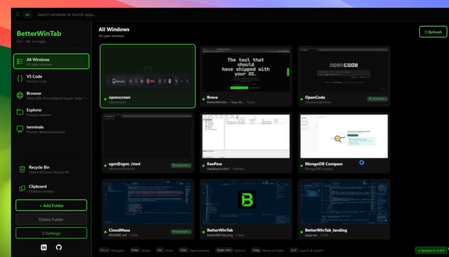
Same here. And for a long time, I just accepted it as part of the daily routine. Terminals, browsers, VSCodes… the same app open multiple times. And every time I looked for something: either I couldn't find it, or I ended up switching to the wrong window. A small annoyance, sure. But when it happens 30 times a day, it starts to add up. WIN + TAB, CTRL + TAB… I use them constantly. But they're slow, clunky, and never really useful when you have a lot of windows or multiple desktops. What I needed was something simple: type a window's name, no matter which desktop it's on, and jump straight to it. I couldn't find anything like that. So I built it myself. I've created a window manager that's fast, lightweight, and designed with one goal: get you exactly where you want to be, save you time, and make your life a little easier. It's open-source . If you found this project useful, please STAR it and UPVOTE, It helps me a lot! P.S.: Since I could never find the Recycle Bin either… I added a shortcut for that too. Priorities 😄 All feedback is welcome — I'm reading!PaulloadJun 03, 2026Iron Contributor8Views0likes0Comments
Windows activation lost
Hey everyone! i recently joined the insider program with a windows 11 Home edition PC. after that, it switched itself to pro edition for some reason, and my activation was lost. after that, i left the insider program, and reupdated to the normal edition to wndows, but my activation was still gone. my motherboard came with a built in activation, and i can't get it out of the BIOS with commands. right now, I'm on windows 25H2 Pro edition, and my PC won't reactivate. it keeps dropping the same error code: 0x803FA067 somebody know the answer to this?dec0Jun 03, 2026Copper Contributor14Views0likes1Comment
Help! Locked out due to Authenticator App Issues
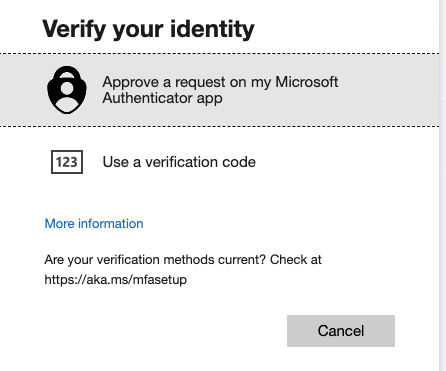
I'm really hoping someone can help - In transferring over my authenticator app to a new phone something went wrong and now the only way to 2-step authenticate is through the app - which I can't access. When i select additional verification methods this is what I get: When I reset my password however, it can verify this with my phone number. But still, I get stuck at the 2nd authentication step above... On my phone authenticator app this is what I can see. i dont get any alerts with codes: and yet again, to set these methods up, I need to confirm on my app. Sometimes i am asked to scan a QR code, but not sure where i can find this as i cant sign in... I am going in circles and so frustrated. I've called the help line and asked the chat suport with no help and so really hoping someone can help me as I'm locked out of my work account, which is my small business. it is an office 365 small business account I purchased through Microsoft. Really would value any advice or solutions! 🙏lockedoutJun 03, 2026Copper Contributor35Views0likes2Comments AsaoniuJun 03, 2026Brass Contributor11Views0likes0Comments
The Windows Insider settings screen says the account has already been registered and linked.
When I go to the Windows Insider Program tab in Windows Settings, a yellow warning icon appears at the top: “Your device is set to receive Insider Preview builds. To change your Insider tier, make sure your Microsoft account is enrolled in the Insider Program and linked on this page.” The problem is that I’m already enrolled in the Insider Program, I’m currently running that version, and my account is linked in Settings. Is this a bug in the current version?DaxxonFosterJun 03, 2026Iron Contributor31Views0likes1Comment
preview builds prevents virus and threat protections to start
I have win11Pro, upgraded from 10 home. I am an insider and have switched to a canary channel. I never switched it, but now I only get the preview release builds. I am trying to download some trial software for my work and cannot since it "fails virus scanning." When i checked on the virus and threat protections, i found that it was stopped. I tried to restart it. It would not. I thought, "Maybe I need to update my device," so I did. Restarted. I then went back to the virus and threat protections and attempted to restart them, but it failed again. I checked my startup applications and services, and of course, virus and threat detection is supposed to start on booting. I don't know how to fix this bug, and i need to download a trial software for work, but I need it to pass virus scanning as well. I cannot achieve this if the service has stopped and cannot be restarted. What do I do?manodwellJun 03, 2026Copper Contributor13Views0likes1CommentC Drive keeps filling up and I can't figure out why
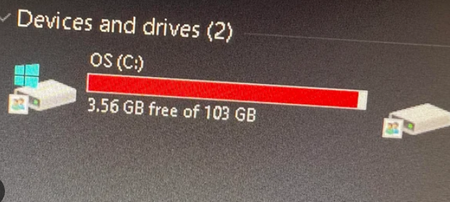
The C Drive on my laptop is a total 193 GB that I was able to keep at around 45-50 or so GB free until last year when the space started to fill up by itself. It now normally is around 28-32 gb free usually although briefly it was back up to 40 gb free after a Windows update, then came back down to to 28 gb after some weeks. Restarting the computer usually created some free space again, I'm not sure why. Its at its lowest now at 20-22 gb free and its starting to concern me. Anything I download or install I put in the D drive, I did a quick check in any case to see if I missed anything there that's taking up too much, but there isn't. I tried to do disk clean up with administrator permission but that at most only detected around 300 mb of unnecessary files to clean up. I tried Wiztree on some people's recommendations to see what was taking space. I'm not good at reading these sorts of things, so the most I can tell is that: Windows folder takes up the most space at 55.4 % Users folder is a total 40.7 GB. The AppData folder is taking up the majority of that at 27.8 (Local - 17.9 gb, Roaming - 8.9 gb, Local Low - 938.7 mb). Local has the Google folder at 11.3 GB so I assume that's an issue here? Roaming has the user date related to an art program I use at 6.4 gb. Program files takes up 19.9 GB with WindowsApps at 6.3 gb and Steam folder at 4.9 GB, and 5 other folders taking up about 1 GB each. I figure Steam is an issue here but I'd have to check what to do with it so that it doesn't mess up any other data, I otherwise put steam game files in the D folder. These are the major ones taking up space, should I just go through them individually and figure out what to do delete or should I do something else, or did I miss something else? Should I try some other program than Wiztree to help me out with this. I'm hesitant to touch anything in the case of messing up and deleting something important. Sorry for the long post, appreciate any advice. And I hope I posted the correct flair.CynthiaomJun 03, 2026Copper Contributor8Views0likes0Comments
USB Speakers Not Recognizing/Referred to as "Steam Streaming" Devices Following Potential Update
My USB speakers are suddenly not being recognized, and instead are being referred to as "Steam Streaming Speakers/Microphone" in the sound settings. I've tried pretty much everything I can think of, including: Disabling the speakers in settings Unplugging/plugging in Speakers (lights/speaker "pop" occurs, but no sound comes from them) Checking BIOS to make sure Audio Controller was enabled Disabling/uninstalling drivers in Device Manager then restarting Uninstalling device drivers in Device Manager then restarting I've found no fix so far and the most likely option seems to just be it's some weird thing that happened when either Steam or Windows updated. The drivers remain missing whenever I restart my computer, and plugging them/unplugging them gets no recognition whatsoever from the PC. Just wondering if anyone else has had this happen. Dunno if this has anything to do with a Windows Insider update tbqh (as I am in the Insider program and did just received an update for it two nights ago), but it's the only thing I can think of because I updated last night before going to bed and this issue only began today.anthonynashJun 03, 2026Copper Contributor51Views0likes2CommentsEgregious bug in this distro on Windows PC
Hi everyone. This was the first linux distro I ever tried for personal use and I'm sorry to say that I'd rather switch back to windows than keep using pop_os. I switched to Ubuntu and life has never been better. Here are my issues with this os: Window size management: if you've used this distro for a while you'll notice that it sometimes refuses to let you change window size. Why? I don't know. It seems to happen out of nowhere. Random glitches when performing random actions: see the video above. Besides that video, it also happens if you've got the gnome extensions together with proton vpn and then hover over the proton vpn extension in the top right of your screen. It also sometimes happens when just hovering with your mouse on the top of windows. Bad media player: the media player itself is alright. Not anything spectacular but esthetically better than VLLC. The problem however is that it doesn't close itself off. If you've got around 8 videos lined up. Double press them and then use the cosmic media player. After each press, close the window as soon as the video loaded. Your computer should sound like an airplane at this point and if you look at System Monitor your CPU must be going crazy. Look into resources and you'll see the media player processes eating up all of the resources as if it's streaming 8 different shows on 8 different monitors at the same time. I can't recommend this os to anyone to be honest.RonaldwolJun 03, 2026Copper Contributor31Views0likes2Comments





Tags
- insider175 Topics
- windows 11137 Topics
- windows 10120 Topics
- Feedback118 Topics
- Windows Insider98 Topics
- dev76 Topics
- suggestion60 Topics
- Windows1155 Topics
- new50 Topics
- fast ring49 Topics