
Forum Widgets
Latest Discussions

opted out of WIP, but still, I am stuck
After the recent Windows Insider program update, we can now leave the WIP, even if we were previously on the developer build, without doing a clean reinstall. I did not have time and energy to do a complete clean reinstall of Windows to go back from developer build to the normal Windows version as I I got my PC recently and I did not know about these thing so I accidentally signed up in WIP Without doing research that we cannot go back from the developer build without doing a clean reinstall but thankfully, they gave the option recently. I went to the Windows Update section> Windows Insider Programs section in the Updates section and clicked on the rollout button, and there was a link to leave the insider program, which I also did, and on that website, now it says that I am no longer a WIP user. After I also got an update, which was not a preview build like I was getting before, but Windows 11, version 25H2, so I installed it, and I have read it was in place to upgrade an IPU, and all my data should be migrated safely. Although I did not check everything, from what I have used PC after Opting out and updating, mostly everything is in place as it was. The problem is that now when I go to the update section. Then, in the Windows Insider program section, I see a reinstall button where it says that it will go back to the preview build if I click on it, but if we are outside of the Insider build like I was before, when I even tried signing up for this it did not show us restart button when i was on the normal Windows 11 when I bought the pc. The normal Windows update after opting out should not show a restart button in the Windows Insider Program settings. Also, when I try to check for an update, it still shows me the Preview build I was getting before, which shouldn't happen. Why am I not getting a normal update, and instead, the preview build, AND in the Windows Insider section (Windows Update menu), I am still seeing that it says to restart to get back to the Windows Insider program, which should not be supposed to happen. HELP, THIS IS FRUSTRATING.SolvedAshwani_JhaJun 04, 2026Copper Contributor39Views0likes1CommentThe Windows Insider settings screen says the account has already been registered and linked.
When I go to the Windows Insider Program tab in Windows Settings, a yellow warning icon appears at the top: “Your device is set to receive Insider Preview builds. To change your Insider tier, make sure your Microsoft account is enrolled in the Insider Program and linked on this page.” The problem is that I’m already enrolled in the Insider Program, I’m currently running that version, and my account is linked in Settings. Is this a bug in the current version?SolvedDaxxonFosterMay 27, 2026Iron Contributor84Views0likes2CommentsWindows 11 Insider Experimental Future Platform build is stuck at 29591, and no updates are detected
I went to Settings → Windows Update → Check for updates, hoping to detect and download version 29595, but it actually told me that I was already running the latest version and couldn't update to 29595.SolvedEmmettBrooksMay 27, 2026Iron Contributor70Views0likes1CommentEgregious bug in this distro on Windows PC
Hi everyone. This was the first linux distro I ever tried for personal use and I'm sorry to say that I'd rather switch back to windows than keep using pop_os. I switched to Ubuntu and life has never been better. Here are my issues with this os: Window size management: if you've used this distro for a while you'll notice that it sometimes refuses to let you change window size. Why? I don't know. It seems to happen out of nowhere. Random glitches when performing random actions: see the video above. Besides that video, it also happens if you've got the gnome extensions together with proton vpn and then hover over the proton vpn extension in the top right of your screen. It also sometimes happens when just hovering with your mouse on the top of windows. Bad media player: the media player itself is alright. Not anything spectacular but esthetically better than VLLC. The problem however is that it doesn't close itself off. If you've got around 8 videos lined up. Double press them and then use the cosmic media player. After each press, close the window as soon as the video loaded. Your computer should sound like an airplane at this point and if you look at System Monitor your CPU must be going crazy. Look into resources and you'll see the media player processes eating up all of the resources as if it's streaming 8 different shows on 8 different monitors at the same time. I can't recommend this os to anyone to be honest.SolvedRonaldwolMay 12, 2026Copper Contributor54Views0likes2CommentsQuick question about window PC requirements for meta link cable?
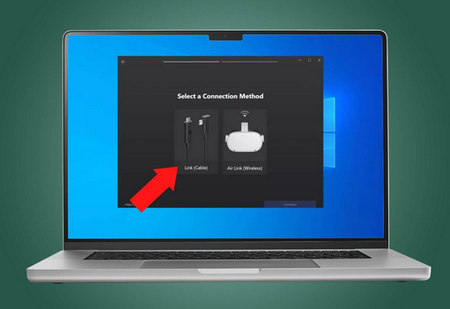
Do I not have the right requirements? I finally got myself a link cable and was going to connect it to my computer, but it’s just not reading it and it’s saying, I don’t meet the updated minimum specifications. I have a: NVIDIA GeForce RTX 5060 Laptop GPU (sorry for being dumb I am)SolvedPaulloadMay 08, 2026Iron Contributor60Views0likes2CommentsIs it possible to run ryujinx canary on an administrator account on windows?
hi! I recently saw a tutorial for opening ryujinx (from extracted folder) when it isn't working, and the guys said that yu need to make a local acc for your pc. I'm wondering if there's anyway I can do this without doing that, because I'd have to redownload everything.SolvedManstawayMay 08, 2026Copper Contributor290Views0likes4CommentsWhy Windows 11 still depends on 1990s code
Windows 11 looks modern on the surface. Rounded corners, AI features, redesigned menus, cloud integration, Copilot branding everywhere. Underneath all of that, Microsoft is still relying on core technology designed during the Windows 95 era. That is not speculation or internet nostalgia. Microsoft CTO Mark Russinovich recently acknowledged that the Win32 API, a programming foundation tied closely to Windows from the 1990s, remains deeply embedded in Windows 11. In many cases, everyday actions like right-clicking files or launching classic desktop apps still depend on that layer. For some people, this sounds alarming. In reality, it says more about how operating systems evolve than about Windows being outdated. Win32 never really went away Win32 became mainstream with Windows 95, although parts of it existed earlier in Windows NT. It gave developers a stable way to build desktop software for Windows. Once millions of applications started relying on it, replacing it became extremely difficult. Russinovich described Win32 as “bedrock” for Windows because entire ecosystems were built on top of it. That includes: business software used by corporations for decades creative tools and engineering applications games from multiple generations of Windows Microsoft’s own desktop products A huge part of Windows’ success came from backward compatibility. Users could often run software written years earlier without major issues. Businesses especially depended on that reliability.SolvedZillmannMay 08, 2026Brass Contributor254Views0likes2Comments
[Proposal] Windows Atomic: Triple-Kernel Isolation & AI-Master Engine
Technical Proposal: The Windows Atomic Concept A Strategic Document Combining Engineering Ingenuity with Commercial Viability General Definition Windows Atomic is a next-generation operating system based on the philosophy of "Atomic Partitioning." It is designed to end the era of sudden system crashes and performance degradation by decoupling system functions into three completely independent kernels. These kernels operate within protected, isolated environments, all managed by a Sovereign AI-Master Engine. Engineering Structure: The Triple-Kernel Shield Sovereign Kernel (SK) Nature: A highly protected and isolated environment, completely separated from the rest of the system. Function: The supreme authority for physical resource management (CPU/RAM). It strictly and physically allocates CPU threads and a RAM bridge for the Master Engine. Maintenance: Features a "Protected Maintenance Vault" designed to restore and repair the engine during the boot process. Microsoft Services Kernel (MSK) Nature: A protected, isolated environment dedicated to Microsoft add-ons and services (e.g., Copilot, Edge). Function: Operates on a "Zero-Idle" basis, meaning it consumes zero system resources unless an explicit request is made. Drivers & Apps Kernel (DAK) Nature: An active, protected environment for third-party drivers and user applications. Function: Acts as a "Safety Valve" to absorb and isolate driver errors or software conflicts, preventing them from affecting the core system. The AI Master Engine The AI Master Engine is a comprehensive operational unit responsible for managing, coordinating, requesting, and transmitting all data between the three kernels. Physical Hardware Reservation: Mid-Range Hardware (8th Gen): Reserves 2 Threads (Request/Delivery) and 512MB of RAM. Modern Hardware (13th/14th Gen+): Reserves 4 Threads (2 Requests / 2 Delivery) and 800MB to 1GB of RAM. Technical Goal: To ensure ultra-fast data transfer and prevent channel interference, achieving Zero Latency responsiveness. Strategic Update Lifecycle This architecture provides Microsoft with immense development flexibility without compromising system stability: Sovereign Kernel (Quarterly): Core updates are released every 3 months, focusing on deep stability and advanced security, allowing developers ample time for rigorous testing. Engine & Services (Monthly): Monthly security and feature updates for the Master Engine and Microsoft services to keep pace with new technologies without risking the "Heart" of the OS. Maintenance & Intelligent Diagnostics Boot-Time Restoration: Performs periodic audits of the engine's files before entering the OS. Any corrupted file is instantly replaced from the Maintenance Vault within the protected environment. Fault Identification: The engine precisely identifies the source of any conflict (specific driver or application), isolates it within its protected kernel, issues a transparent report to the user, and executes an automatic recovery. Technical Conclusion The Windows Atomic system ensures that the "Heart" remains protected and clean, while the Master Engine intelligently manages crises and physical resource allocation. This smart scheduling of updates ensures a perfect equilibrium between Continuous Innovation and Absolute Stability. Data Flow & Logical Architecture Diagram [ MS Services Kernel ] --- [ Reserved Request Paths ] ________________ [ Reserved Delivery Paths ] --- [ Sovereign Kernel ] (Protected Env) | | | | | | (Isolated Env) | | | AI-Powered | | | [ Drivers & Apps Kernel ]- [ Reserved Transfer Paths ]-- | Master Engine | -- [ Auto-Recovery Paths ] ---- [ Maintenance Vault ] (Protected Env) | | | | | | (Within Sovereign) |________________________| |________________| |_________________________| The Strategic Profitability & Adoption Roadmap for Windows Atomic Commercial Clause: The Adaptive Profit Model Instead of phasing out legacy hardware, Windows Atomic implements the "Adaptive Performance" principle to ensure market inclusivity and sustainable revenue. Phase I: The "Containment" Stage (Targeting 2 Billion Existing Devices) Universal Compatibility: The system is designed to support legacy hardware (minimum 4GB RAM) using the "Flexible Engine Mode." Profitability: Microsoft generates revenue through "Upgrade Licenses" or "Cloud-based AI Services." The system’s absolute stability—achieved via Kernel Isolation—extends the hardware lifecycle, converting users into long-term subscribers of the Microsoft ecosystem (Microsoft 365, Game Pass). Phase II: "Technical Excellence" (Subscription-Based Premium Features) Microsoft introduces periodic software enhancements for the Engine through a Subscription Model. These updates offer exclusive performance-tier features, such as a "20% Gaming Performance Boost" or "Ultra-Secure Banking Isolation," ensuring a consistent monthly recurring revenue (MRR). Phase III: The "Golden Alliance" (The 5-Year Strategic Plan) The "Atomic-Ready" Generation: In strategic partnership with hardware manufacturers, new components (Motherboards, CPUs) will be launched under the "Atomic Certified" brand. Consumer Incentive: This is an elective upgrade path. Users will be driven to purchase "Atomic Certified" hardware to unlock "Physical Reserved Paths," which enable system speeds up to 10x faster than standard software-based versions. Shared Revenue: Microsoft earns Licensing Fees for every hardware component sold bearing the "Atomic" certification. The Business Logic (The Hook) Microsoft secures a dual-win scenario: Immediate Value: By retaining the 2-billion-user base with a non-crashing, stable OS, Microsoft drastically reduces technical support overhead while maximizing service-side sales. Future Value: By creating a "Genuine Necessity" for hardware upgrades to fully utilize the Isolated Kernel and Physical Reserved Paths, revitalizing the global PC market. Final Addendum: Dynamic Profitability Strategy Maximum Compatibility: Windows Atomic maintains the massive 2-billion-device user base via the "Flexible Engine" architecture. Revenue Model: Driven by "Smart Engine" service tiers, software subscriptions, and hardware licensing fees for the "Atomic-Ready" hardware generation, positioned to dominate the market over the next five years. Final Conclusion: Under this logic, Microsoft avoids user churn. Instead, it establishes a Strategic Roadmap that guarantees sustained profitability and market leadership for the next decade. Conclusion: Shaping the Future of Windows Together Windows Atomic is not just a proposal for UI tweaks or cosmetic features; it is a call to rethink the very "core" of the operating system millions rely on. We are moving from a system that "struggles to stay stable" to one "built on absolute reliability" through isolated kernel architecture and a smart engine. This proposal balances the engineering ambition for peak performance with corporate goals for sustainable profitability, all while keeping millions of existing devices at the heart of the ecosystem. I invite my fellow experts, system architects, and tech enthusiasts in this community to share their thoughts: Do you believe that "Physical Path Isolation" is the ultimate solution to end driver conflicts and prevent system file corruption forever? How do you foresee the impact of the "AI-Master Engine" on gaming performance and professional productivity? Your engagement, feedback, and support—through comments or upvotes—are what will carry our voice to the core development team at Microsoft. Let us usher in a new era where Windows is synonymous with "Absolute Reliability." Thank you for your time and trust. engineer122Solvedengineer122Apr 30, 2026Tin Contributor215Views0likes2Comments








Tags
- insider183 Topics
- windows 11169 Topics
- windows 10129 Topics
- Feedback128 Topics
- Windows Insider116 Topics
- dev79 Topics
- Windows1164 Topics
- suggestion63 Topics
- new51 Topics
- fast ring51 Topics