Forum Widgets
Latest Discussions

Windows 12 as far as i know?
As per this thread created, i got some information about Windows 12, which is: Windows 12 is coming about late 2024 or early 2025. Windows 12 is possibly already show up on Canary Channel although it is not officially confirmed. Several news sources say that HP give a hint if around October 2024, the Windows 11 version 24H2 (or Windows 11 2024 Update) is released, while HP is keep silent about Windows 12, which is possibly Windows 12 will be delayed a bit later after Windows 11 24H2 released. System requirements for Windows 12 is definitely higher than Windows 11. Windows 12 still require TPM 2, Secure Boot support, and processor that capable to use hardware accelerated VBS properly, such as processor that released on 2018 and later. Windows 12 require minimum 8 GB of ram and possibly still same 64 GB disk space, while SSD is becoming a mandatory. Actually, Windows 12 require special hardware named NPU (Neural Processing Unit) for all features in Windows 12 is working properly, but since the NPU is still very expensive to acquire (or basically you need an Intel Core Ultra 5 125U at least), so these requirements should be optional. Information about whether Windows 12 will be a subscription based operating system or not is still unclear, but most speculation says that Windows 12 is not required to subscribe to use. That's it from me. If you got any more further information about Windows 12, you can share here. Thanks to XDA that give me a big overview about Windows 12.AnonymousFeb 12, 20261MViews7likes89Comments
Congelamientos en juegos y apps - Build 26300.7760 Dev - Driver NVIDIA 591.86
Hola, Presento bloqueos (hangs) constantes en Windows 11 Insider (Canal Dev) que afectan tanto a juegos (Minecraft) como a aplicaciones generales del sistema. Detalles del sistema: Compilación del SO: 26300.7760 (Versión 25H2). Driver GPU: NVIDIA GeForce Game Ready 591.86 (Publicado el 27/01/2026). Hardware: Portátil/PC MSI. Descripción del fallo: La imagen se congela por completo. La única forma de "desbloquear" la interfaz es realizar un cambio de contexto (minimizar/maximizar o cerrar sesión). El problema persiste incluso tras una instalación limpia de los drivers gráficos. Cabe destacar que el equipo sufrió un cuelgue total durante la instalación de esta última build, lo que sugiere una posible corrupción de archivos o inestabilidad crítica en la rama 26300 con hardware MSI/NVIDIA. Pasos realizados sin éxito: Actualización de drivers a la versión 591.86. Ejecución de sfc /scannow (sin errores detectados o reparados sin éxito). Imposibilidad de realizar rollback por eliminación de archivos de versiones anteriores. ¿Alguien más en la build 26300 está experimentando este comportamiento con los drivers de enero? Agradecería cualquier sugerencia que no implique formatear el equipo.elgery1Feb 12, 2026Occasional Reader4Views0likes0Comments
New laptop problems with system
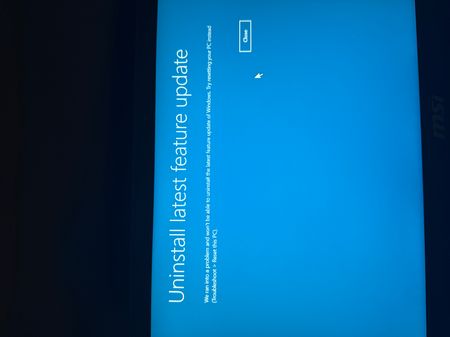
Hello, i have this problem on new bought laptop that is completely brand new. I updated Windows and it happened. So what happened? After opening Windows, logging in my screen looks like it’s constanly refreshing. There is no way to open anything or go into settings. Only way to open cmd is via task manager which Works. Even after trying a few cmd options and then uninstalling updates it’s still like that. (Constant refresh) when turned in safe mode same thing. Even in „tryb awaryjny” it’s still the same. I tought maybe uninstalling latest feature update will help but i cannot do that. this laptop has like 5 days so pls help me cuz im losing itFakakiriFeb 11, 2026Copper Contributor89Views0likes5CommentsWith Microsoft Edge too much advertising with Google...
Following a recent update of "Microsoft Edge" when I use the "Google" search engine and I enter a simple word before finding information on the word I have lots of ads that I don't have no need. Recently I have been looking for information on road works not far from my home and as I use the word "exchanger", I find myself with heat pumps and others, I have to go down my elevator to find the information I need. 'need. With the same search with Firefox no problem, just with Edge. Do you know how to prevent all these ads?AldenGroveFeb 11, 2026Iron Contributor37Views0likes2CommentsSanDisk 1tb Extreme causing file explorer to not respond?
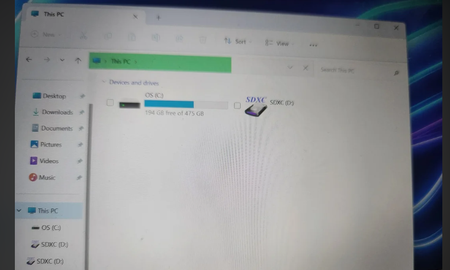
This is a Sandisk SDXC Extreme PRO 64 GB I tried on two PCs: one running W10, the other running W7, both with an internal drive. The checks I did: To check the operation of the (internal) drive, I have an old compact flash card: it works on both PCs. The SD card: nothing, on both PCs. When I remove the card, message from W10: F\: invalid directory. Nothing found on the InternetPherickFeb 11, 2026Copper Contributor40Views0likes1Comment
RSAT for Windows 11 ARM64
When will we see the addition of RSAT such as Active Directory, DHCP and Group Policy Management on Windows 11 Pro using ARM64?Kylem843Feb 10, 2026Brass Contributor18KViews18likes32CommentsHow can I combine multiple audio/music files into one
Hello, guys, I've been organizing some recording materials recently, and I want to combine several audio clips into a complete file. As a result, I was a little confused when I was operating... I usually use Windows 11, and I have some audio files in mp3 and wav formats. I want to ask if you have a simpler way to merge these audio files into one file? It would be best if it can be processed in batches, and the sound quality should not be reduced too much. Has anyone used the command line or the system's own tools to do this? I tried using Audaccity, but there are too many steps and it's a bit troublesome... Are there any brothers and sisters who can share how you combine multiple audio files into one? Thank you! !SolvedQuincyWilderFeb 09, 2026Iron Contributor15KViews0likes8CommentsHow to move a file from one computer to another with the mouse?
I have two computers and I use Mouse without borders to be able to scroll between the two computers. the Logitech software which allows you to do a flow in the same way offers to copy and paste files between two computers but this does not work for me. In fact what I would like to know is if it was possible to move a file from one computer to another with the mouse with another software? THANKS!AmayaIFeb 09, 2026Bronze Contributor16Views0likes0Comments
More video thumbnails in Explorer.
Overnight, new videos created on my PC no longer display thumbnails (Windows 10 x64 Pro 22H2 last update) except for .wmv and .avi Those who had their thumbnails cached kept them. It's only for videos, no problem for images. I use V1C by default but it's the same with another player. From what I understand, it's the explorer that manages the thumbnails so it's normal that using V1C or something else doesn't change anything. I have tried almost every solution found on the internet. Among other things, I deleted the cache, which just had the effect of obviously removing the existing thumbnails but without rebuilding them. What I don't understand is did it work without problems and then no.AlmaiwFeb 09, 2026Iron Contributor40Views0likes2Comments




Tags
- insider159 Topics
- windows 10119 Topics
- windows 11119 Topics
- Feedback110 Topics
- Windows Insider80 Topics
- dev66 Topics
- suggestion52 Topics
- Windows1149 Topics
- fast ring47 Topics
- new45 Topics