Forum Widgets
Latest Discussions
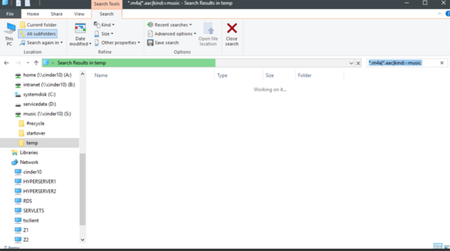
How to find old files in Windows 11 based solely on vague memory or project concepts?
Months after a project is completed, it often becomes difficult to retrieve the needed files due to forgetting the exact file name, precise keywords, or the final storage location. The search function in Windows File Explorer is effective initially, but over time, relying solely on file naming and folder structure provides limited help. I tend to remember the content of the file or the project concept rather than its organization method. I'm curious to know how others deal with this problem in the long term: do they mainly rely on Windows search, use external note/summary tools, manually add tags, or simply accept that old files are hard to find?KodyonFeb 04, 2026Iron Contributor26Views0likes4Comments
Windows 11 Insider Preview 27729 BSOD KMODE_EXCEPTION_NOT_HANDLED after Login
When I try to update from version 27695 to a new version, I get a blue screen after logging in. KMODE_EXCEPTION_NOT_HANDLED I have uploaded the minidumps and the logs here. https://drive.google.com/drive/folders/1uyL37s07UYLXvSqpxWOLmDfe2ISNXuYa?usp=sharingtinnitusFeb 04, 2026Copper Contributor336Views0likes1Comment
Windows 11 enters a reboot loop after initialisation and cannot connect to the network.
After initializing Win11, the computer keeps restarting and displays "Not connected to network," but the actual network is working fine. How can this be skipped or fixed?MikaeliopFeb 04, 2026Iron Contributor13Views0likes1Comment
Problema con actualización 26220.7262 en surface 3
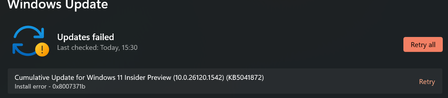
Hola, poseo una surface 3 pro, y actualmente estoy en el programa insider, actualmente estoy usando el paquete insider preview 26120.6982, instalado el 15/10/2025, le problema viene cuando abro Windows Update, me aparece una actualización con la versión 26220.7262, donde tengo que aplicar Descargar e Instalar, hago click y aparentemente comienza a descargar e instalar, llegado al porcentaje del 100% instalado, el sistema me pregunta si quiero reiniciar para aplicar la actualización, y que durará 20 minutos aproximadamente. Cierro todos los programas y le aplico a que instale la actualización y actualice. Comienza a hacer el reinicio, pero en ningún momento muestra la típica pantalla de: No apague el equipo, aplicando actualización. Sino que hace un reinicio normal y corriente. Cuando vuelve a cargar win11, inicio la sesión y veo que no se muestran cambios, y el paquete insider sigue siendo el anterior, y cuando abro windows update me vuelve a mostrar que hay un paquete de actualización, que descargue e instale, y vuelve a hacer el mismo proceso, descargar, instalar y reiniciar sin hacer cambios en el equipo.LaloNetFeb 04, 2026Copper Contributor27Views0likes1CommentKill this Canary
I have Windows 11 Pro. I never signed up for any Insider builds, but somehow I ended up on a Canary build. I removed it and everything was fine for a while. Then I upgraded my CPU, network card, and motherboard didn’t think it was a big deal. Later I noticed my account name had changed on my PC. Odd, but whatever. I asked Copilot about it and found out I no longer had a local account. Still not a huge deal, except suddenly I couldn’t change anything because “your organization manages some of these features.” How is that even possible? I built this PC myself. I installed the software. Nothing has ever been connected to a work or school account. So I figured I’d start fresh. I backed everything up and downloaded a clean Windows build. That’s when I discovered the Canary build had somehow come back. I have no idea how. I’ve spent the last three days trying to get this Canary build off my PC with no success. I’ve deleted the hard drive, wiped the BIOS, used Rufus to create a bootable installer from my Windows 10 laptop, and installed it with my modem, router, extender, and phone all unplugged so nothing could trigger the Canary build to return. And yet this stupid build is still on my PC. At this point I can’t even use my computer. I’m probably going to have to reinstall Windows again. One tech support person told me I “have a Canary ring,” whatever that means, but it sounds like Windows can just install itself on my PC without my consent. There’s a word for that, and I’m not a fan. Please, for the love of God, help me get rid of this Canary build and get my PC back.RumpelstiltskinFeb 04, 2026Copper Contributor9Views0likes1CommentUnable to Re-enable Smart App Control After Disabling It in Windows 11 - Any Solutions?
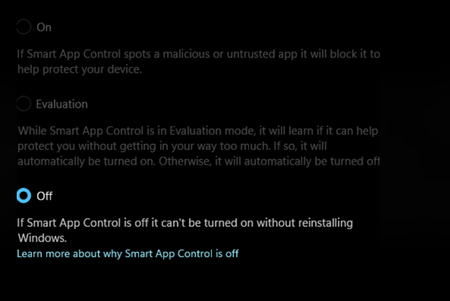
I temporarily disabled Smart App Control to mount an ISO file but now find it impossible to turn it back on. Is there any method to resolve or bypass this restriction?EorkuFeb 04, 2026Iron Contributor55Views0likes3Comments tkannadasanFeb 04, 2026Copper Contributor341Views0likes2Comments
After installing software in Windows 11, frequent internal server errors occur.
Need help: After installing a certain work/study-related software on Windows 11, multiple "Internal Server Error" pop-up windows frequently appear (as shown in the attached image). They keep reappearing even after being closed. Hoping to resolve this issue without uninstalling the software, what steps should I take? Thank you!OlddiesFeb 04, 2026Silver Contributor24Views0likes2Comments




Resources
Tags
- insider159 Topics
- windows 10119 Topics
- windows 11118 Topics
- Feedback110 Topics
- Windows Insider79 Topics
- dev65 Topics
- suggestion52 Topics
- Windows1149 Topics
- fast ring47 Topics
- new45 Topics