
Forum Widgets
Latest Discussions

Personal computer used at work sign-in options
I got a new personal windows 11 laptop I use at work. My boss had me sign into my company Microsoft account to add windows products and onedrive. Now when I want to change my password, it says unavailable and I have to enter code from Microsoft Authenticator app presumably on my boss’s device. I don’t want this. How can I setup my computer so that I log into my Microsoft account and then still receive my work’s Microsoft account’s products and onedrive?Anonymous238Apr 17, 2026Copper Contributor46Views0likes2Comments
7 General suggestions to Windows and its Apps
During my experience on Windows I’ve been thinking about how it could improve, especially around Fluent Design. I wrote down seven ideas that I’d love to hear opinions on. I will be sharing them here: #1: Two branches for Windows and content updates; Trying to please everyone with a single version of Windows is difficult, so Microsoft could maintain two official branches of the system: a “Vintage Windows” (like Windows 10), for those who prefer the classic interface and a more traditional look, with extended support indefinitely and security updates. And a “Modern Windows” (Windows 11), consistent with Fluent Design, constantly updated, and focused on introducing new features. Both would use the same kernel and APIs for developer compatibility. This approach would offer users greater freedom of choice and demonstrate that a trillion-dollar company is dedicating teams to simultaneously deliver traditional features and modernity. I’ve seen many people complain about the lack of consistency and lack of content. Additionally, I miss feature updates for Windows and hope that Microsoft brings more flexibility, apps, and Fluent 2-style fixes in future updates. And, yes, this would increase the efforts and costs, but it's a cost that a trillion-dollar company could take. #2: Modern Flyouts and Windows' limitation with volume mixer; In Windows 11, the multimedia controls displayed by apps like Fluent Flyouts are very limited; they only allow you to pause or skip tracks, with no option to adjust the volume or use repeat or shuffle buttons. This makes the experience less convenient compared to Android, where users can control the app’s volume or the music’s volume separately, and the operating system allows third-party apps to do so. My suggestion is that Microsoft should be more flexible and give apps like Modern Flyout the ability to adjust the volume, so you could turn the music up or down without affecting the overall system volume. Honestly, it’s surprising that something as basic as this hasn’t been implemented yet in the most widely used operating system. #3: Lack of flexibility in the Windows 11 search bar; Windows 11 still limits users and developers to a rigid and impractical search bar. Apps like Fluent Search, Flow Search, and Everything Toolbar are much faster and more powerful, but they’re confined to taskbar icons or floating search bars, while the native search bar takes up space without offering the same efficiency. Microsoft needs to be more flexible and release an API that allows third-party apps to appear as a search bar directly on the taskbar. This isn’t a complex feature; it’s something simple and obvious that should already exist. If the official search bar itself isn’t improved, the least they could do is give other apps the freedom to offer a superior experience. It’s frustrating to see Windows remain limited in such basic aspects, while other systems offer more modern and practical solutions. Microsoft needs to listen to users and stop holding Windows back with an outdated model. #4: Windows Task Scheduler and other menus and tools need to be updated The native Windows Task Scheduler is completely outdated and inconsistent with the Fluent 2 style. Independent projects like the Fluent Task Scheduler show that it’s possible to have a modern, organized, and much more user-friendly interface. It’s frustrating that these apps have to coexist with outdated system tools, without being able to replace them or integrate with the system. Microsoft, as a trillion-dollar company, should invest in modernizing its own utilities or hire independent developers who have already proven capable of creating superior solutions, such as the Fluent Task Scheduler. The lack of visual and functional consistency in Windows is glaring and needs to be addressed #5: Lack of flexibility in naming user folders Compared to the Android system; Windows is very inflexible and lacks practicality in many ways. For example, if my folder is C:\Users\eagl, I cannot simply correct it to eagle without creating an entirely new user profile. This lack of flexibility is a major hurdle for personalization on what could be a basic and simple fix. On Android, I was already so used to the system’s practicality that when I switched to Windows—which was supposed to be a more robust and powerful system—I was surprised to find it lacks even such a basic feature. #6: Differences in user experience between home and business users, and inconsistencies in Fluent 2; Microsoft seems to be focusing more and more on businesses, consistently applying Fluent 2 to apps like Teams, Outlook, and Office, while everyday users are left with a Windows full of outdated and inconsistent menus. This contradicts the marketing that promotes Fluent 2 as the standard, yet is frequently violated by the official apps themselves. It’s frustrating to see that Microsoft can’t deliver on its promises. If it really wants to preserve old elements for the sake of businesses, then it should separate the systems, as in point #1: a legacy one for compatibility and a modern one for home users. Or, at the very least, adhere to the Fluent 2 style across all of Windows. I love Fluent 2 and really want to see significant progress in this area, but seeing that Microsoft itself hasn’t made much effort in this regard has been a disappointment. The trillion-dollar company that talks so much about innovation shouldn’t be delivering a fragmented and outdated system. #7: Digital Wellness and productivity; Microsoft should make a native app with fluent style to help users watch their screen/app time. In 2026 there hasn't been an app that's free, solid and that feels native in Windows 11, because there aren't any API for that. Apps like Activity Watch for some reason don't work in my PC and apps like SolidTime are paid and not really fluent. Naturally, something like this should be made by Microsoft itself. Android has it since the beginning, why Windows doesn't have it yet? I believe that these suggestions, even though difficult, could contribute for a more consistent user experience, improved productivity and easier accesibility.SparkingEagleApr 17, 2026Brass Contributor238Views2likes12Comments
Free up space in crossdevice mobile phone folder
I like the idea of having my connected mobile device storeg folder accessible from my PC. It is a very similar concept to OneDrive where you can see the contents/thumbnails of the cloud folders and files, without it actually taking up space on local hard drive. And you can access those when online, by downloading/storing it locally first. In OneDrive you can free up space by right clicking on the files/folders and free up disk space. However, I don't see this option for the phone storage files and folders. Why? Isn't there any? How do I free up local disk space once I don't need to have files/folders stored locally anymore in phone storage? I don't see any option for it by right clicking. Is there another way? Sure, I can delete it, but then it gets deleted both locally and on the phone ... and I just want to free up space on local drive, sort of de-synchronize it. How?Lovro SipovacApr 17, 2026Occasional Reader35Views0likes0Comments
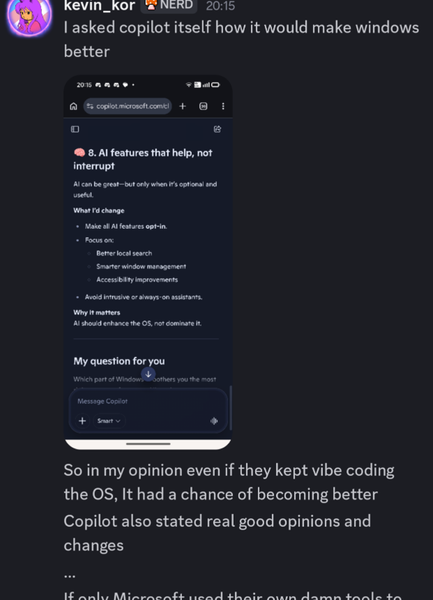
For Windows 11, Microsoft should ask its own AI what users really want
Microsoft spent heavily on AI and forced it everywhere in Windows 11, which most users dislike. It’s disappointing they never let the AI suggest real improvements for the system based on user feedback.AnselRhodesApr 17, 2026Iron Contributor25Views0likes0CommentsWindows 11 screen goes black after waking from sleep, only mouse moves
After waking my PC from sleep, the screen is totally black but the mouse cursor still works. Keyboard is unresponsive, I can only force restart. Tried updating graphics drivers and disabling fast startup, no luck.DaxxonFosterApr 17, 2026Iron Contributor27Views0likes0CommentsHow do i completely remove Chrome from Windows 11 as it won't let me uninstall
Hello everyone, Why Windows 11 won't let me uninstall Chrome? I am trying to completely remove Google Chrome from my Windows 11 PC, but it will not uninstall properly. When I try the normal uninstall method, it either does nothing, gives an error, or Chrome still seems to stay on the computer afterward. I am not very tech-savvy, so I would really appreciate simple and beginner-friendly help. Is there a safe way to completely remove chrome from Windows 11, including leftover files, if the standard uninstall option does not work? I would also like to know if there is a built-in Windows method for this or if I need a trusted third-party tool.ManstawayApr 17, 2026Copper Contributor108Views0likes7Comments



Tags
- Features2,089 Topics
- configuration1,946 Topics
- device management1,348 Topics
- Update management1,049 Topics
- Application Management910 Topics
- security820 Topics
- deployment583 Topics
- community471 Topics
- accessibility297 Topics
- licensing247 Topics