
Forum Widgets
Latest Discussions

The New Start Menu Is a Perfect Example of Microsoft Forcing Unwanted “Features” on Users
I’m posting this because I’m beyond fed up with the direction Microsoft is taking with Windows, and the latest Start Menu redesign is really unwelcomed. Whoever decided to implement the new “All” section with forced Categories, Grid/List views, and a permanently attached app list seems to have completely forgotten something fundamental: this is my Start Menu, not theirs. I’ve already turned off every bit of clutter I can — Recommended, recent files, “suggestions,” all of it. Yet Windows still insists on injecting an enormous block of UI I never asked for and will never use. I don’t care whether it’s Categories, List, or Grid. I don’t want any of it. I want the Start menu to show ONLY the pinned items I chose, nothing else, the same way it worked for years. But now? Microsoft has deliberately removed the ability to collapse, hide, disable, or eliminate this lower “All” section entirely. It wastes space, disrupts workflow muscle memory, and provides zero value for users who already know exactly what they need. It’s an unwanted visual and functional takeover of the one UI element that should be the most personal and customizable. This is exactly the type of “change for the sake of change” that pushes long‑time Windows users away. It feels like decisions are being made by people who never actually use Windows for real work, and who believe their design experiments matter more than respecting users’ preferences. I’m tired of being forced into UI experiments I never opted into. I’m tired of updates that remove more choice than they add. And I’m tired of Microsoft ignoring the most universal feedback users keep giving: Stop shoving new UI elements in our faces and give us back full control over our own operating system. If Microsoft wants people to stay enthusiastic about Windows instead of increasingly frustrated with every forced redesign, then we need true user‑controlled customization — not “pick between three unwanted layouts,” not “view modes,” not scripts, not policies, not third‑party hacks. Just a simple, basic ability to hide what we don’t want. Give us the Start Menu we choose, not the Start Menu you decide we should have.William_HolmesJan 22, 2026Brass Contributor116Views4likes2Comments
Windows 11 23H2 → 25H2 in-place upgrade fails in SAFE_OS / MIGRATE_DATA
I'm trying to in-place upgrade a Windows 11 23H2 system to 25H2 and consistently get a rollback in the SAFE_OS / MIGRATE_DATA phase with 0x8007042B – 0x2000D. After a lot of analysis (Panther logs, SetupDiag, DISM, etc.), the failure always points to migration problems around Microsoft-Windows-TPM-Driver-WMI (CCSIAgent) and, secondarily, Microsoft-Windows-DirectoryServices-ADAM-Client (adammigrate.dll). I'd like to confirm whether this is a known 25H2 migration issue (especially on Education) and if there is any supported workaround short of a clean install. --- ENVIRONMENT - OS: Windows 11 Education 23H2, Build 22631.6276 - Edition: Education (confirmed via winver and Settings → System → About) - Target: Windows 11 25H2 (26200.6584, "2025 Update") - Upgrade method tried: - Windows Update feature enablement - Windows 11 Installation Assistant - Official 25H2 ISO (26200.6584.250915-1905.25h2_ge_release_svc_refresh_CLIENT_CONSUMER_x64FRE_en-us.iso) mounted locally → setup.exe - Hardware: - Motherboard: Gigabyte Z690 AORUS PRO (BIOS F31) - SSD: WD_BLACK SN770 NVMe (firmware 731130WD, WD Dashboard reports "Healthy", no errors) - TPM 2.0: Intel PTT (firmware TPM) enabled - Secure Boot: Enabled - BitLocker on C: OFF (fully decrypted) --- SYMPTOM Every full in-place upgrade attempt (23H2 → 25H2) behaves as follows: 1. Setup runs, copies files, reboots to SAFE_OS phase. 2. During MIGRATE_DATA, setup fails and rolls back to 23H2. 3. Message on screen: "0x8007042B – 0x2000D The installation failed in the SAFE_OS phase with an error during MIGRATE_DATA operation" In C:\$WINDOWS.~BT\Sources\Panther\setuperr.log / setupact.log, the failure is always in SAFE_OS / MIGRATE_DATA and includes: V2VArbitrate: Source migration unit <System>\Microsoft-Windows-TPM-Driver-WMI (CCSIAgent) is not supported on the destination machine and it will not be restored V2VArbitrate: Source migration unit is critical, arbitration will fail V2V Arbitration failed. Last error: 0x00000032 pSPExecuteApply: Apply operation failed. Error: 0x0000002C Apply (machine-independent apply, offline phase): Migration phase failed. Result: 44 ExecuteOperations: Failed execution phase Safe OS. Error: 0x8007042B On some runs, just before the TPM arbitration failure, there are also errors related to DirectoryServices-ADAM-Client: Failure while calling IPostApply->ApplySuccess for Plugin="Microsoft-Windows-DirectoryServices-ADAM-Client\adammigrate.dll"… Error: 0x80070002 Error READ, 0x00000002 while gathering/applying object: apply-success, Action,CMXEXmlPlugin, C:\$WINDOWS.~BT\Sources\ReplacementManifests, Microsoft-Windows-DirectoryServices-ADAM-Client\adammigrate.dll… However, the ADAM plugin errors are logged as "ignore" in some traces, while the actual rollback is always tied to the critical TPM-Driver-WMI migration unit. --- WHAT I HAVE ALREADY TRIED I've tried to rule out all the usual suspects and a bit more: 1. Health checks & storage - sfc /scannow → no integrity violations - DISM /Online /Cleanup-Image /ScanHealth / CheckHealth / RestoreHealth → clean - chkdsk C: /scan → no file system / bad sector issues - WD Dashboard extended test → drive healthy, no SMART warnings 2. Drivers, TPM, AV, services - TPM: - Device: "Trusted Platform Module 2.0" (ACPI\MSFT0101\1) - Driver provider: Microsoft (inbox TPM driver), no OEM TPM drivers - pnputil /enum-drivers | findstr /i tpm shows only Microsoft TPM entries; any OEM/TMP-related oem*.inf were removed. - Legacy / problematic drivers: - Removed old Intel CougarPoint USB driver (oem25.inf) via pnputil /delete-driver oem25.inf /uninstall /force. - Antivirus / security: - McAfee WebAdvisor fully uninstalled. - Kaspersky products uninstalled via standard uninstallers and then cleaned with Kaspersky's kavremover in Safe Mode. - No Kaspersky services, drivers, files, or uninstall entries remain. - Currently only Microsoft Defender is active. - Telemetry: - Connected User Experiences and Telemetry (DiagTrack) service set to Manual and Running to avoid telemetry-related cancellation (0x800704C7). 3. Upgrade artefacts / component cleanup - Deleted: - C:\$WINDOWS.~BT - C:\$GetCurrent - C:\$WINDOWS.~WS - C:\Windows\SoftwareDistribution\Download - Ran: - DISM /Online /Cleanup-Image /StartComponentCleanup /ResetBase - Then again DISM /Online /Cleanup-Image /RestoreHealth and sfc /scannow 4. ISO & media verification - 23H2 ISO: Win11_23H2_English_x64.iso (official multi-edition ISO, SHA-256 verified). - 25H2 ISO: 26200.6584.250915-1905.25h2_ge_release_svc_refresh_CLIENT_CONSUMER_x64FRE_en-us.iso (official 25H2 ISO, SHA-256 verified). - Both mounted locally; upgrade run via setup.exe from the ISO (no third-party media tools). - Tried with Dynamic Update enabled and disabled (/DynamicUpdate Disable). 5. Compatibility scan vs full upgrade behavior - Running from 25H2 ISO: setup.exe /Compat ScanOnly /DynamicUpdate Disable → completes WITHOUT logging the earlier TPM-Driver-WMI / MIGRATE_DATA critical failures. - However, when running a FULL in-place upgrade (same ISO, same environment, DynamicUpdate disabled, "Keep personal files and apps"), the upgrade still fails in SAFE_OS / MIGRATE_DATA with the same TPM-Driver-WMI critical arbitration error and rollback. So, compatibility scan looks clean, but the real SAFE_OS/MIGRATE_DATA phase still hits the TPM-Driver-WMI migration problem. 6. ADAM / DirectoryServices-ADAM-Client state - DISM shows DirectoryServices-ADAM-Client feature as Disabled. - The ADAM migration plugin (adammigrate.dll) logs 0x80070002 during IPostApply->ApplySuccess on some runs. - As suggested in other cases, I have tried: - dism /online /enable-feature /featurename:DirectoryServices-ADAM-Client /norestart → reboot - dism /online /disable-feature /featurename:DirectoryServices-ADAM-Client /norestart → reboot - The ADAM error sometimes disappears or is logged as "ignored", but the TPM-Driver-WMI critical arbitration error persists and still causes rollback. 7. Attempt to repair TPM-Driver-WMI as a package (failed) Following the idea that TPM-Driver-WMI might be a partially removed servicing package, I: - Ran: DISM /Online /Get-Packages | findstr /i "TPM-Driver-WMI" → NO ENTRIES. There is no Microsoft-Windows-TPM-Driver-WMI-Package~… installed as a standalone package. - Mounted Win11_23H2_English_x64.iso as G: and searched for *TPM-Driver-WMI*.cab: → No such cab found anywhere in the ISO. - Mounted install.wim (index 4, Education) read-only and inspected Windows\servicing\Packages, and ran offline DISM /Image:... /Get-Packages | findstr TPM: → No Microsoft-Windows-TPM-Driver-WMI package or mum/cab. Only the component payload exists in WinSxS (amd64_microsoft-windows-tpm-driver-wmi_31bf3856ad364e35_10.0.22621.1...), but there is no installable package to feed into DISM /Add-Package. So there is NO STANDALONE TPM-Driver-WMI package that I can re-add or repair via DISM; it appears baked into the base image. --- CURRENT SITUATION - TPM driver: Microsoft inbox, no OEM TPM drivers. - AV: only Defender. - Component store: DISM /RestoreHealth and sfc /scannow are clean. - Storage: healthy. - Telemetry service: running. - ADAM client: "enable → disable" cycle tried. - 25H2 compatibility scan: now passes without TPM migration errors. - Full upgrade: still fails in SAFE_OS / MIGRATE_DATA with: - Source migration unit <System>\Microsoft-Windows-TPM-Driver-WMI (CCSIAgent) is not supported on the destination machine and it will not be restored - Source migration unit is critical, arbitration will fail - V2V Arbitration failed. Last error: 0x00000032 - pSPExecuteApply: Apply operation failed. Error: 0x0000002C - ExecuteOperations: Failed execution phase Safe OS. Error: 0x8007042B At this point, the only remaining options I can see are: - In-place repair install of 23H2 using the 23H2 ISO (setup.exe → keep apps & data), to rebuild the whole servicing/migration stack, and then retry 25H2; - Or clean install 25H2 from scratch. Before I go down that path, I'd like to know: --- QUESTIONS 1. Is this a known migration issue in Windows 11 25H2 (especially for Education) involving Microsoft-Windows-TPM-Driver-WMI (CCSIAgent)? In other words, is the "not supported on the destination machine" for this migration unit an expected symptom of a current 25H2 bug or a misconfiguration on my side? 2. Is there any supported way to reset/repair/ignore the TPM-Driver-WMI migration unit on the source side, given that: - there is no standalone Microsoft-Windows-TPM-Driver-WMI-Package~*.cab in the 23H2 ISO, and - DISM /Get-Packages does not list such a package? 3. Is an in-place repair install of 23H2 the recommended next step in this scenario, or is the official guidance to perform a clean install of 25H2 when SAFE_OS / MIGRATE_DATA fails on a critical migration unit like this? 4. Is there any known difference between consumer vs Education/volume 25H2 media that could affect whether the TPM-Driver-WMI migration manifest is present on the target image? Any official guidance or confirmation (e.g., "this is a known issue; wait for an updated 25H2 image or cumulative update" vs "your 23H2 install is irreparably corrupted, clean install recommended") would be very helpful before I commit to a wipe-and-reinstall. Thank you in advance.panagos13Jan 22, 2026Copper Contributor2.3KViews3likes13CommentsWindows 11 Initiated a Restore after WinPE / dism partition capture
I recently needed to create backups of a Windows 11 machine. I created a WinPE USB as per Microsoft instructions and booted the laptop into using WinPE (I had already turned off BitLocker on the laptop and waited for it to decrypt the laptop). After I captured the partitions (system, recovery, primary, oem) as separate wim files, I rebooted the machine an it started a System restore, which I was not anticipating and honestly have never had happen before. My experience though is primarily with Windows 10. Is this expected behaviour?48Views0likes1Comment
I don't want to update the Windows 11 system version.
The system frequently prompts for updates, and the pause option is grayed out and cannot be clicked. I heard that the new version will lose hard drive data, so I don't dare to upgrade it casually. Is there a reliable way to permanently disable updates?BoboinJan 22, 2026Iron Contributor47Views0likes1Comment
Microsoft Edge's "Preview Channel" Option Disappeared in Windows 11
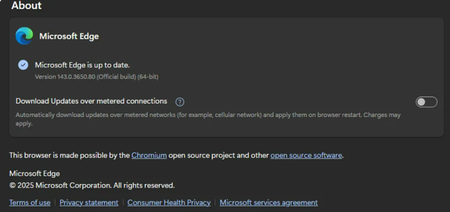
Previously, I joined the Dev channel through the option "Get early preview versions of Microsoft Edge" in the settings, and the browser version switched to Beta. However, recently Edge seems to have automatically received and rolled back to the official Release version, causing the original preview channel selection entry in the settings to completely disappear, making it impossible to reselect or join any preview programs (Dev, Beta, Canary). Seeking methods to restore the channel option or rejoin the preview versions.StonehuJan 22, 2026Iron Contributor12Views0likes0Comments
Windows 11 Default Application Selection and Launch Options Missing
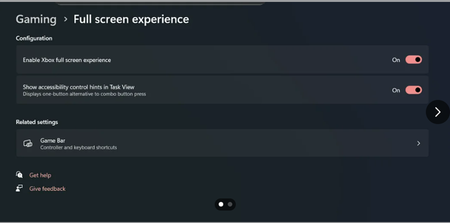
After updating my device to the latest version of the Windows 11 Beta Channel, the system enabled the Full-Screen Experience feature, but the settings interface lacks key options, which affects normal usage.OakleyCruzJan 22, 2026Iron Contributor10Views0likes0Comments
¿Cómo liberar espacio en el ordenador Windows 11 PC?
¡Hola a todos! Mi disco principal (C:) está prácticamente lleno y Windows me está mostrando advertencias. Esto está ralentizando mi equipo y tengo problemas para instalar actualizaciones o guardar nuevos archivos. He intentado eliminar algunos archivos manualmente y vaciar la papelera de reciclaje, pero la ganancia de espacio fue mínima. Necesito métodos más efectivos y seguros. ¿Podrían compartir sus mejores consejos y pasos para liberar espacio en Windows 11 PC de manera efectiva? Mi objetivo es liberar espacio en Windows 11 sin dañar el sistema operativo o perder archivos personales importantes. Saludos.UriahParkerJan 22, 2026Iron Contributor36Views0likes7Comments
Windows 11 24H2 Pro frequently displays the “This PC” window automatically.
When using Windows 11 Pro 24H2, File Explorer randomly pops up and displays the “This PC” window, especially when gaming in full-screen mode, forcing a switch to the desktop and severely disrupting operations. Standard troubleshooting failed to identify the trigger source. Seeking a permanent solution.GordonyJan 22, 2026Iron Contributor15Views0likes0CommentsWhat is the circular icon with double arrows in the lower-right corner of the Windows 11 desktop?
An unknown icon has appeared in the bottom-right corner of the taskbar (near the system tray). It looks like a solid dot with two arrows beside it (possibly pointing in the same or opposite directions). Clicking the icon produces no response or pop-up window. However, when you click the ‘Show Desktop’ button on the taskbar, the icon disappears. It reappears once any application window is opened. Please explain the meaning of the icon, its origin, and how to remove it.LarkinFoxJan 22, 2026Iron Contributor22Views0likes0Comments
Windows 11 24h2 cpu support for windows 10 to windows 11 upgrade
Hello everyone, Not sure if my Windows 10 PC could meet the minimum requirements for Windows 11 (doubt about the CPU), and I want to install Windows 11 version 24H2. With Microsoft's strict CPU requirements for Windows 11, I'm concerned whether my PC will still be eligible for the upgrade when 24H2 releases. What is Windows 11 24h2 cpu support? I know that initially, Windows 11 required 8th Gen Intel or Zen 2 AMD CPUs (with some exceptions), but not sure if the 24H2 update will change these requirements or enforce them even more strictly.DaxxonSawyerJan 22, 2026Iron Contributor68Views0likes7Comments

Resources
Tags
- Features1,899 Topics
- configuration1,837 Topics
- device management1,221 Topics
- Update management968 Topics
- Application Management856 Topics
- security736 Topics
- deployment523 Topics
- community403 Topics
- accessibility255 Topics
- licensing219 Topics