
Forum Widgets
Latest Discussions
AVG Prevented HP Smart Installing - Windows 11
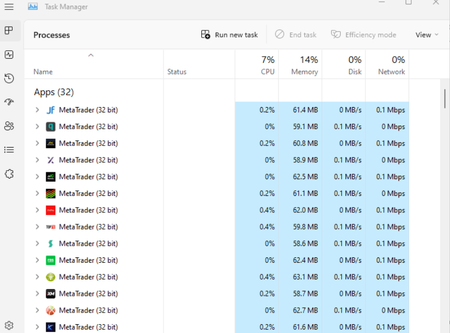
Neighbour was tearing his hair out trying to get a new HP printer (yes, I know…) connected and the HP Smart app systematically crashed during install. No indications from AVG that it was doing anything, but watching Task Manager, I saw AVG CPU use spike just as HP Smart crashed. Uninstalled the various AVG elements and restarted. HP Smart app installed normally and new printed set up correctly. Neighbour already had the hump with the recently installed AVG as it “kept trying to sell him add-ons”, so he wasn’t fussed about it being removed.KiariesJan 14, 2026Iron Contributor34Views0likes2Comments
Windows 11 stuck at 100% with a black screen and error message?
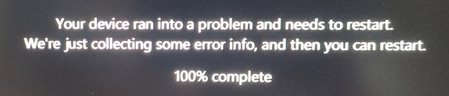
During system startup, a black screen appears with an error message, and the progress bar or loading screen is stuck at 100%, preventing access to the desktop. Please provide a forced recovery or repair solution.JosewJan 14, 2026Silver Contributor58Views1like2CommentsSlowness and saturated Ram following transition to Win 11
I have a Dell G5 15 5587 (2019) laptop - (16go Ram - SSD 256 + DD 1To - Intel 6c/12t CPU - GPU 1060 6go) Since switching to Win 11 last November (voluntary automatic migration), I have had major problems with slowness. The RAM is quickly saturated at more than 85%, everything reacts very slowly, after an hour I have to restart the PC to regain some flexibility). Documents take a good minute to open, with more than 5 PDFs the reader crashes, etc. It's a real hassle. The CPU is never used much (I don't play on it anymore), but it takes crazy hits which can last 30sc where it gets carried away before returning to a normal office level. Do you have any suggestions? Thanks in advance.RakkxunsuopJan 14, 2026Iron Contributor21Views0likes2Comments
Supporthub Bug
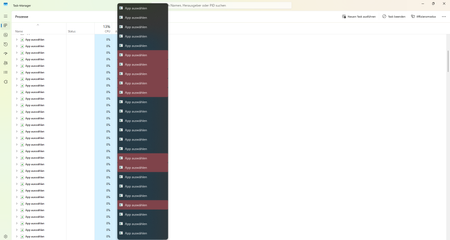
If you click on supporthub of your sound settings, windows 11 will start a "open app" roulette! It open´s about 30 tabs of them, all of them blink and it looks like a roulette. It want´s to open an app to open a link to the SupportHub. But it never find´s the App (the app is required to open the link somehow) and lead you to the microsoft store, but in the strore there´s no app!Problemfinder23Jan 13, 2026Occasional Reader11Views0likes1Comment
Updates from Oct 2025 to Jan 2026 causing Desktop and Taskbar to disappear
Machine is DELL Optiplex 7070, OS is Windows 11 x64: Starting in Oct 2025 and thru to Jan 2026 following updates caused the taskbar to disappear: KB5065789 KB5066835 KB5068861 KB5072033 The first three times I was able to uninstall the update since I had access to god-mode on my desktop. But on Jan. 11, 2026 the last one (KB5072033)also caused my desktop to disappear. Just a black screen. I used Ctrl-Alt-Del to get to task manager and by working on changing permissions on Explorer.exe and stopping and restarting explorer.exe I was finally able to get the desktop to return and then uninstall KB5072033. I Have paused updates for 5 weeks, and hidden the offensive ones, but I rely on the computer to manage many accounts and this is getting really scary.DrewDowdell50Jan 13, 2026Copper Contributor16Views0likes1CommentWindows 11 frequently prompts to restart the computer during startup.
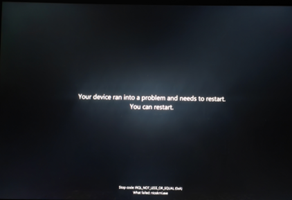
When booting up, the computer frequently prompts “Restart required” (despite no prior updates or other operations). After performing a forced shutdown and restarting, the system boots normally. This issue has recurred twice with identical symptoms. Please identify the root cause and provide a permanent solution.EorkuJan 13, 2026Iron Contributor95Views0likes3CommentsWhy can't I update my Windows 10 to 11 on my pc?
Downloaded the Windows 11 ISO version 25H2 from Microsoft, hoping this could be fine for upgrading Windows 10 to Windows 11 25H2 on my Dell desktop PC. After waiting a couple of minutes, the Windows 11 setup wizard this PC can't run Windows 11. I don't know what is this. Though the PC was built a couple of years go, it is still in good condition and the hardware specs are decent, including an Intel i7 7700K CPU, 1TB SSD, 16GB RAM and 8GB. Any ideas why can't I update my Windows 10 to 11? Thanks for any help you can offer.CyrusIronwoodJan 13, 2026Iron Contributor47Views0likes7Comments
New AZERTY "NG" French Standard Keymap NF Z71-300
Pleasantly surprised to see this addition in 24H2. I'm just curious if anyone has seen any vendors selling keyboards with this layout? ( I checked all the mainstream laptop makers, including Microsoft surface. ) There is one seller on Amazon selling retrofit stickers; Bépo, conversely, seems to have traction. Until then, I guess one can practice typing in the blind.BSekleckiGEJan 13, 2026Copper Contributor61Views0likes2CommentsWindows 11 23H2 → 25H2 in-place upgrade fails in SAFE_OS / MIGRATE_DATA
I'm trying to in-place upgrade a Windows 11 23H2 system to 25H2 and consistently get a rollback in the SAFE_OS / MIGRATE_DATA phase with 0x8007042B – 0x2000D. After a lot of analysis (Panther logs, SetupDiag, DISM, etc.), the failure always points to migration problems around Microsoft-Windows-TPM-Driver-WMI (CCSIAgent) and, secondarily, Microsoft-Windows-DirectoryServices-ADAM-Client (adammigrate.dll). I'd like to confirm whether this is a known 25H2 migration issue (especially on Education) and if there is any supported workaround short of a clean install. --- ENVIRONMENT - OS: Windows 11 Education 23H2, Build 22631.6276 - Edition: Education (confirmed via winver and Settings → System → About) - Target: Windows 11 25H2 (26200.6584, "2025 Update") - Upgrade method tried: - Windows Update feature enablement - Windows 11 Installation Assistant - Official 25H2 ISO (26200.6584.250915-1905.25h2_ge_release_svc_refresh_CLIENT_CONSUMER_x64FRE_en-us.iso) mounted locally → setup.exe - Hardware: - Motherboard: Gigabyte Z690 AORUS PRO (BIOS F31) - SSD: WD_BLACK SN770 NVMe (firmware 731130WD, WD Dashboard reports "Healthy", no errors) - TPM 2.0: Intel PTT (firmware TPM) enabled - Secure Boot: Enabled - BitLocker on C: OFF (fully decrypted) --- SYMPTOM Every full in-place upgrade attempt (23H2 → 25H2) behaves as follows: 1. Setup runs, copies files, reboots to SAFE_OS phase. 2. During MIGRATE_DATA, setup fails and rolls back to 23H2. 3. Message on screen: "0x8007042B – 0x2000D The installation failed in the SAFE_OS phase with an error during MIGRATE_DATA operation" In C:\$WINDOWS.~BT\Sources\Panther\setuperr.log / setupact.log, the failure is always in SAFE_OS / MIGRATE_DATA and includes: V2VArbitrate: Source migration unit <System>\Microsoft-Windows-TPM-Driver-WMI (CCSIAgent) is not supported on the destination machine and it will not be restored V2VArbitrate: Source migration unit is critical, arbitration will fail V2V Arbitration failed. Last error: 0x00000032 pSPExecuteApply: Apply operation failed. Error: 0x0000002C Apply (machine-independent apply, offline phase): Migration phase failed. Result: 44 ExecuteOperations: Failed execution phase Safe OS. Error: 0x8007042B On some runs, just before the TPM arbitration failure, there are also errors related to DirectoryServices-ADAM-Client: Failure while calling IPostApply->ApplySuccess for Plugin="Microsoft-Windows-DirectoryServices-ADAM-Client\adammigrate.dll"… Error: 0x80070002 Error READ, 0x00000002 while gathering/applying object: apply-success, Action,CMXEXmlPlugin, C:\$WINDOWS.~BT\Sources\ReplacementManifests, Microsoft-Windows-DirectoryServices-ADAM-Client\adammigrate.dll… However, the ADAM plugin errors are logged as "ignore" in some traces, while the actual rollback is always tied to the critical TPM-Driver-WMI migration unit. --- WHAT I HAVE ALREADY TRIED I've tried to rule out all the usual suspects and a bit more: 1. Health checks & storage - sfc /scannow → no integrity violations - DISM /Online /Cleanup-Image /ScanHealth / CheckHealth / RestoreHealth → clean - chkdsk C: /scan → no file system / bad sector issues - WD Dashboard extended test → drive healthy, no SMART warnings 2. Drivers, TPM, AV, services - TPM: - Device: "Trusted Platform Module 2.0" (ACPI\MSFT0101\1) - Driver provider: Microsoft (inbox TPM driver), no OEM TPM drivers - pnputil /enum-drivers | findstr /i tpm shows only Microsoft TPM entries; any OEM/TMP-related oem*.inf were removed. - Legacy / problematic drivers: - Removed old Intel CougarPoint USB driver (oem25.inf) via pnputil /delete-driver oem25.inf /uninstall /force. - Antivirus / security: - McAfee WebAdvisor fully uninstalled. - Kaspersky products uninstalled via standard uninstallers and then cleaned with Kaspersky's kavremover in Safe Mode. - No Kaspersky services, drivers, files, or uninstall entries remain. - Currently only Microsoft Defender is active. - Telemetry: - Connected User Experiences and Telemetry (DiagTrack) service set to Manual and Running to avoid telemetry-related cancellation (0x800704C7). 3. Upgrade artefacts / component cleanup - Deleted: - C:\$WINDOWS.~BT - C:\$GetCurrent - C:\$WINDOWS.~WS - C:\Windows\SoftwareDistribution\Download - Ran: - DISM /Online /Cleanup-Image /StartComponentCleanup /ResetBase - Then again DISM /Online /Cleanup-Image /RestoreHealth and sfc /scannow 4. ISO & media verification - 23H2 ISO: Win11_23H2_English_x64.iso (official multi-edition ISO, SHA-256 verified). - 25H2 ISO: 26200.6584.250915-1905.25h2_ge_release_svc_refresh_CLIENT_CONSUMER_x64FRE_en-us.iso (official 25H2 ISO, SHA-256 verified). - Both mounted locally; upgrade run via setup.exe from the ISO (no third-party media tools). - Tried with Dynamic Update enabled and disabled (/DynamicUpdate Disable). 5. Compatibility scan vs full upgrade behavior - Running from 25H2 ISO: setup.exe /Compat ScanOnly /DynamicUpdate Disable → completes WITHOUT logging the earlier TPM-Driver-WMI / MIGRATE_DATA critical failures. - However, when running a FULL in-place upgrade (same ISO, same environment, DynamicUpdate disabled, "Keep personal files and apps"), the upgrade still fails in SAFE_OS / MIGRATE_DATA with the same TPM-Driver-WMI critical arbitration error and rollback. So, compatibility scan looks clean, but the real SAFE_OS/MIGRATE_DATA phase still hits the TPM-Driver-WMI migration problem. 6. ADAM / DirectoryServices-ADAM-Client state - DISM shows DirectoryServices-ADAM-Client feature as Disabled. - The ADAM migration plugin (adammigrate.dll) logs 0x80070002 during IPostApply->ApplySuccess on some runs. - As suggested in other cases, I have tried: - dism /online /enable-feature /featurename:DirectoryServices-ADAM-Client /norestart → reboot - dism /online /disable-feature /featurename:DirectoryServices-ADAM-Client /norestart → reboot - The ADAM error sometimes disappears or is logged as "ignored", but the TPM-Driver-WMI critical arbitration error persists and still causes rollback. 7. Attempt to repair TPM-Driver-WMI as a package (failed) Following the idea that TPM-Driver-WMI might be a partially removed servicing package, I: - Ran: DISM /Online /Get-Packages | findstr /i "TPM-Driver-WMI" → NO ENTRIES. There is no Microsoft-Windows-TPM-Driver-WMI-Package~… installed as a standalone package. - Mounted Win11_23H2_English_x64.iso as G: and searched for *TPM-Driver-WMI*.cab: → No such cab found anywhere in the ISO. - Mounted install.wim (index 4, Education) read-only and inspected Windows\servicing\Packages, and ran offline DISM /Image:... /Get-Packages | findstr TPM: → No Microsoft-Windows-TPM-Driver-WMI package or mum/cab. Only the component payload exists in WinSxS (amd64_microsoft-windows-tpm-driver-wmi_31bf3856ad364e35_10.0.22621.1...), but there is no installable package to feed into DISM /Add-Package. So there is NO STANDALONE TPM-Driver-WMI package that I can re-add or repair via DISM; it appears baked into the base image. --- CURRENT SITUATION - TPM driver: Microsoft inbox, no OEM TPM drivers. - AV: only Defender. - Component store: DISM /RestoreHealth and sfc /scannow are clean. - Storage: healthy. - Telemetry service: running. - ADAM client: "enable → disable" cycle tried. - 25H2 compatibility scan: now passes without TPM migration errors. - Full upgrade: still fails in SAFE_OS / MIGRATE_DATA with: - Source migration unit <System>\Microsoft-Windows-TPM-Driver-WMI (CCSIAgent) is not supported on the destination machine and it will not be restored - Source migration unit is critical, arbitration will fail - V2V Arbitration failed. Last error: 0x00000032 - pSPExecuteApply: Apply operation failed. Error: 0x0000002C - ExecuteOperations: Failed execution phase Safe OS. Error: 0x8007042B At this point, the only remaining options I can see are: - In-place repair install of 23H2 using the 23H2 ISO (setup.exe → keep apps & data), to rebuild the whole servicing/migration stack, and then retry 25H2; - Or clean install 25H2 from scratch. Before I go down that path, I'd like to know: --- QUESTIONS 1. Is this a known migration issue in Windows 11 25H2 (especially for Education) involving Microsoft-Windows-TPM-Driver-WMI (CCSIAgent)? In other words, is the "not supported on the destination machine" for this migration unit an expected symptom of a current 25H2 bug or a misconfiguration on my side? 2. Is there any supported way to reset/repair/ignore the TPM-Driver-WMI migration unit on the source side, given that: - there is no standalone Microsoft-Windows-TPM-Driver-WMI-Package~*.cab in the 23H2 ISO, and - DISM /Get-Packages does not list such a package? 3. Is an in-place repair install of 23H2 the recommended next step in this scenario, or is the official guidance to perform a clean install of 25H2 when SAFE_OS / MIGRATE_DATA fails on a critical migration unit like this? 4. Is there any known difference between consumer vs Education/volume 25H2 media that could affect whether the TPM-Driver-WMI migration manifest is present on the target image? Any official guidance or confirmation (e.g., "this is a known issue; wait for an updated 25H2 image or cumulative update" vs "your 23H2 install is irreparably corrupted, clean install recommended") would be very helpful before I commit to a wipe-and-reinstall. Thank you in advance.panagos13Jan 13, 2026Copper Contributor1.8KViews2likes12Comments(KB5064081) (26100.5074) Failed to install - 0x800f081f
Hi.... I've been trying to install 2025-08 Cumulative Update Preview for Windows 11 Version 24H2 for x64-based Systems (KB5064081) (26100.5074) for the last five days. It downloads okay. But when I try to install it, that's when the fun starts. It installs up to 25% and then sits there for a while. Then it starts installing again and zooms up to 88%, then it pauses for a few seconds. It then zips up to 100%, but then I always get the error message "2025-08 Cumulative Update Preview for Windows 11 Version 24H2 for x64-based Systems (KB5064081) (26100.5074) Failed to install - 0x800f081f." I've tried a lot of solutions I found online. But I have yet to find a solution that downloads / installs the update and finishes completely successfully. No matter what solution I try it always ends up in the scenario I mentioned above. The solutions I have tried in the last five days are listed below. 1 - Windows Update Troubleshooter, which failed to run. 2 - Reset Windows Update components: net stop wuauserv net stop cryptSvc net stop bitsnet stop msiserve Rename your update folders by running this code: ren C:\Windows\SoftwareDistribution SoftwareDistribution.old ren C:\Windows\System32\catroot2 catroot2.old Run the following commands to restart the update components: net start wuauserv net start cryptSvc net start bits net start msiserver 3 - Ran SFC and DISM to repair corruption in an elevated Command Prompt: Dism /Online /Cleanup-Image /ScanHealth Dism /Online /Cleanup-Image /CheckHealth Dism /Online /Cleanup-Image /RestoreHeal 4 - Manually downloaded the update from the Microsoft Update Catalogue and installed the update. 5 - Outbyte PC Repair. 6 - Downloaded to the SSD and mounted the ISO Windows file, while keeping my files, apps, etc. 7 - Performed an "In-Place Upgrade", with wiping the disk and not keeping my files, apps, etc. Therefore wiping the SSD clean. The PC involved is: ASUS Viviobook E1504FA (laptop) AMD Ryzen 5 7520U with Radeon Graphics 8.00 GB (7.28 GB usable) Windows 11 Home 24H2 - OS Build 26100.4946 Would anyone have any ideas / suggestions that I can try to get this update installed successfully? Thank you.Hugger1Jan 13, 2026Copper Contributor158Views1like1Comment





Resources
Tags
- Features1,878 Topics
- configuration1,820 Topics
- device management1,202 Topics
- Update management955 Topics
- Application Management849 Topics
- security722 Topics
- deployment510 Topics
- community387 Topics
- accessibility250 Topics
- licensing216 Topics