User Profile

JinsengH
Brass Contributor
Joined Mar 03, 2021


User Widgets
Recent Discussions
Re: Managing accounts in multiple Partner/CSP tenants
I just tried again, and it didn't work. I set my guest account as a "Make this user an admin for partner companies: Full Administration", and I added the account to the GDAP group that grants Global Admin to a Test Customer. I then logged into https://partner.microsoft.com/dashboard/v2/home and switched to the CSP tenant. My guess account doesn't see the Customers Tile. I manually obtained the link for Home > Customers > Customer List > Test Customer and tried to access that with the guest account. That only displayed an error stating "No Access User doesn't have the necessary permissions to view the page." and only displayed "Service requests" on the left hand navigation. Clicking that generated "Something went wrong".Re: Managing accounts in multiple Partner/CSP tenants
It's possible to use a guest account to gain access to certain areas of the Microsoft Partner Center CSP site. However, when you dig into Customers > pick a customer > Service Management > click on a service to administer (ex. Microsoft 365), the context is lost and that admin portal doesn't present information for that customer's tenant. I forget now if it presents information about the home tenant of the logged in account or the tenant of the CSP Partner portal.Re: Managing accounts in multiple Partner/CSP tenants
I knew that would be their response, but thank you for confirming. I’m sure there are many technical reasons, but can you let them know that this would be easier and more secure if we could use Guest accounts from our internal production Tenant in addition to member accounts in the CSP tenant that would reduce maintenance and risk significantly I still wonder how other CSPs are managing this complex and inefficient system. Are they doing it manually, using home grown user management tools, using 3rd party tools, etc?Re: Managing accounts in multiple Partner/CSP tenants
Some are, and some are not. The Partner tenants are linked in Partner Center (Microsoft Partner Center > Gears > Account Settings > Organization Profile > Tenants), but many of our CSP tenants are not linked. Even if they were, only Member accounts (logins) in those CSP tenants have access to CSP functionality.Managing accounts in multiple Partner/CSP tenants
How are other people managing accounts in multiple Partner/CSP tenants? We're a global partner with customers around the world. Microsoft's requirement that customers only be supported by partner/CSP tenants in the customer's region means that we have to create user accounts in many different tenants. This is hard to administer and hard for our staff to use. It would be less of an issue if guest accounts worked, but they don't. Do you manually on/offboard accounts from all the different tenants? Have you purchased a 3rd party M365 tenant administration tool? Have you built your own tenant administration tooling to consolidate these tasks? Your thoughts are appreciated.SolvedRe: M365 User export CSV format changed
I opened a case with Microsoft. The engineer was aware of the change, but had no documentation about it, so we closed the case. I also recently noticed that they changed the columns in the export again. I had to rework one of my automated processes again because of this. However, one good point is that the Licenses field now contains a "+" delimiter like it did in the old report. The only thing I think is an outstanding bug is in the UserStatus field. It shows guests as "Guest", but it shows "Unlicensed" for unlicensed members and a list of non-delimited licenses for licensed members. I feel it should just show "Member" for member accounts. I can work around this issue, so it's not a problem for me.854Views0likes1CommentRe: M365 User export CSV format changed
GaelBT, Interesting. I didn't know what the back end of the Export user feature was. I'm curious, do you remember where you heard that? The timing of the change sounds reasonable. I just saw another notification about the retirement and that there will be brief outages in the coming months while they prepare for the retirement.894Views0likes0CommentsRe: M365 User export CSV format changed
Thanks for pointing that out. We also have some of our own PowerShell scripts. it's just surprising that Microsoft would change this output format, especially the lack of delimiter in the license field, without any warning or Microsoft specified alternative. I've already had to update several of our processes because of this.844Views0likes0CommentsM365 User export CSV format changed
Has anyone else noticed that the format for the "Export Users" feature in the Microsoft 365 admin center changed? It's missing some columns (fields) and no longer has a delimiter between the Licenses. This makes using this file for license reviews impossible.Solved1.8KViews2likes9CommentsProject for the Web start and end times
We have a business requirement to set start and end times (or could be start time and duration) for tasks. During a go-live, we plan tasks to the 15 minute increment. For example, we need to specify that Task1 starts at 9:00, Task 2 at 9:15, Task 3 at 9:30, task 4 at 10:15, etc. I feel like there should be Start/End DateTime field types, but cannot find such a thing. Thoughts?269Views1like0CommentsRe: Routing rules for unassigned numbers
I'm running into the same situation. I wanted to set up a "Catch-All" routing rule that would route any unassigned numbers matching our area code to our auto-attendant. I then learned that any outbound calls to our area code were being directed to our AA. I opened a case with Microsoft and they're saying this is by-design. They say that technically, external numbers are unassigned, so routing rules will match them. We need to be more specific with our Routing Rule matching configuration so that we're not matching external numbers. That would be easy if we had a block of numbers with no gaps, but numbers provided by Microsoft often have gaps between them. Microsoft is saying that the safest option is to create a rule for each specific unassigned number.799Views0likes0CommentsRe: Share file for download in MS Stream (SharePoint)
This doesn't seem to be working for me. I shared a recording with an external guest and "block download" set to Off. The recipient doesn't have a download button and when I manage the sharing link, Block Download is set to On. This page: https://support.microsoft.com/en-us/office/play-and-share-a-meeting-recording-in-teams-7d7e5dc5-9ae4-4b94-8589-27496037e8fa#bkmk_downloadmeetingrecording says: "Only the person who started the recording and the meeting organizer can download the recording." That seems like a poor design choice.7.5KViews1like0CommentsRe: External User (Guest) E-mail Notifications in Planner
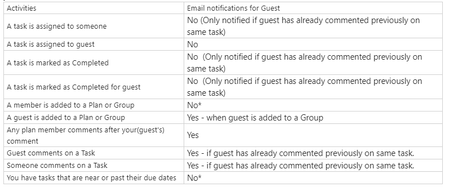
TMediaBE I don't have an environment to test with right now, but apparently this is expected behavior. I opened a case with Microsoft and they confirmed what you're seeing. They said this is the tested output for Guest users: I found something here: https://feedbackportal.microsoft.com/feedback/forum/a1a93b69-2f1c-ec11-b6e7-0022481f8472 and up-voted it.9.9KViews2likes1CommentIntegrate AADDS with Microsoft Defender for Identity
I saw an old post about this, but I'm hoping something has changed. Is it possible yet to integrate Azure Active Directory Domain Services with Microsoft Defender for Identity? We have the sensors installed on our local Active Directory domain controllers. We will likely configure AADDS and start moving resources away from local AD to AADDS and want to maintain the same level of security monitoring. Thoughts? Thanks.Solved1.9KViews0likes1Comment
Recent Blog Articles
No content to show