partner question
278 Topics
CSP Indirect Reseller error on enrollment
I intend to enroll as a CSP Indirect Reseller. My partner ID has been active and valid for some time. I did additional checks on my end to ensure all basis were covered: Company verification: approved Domain grantor.co.mz: verified in our tenant MFA: enabled on the admin account Roles: Global Administrator (Entra) and Account admin (Partner Center) Retried in a clean InPrivate browser session I logged a ticket and sent additional information (TrackingID#2610210050002089). I get an error when finalizing the enrollment process as seen below: Please help for I do not know how to proceed and I am going on to the second week without a reply on this. I Shared the screen recording and HAR file. Cheers
Error 2100 during MAICPP enrollment – Legal info blank
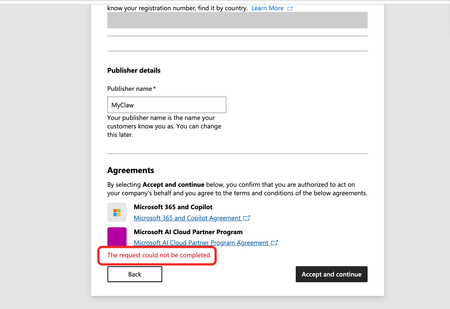
Issue: I'm stuck at the Agreements step of the Microsoft AI Cloud Partner Program (MAICPP) enrollment. When I click Accept and continue, the page displays: The request could not be completed. No further details are provided (no reference number, no transaction ID). Evidence of orphaned legal entity (error 2100): After the failed submission, I navigated to Settings → Account settings → Organization profile → Legal info, and the page renders only the title and description text—no tabs, no form fields, completely blank (screenshot attached). This matches the documented symptom of error 2100 / orphaned legal entity: the backend created a legal entity record during the first submission attempt, but it was never linked to a program enrollment. Subsequent attempts to accept the agreements fail because the system tries to create a duplicate entity. Environment: Tenant ID: 70a418c9-dca7-4bf3-90b0-765294ae60aa Verified domain: http://myclaw.ai/ Publisher name: MyClaw Account type: Company Submitting user role: Global Administrator Target program: Microsoft AI Cloud Partner Program (MAICPP) Goal: Obtain Partner ID → apply for Verified Publisher in Entra ID Already tried: Clearing cache, incognito mode, different browsers – no change Checked Identifiers page – also blank (no Partner ID, no publisher table) Cannot use the standard support form (requires a workspace, which I don't have until enrollment completes) Cannot use the no-login support form (Submit button fails) Request: Please manually clear the orphaned legal entity record or link the existing entity to the MAICPP enrollment, so I can complete the registration. Attached screenshots: "The request could not be completed" error at the Agreements step Legal info page rendering no tabs Thank you.224Views1like3Comments
MAICPP Partner roaster synchronization Issue - Technofocus Levelup Campaign Eligibility
Hello Community Team and Moderators, I am posting to seek guidance and visibility regarding an active Partner Operations support request (Case #2610290050004098) regarding campaign roster synchronization for our organization, Belvit Hub (Partner ID: 7157172). Context & Status: Partner Status: Belvit Hub’s Microsoft AI Cloud Partner Program (MAICPP) enrollment is active, and legal entity vetting was authorized on September 24, 2026. Issue: 500+ candidates from our organization participating in the Technofocus LevelUp / Certification Week campaign are receiving an "Ineligible Domain" block when attempting to register for exam vouchers. Vendor Feedback: Technofocus (LevelUp) support confirmed in writing that their portal cannot manually override domain eligibility and that they are waiting for an updated partner eligibility roster refresh from Microsoft Skilling Operations. Partner Support engineer Hesham Ali has initiated an internal consultation to route this to the relevant internal team. We are posting here to ask if community moderators can assist in ensuring this roster update reaches the Skilling Operations team so our candidates can access their exam vouchers. Thank you for your assistance. Reference Details: Partner Name: Belvit Hub Partner ID (MPN): 7157172 Support Ticket: #2610290050004098
Partner Center Enrollment Blocked – Trust Code 715-123160 – Requesting Manual Review
Hello Microsoft Partner Community Team, We are attempting to enroll our company in the Microsoft AI Cloud Partner Program, but our registration is being blocked by the automated trust verification system. We are a legitimate, legally registered business operating in the cloud connectivity industry. Our DUNS number and all company information entered during enrollment are accurate and match our official government records. Error details: Reference Number: 715-123160 Transaction ID: 0e136d6b-9164-41c3-be26-9b301c9aac24 Correlation ID: f8085e89-17fd-4b2a-8b47-40aea3030d82 Due to this block, our Partner Center account has no active workspaces, which means we are completely unable to create a support ticket through the standard Partner Center portal. We have also tried the partner.microsoft.com/support page, but it redirects us back to Partner Center — creating a loop with no resolution. We are kindly requesting: Escalation to the Partner Center Vetting / Trust & Safety team for manual review A reset or unblock of our enrollment so we can complete registration Guidance on any documentation required (business registration, address proof, domain ownership, etc.) — we are ready to provide everything immediately for email contact, please contact the email address we leave on the request (format as: email address removed for privacy reasons) Thank you in advance for your assistance.Microsoft Partner Center Verification - 27 days without resolution or actionable feedback
Subject: Microsoft Partner Center Verification – 27 Days Without Resolution or Actionable Feedback Hello Microsoft Partner Support / Partner Compliance Team, I am posting here in the hope that someone from Microsoft who has access to the relevant verification results can assist me with an ongoing issue with my Microsoft Partner Center verification. I have now been trying to resolve this issue for 27 days. Despite contacting Microsoft support multiple times and opening several support tickets, I still haven't received a clear explanation of what needs to be updated, changed, or corrected to complete my organization's verification. My indirect reseller status is also still showing as Pending, and I am unable to get a clear answer about what is preventing the process from moving forward. The generic email response I have repeatedly received states: "We've reviewed your appeal for verification. Based on the information you have provided to date, we have determined that your organization does not currently meet the requirements to pass verification. We have closed your application." Unfortunately, this response does not identify which verification check has failed or explain what information needs to be corrected. My application appears to be stuck at the Contact Information and Identity Verification stages. Furthermore, the Fix Now / Resolve Now option is not appearing, meaning I have no way to address or resubmit the information through Partner Center. I am becoming increasingly frustrated because, despite my repeated efforts to resolve this matter through the official support channels, I feel that I am simply receiving generic responses rather than having my case reviewed by someone who can actually investigate the issue and help me resolve it. I am requesting the following: A manual review of my Partner Center verification application by someone who has access to the actual verification results. Specific clarification of which verification checks have failed and what information needs to be corrected. Assistance in resolving the issue so I can complete verification and progress my indirect reseller application. Reopening or resetting my application if necessary, so I can correct any outstanding issues. I have made every effort to complete the process correctly and have repeatedly contacted support in good faith. However, without specific feedback or access to someone who can review the underlying verification results, I am unable to move forward. I would genuinely appreciate it if a real person from Microsoft Partner Support, Partner Compliance, or the relevant verification team could contact me directly and provide clear, actionable guidance. For reference, my details are: Organization: Verasura UKI Ltd Microsoft Partner ID: 7163240 Support Ticket Number: 2610270050005027 Indirect Reseller Status: Pending I can provide any additional documentation or information required to assist with the review. Thank you for your time and assistance. I sincerely hope someone can help bring this matter to a resolution.Identity verification rejected, no Fix now option – ticket 2610230010000294
We’re an Australian MSP enrolling in the CSP Reseller program. Our current verification status is: Contact verification: Verified Identity verification: Not Verified (no Resolve or Fix now button, so we can’t appeal) Business verification: In Progress – Microsoft Action (ETA was 28 Oct, still pending) I opened ticket 2610230010000294 on 23 Oct but haven’t been contacted yet. Could someone please review the ticket and re-trigger identity verification? We’re happy to provide ID and business registration documents that match our account details. We’d also like to know why identity verification failed, so we can fix the cause and avoid another rejection. Thanks in advance.
To enroll in Microsoft's Windows Hardware Developer Program for kernel driver attestation signing
Hello Partner Compliance team and JillArmourMicrosoft, We are an enterprise security software vendor trying to enroll in the Windows Hardware Developer Program so that we can attestation sign our own kernel-mode driver. Current status: - We followed the documented registration steps: https://learn.microsoft.com/en-us/windows-hardware/drivers/dashboard/hardware-program-register - We have a valid EV code signing certificate (not expired, not revoked) - We signed in with our Microsoft Entra global administrator account - The Hardware program status now shows Rejected - There is no Fix now option available to correct anything - Trying to enroll again is blocked With no Hardware workspace, we cannot raise a ticket through Help + support, and Services Hub asks for a paid support plan What we have done: - Submitted a request through the "Provide issue details" form for users who cannot sign in - Ticket number: 2608030040002698 - So far we have received only the automated confirmation Request: Could someone please route this ticket to the Windows Hardware Program / Hardware Dev Center team? We would like to know the specific reason for the Rejected status so we can correct our Legal info, complete account verification and have the enrollment reactivated. Our requirement is limited to attestation signing our own driver for Windows 10/11 client systems. We are not requesting Windows Update distribution. We can share our Seller ID, tenant details, ticket number and screenshots privately. Thank you for your help.
CSP Indirect Reseller enrollment deactivated + can't open a support ticket
Hello, My partner account (company LIS-INFO, France) has a legal verification status of Authorized as of today, on both the Partner and Reseller profiles. However, when I try to enroll in the Cloud Solution Provider – Indirect Reseller program (via aka.ms/accounts/varEnrollment or via "Other programs" in Account Settings), I consistently get the message: "This program registration has been deactivated for your account." I also notice that the "Customers" workspace shows "Access not granted" under Account Settings > My access, which is consistent with the CSP enrollment being deactivated. I believe this may be related to an earlier partnership application that failed before my current application was approved. I have been unable to submit a support ticket through the normal Partner Center channel — the "Contact support" flow gets stuck on an infinite loading spinner, across multiple attempts over several weeks (different browsers, different sessions). This is why I'm posting here instead. This is currently blocking me from establishing a distributor relationship with my indirect provider (ALSO), who has confirmed they cannot resolve this on their end since the block is on my Partner Center account, not on the distributor relationship itself. I'd be happy to share my Partner/MPN IDs privately with anyone from Microsoft who can help look into this. Thank you for your help.Verification "Authorized" but Partner Center remains deactivated. No support channel reachable.
We are a company seeking help with a Partner Center account state inconsistency (Seller ID available by direct message to a Community Manager or Microsoft employee). Timeline: - Our Windows Hardware Developer Program enrollment was rejected at the Employment Verification stage. - Microsoft Vetting Operations instructed us in writing to update our profile to a company-owned domain and provide domain registration documentation. We complied fully and same-day: registered and verified a company domain on the enrolling tenant, updated the seller contact and company approver to an address on that domain, and supplied registrar documentation. - The verification pipeline re-ran: Email, Identity, and ultimately all stages completed. Legal Info now shows Verification Status: AUTHORIZED. - However, the Partner Center account itself returns "your Partner Center account has been deactivated" on every workspace — Hardware, Programs, and the support wizard — so we cannot file an in-portal support case from the deactivated account. - Email follow-ups to the Vetting Operations thread and to an assigned Dev Center support engineer have gone unanswered for over a week. We hold multiple correlation IDs (most recent: f4fd02fd-d21f-462f-8765-1ea3d6132ad2, 02 Oct 2026). Our read: the account object was deactivated when the earlier application was closed, and was never re-activated when the verification subsequently authorized — a state inconsistency between the vetting record and the account. Ask: could a Community Manager or Microsoft employee escalate this to the team that can re-activate a verified account? The verification work is complete; only the deactivation flag remains, and it is blocking a driver-signing deliverable. We can provide the Seller ID, case numbers, correlation IDs, and full documentation through any private channel indicated. Thank you. Access restricted We're sorry, you don't have permission to access this page because your Partner Center account has been deactivated. For assistance, please contact your Partner Center administrator or support. Correlation ID: f4fd02fd-d21f-462f-8765-1ea3d6132ad2 Correlation vector: leO3sWI4S0K2fExK.4 Time: 02 Oct 2026 22:36:07 +00:00Identity verification closed after a corrected name typo, and no route to support
Our Partner Center identity verification failed and was closed ("no further action will be taken"). The cause was a typo in the primary contact name, which has since been corrected to match the ID exactly. In Help + support the assistant doesn't offer a support request, so we can't ask for the existing verification to be reopened. Could a moderator help reopen verification on the existing account, or point us to the right channel? Happy to share account details privately.