User Profile

AlistairKeay1
Brass Contributor
Joined Jun 08, 2017


User Widgets
Recent Discussions
Multi-Geo, Satellite Location, Namespace
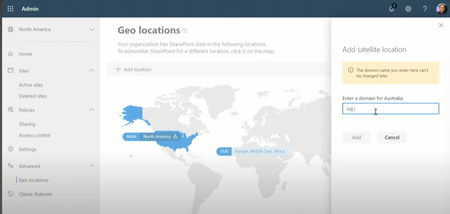
Can I check. When adding a Geo Location in SPO Admin. (I don't have access in my test environment to MultiGeo _ so going off a youtube video on this). Under the "Enter a domain for <location>" 1. Can the value in domain be anything? The field appears to be a free text field. If the primary SPO URL is Contoso.Sharepoint.com. 2. Does the domain have to be contoso+ <suffix> 2a. I assume "ContosoEUR" _ is valid 2b. I would assume "ContosoEU" _ is also valid. 3. Can the name be <Prefix> + Contoso? eg "EUContoso" 4. Can the name be something completely different eg "Wingtips" Thanks247Views0likes0CommentsDirect Routing Multiple Tenant, Can I remove the account after activating the domain
https://learn.microsoft.com/en-us/microsoftteams/direct-routing-sbc-multiple-tenants Following the above After "Activating the domain name" by adding a user with the domain used. Do I need to keep the account or can I delete it? ThanksSolved746Views0likes1CommentRe: Teams Shared Channel PowerShell, Retrieve Members and Teams
FYI what I am trying to do\why is as follows. Tenant to tenant migration project. Till now shared channels are used from "Target" to "Source". As we collapse down the source into target I want to make sure the source users, when they logon with their new target account continue to have access to the shared channels. I have a working script (still in testing phase) which is roughly as follows Get-UnifiedGroup #get all the teams groups. Get-Team too slow Loop through each group and $Channels = Get-TeamChannel -MembershipType Shared Then loop through each channel and Get-TeamChannelUser Then loop through each user and identify those users like “*@sourcedomain.com” etc Map the new user identity to the old. Add-teamchanneluser of the new identity I just need to work on how to handle the shared with a team logic. (The source teams are being copied to target using ShareGate)1.9KViews1like0CommentsTeams Shared Channel PowerShell, Retrieve Members and Teams
I can retrieve the members of a shared channel via Get-TeamChannelUser -GroupId <> -DisplayName <> However when sharing a shared channel there is the option to "share with a team" (which you could be the one you own etc) I can't see a way to retrieve the list of "teams" Advice welcome ThanksSolved2.2KViews0likes3CommentsConnect to two Tenants Single PS Session (connect-MicrosoftTeams)
I am migrating a customer from one tenant to another (Teams Voice) What I am interested in, is it possible to connect to two tenants in a single PS session Till now I would export in one session to a file then import to the other and upload. So not very efficient However I stumbled across an article for exchange where you could connect to two tenants in a single PS session to migrate data... but I can't get it to work in teams Ref https://mymicrosoftexchange.wordpress.com/2017/10/05/office-365-run-a-script-connected-to-2-exchange-online-sessions/ I have tried the following $sourceSession = connect-MicrosoftTeams $result = import-pssession $sourceSession -prefix SRC $DestSession = connect-MicrosoftTeams $result = import-pssession $DestSession -prefix DST However I get Import-PSSession: Cannot bind parameter 'Session'. Cannot convert the "Microsoft.TeamsCmdlets.Powershell.Connect.Models.PSAzureContext" value of type "Microsoft.TeamsCmdlets.Powershell.Connect.Models.PSAzureContext" to type "System.Management.Automation.Runspaces.PSSession". I have a nasty feeling while Import-PSSession is supported for exo and was for SFB O I don't think Teams supports this. Any advice\thoughts welcome.521Views0likes0CommentsIdentify Member accounts converted from Guests
Summary Is there a way to identify guest accounts that have been converted to member accounts? Background A unknown number accounts have been created as guests and then later converted to member accounts (They have been renamed so no obvious way to tell) The issue we face is that we have shared channels enabled in teams and are randomly hitting the issue "Guests - including those converted to members (in their user type property) - can't be added to a shared channel." https://learn.microsoft.com/en-us/microsoftteams/shared-channels. Looking at all attributes via get-csonlineuser between one of the accounts in question and a regular account _ there is no obvious difference We are trying to understand the scale of the issue hence the question. So a way using PowerShell would be ideal Thanks for any help929Views0likes2CommentsRe: Exchange Contacts and Teams
I have some final feedback https://docs.microsoft.com/en-us/microsoftteams/troubleshoot/exchange-integration/external-contacts-not-in-search In summary Do not expect to see results for EXO contacts in teams. Another area I also explored was "mail enabled users". While they do appear in a search via a friendly name they act very much like guest accounts. ie mail flow works to external address but IMs stay within the org and do not go to an external federated company.9.3KViews0likes5CommentsRe: Exchange Contacts and Teams
Understood and thanks. Feature ID: 93050 removed a lot of pain for telephony but this feature relates to personal outlook contacts. The requirement I have is to allow a search for and then IM a federated company based on finding a friendly name in the GAL9KViews0likes6CommentsRe: Exchange Contacts and Teams
Thanks for the reply. When you say "Microsoft doesn't support Azure AD contacts in Microsoft Teams" _ is this documented anywhere? Why was the MS engineer able to demonstrate that is appeared to work for him. Thanks for the suggestion of your application9.1KViews0likes8CommentsExchange Contacts and Teams
Question Should contacts added via https://admin.microsoft.com/Adminportal/Home#/Contact Be visible \ searchable in teams? Notes In my test and production tenant the answer is no. eg Adding a contact via the admin center such as "john Smith" contact with a valid e-mail address. I can see the contact in outlook\GAL In teams searching for "john", "john smith", "john ", "smith", "smith " etc does not find any results (The production tenant has many contacts none of which are visible in teams) However raising an MS case the engineer said it did work for him in his testing Conclusion Any advice welcome Note this question does not relate to personal contacts stored in outlook\teams but to contacts in the GAL 1. Should contacts from the GAL be visible in teams 2. If yes how do I make them visible in my tenant (There are only so many ways to add a contact via the admin center)Solved9.6KViews0likes10CommentsRe: Teams Dial Plan on Teams Phone \ Limit what can be called
I have resolved my issue 1. I created a dial plan that translated ^(\d*)$ to +1...... (Number belongs to a internal user) 2. I assigned the most restrictive teamsipphonepolicy to the CAP account 3. For the account (via TAC.. PS options available), voice, outbound calling set to "don't allow" 4. Net result is that calling any number generally goes to +1.... which belong to the internal user 5. Dialling E164 result in breaking through the dial plan but the message "we couldn't complete the call" comes up1.5KViews1like0CommentsTeams Dial Plan on Teams Phone \ Limit what can be called
Requirement is to have a phone which is outside the office in the corridor. Couriers etc can use the phone to dial reception and ask to be let in _ that should be the extent of what can be called What I have to work with is A Teams Phone CAP license MS Calling Plan My first thought was to use MS calling plan + dial plan .* => Translates a set number +1...... On the desktop client this works. On the teams phone not _ it fails (On an android phone I do see a little more "+1...+1... is not a valid number". Note sure what is going on there) Test2 ^555$ => Translates a set number +1...... This works universally but doesn't achieve what I am after. A method to use a Teams phone that can only calls a limited range of internal numbers Any thoughts advice welcome Just base suggestions on what I have to work with please! Thanks for any advice1.7KViews0likes1Commentpolicy-based recording for calling, Licence/Service Plan Details
Situation Customer has E5 but under License, Service Plan details _ has largely turned off everything except Microsoft Teams, SharePoint etc for example. What component of the service plan needs to be on to support compliance based call recording? (CsTeamsComplianceRecordingPolicy) I see the note around "Compliance Recording can be enabled on Microsoft 365 A3/A5/E3/E5/Business Premium and Office 365 A3/A5/E3/E5 users" but I am trying to get what part of an E5 needs to be on. Customer is just starting the journey online and is very cautious_ hence turning everything off. My area is looking at telephony and there is a need for call recording for compliance purposes so need to justify what needs to be turned on. Thanks706Views0likes0CommentsRe: Common Area Phone License and Meeting Rooms \ SignInMode
In my testing "Teams Room Standard" is working for me reliably and makes sense for meeting rooms. Reboots etc and the phone continues to work fine for me showing the calendar Response from MS "We’ve recently published documentation to provide more information. https://docs.microsoft.com/en-us/microsoftteams/devices/teams-android-devices-user-interface Because of a recent change in enforcing licenses on phones, it might seem to the customer that they lost functionality. " There will be further changes GA in September _ not quite sure what the outcome will be. From my testing 1. CAP license will lock down the phone to a common area phone mode _ so "fair enough" 2. Meeting room phones\devices need at least "Teams Room Standard" to expose the calendar _ again "fair enough" Still trying to get a clear answer on what license to use for a generic reception account where the "user sign in experience" is required. On the face of it a "E1 + Phone System question" seems logical but still checking on this to ensure compliant with licensing rules etc17KViews1like0CommentsRe: Common Area Phone License and Meeting Rooms \ SignInMode
Thanks. The reception phone needs "UserSignIn" mode _ key is what you picked up. The intent is a phone that will be left signed in as "Reception NY" for example. The person manning the phone can answer calls to reception and then transfer to typically an internal contact _ so it needs to show speed dials\contacts on the phone to allow simple\quick transferring. (No calendar\mail requirements) MS told me to hold on while they investigate. Idea of E1 + Phone System flagged as "technically it works but this scenario is not compliant for device " Also don't suppose you know _ is SideCar RTM or still classified as Beta? When I lasted tested it worked perfectly but in production I hit "Due to a known issue the sidebar may trigger the bug of displaying "sign in your account" window on secondary interfaces. New Teams APP solved this issue will be released by Microsoft on TAC"17KViews0likes2CommentsRe: Common Area Phone License and Meeting Rooms \ SignInMode
Thanks for the reply Yes I also heard back from MS _ it isn't as clear as what you state but writing is on the wall "Teams Rooms devices now require device licensing, either Teams Rooms Standard or Teams Rooms Premium (managed services). All future meeting room capabilities will only be available in Teams Rooms Standard and Premium SKUs. In your case I assume you want to manage the device so the best option is the Teams Rooms Standard SKU." I also see another article which echoes the one you call out. https://pupuweb.com/mc273378-enforcement-licenses-teams-phones/ So it would seem that CAP license have the CAP policy enforced. I will just need to figure out what license is needed for a reception phone18KViews0likes4CommentsRe: Common Area Phone License and Meeting Rooms \ SignInMode
My observed behaviour is as follows Account created, common are phone license allocated and TeamsIpPhonePolicy, SignInMode set to MeetingSignIn Phone signs in The phone switches to "CommonAreaPhoneSignIn" mode. This is also seen in the logs from the phone. ie MS are sending this parameter. Key is the setting configured via grant-CsTeamsIPPhonePolicy is not honoured. License on the account is changed to "Microsoft Teams Rooms Standard" (Only change) The phone switches to "MeetingSignIn" mode Changing the license back to common are phone license After 24 hours the phone flips back to "CommonAreaPhoneSignIn" All I can conclude is that there is a change in behaviour. If you are putting a conference phone in a meting room (Yealink CP960, Poly Trio c60 etc) you have to assign a "Microsoft Teams Rooms Standard". Using a CAP license MS is locking to "CommonAreaPhoneSignIn" mode I would love to hear what other people experience _ is this a fault or a license shift in position from MS.18KViews0likes8CommentsRe: Common Area Phone License and Meeting Rooms \ SignInMode
Thanks Peter Yes my steps are as per the document. Key is the teamsipphone policy seems to be ignored and the phone switches to CommonAreaPhoneSignIn even though policy is MeetingSignIn Other quirks. In subsequent testing, with no other change, if I assign a Microsoft Teams Room license the teamsiphonepolicy is honoured and the calendar is shown. More surprising is if I then downgrade the license back to cap…. MeetingSignIn Continues. I know one other org seems to be hitting the same issue18KViews0likes9Comments

Recent Blog Articles
No content to show