User Profile

PLove59
Brass Contributor
Joined Feb 21, 2020


User Widgets
Recent Discussions
SharePoint Comments @mention Error
Hello All, My VP reported an error message that he received while trying to add @mention to the Comments of a SharePoint Online News post. After adding 12 @mention names he received the following error messages: "Could not complete that action" and "Couldn't post comment. Try again." Has anyone seen these error message when attempting to post Comments? Is there a limit to the number of @mention names you can enter in a Comment? A screenshot of the error message is attached. Thank you in advance for any assistance. PLove2.5KViews0likes2CommentsDelve Profile for Personal Landing Page
I am trying to add custom user property in the SharePoint Admin Center to display in the Delve personal profile. I've added a custom property as a string, URL and HTML and neither appear in Delve, nor do they appear in the Search schema. Is it possible to add these custom properties to Delve? If so, how do I customize the page to display the new properties? Thank you for any assistance you can offer. Patti537Views0likes0CommentsFormula for SPO Calculated Column
Hello All, I need to revise the following Excel formula, =DAYS(F18,TODAY()) / 365 * 12 * 4000 for a SPO list's Calculated Column. I'm using a Date/Time column [Shipout] to calculate the cost for a 'billed to date.' The Calculated Column will contain the cost for the time billed. Can anyone tell me what that formula would be? Thank you for any assistance! PLoveSolved1.3KViews0likes2CommentsRe: Create a View on SharePoint Document Library Sub-Folder with PowerShell
AndySvints Thank your for your response. I added the Set-PnPView to the script, but the view still does not include the files within that subfolder. Unfortunately, I'm not very familiar with PowerShell and not sure how to proceed. Screenshots of the Documents and TestFolder views are below. Thank you for your assistance with this.2KViews0likes0CommentsCreate a View on SharePoint Document Library Sub-Folder with PowerShell
I'm trying to create views for sub-folders in a SharePoint Online document library using SharePoint Online Management Shell. The script creates the view but does not include the files in the sub-folder; it mirrors the display in the 'All Documents' view. I've changed the settings for the view, but it does not correct the display. Can you tell me what other information is needed in the script to display the files in the sub-folder view? Thanks Patti #Config Variables $SiteURL = "https://XXXX.sharepoint.com/sites/TestTeamSite" $ListName = "Documents" $ViewName = "0002TestFolder" $ViewFields = @("DocIcon", "Name","Modified", "Modified By") $ViewColumns = "DocIcon", "Name", "Modified", "Modified By" $Query = "<OrderBy><FieldRef Name='Title' /></OrderBy><Where><Geq><FieldRef Name='Modified' /><Value Type='DateTime'><Today/></Value></Geq></Where>" #Get Credentials to connect #$Cred = Get-Credential Try { #Connect to PNP Online Connect-PnPOnline -Url $SiteURL -UseWebLogin #sharepoint online pnp powershell create view Add-PnPView -List $ListName -Title $ViewName -ViewType Html -Fields $ViewFields -Query $Query -ErrorAction Stop Write-host "View '$ViewName' Created Successfully!" -f Green } catch { write-host "Error: $($_.Exception.Message)" -foregroundcolor Red }Solved2.1KViews0likes2CommentsRe: Unique Permissions on Document Library
My apologies for the late response. The project managers have been using shared links for access to folders and it's caused a permission nightmare. I may have it resolved. I've created unique permission groups for each folder and placed the respective Users in those groups. We're testing now to confirm the issue has been resolved. Thank you for your assistance!2.1KViews0likes0CommentsUnique Permissions on Document Library
Hi, I have a document library with 13 Folders and approximately 850 Thousand files within those folders. The files were migrated to SharePoint Online from a Box server. The migrated files included the original permissions set on those folders and files. We have set additional unique permissions on a new folder that was added in November 2020. We are experiencing issues with access to that new folder. Is it possible the excessive number of files combined with unique permissions has caused this issue? If so, how do I resolve the access problem?Solved2.2KViews0likes2CommentsHTTP Request Fails to Update Permission Group
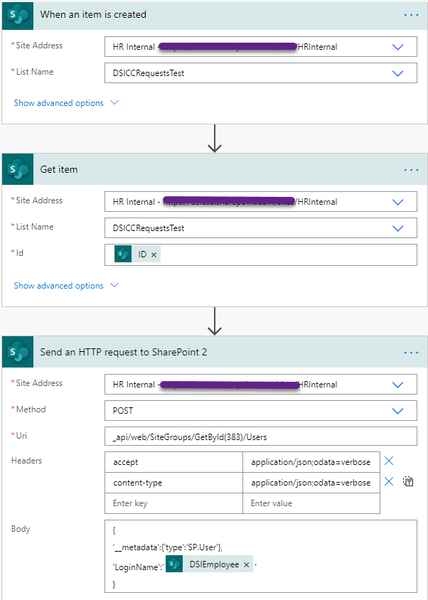
Hello All! I'm trying to update a SharePoint permission group with Users as they are added to a SharePoint list. I'm using the HTTP Request to update the permission group, but it keeps failing with a BadGateway message or it times-out. Is this even possible to do with a Flow or, am I doing something wrong? Screenshots of the Flow and Error Message are below. Thank you in advance for any help! PattiRe: Team Site Left Navigation Column Not Visible to Site Members
My apologies for the late reply. I discovered the issue and resolved it. The links in the left nav column point to files that were migrated into SharePoint from a different file server. The permissions migrated to SharePoint with the files as well and only Users with access to the respective files are able to see the links in the left nav column. My mistake, I didn't realize that the permissions would migrate into SharePoint with the files. Thank you for your time and assistance.7.3KViews0likes0CommentsRe: Team Site Left Navigation Column Not Visible to Site Members
ChrisWebbTech Hi Chris, Thank you for responding! Responses to your questions are below. (1) One of the articles I read, while researching this issue, 'recommended enabling those Site Settings.' (2) Links in the Quick Launch go to individual folders in a document library on the same site. (3) Audience targeting was enabled and I disabled it yesterday. (4) I did find an article with a similar issue that occurred in 2010, but I believe it had something to do with customization of the site's master page, https://sharepoint.stackexchange.com/questions/33920/left-nav-only-appearing-for-site-collection-admins. I realized something this morning as well. When I submitted the site to Members for review on 8/28, they were able to see and access the links in the left nav column. Thanks again, Patti7.5KViews0likes2CommentsTeam Site Left Navigation Column Not Visible to Site Members
Hello, I have a SharePoint Online Team Site with multiple links in the left navigation column that only the Site Administrators can see. Site Owners and Members only see the "Home" link in the navigation column. I activated the Site Collection Features > SharePoint Sever Publishing Infrastructure and corresponding Site Actions > Manage Site Features > SharePoint Server Publishing features. The 'custom script' setting is enabled and the Quick Launch setting is enabled and I've removed and re-created the navigation links. Has anyone seen this issue before? Thank you in advance for any assistance, PLoveSolved8KViews0likes4CommentsConditional Formatting
Hello All, I'm trying to use 'Conditional formatting based on the value in a text or choice field (advanced)' in a SharePoint Online project tracking list and the formatting is not appearing on the list. I used the JSON from the Microsoft Docs article, 'Use column formatting to customize SharePoint,' and changed the names of the choice field names. I'm not sure what I'm doing wrong. I've used the view-formatting-schema as well and no change. { "$schema": "https://developer.microsoft.com/json-schemas/sp/v2/column-formatting.schema.json", "elmType": "div", "attributes": { "class": "=if(@currentField == 'Closed', 'sp-field-severity--good', if(@currentField == 'Submitted', 'sp-field-severity--low', if(@currentField == 'Open', 'sp-field-severity--warning', if(@currentField == 'Potential RFI', 'sp-field-severity--severeWarning', 'sp-field-severity--blocked')))) + ' ms-fontColor-neutralSecondary'" }, "children": [ { "elmType": "span", "style": { "display": "inline-block", "padding": "0 4px" }, "attributes": { "iconName": "=if(@currentField == 'Closed', 'CheckMark', if(@currentField == 'Submitted', 'Forward', if(@currentField == 'Open', 'Error', if(@currentField == 'Potential RFI', 'Warning', 'ErrorBadge'))))" } }, { "elmType": "span", "txtContent": "@currentField" } ] } Thanks for any assistance! PattiSolved2.1KViews0likes3CommentsAssociate SPO Root Site with Hub Site
Good Morning, Is it possible to associate the SharePoint Online root site with a Hub site? I 'associated' the root site, which is a classic Team site, with a Hub site, but I don't see the navigation menu. I have a customer that would like to see the Hub site navigation menu on the root site, especially on this page, https://TENANT.sharepoint.com/_layouts/15/sharepoint.aspx. Thank you for any assistance! PattiSolved936Views0likes2CommentsEditing JSON in List View Formatting Fails to Display
Hello All, I'm trying to add an additional map location to the JSON for the SharePoint 'Contact-Card-Format' list view formatting, (https://github.com/pnp/sp-dev-list-formatting/tree/master/view-samples/contact-card-format). I removed the Company, Email, Phone, and Picture options from the JSON and it works perfectly. But, when I add the additional JSON for the map location fields, the entire list item disappears. I've tried various approaches and nothing seems to work. I'm fairly new to the list view formatting and JSON so I'm not sure what I'm missing, doing wrong, etc. A Word file with the revised JSON is attached. Many thanks for any assistance, feedback, etc., you may have to offer. PLoveSolved1.6KViews0likes2Comments
Recent Blog Articles
No content to show