User Profile

emadadel2008
MVP
Joined Feb 28, 2019


User Widgets
Recent Discussions
Re: Audit user accessing entreprise App by SPN sign-in
You're facing a common challenge in hybrid environments where service principal (SPN) or app registration-based access doesn't directly tie to a specific user identity in the sign-in logs. This is because these types of access often rely on machine or application identities rather than individual user accounts. Potential Solutions to Identify Users Behind SPN/App Registration Access While there's no direct way to map SPN/app registration access to a specific user in the traditional sign-in logs, you can explore the following strategies to gain more insights: 1. Leveraging Microsoft Purview Information Protection (PIP): Track Sensitive Information: Configure PIP to track sensitive information accessed through your app registration. Correlate with User Activity: By analyzing the access patterns of sensitive data and cross-referencing them with user activity logs, you might be able to infer which users are likely behind the SPN/app registration access. Limitations: This approach may not provide a definitive answer, especially if the accessed data isn't highly sensitive or if multiple users have access to the same data. 2. Customizing Application Logging: Enhance Application Logging: If you have control over the application's code, you can implement custom logging to capture additional details about the user or device making the request. Correlate with Entra ID Logs: By capturing relevant information like user agent, IP address, or specific actions performed within the application, you can try to correlate this data with Entra ID logs to identify potential users. 3. Leveraging Conditional Access and Device Registration: Enforce Conditional Access Policies: Implement Conditional Access policies that require multi-factor authentication (MFA) or device registration for access to sensitive resources. Analyze Conditional Access Logs: By examining the devices and users that successfully authenticate, you might be able to identify the individuals behind the SPN/app registration access. 4. Consider Azure AD Privileged Identity Management (PIM): Monitor Privileged Access: If your app registration requires elevated privileges, use PIM to track who activates these privileges and when. Correlate with Access Logs: By analyzing PIM activity logs, you can identify potential users who might be using the app registration. 5. Consult with Microsoft Support: Seek Expert Advice: Reach out to Microsoft support for tailored guidance based on your specific environment and requirements. Explore Advanced Logging and Monitoring Options: Microsoft support engineers may be able to provide additional insights or recommend advanced logging and monitoring techniques.59Views1like0CommentsImportant Update: Azure Automation Update Management and Log Analytics Agent Retirement
Important Update: Azure Automation Update Management and Log Analytics Agent Retirement Attention Azure users! This is a critical notice regarding the retirement of two key services: Azure Automation Update Management and the Log Analytics agent. Both will be discontinued on August 31, 2024. To ensure uninterrupted update management for your virtual machines, migrating to Azure Update Manager is essential before the retirement date. Why the Change? Microsoft is streamlining its update management offerings by focusing on Azure Update Manager, a robust solution with several advantages. These include: Simplified onboarding: Azure Update Manager leverages existing Azure features for effortless integration. Enhanced control: Granular access controls allow for precise management of update deployment. Flexible automation: Automatic patching capabilities streamline the update process. Taking Action: Migrate to Azure Update Manager To avoid disruptions after August 31st, migrating to Azure Update Manager is necessary. Microsoft provides a comprehensive guide to facilitate this transition: Move from Automation Update Management to Azure Update Manager https://learn.microsoft.com/en-us/azure/automation/update-management/overview This guide details the migration process, ensuring a smooth transfer to the new platform. Don't wait! Begin the migration process today to ensure your virtual machines receive updates seamlessly after the retirement of Azure Automation Update Management and the Log Analytics agent.Re: How to migrate Azure vNET-integrated API-Management stv1 to stv2?
I understand your concerns about migrating your vNET-integrated Azure API Management (API-M) instances from stv1 to stv2 with the limitations of backup & restore and the missing stv2 dev tier. Here's how you can approach this: Migration Strategy: Migrate Production (Prod) to stv2 Standard: Since backup & restore across service tiers isn't supported, a direct migration with rollback isn't feasible. Here's a two-step approach: Test Migration: Create a new stv2 Standard instance in the same region as your Prod stv1 instance. Use the Azure API Management portal or PowerShell to export your Prod stv1 configuration (policies, APIs, products etc.). Import the exported configuration into the new stv2 Standard instance. Thoroughly test your migrated APIs in the new stv2 environment to ensure functionality. Production Cut-over: Once testing is successful, schedule a maintenance window for minimal disruption. Update your DNS records or firewall rules to point to the new stv2 Standard instance's VIP address. De-provision your stv1 Prod instance after confirming everything is functioning smoothly in stv2. Development (Dev) Environment: The absence of a stv2 Dev tier creates a cost challenge. Here are two options: Consolidate Dev and Prod on stv2 Standard: If your Dev environment has lower traffic compared to Prod, consider migrating Dev to the same stv2 Standard instance used for Prod. You can configure different policies and backends for Dev and Prod APIs within the same instance for better resource utilization. Delay Dev Migration: If Dev environment separation is crucial, you can temporarily hold off on Dev migration. Continue using the stv1 Dev instance until Microsoft releases the stv2 Dev tier (there's no official confirmation on its availability yet, but you can keep an eye on Microsoft documentation for updates).962Views0likes1CommentRe: Azure AD Sync Error 0xcaa10001 in access work or school settings
Dear preuley30 can take to troubleshoot and potentially solve the issue: 1. Check Azure AD Errors: 2. Verify BYOD Policy and Device Registration: 3. Re-sync Azure AD Connect (if applicable): 4. Clear AAD Cache and Re-register Device: 5. Check Network Connectivity and Firewall Rules: 6. Update Device and Apps: Let me know if these steps help you1.4KViews0likes0CommentsRe: Workday for automatic user provisioning
HI eliekarkafy Can I configure my Workday HCM tenant with two Azure AD tenants? Yes, this configuration is supported. Here are the high level steps to configure this scenario: Deploy provisioning agent #1 and register it with Azure AD tenant #1. Deploy provisioning agent #2 and register it with Azure AD tenant #2. Based on the "Child Domains" that each Provisioning Agent will manage, configure each agent with the domain(s). One agent can handle multiple domains. In Azure portal, setup the Workday to AD User Provisioning App in each tenant and configure it with the respective domains. Reference : https://learn.microsoft.com/en-us/azure/active-directory/saas-apps/workday-inbound-tutorial#can-i-configure-my-workday-hcm-tenant-with-two-azure-ad-tenants2.4KViews0likes0CommentsCreating a SQL Login with SQL Server Availability Groups
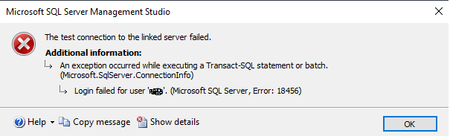
The issue The logins used in the databases included in an AG must share the same SID if you have SQL Server AlwaysOn, availability groups. How come? Let's investigate further... A row is added to the [syslogins] table in the [master] system database each time a user is created. Now, when you map a user to a database and begin adding roles to that database for the specific user principal, a row with the pertinent data is added to the [sysusers] user database table. The [syslogins] and [sysusers] tables are connected based on SID information. Tada!. You can query sys.database_principals to get a list of database principals. As shown below, we have similar SID’s for a login [SQLAg2User] and database user [SQLAg2user]. Environment information The SQL Server Always On Availability Groups for these two nodes have the following characteristics for the purposes of this article: Primary Replica: SQLNode1\INST1 Secondary Replica: SQLNode2\INST1 Database: [MyNewDB] The Solution Enters T-SQL: You create the login on the primary replica node with the following script or something like that, that fits your needs: -- Connect to the PRIMARY REPLICA node of the AG USE [master] GO -- Create the login CREATE LOGIN user1 WITH PASSWORD = N'aStrongPasswordHere'; If everything runs successfully you run the next to get the SID of the user: USE [master] GO -- Get the SID of the user createdSELECT [sid], [name] FROM [syslogins] WHERE [name] = 'user1'; GO Now, that you have the SID, switch the connection the secondary replica and execute the following query: -- Connect to the **SECONDARY** REPLICA node of the AG USE [master] GO CREATE LOGIN user1 WITH PASSWORD = N'useTheSamePassword', sid=<copy-paste the SID from above>; Now, you are ready to go back to your Primary Replica that has the databases you want to grant the rights for the user and do so freely. The next time your database fails over to the other node it will work without a problem. Just a side note: why Windows Authentication mode does not have this SID problem? Well, if you think about it, the SID is governed by one source: the Windows Active Directory.12KViews3likes0CommentsError: MigrationPermanentException -Unauthorized
I have Migration from google g suite to office 365 and when i make sync it issue User status Data migrated: Migration rate: Last successful sync date: Error: MigrationPermanentException: The call to https://www.googleapis.com/oauth2/v4/token returned with status code Unauthorized: Unauthorized Error response: unauthorized_client Error description: Client is unauthorized to retrieve access tokens using this method, or client not authorized for any of the scopes requested. --> The call to https://www.googleapis.com/oauth2/v4/token returned with status code Unauthorized: Unauthorized Error response: unauthorized_client Error description: Client is unauthorized to retrieve access tokens using this method, or client not authorized for any of the scopes requested. Can help me27KViews0likes9CommentsWhat is Microsoft Entra
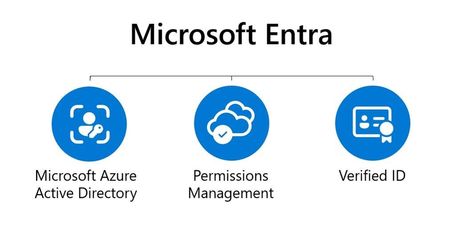
Microsoft has released a new product family called Entra. This includes Azure AD, as well as two new product categories: Cloud Infrastructure entitlement management (CIEM) and decentralized identity. These products will help provide secure access to everything for everyone by providing identity and access management, cloud infrastructure entitlement management, and identity verification services. In addition, we are announcing new solutions and products within the Entra family. For the benefits, we can easily identify three key advantages: 1. Minimize risks from cloud access 2. Decentralized identity community 3. Automatic critical identity governance1.8KViews1like0CommentsCheck in and check out time in SQL
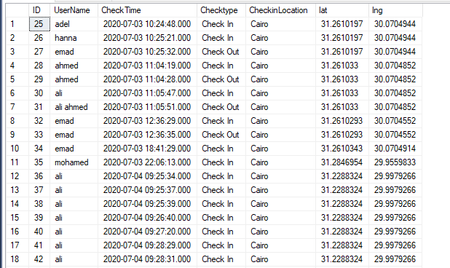
My table is: SELECT TOP (1000) [ID] ,[UserName] ,[CheckTime] ,[Checktype] ,[CheckinLocation] ,[lat] ,[lng] FROM [dbo].[CheckTime] INSERT INTO [dbo].[CheckTime] ([UserName], [CheckTime], [Checktype],[CheckinLocation], [lat], [lng]) VALUES (<UserName, nchar(10),> ,<CheckTime, datetime,> ,<Checktype, nvarchar(50),> ,<CheckinLocation, nvarchar(50),> ,<lat, float,> ,<lng, float,>)GO Create table script: CREATE TABLE [dbo].[CheckTime] ( [ID] [int] IDENTITY(1,1) NOT NULL, [UserName] [nchar](10) NULL, [CheckTime] [datetime] NULL, [Checktype] [nvarchar](50) NULL, [CheckinLocation] [nvarchar](50) NULL, [lat] [float] NULL, [lng] [float] NULL, CONSTRAINT [PK_CheckTime] PRIMARY KEY CLUSTERED ([ID] ASC) WITH (STATISTICS_NORECOMPUTE = OFF, IGNORE_DUP_KEY = OFF) ON [PRIMARY] ) ON [PRIMARY] I need to select each distinct home holding the maximum value of datetime. max CheckTime as check out min CheckTime as check in I need a result like this: id | Username | check in | check out---+----------+-------------------+------------------- 1 | 10 | 2017-1-2 08:02:05 | 2017-1-2 10:02:05 1 | 12 | 2017-1-2 08:02:05 | 2017-1-2 10:02:05 1 | 12 | 2017-1-3 08:02:05 | 2017-1-3 10:02:05 1 | 10 | 2017-1-3 08:02:05 | 2017-1-3 10:02:05 I have tried:2.9KViews0likes0CommentsAccess Denied - SP.RelatedItemManager.addSingleLink? SharePoint Desinger Workflow
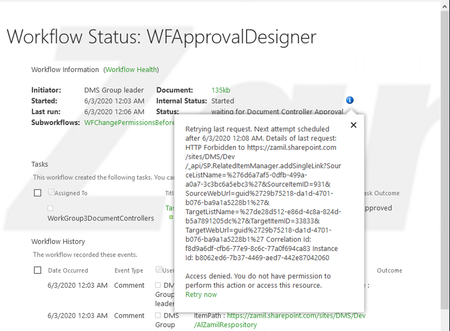
We have developed a multi step approval workflow on a document library using Sharepoint designer that involves taking 4 approvals one after the other. Inside the Main WF we have incorporated sub workflows that changes the permission on the file during different workflow stages to protect the document from change during the workflow. We are using WF 2013 for the main workflow and WF 2010 for the sub workflows Currently we are experiencing an Access denied error that appears in the workflow status page. This error prevents the workflow from moving forward keeping the WF stuck for several hours and then disappears by itself and the WF continues. The Error message mentions that the access is denied for SP.RelatedItemManager.addSingleLink end point I have done some research and found out that RelatedItemManger.addSingleLink method accepts 6 parameters of the related items. in this case the related item is the file on the Document Library (related to the task created by WF). I am not sure why does the access gets denied and after several hours it resolves. Anybody experienced the same problem. Appreciate the helpError 500 trying to access ECP - Exchange 2016
I have installed Exchange 2016 on a vm with win server 2016 join in a domain! Installation completed successfully and did all deployment but when im trying to login on the ECP/OWA am not able. I`m getting error 500. and i get error when i try to Get-EcpVirtualDirectory -ShowMailboxVirtualDirectories | FL Identity,*Site*,*URL*,*Auth* [PS] C:\Windows\system32>Get-EcpVirtualDirectory -ShowMailboxVirtualDirectories | FL Identity,*Site*,*URL*,*Auth* The task wasn't able to connect to IIS on the server 'EX1.EmadAdel.Local'. Make sure that the server exists and can be reached from this computer: The RPC server is unavailable. + CategoryInfo : ReadError: (EX1\ecp (Default Web Site):ADObjectId) [Get-EcpVirtualDirectory], IISNotReac hableException + FullyQualifiedErrorId : [Server=EX62016,RequestId=9b55718a-52d4-4540-9db8-cb33b43950b2,TimeStamp=5/2/2020 9:15:4 0 PM] [FailureCategory=Cmdlet-IISNotReachableException] 2F2CA45E,Microsoft.Exchange.Management.SystemConfiguration Tasks.GetEcpVirtualDirectory + PSComputerName : ex62016.emadadel.local The task wasn't able to connect to IIS on the server 'EXBackEnd1.EmadAdel.Local'. Make sure that the server exists and can be reached from this computer: The RPC server is unavailable. + CategoryInfo : ReadError: (EXBACKEND1\ecp (Exchange Back End):ADObjectId) [Get-EcpVirtualDirectory], II SNotReachableException + FullyQualifiedErrorId : [Server=EX62016,RequestId=9b55718a-52d4-4540-9db8-cb33b43950b2,TimeStamp=5/2/2020 9:15:4 3 PM] [FailureCategory=Cmdlet-IISNotReachableException] CD635A6C,Microsoft.Exchange.Management.SystemConfiguration Tasks.GetEcpVirtualDirectory + PSComputerName : ex62016.emadadel.local The task wasn't able to connect to IIS on the server 'EXBackEnd1.EmadAdel.Local'. Make sure that the server exists and can be reached from this computer: The RPC server is unavailable. + CategoryInfo : ReadError: (EXBACKEND1\ecp (Default Web Site):ADObjectId) [Get-EcpVirtualDirectory], IIS NotReachableException + FullyQualifiedErrorId : [Server=EX62016,RequestId=9b55718a-52d4-4540-9db8-cb33b43950b2,TimeStamp=5/2/2020 9:15:4 6 PM] [FailureCategory=Cmdlet-IISNotReachableException] CD635A6C,Microsoft.Exchange.Management.SystemConfiguration Tasks.GetEcpVirtualDirectory + PSComputerName : ex62016.emadadel.local The task wasn't able to connect to IIS on the server 'Ex.EmadAdel.Local'. Make sure that the server exists and can be reached from this computer: The RPC server is unavailable. + CategoryInfo : ReadError: (EX\ecp (Exchange Back End):ADObjectId) [Get-EcpVirtualDirectory], IISNotReac hableException + FullyQualifiedErrorId : [Server=EX62016,RequestId=9b55718a-52d4-4540-9db8-cb33b43950b2,TimeStamp=5/2/2020 9:15:4 9 PM] [FailureCategory=Cmdlet-IISNotReachableException] E9FCE425,Microsoft.Exchange.Management.SystemConfiguration Tasks.GetEcpVirtualDirectory + PSComputerName : ex62016.emadadel.local The task wasn't able to connect to IIS on the server 'Ex.EmadAdel.Local'. Make sure that the server exists and can be reached from this computer: The RPC server is unavailable. + CategoryInfo : ReadError: (EX\ecp (Default Web Site):ADObjectId) [Get-EcpVirtualDirectory], IISNotReach ableException + FullyQualifiedErrorId : [Server=EX62016,RequestId=9b55718a-52d4-4540-9db8-cb33b43950b2,TimeStamp=5/2/2020 9:15:5 2 PM] [FailureCategory=Cmdlet-IISNotReachableException] E9FCE425,Microsoft.Exchange.Management.SystemConfiguration Tasks.GetEcpVirtualDirectory + PSComputerName : ex62016.emadadel.local Identity : EX62016\ecp (Exchange Back End) WebSite : Exchange Back End InternalUrl : ExternalUrl : InternalAuthenticationMethods : {Ntlm, WindowsIntegrated} BasicAuthentication : False WindowsAuthentication : True DigestAuthentication : False FormsAuthentication : False LiveIdAuthentication : False AdfsAuthentication : False OAuthAuthentication : False ExternalAuthenticationMethods : {Fba} Identity : EX62016\ecp (Default Web Site) WebSite : Default Web Site InternalUrl : https://ex62016.emadadel.local/ecp ExternalUrl : InternalAuthenticationMethods : {Basic, Fba} BasicAuthentication : True WindowsAuthentication : False DigestAuthentication : False FormsAuthentication : True LiveIdAuthentication : False AdfsAuthentication : False OAuthAuthentication : False ExternalAuthenticationMethods : {Fba} [PS] C:\Windows\system32>Solved31KViews0likes5CommentsRe: Error: MigrationPermanentException -Unauthorized
MMartinez07 Well, make sure the token is valid, and has the necessary permissions/scopes as detailed here: https://docs.microsoft.com/en-us/exchange/mailbox-migration/perform-g-suite-migration#grant-access-t... make sure you have done this point "Grant access to the service account for your Google tenant" in https://docs.microsoft.com/en-us/exchange/mailbox-migration/perform-g-suite-migration#grant-access-t... Grant access to the service account for your Google tenant Go to the G Suite Admin page and sign in as G Suite admin for your tenant. Click Security, then click Advanced settings, and then click Manage API client access. In Client Name, type the ClientId for the service account you created in the Create a Google Service Account section above. In API Scopes, add the required scopes in comma-separated format, with no spaces in between. For example, https://mail.google.com/,https://www.googleapis.com/auth/calendar,https://www.google.com/m8/feeds/,https://www.googleapis.com/auth/gmail.settings.sharing. If the API Scopes are entered incorrectly, the resulting list won't match and the migration process will fail later, after you start the migration batch. Click Authorize. Verify that the resulting list shows "Email (Read/Write/Send)", "Calendar (Read-Write)", "Contacts (Read/Write)", and "https://www.googleapis.com/auth/gmail.settings.sharing". Note25KViews1like0CommentsErrors were encountered during the configuration of the Search Service ApplicationSystem.Data.SqlCli
ERRORS WERE ENCOUNTERED DURING THE CONFIGURATION OF THE SEARCH SERVICE APPLICATIONSYSTEM.DATA.SQLCLIENT.SQLEXCEPTION (0X80131904): BY EMADADEL2008, MARCH 1, 2019 SHAREPOINT, UNCATEGORIZED While Creating Search Service Application I got the below error. Errors were encountered during the configuration of the Search Service Application. System.Data.SqlClient.SqlException (0x80131904): Windows NT user or group ‘RITSOL\Administrator’ not found. Check the name again. at System.Data.SqlClient.SqlConnection.OnError(SqlException exception, Boolean breakConnection, Action1 wrapCloseInAction) at System.Data.SqlClient.TdsParser.ThrowExceptionAndWarning(TdsParserStateObject stateObj, Boolean callerHasConnectionLock, Boolean asyncClose) at System.Data.SqlClient.TdsParser.TryRun(RunBehavior runBehavior, SqlCommand cmdHandler, SqlDataReader dataStream, BulkCopySimpleResultSet bulkCopyHandler, TdsParserStateObject stateObj, Boolean& dataReady) at System.Data.SqlClient.SqlCommand.FinishExecuteReader(SqlDataReader ds, RunBehavior runBehavior, String resetOptionsString, Boolean isInternal, Boolean forDescribeParameterEncryption) at System.Data.SqlClient.SqlCommand.RunExecuteReaderTds(CommandBehavior cmdBehavior, RunBehavior runBehavior, Boolean returnStream, Boolean async, Int32 timeout, Task& task, Boolean asyncWrite, Boolean inRetry, SqlDataReader ds, Boolean describeParameterEncryptionRequest) at System.Data.SqlClient.SqlCommand.RunExecuteReader(CommandBehavior cmdBehavior, RunBehavior runBehavior, Boolean returnStream, String method, TaskCompletionSource1 completion, Int32 timeout, Task& task, Boolean& usedCache, Boolean asyncWrite, Boolean inRetry) at System.Data.SqlClient.SqlCommand.InternalExecuteNonQuery(TaskCompletionSource`1 completion, String methodName, Boolean sendToPipe, Int32 timeout, Boolean& usedCache, Boolean asyncWrite, Boolean inRetry) at System.Data.SqlClient.SqlCommand.ExecuteNonQuery() at Microsoft.Office.Server.Data.SqlSession.ExecuteNonQuery(SqlCommand command, SqlInfoMessageEventHandler handler) at Microsoft.Office.Server.Data.SqlSession.ExecuteNonQuery(SqlCommand command) at Microsoft.Office.Server.Data.SqlServerManager.GrantLogin(String user) at Microsoft.Office.Server.Search.Administration.SearchDatabase.EnsureServiceAccountExist(SPProcessIdentity account) at Microsoft.Office.Server.Search.Administration.SearchDatabase.SynchronizeAccessRules(SearchServiceApplication searchApp) at Microsoft.Office.Server.Search.Administration.SearchServiceApplication.SynchronizeDatabases() at Microsoft.Office.Server.Search.Administration.SearchServiceApplication.Provision() at Microsoft.Office.Server.Search.Administration.SearchAdminUtils.UpdateIgnoreSPUpdatedConcurrencyException(String description, SearchAdminUtilsUpdateDelegate updateDelegate, SearchAdminUtilsRefreshObjectDelegate refreshObjectDelegate) at Microsoft.Office.Server.Search.Administration.SearchConfigWizard.CreateSearchApp() at Microsoft.Office.Server.Search.Administration.SearchConfigWizard.ProvisionSearchServiceApplication() at Microsoft.Office.Server.Search.Administration.SearchConfigurationJobDefinition.ExecuteTimerJob() ClientConnectionId:ed1296ba-ab20-4bb2-8288-de2e036ab81f Error Number:15401,State:1,Class:11 2/27/2019 8:05:00 PM This error happen when you install SQL with before joined domain Before joined domain my account is “HWC-HEP-3563120\Administrator “ and after it will be “RITSOL\Administrator” The Solution is just rename the account with RITSOL\Administrator Logged into SQL Server Management Studio Navigated to the Security folder Note: Also make sure that RITSOL\Administrator has the following roles 2. Also Checked SharepointServerSearch status has been started in Central Administration–> Services on Server . now we can create “Search Service Application ” in central administration search service application was created successfully3.3KViews0likes0Comments
Groups
Azure Tech Bites
Azure Tech Bites event series help inspiring digital transformation and cloud adoption by empowering technical communities to achieve more by building an echo system of technical community (customers, partners and experts) focused on building customer trust to drive tech intensity in solving business problem by effectively using Azure products and services and accelerate cloud adoption for a better customer-connected experienceLatest Activity: Sep 01, 2025
Egypt Azure Community
Welcome to the Egypt Azure Community (Formally Azure Tech Group in Egypt)Fabric and Power BI – Ashraf Ghonaim (MVP, MCT)
Be at the forefront of analytics innovation and dive into the heart of cutting-edge analytics by joining our Microsoft Fabric & Power BI Learning Room! This dynamic space unites Data Engineers, Scientists, BI and Analytics Specialists, offering a collaborative platform featuring Power BI, Data Factory, Data Engineering, Data Science, Data Warehousing, Synapse Real-Time Intelligence, and Fabric Databases. Whether you're a beginner starting your analytics adventure or a seasoned pro pushing boundaries, our global Fabric community welcomes you. Connect, share experiences, and learn from one another in a vibrant online space. Immediate answers to burning questions, the latest updates, news, events, resources, and insights into new Fabric certifications like PL-300, DP-600, DP-700, etc. await you. Join us in this one-stop-hub for collaborative learning, growth, and endless possibilities.
Leina Future Data & AI Hub
Empowering Learners in Data, AI, Power BI & Microsoft Technologies Latest Activity: Dec 31, 2025Recent Blog Articles
No content to show