User Profile

techchirag
MVP
Joined Jul 16, 2016


User Widgets
Recent Discussions
Bringing data to life using Power BI
Hi folks, Last weekend in London, I had the pleasure to present a session at SPS Events London "Bringing data to life using Power BI" - hopefully you will find the slides for your benefit! http://www.slideshare.net/techChirag/bringing-your-data-to-life-using-power-bi-sps-london-2016715Views5likes0CommentsPower Users Guide to Office 365
Last weekend I had the pleasure to present a session at Sharepoint Saturday Belgium 2016 in Brussels "Power Users Guide to office 365" - and you can access the slides in the link below. https://techchirag.com/2016/10/17/power-users-guide-to-office-365-spsbe/ One of the main reasons I put this session together is because when I come across client Office 365 implementations most users are unaware of the full set of capabilities Office 365 app and services have on offer. The session covered all the apps in the screenshot with red star. Hopefully the slides will be of benefit to you. Thanks ChiragKey MSIgnite SharePoint announcements and updates in pictures!
Hi folks! Like some of you, this week I had a pleasure of attending Live MSIgnite sessions remotely from London, UK. These included mainly on SharePoint and Office 365 related tech. As I was also tweeting mainly for my learning log, you may find the screen shots of slides in my twitter media useful with announcements and updates! https://twitter.com/techChirag/media What were your highlights and takeaways from MSIgnite?583Views0likes0CommentsRe: Confused? I have new modern team sites but what about my root site collection's pages?
The root site collection indeed is based on publishing site template that has a classic experience behaviour for the limitations as outlined in the article Differences between the new document library experience and classic mode. My understanding is that modern pages are based on SharePoint Online team sites and changes to pubslishing sites are coming in H! Calendar 2017 as per the SharePoint Roadmap (slide 15). hope this helps.3.3KViews0likes5CommentsChanging the way you work with Modern SharePoint Team Sites and Office 365 Groups
Last week at a community event Collab 365 Global Conference, I presented a session “Changing the way you work with Modern SharePoint Team Sites and Office 365 Groups” which was well attended with lots of good questions in the session chat. Youi can access both the slides and the recording in the links below. Hopefully it will be of benefit to you. Any questions please feel free to ask here. Thanks Chirag. Slides: http://www.slideshare.net/techChirag/changing-the-way-you-work-with-modern-sharepoint-team-sites-and-office-365-groups-collab365-global-conference-2016 Video: https://youtu.be/HCoY5pOj468605Views2likes0CommentsRe: Hiding Quick Launch menu in SharePoint Online on all pages
Hi Jakob, The quick launch is disabled if you view in the classic experience. However, as you point out, to me this is by design for modern look. For example, as recently "Pages" link appeared for enabling us to navigate to pages library to create site page. I guess its a case of one step forward and few steps backwards. Thanks Chirag22KViews0likes0CommentsProfessional Learning Community (PLC) Groups in Office 365
According to Office 365 Education customers today, a new feature called Professional Learning Community (PLC) Groups is appearing on Office 365 Education tenants who have Office 365 Groups enabled. Can anyone share their experences (good and "not good")?Solved2.5KViews1like1CommentList of Microsoft Forums?
So as per last week's announcement, we've had a name change ceremony from Office 365 Network (Preview) to Microsoft Tech Community! Few weeks ago I did a quick blog post to maintain a list of currently supported Microsoft forums as below. Have I missed any others and will these forums appear in these space as consolidation to make things easier? Microsoft Community – http://answers.microsoft.com/ – help with technical support. Power Users Community – https://powerusers.microsoft.com/ – Gateway to Power BI, Flow, Power Apps, Stream communities forums. Power BI Community – https://community.powerbi.com/ PowerApps Community – https://powerusers.microsoft.com/t5/PowerApps-Community/ct-p/PowerApps1 Microsoft Flow Community – https://powerusers.microsoft.com/t5/Microsoft-Flow-Community/ct-p/FlowCommunity Microsoft Stream Community – https://powerusers.microsoft.com/t5/Microsoft-Stream-Community/ct-p/StreamCommunityBoards Azure Forums – https://azure.microsoft.com/support/forums/ Microsoft Social – https://social.microsoft.com/Forums Microsoft Technet – https://social.technet.microsoft.com/Forums – for IT Professionals technical support. MSDN – https://social.msdn.microsoft.com/Forums – for developers technical support Yammer Office 365 Network (Closing soon) – https://www.yammer.com/itpronetwork Thanks Chirag21KViews7likes11CommentsRe: ROLLING OUT: SharePoint Online team sites + Office 365 Groups & Pages
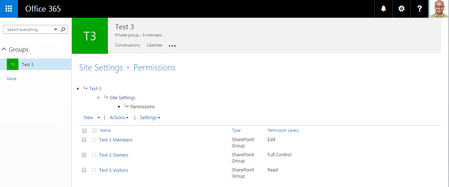
Joe Fedorowicz currently the permission groups consist of owners, members and visitors. For each of the group, the group name permission object (i.e. test 3) resides in all of the above permission groups - screenshot below. Makes perfect sense to use at least the owners and members group. We'll have await further information as how this will pan out.7.2KViews1like0CommentsRe: ROLLING OUT: SharePoint Online team sites + Office 365 Groups & Pages
Joe Fedorowicz Office 365 Groups was always based on SharePoint Site Collection (i.e. top level site with one library). The integration now expands this site into a full-blown SharePoint site as we know it. Therefore, more site ownership controls such as permissions and create other business apps, etc.7.2KViews1like4CommentsNew SharePoint Online Team Site with disabled creation of Office 365 Group
Based on SharePoint and Office 365 Group integration, when new team site is created (public or private), a new Office 365 group membership will be created. How will this work with O365 Administrators who have disabled creation of Office 365 Groups when new SharePoint site is created?654Views2likes0CommentsRe: ROLLING OUT: SharePoint Online team sites + Office 365 Groups & Pages
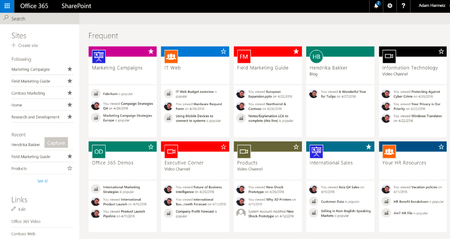
Good question! Robert Woods Not everything is created from SharePoint and more often OneDrive tends to be a starting point for a document lifecycle and eventually will end up in a SharePoint team site or even in Groups! Overall for me they are the endpoints to get to the information relevant to me. I've highlighted the key differentiators between each of the apps. OneDrive app - lets you work with your personal (OneDrive) and work files (OneDrive For Business) - access all your OneDrive files and files shared with you SharePoint App - access to intranet - quick access to your team sites and the people you work with - to see the site activity, sites you frequently visit and the sites you follow - share a site (subject to permissions) - access to recent and popular files spreasd across multiple document libraries Outlook Groups (Office 365 Groups) App: - Easily participate in group email conversations - Work together using the shared team OneNote's notebook - Discover and join Office 365 Groups relevant to you Hope this helps.7.3KViews1like1CommentSharePoint Online Team Sites coming to Office 365 Groups - Mobile Apps Experience?
Having absorbed the great news yesterday of SharePoint Online Team Sites coming to Office 365 Groups. Are there any plans for change (if any) for both SharePoint App and Office 365 Group (Outlook Group) App experiences?777Views0likes2Comments

Recent Blog Articles
No content to show