User Profile

WeeTeckTan
Iron Contributor
Joined Jan 19, 2018


User Widgets
Recent Discussions
Able to Edit PDF file but Download is Blocked for The External User
Hi All, Did anyone have this requirement that the pdf file was shared to the external user but he/she is able to edit the file but not able to download? Seeking for a solution to achieve this. Please advise. Thanks.476Views0likes3CommentsService Accounts Password Changed From AD Impacts to SharePoint 2019
Hi All, Anyone of you know about the details or the impacts to SP2019 Central Administration, SharePoint Timer Job services, services application & app pool if reset the password of all service accounts & Farm account from AD? Please advise. Thanks.Outlook 2019 Room Finder
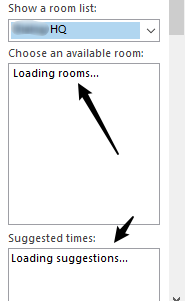
Dear All, Currently facing the slow loading of room list under 'Choose an available room' box after selected a room list. It's taking 10 seconds to load the meeting room based on the selected room list. Please advice on the performance improvement. Note: Using Outlook 2019 (windows 10) to connect the meeting room list (Office 365 Tenant) Cheers, VTEC1.4KViews0likes1CommentPerformance issue to sync from local to SharePoint Online (AutoCAD)
Dear All, The engineering team members are having problem with AutoCAD files sync library, it take 10 minutes to sync back to cloud (SharePoint Online). Do you guys face this issue before? How do we cater for this issue or using the alternate solution? Please advise. Thanks. Rgrds, VTEC684Views0likes0CommentsDamaged file issue handling in document library
Dear All, The worst case scenario as below. Checked current file to be opened in Word Online or Word Client but it mentioned that the file content problem and cannot be opened. Tried to check the older version of current file in version history and click View. The older version of file cannot be opened as well. The user may blame SharePoint Online caused this file corrupted. What shall we do to handle this case? Please advise. Thanks. Rgrsd, VTEC476Views0likes0CommentsSite Activity Webpart issue
Dear All, Recently I received a few users' feedback that the site activity info are not accurate and it may caused that misunderstanding SharePoint Online Modern Team Site has integrity issue. The user said that the document is not being viewed/opened but the site activity webpart showed that her name is stated. Anyone of you have received any complaint about this? Does it possible a bug of this webpart? Please advice. Thanks. Rgrds, VTEC1.3KViews1like2CommentsThe full filename can't be seen in Document Upload Detail Panel
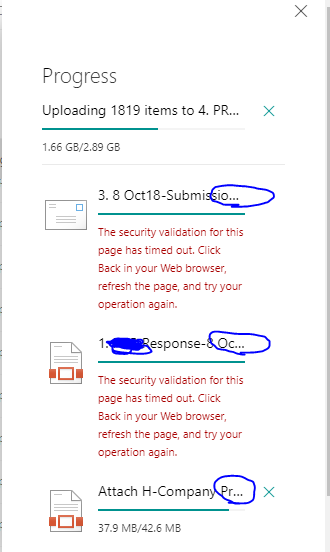
Dear All, Anyone of you noticed that the message is not displaying the full name of document especially we need to identify which file is not being uploaded due to failure? Does any way to resolve this or anyone posted the idea to enhance the UI\UX of this message detail panel? Does the message will be stored in any form of file (eg. text file) in SharePoint Online? It will be good to trace it and we don't require to snapshot or write down what are the failures for those files during uploading progress. Please advice. Thanks. Rgrds, VTEC2KViews0likes5CommentsRe: Hardware Software Requirement for SharePoint Online users
jcgonzalezmartin ,yeah..same spec with you. Probably the user's expectation is higher. May expect that the page loading is 1 or 2 seconds. You are right that Windows 7 performance is slower than Windows 10. I observed that 2 users use the desktop machine in same model and same spec but in different OS (Win 7 and Win 10). The user experience in Win 10 is better than Win 7. Thanks.12KViews0likes0CommentsRe: Hardware Software Requirement for SharePoint Online users
jcgonzalezmartin , I agree with you but what if open in office desktop, it may depend on local machine spec. I gained the feedback from the end users that it's slower in opening office desktop either using MS surface (windows 8) or desktop PC (Windows 7, 3GB RAM only). That's why it's better to come out the minimal and optimum spec of machine for the end users to minimize the issues of using SPO and improving the better user experience. Some use Office 2007 where they can't open office from SPO... Thanks. Rgrds, VTEC12KViews0likes3CommentsHardware Software Requirement for SharePoint Online users
Dear All, I couldn't find any related document for the optimum spec machine for SharePoint Online end users. This is the list of machine spec. Please comment. Thanks. Operating system Windows 10, Windows 8.1, Windows 8, Windows 7 Service Pack 1 Browser Safari, Google Chrome, and Firefox - latest version Microsoft Edge - latest version Email client software Office 2016\Office 365 Pro Plus Office for Mac 2016\Office 365 Pro Plus for Mac Computer and processor 1 GHZ or faster x86 or 64-bit processor Memory 16GB RAM (64-bit) recommended for graphics features Disk space 3 gigabytes (GB) Monitor resolution 1024 x 768 Exchange ActiveSync must be supported for Office 365Solved12KViews0likes6CommentsRe: Excel "Share Workbook" feature is applicable if open in Excel Desktop from SharePoint Online?
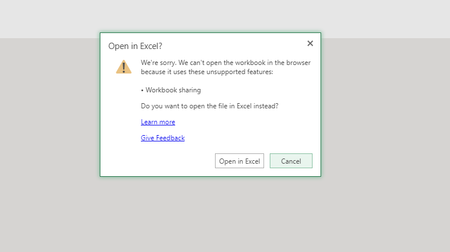
VasilMichev , If we turn on "Share Workbook" in Excel Desktop, we couldn't open Excel Online afterwards. Please see the screenshot below. We couldn't open either in Excel Online or Excel Desktop (Share Workbook is on). What is the better way to guide users about this? I tried Share Workbook in Excel Desktop, other user can't edit the workbook at same time if I am editing. Thought that it's similar with Excel Online (co-editing). Please advise and help VasilMichev wrote: Yes, you should be able to use the Share functionality from either the web or the desktop version. . Thanks. Rgrds, VTEC1.1KViews0likes2Comments
Recent Blog Articles
No content to show