
Forum Widgets
Latest Discussions
Intune application migration & app management
Migrating applications from Configuration Manager and other on-prem solutions to Microsoft Intune cloud native remains a challenging and time consuming undertaking, especially when dealing with complex line-of-business, legacy, and custom home-grown applications. Some organizations pursuing a full cloud-native management vision are encountering blockers related to application compatibility, re-packaging, and the scale of existing app estates - all while trying to maintain business continuity, device compliance, and preparing for the AI and Copilot era. Start here Read Face the future today by moving your application to cloud native Bookmark the Microsoft Intune planning guide Navigate to: Why app migration matters | Application packaging partners | Frequently asked questions Why app packaging matters Centralizing application management in Intune can deliver operational benefits such as unified enforcement and improved security posture—while supporting broader modernization goals. Common blockers that slow cloud-native adoption include: App compatibility and dependency complexity Manual repackaging effort at scale Risk of disruption during cutover Application packaging partners To address the complex realities of app migration, the Microsoft partner ecosystem has stepped up with specialized offers designed to reduce risk and accelerate cloud adoption. As part of this initiative our Microsoft partners Rimo3 and Robopack are offering no-cost, time-limited app migration service to all Intune customers who are looking to move from Configuration Manager to Intune. These services can help IT teams automate assessment, package conversion, and remediation for various app types, helping organizations realize the full value of Intune faster and with less disruption. Note: The app migration services listed on this page are offered directly by partners and are subject to their terms. Microsoft makes no guarantees or commitments regarding availability or outcome. Rimo3 helps IT professionals modernize, migrate, and manage applications at enterprise scale. The platform eliminates manual effort by automating packaging, validation, and patch testing. With patented IP, Rimo3 ensures every app is compatible, secure, and visible for dependencies and update readiness before deployment. Automated, unattended workflows reduce migration timelines from months to days, while contextual patch validation minimizes production risk. Rimo3 keeps environments evergreen with zero-touch app management and enhances Microsoft Intune with bulk operations, advanced controls, and unified reporting. Robopack is a cloud-native Intune app lifecycle platform that lets you package, deploy, and keep third-party apps updated, across one or many tenants, with phased control and PowerShell App Deployment Toolkit (PSADT)-based customization. Start with a self-service migration readiness report, mapped to the library of 41,000 pre-packaged, fully documented apps ready to go, or upload your own apps to be analysed and converted. Robopack Radar discovers apps installed across your estate, allowing you to quickly migrate to Intune and uncover Shadow IT. Frequently asked questions Q: Is this a Microsoft-managed service? A: No. Partner offers are provided directly by partners and subject to partner terms; Microsoft makes no guarantees regarding availability or outcomes. Q: What kinds of apps can these paths help with? A: The published focus is on helping migrations from Conifguration Manager to Intune, including complex legacy and line-of-business apps. Q: Where do I start if I’m early in planning? A: Start with the Intune Planning Guide and Migration Guide.Lior_BelaApr 21, 2026Microsoft29Views0likes0CommentsIssue with creating an issuing CA in Cloud PKI
I have activated an trial license for Cloud PKI a couple of days ago. I follow this guide to create a Root and Issuing CA https://oliverkieselbach.com/2024/03/04/how-to-configure-cloud-pki-certificate-based-wifi-with-intune/ I could create a root certificate successfully, but when i want create an issuing certificate i'm getting this error 'CA failed to be created' I have waited to a couple of hours to try it again but still no luck. What can cause this issue and how to solve this?Ronald-van-der-MeerApr 21, 2026Iron Contributor264Views2likes4Comments
Android 15 - CredentialProviderPolicy not surfaced by Intune
I have been having an issue with Android 15 devices. We use Authenticator as our password autofill provider. As soon as a device is updated from Android 14 to Android 15, the password autofill provider is no longer set and the setting to change it is 'blocked by work policy.' I have already tried removing all policies that apply to the devices (device config and device compliance policies) and factory resetting them. Simply having them enrolled as corporate owned fully managed devices causes this to happen. I raised the issue in the Android Enterprise community blog. A link to that is included below. Someone on that thread found that there is a policy in Android 14/15 called the credentialproviderpolicy. When that policy is blocked or unconfigured, this behavior happens. I cannot find anywhere in Intune where I can set this policy. It seems that it is allowed by default when managing Android 14 with Intune, but not set or blocked when the device switches to Android 15. Is there any way to specifically set a policy that is not reflected in the Intune UI? This is a blocker for being able to move more phones to Android 15. Link to Android Enterprise thread: https://www.androidenterprise.community/t5/admin-discussions/android-15-cannot-set-default-password-app/m-p/8827#M2105 Thanks, TomtngvmdApr 20, 2026Brass Contributor5.5KViews13likes26Comments
How to repair an application deployed via Intune with no admin rights
Hi, I would like to know how to repair an applcation deployed by Intune. User has no admin rights , so via control panel is not an option. User is not set as primary user on device. Thks for all commentssylsimp1Apr 20, 2026Copper Contributor25Views0likes1Comment
SSID connection using intune pushed profile kept prompting manual login
Hi, anyone encountered an issue where users connecting to an SSID with 802.1X authentication using an Intune-pushed Wi-Fi profile (with credential caching enabled) are still being prompted to enter their credentials manually? However, it works fine by configuring the network connection protocol manually. Thank you.SSChewApr 20, 2026Copper Contributor64Views0likes3CommentsWhich Entra account are you supposed to use to connect to a managed Google Play account?
At Connect Intune account to managed Google Play account - Microsoft Intune | Microsoft Learn, it says: We recommend using the Microsoft Entra account you're signed into to create the Google Admin account. So I used my Entra account to set it up. Now, though, when I look at the Managed Google Play item in Intune under Devices > Android > Enrollment, it has my email address under "Linked account". Was I supposed to create a shared Entra account to make this connection? What happens when I leave the org?RyanSteele-CoVApr 18, 2026Steel Contributor53Views0likes2Comments
Platform SSO "Page not found" on macOS Tahoe 26.4 — Company Portal 5.2602
Environment: macOS Tahoe 26.4 Company Portal 5.2602.0 (latest as of April 2026) Microsoft Intune — Automated Device Enrollment (ADE) Platform SSO with Secure Enclave (UserSecureEnclaveKey) SSO Extension: com.microsoft.CompanyPortalMac.ssoextension / Team ID: UBF8T346G9 URLs configured: https://login.microsoftonline.com, https://login.microsoft.com, https://sts.windows.net Device: MacBook Pro 14" (Apple Silicon), supervised, ADE-enrolled Issue: During Platform SSO registration, after the user authenticates successfully in the SSO registration prompt, Company Portal crashes with a "Page not found" error. The registration never completes — no WPJ certificate is created, no SSO registration key is stored in the Secure Enclave. Console logs show: CompanyPortalMac: URL(filePath:) API misuse — usingass old file path API which does not support security scoped bookmarks The error occurs specifically at the token exchange step after authentication, suggesting the Company Portal binary is calling a deprecated macOS file URL API that Tahoe 26.4 now enforces more strictly. What we tried: Full wipe and re-enrollment via ADE Removing and reinstalling Company Portal via Intune Different user accounts Verified SSO extension profile is correctly applied (confirmed via profiles show -type configuration) Verified network connectivity to Microsoft identity endpoints Tested on a clean macOS Tahoe 26.4 install — same result Expected behavior: Platform SSO registration completes, WPJ certificate is created, and SSO token is cached for seamless authentication. Actual behavior: "Page not found" after authentication in the SSO registration flow. Console shows the URL(filePath:) API misuse warning. Registration fails silently — no error surfaced to the user beyond the page not found screen. Question: Is this a known bug in Company Portal 5.2602 with macOS Tahoe 26.4? Is there a newer build or hotfix addressing the URL(filePath:) deprecation? Any workaround available? Tags: Platform SSO, macOS, Company Portal, ADE, Intunemek-a2Apr 14, 2026Copper Contributor43Views0likes0Comments
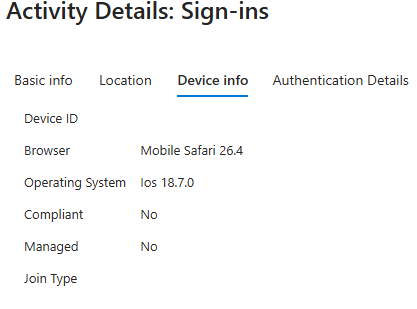
IOS - Embedded Webkit - Not Reporting Correct Device info
It appears that with the latest iOS versions (26.3.1 through 26.4), applications that rely on an embedded WebKit for sign-in are no longer reporting accurate device details within Device Info. Users have company-issued phones that are successfully enrolled in Intune, but when they attempt to sign in to Apple Mail, Conditional Access is denying the login. After reviewing the logs, iOS is reporting the OS version as 18.7.0 to Intune, even though the device is actually running iOS 26.4. Additionally, the device information is coming through as blank, so attributes are not being evaluated. When looking at other logins via the outlook app on that device it all appears normal and works. Has anyone else observed this behavior where WebKit is sending incorrect data to Intune? Does anyone know of a workaround other than relaxing Conditional Access policies?SolvedNexusEgoApr 14, 2026Copper Contributor932Views1like7Comments



Tags
- Intune4,324 Topics
- mobile device management (mdm)2,313 Topics
- Mobile Application Management (MAM)849 Topics
- Software Management471 Topics
- Conditional Access456 Topics
- Graph API252 Topics
- Azure Friday166 Topics
- Autopilot118 Topics
- android75 Topics
- ios61 Topics