

Forum Widgets
Latest Discussions
Microsoft #IntuneForMSPs resource guide
Welcome to your home for all things #IntuneForMSPs! Our goal is to help you grow your Microsoft Managed Service Provider (MSP) business by combining productivity apps, intelligent cloud services, and the world-class security of Microsoft 365 with the multi-tenant management capabilities of you, our partners. Join us for #IntuneForMSPs community meetups to hear first-hand experiences with configuring and managing customer tenants, gain best practices, and get answers to your questions, live and on demand. Upcoming monthly #IntuneForMSPs meetups: Advanced automation and PowerShell for Intune - March 17th, 2026 at 8:00 a.m. PT (3:00 p.m. UTC) Past #IntuneForMSPs meetups – now available on demand! Planning your customers' Intune migration - February 17th, 2026 Getting started with Microsoft #IntuneForMSPs - January 20th, 2026 Jump to: Marketing and business development | Demos and tutorials | Multi-tenant management partners | Application packaging partners | Microsoft communities | Select content from Microsoft MVPs In the spotlight Download the Business Premium best practice deployment guides: Identity and access controls best practice deployment Device enrollment best practice deployment Email & App Protection best practice deployment Device security best practice deployment Data security best practice deployment Marketing and business development Start by joining Microsoft Partner programs AI Business Solutions for Partners Microsoft Security Partners Join the Partner Skilling Hub for Free Go to Microsoft Partner Skilling Hub Create your free account Select Solution areas of interest Intune content: AI Business Solutions, Security Recommended modules Implement with impact: Endpoint Management with Microsoft Intune | Microsoft Partner Skilling Hub Implement with impact: Implement Identity and access management with Microsoft Entra - Modules Download this customizable campaign in a box Protect My Devices BoM Demos and tutorials Whether deploying solutions for yourself or for your customers, these resources can help you with prescriptive ‘do this next’ guidance to get you up to speed quickly. Download the Business Premium best practice deployment guides: Identity and access controls best practice deployment Device enrollment best practice deployment Email & App Protection best practice deployment Device security best practice deployment Data security best practice deployment Follow along with the companion videos: Achieve greater security and productivity with Microsoft Intune and Microsoft 365 Explore click-through interactive guides for more advanced instruction: Microsoft Intune guided demos Topics include configuring app protection policies, configuring Conditional Access, updating Windows from the cloud, configuring corporate devices, deploying and managing line of business (LOB) apps, enabling Universal Print, accessing corporate resources on personal-owned devices, setting up Windows Autopilot for new device delivery, and reducing bandwidth consumption with Delivery Optimization. Multi-tenant management partners Microsoft Intune is proud to collaborate with leading global providers of multi-tenant Intune management solutions. These companies are building innovative capabilities on top of Microsoft Intune, Microsoft Security, and the broader M365 platform. Their companion solutions allow MSPs to: Centrally view and manage all customer tenants and action items through a unified partner dashboard. Take action across environments, leveraging Intune for device management, cloud security, and compliance. Standardize security settings, automate onboarding, and ensure policy consistency at scale-no more repetitive, manual tasks or risky policy drift. Importantly, this is a collaboration. These solutions are independent companions, offering their unique workflows and advanced automation features alongside the Intune platform. Click the image below to watch the Microsoft Intune multi-tenant management video with Jonathan Edwards. Nerdio overview Nerdio brings deep automation and analytics to Intune, Windows 365, Azure Virtual Desktop, and the broader Microsoft cloud. MSPs benefit from multi-tenant dashboards, global policy insights, role-based access, centralized app deployment, and automatic policy versioning with rollback and drift correction. Nerdio’s tooling is designed specifically for MSPs and scales from small teams to large enterprise portfolios. Get more details at Nerdio’s landing page: aka.ms/IntuneforMSPs/Nerdio. Nerdio knowledge hub inforcer overview inforcer empowers MSPs to standardize Microsoft 365 and Intune policies across all tenants, automate environment configuration, monitor compliance in real time, and reduce risk through policy drift detection. Its reporting and automation features free teams from manual, error-prone scripting and help deliver consistent, secure customer experiences, setting MSPs up to deliver advanced AI services to their customers. Learn more at: aka.ms/IntuneforMSPs/inforcer Inforcer resources Application packaging partners Migrating applications from Configuration Manager and other on-prem solutions to Microsoft Intune cloud native remains a challenging and time consuming undertaking, especially when dealing with complex line-of-business, legacy, and custom home-grown applications. Some organizations pursuing a full cloud-native management vision are encountering blockers related to application compatibility, re-packaging, and the scale of existing app estates - all while trying to maintain business continuity, device compliance, and preparing for the AI Copilot era. To address the complex realities of app migration, the Microsoft partner ecosystem has stepped up with specialized offers designed to reduce risk and accelerate cloud adoption. As part of this initiative our Microsoft partners Rimo3 and Robopack are offering no-cost, time-limited app migration service to all Intune customers who are looking to move from ConfigMgr to Intune. These services can help IT teams automate assessment, package conversion, and remediation for various app types, helping organizations realize the full value of Intune faster and with less disruption. Please note: These app migration service offers are made directly by partners, are subject to their terms, and Microsoft makes no guarantees or commitments regarding their availability or outcome. Application packaging partner solution overviews Rimo3 helps IT professionals modernize, migrate, and manage applications at enterprise scale. The platform eliminates manual effort by automating packaging, validation, and patch testing. With patented IP, Rimo3 ensures every app is compatible, secure, and visible for dependencies and update readiness before deployment. Automated, unattended workflows reduce migration timelines from months to days, while contextual patch validation minimizes production risk. Rimo3 keeps environments evergreen with zero-touch app management and enhances Microsoft Intune with bulk operations, advanced controls, and unified reporting. Learn more at: aka.ms/IntuneRimo3Package Robopack is a cloud-native Intune app lifecycle platform that lets you package, deploy, and keep third-party apps updated, across one or many tenants, with phased control and PowerShell App Deployment Toolkit (PSADT)-based customization. Start with a self-service migration readiness report, mapped to the library of 41,000 pre-packaged, fully documented apps ready to go, or upload your own apps to be analysed and converted. Robopack Radar discovers apps installed across your estate, allowing you to quickly migrate to Intune and uncover Shadow IT. Learn more at: aka.ms/IntuneRobopackPackage Microsoft communities Microsoft 365 Blog small and medium business-related posts Microsoft 365 Partner LinkedIn channel Select content from Microsoft MVPs Essential Intune reading list: MVP community content for 2025 - Microsoft Intune BlogLior_BelaFeb 25, 2026Microsoft7.3KViews4likes3CommentsEdge for Android Smartscreen
Hi All I hope you are well. Anyway, is it possible to configure Edge for Android Smartscreen to: Prevent end user bypass Block potential risky downloads I can see various methods and guides pointing to Edge App Configuration policies but just cannot seem to get the this to work on Android Enterprise Fully Managed devices. Any help would be great. SKStuartK73Feb 25, 2026Steel Contributor32Views0likes2Comments
RHEL10 or Ubuntu 26.04 LTS Support
Hi, Is there any time lines when Microsoft Intune client for Linux will be updated to support the latest versions of these operating systems? Is there a published timeline anywhere that says when new releases for Linux will be released? Thanks in advance.MatherWayneFeb 24, 2026Copper Contributor20Views1like0CommentsControlling Excel Add-ins and Microsoft Store App Installations
We have a requirement to block users from adding add-ins to Excel and Installing certain application directly which utilize Microsoft Store apps. Below are the two scenarios we need to address. I would appreciate any guidance or recommendations on how to implement these controls. 1) Blocking Excel Add-ins from Microsoft Store Users are currently able to add add-ins such as “Claude by Anthropic in Excel” directly from the Microsoft Store apps. For example, if a user accesses the URL: https://marketplace.microsoft.com/en-us/product/saas/wa200009404?tab=overview they can proceed to add the add-in to Excel. So, We need a method to prevent users from adding Office add-ins from the Microsoft Marketplace or external sources. 2) Blocking Installation of Microsoft Store Apps (e.g., WhatsApp) We are currently blocking Microsoft Store apps on OS level. However, users can still download and install applications such as WhatsApp directly from the vendor website, which utilize Microsoft store apps in backend: https://www.whatsapp.com/download We are considering configuring the Intune policy “Only Private Store is enabled.” However, we noticed that enabling this setting prevents users from accessing certain built-in applications (e.g., Notepad). Is there any other way to block access Microsoft Store apps directly? Thank you in advance for your assistance. Dilan91Views0likes1CommentReplacing Complex GPO Item-Level Targeting with Intune
Hi All, I’m looking for some advice on the best way to handle this scenario. We’re running a hybrid environment and currently have a GPO that creates 1,000+ registry entries across 150+ user groups using item-level targeting with security groups. Now we need to move this over to Intune, and that’s where things get tricky. Intune doesn’t really offer the same item-level targeting flexibility as GPO. So far, the only workable option seems to be creating 150+ platform scripts or Proactive Remediation scripts, which obviously isn’t ideal from a management perspective. I’m thinking it might be much easier long-term to create one large PowerShell script that checks the logged-in user’s group membership and then applies the appropriate registry settings dynamically. Has anyone dealt with something similar? Is there a cleaner or more scalable approach in Intune? Thanks in advance! Dilan73Views0likes1Comment
Intune - ASR Rules - exclusion
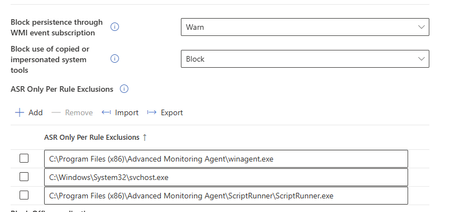
Hello, please can anybody give me an advice about Intune exception? We are using N-Able client for computer management and Intune ASR is blocking it. I tried to add exception in rule setting but it has not helped so far. I am getting defender popup with info that risky action blocked Your admin blocker this action. Blocked app or process - winagent.exe Blocked by - surface attack reduction Rule - Block using of copied or personified system tools. There is my exception but it did not helped. Thank you.JendislavFeb 24, 2026Copper Contributor174Views0likes2Comments
What are the system requirements for hardware-accelerated BitLocker announced in ignite 2025?
Microsoft has recently announced hardware-accelerated Bitlocker (Ref. Link: https://techcommunity.microsoft.com/blog/windows-itpro-blog/announcing-hardware-accelerated-bitlocker/4474609) I would like to know system requirements (Specifically Hardware) that supports this functionality. The article also says below "Coordinate with your suppliers and keep an eye on listings from us and other vendors as PCs become available on the market." But I am unable to find any link for the listing from Microsoft. Does it support all the devices that has TPM 2.0 or does it require any other hardware?123Views0likes1Comment
Unable to deploy out of band update 26200.7628
Hello, I need to deploy OOB 26200.7628 on our computers. We use deployment rings. The 2026.1 OOB update appeared in Releases on January 24. I created an expedite policy with a group of users I want to target with this update (with a restart within 0 days). But nothing has happened since Monday, everyone is still on 26200.7623. Where am I going wrong? Thank you.SolvedMartas133Feb 20, 2026Copper Contributor870Views1like6CommentsWill Intune device-only subscription get additional value in FY27
Will the Intune device-only subscription (Microsoft Intune announces device-only subscription for shared resources | Microsoft Community Hub) get the additional features which Intune P1 will get in FY27 (Microsoft 365 adds advanced Microsoft Intune solutions at scale - Microsoft Intune Blog), Intune Remote Help, Intune Advanced Analytics and Intune P2? This would have a huge impact of our planning how to manage special purpose devices in production environments without any user affinity. Deploying security and configuration settings, Windows Autopilot for Windows IoT Enterprise LTSC kiosk deployment, Windows Autopatch (servicing), Remote Help and FOTA for Zebra devices would be drivers to add these production devices to Intune.Cannot enroll azure vm(windows 24H2) in Microsoft company portal
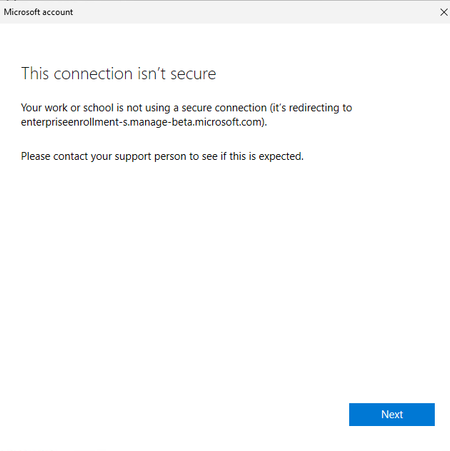
I created a windows VM in Azure. To access company resources on this machine, I attempted to enroll the device through the Company Portal. However, the enrollment failed while setting up the work or school account, with the error message “This connection isn’t secure.” How should I fix this issue?yanxxuFeb 18, 2026Microsoft116Views0likes6Comments




Tags
- Intune4,296 Topics
- mobile device management (mdm)2,305 Topics
- Mobile Application Management (MAM)843 Topics
- Software Management470 Topics
- Conditional Access455 Topics
- Graph API250 Topics
- Azure Friday166 Topics
- Autopilot116 Topics
- android75 Topics
- ios59 Topics