
Forum Widgets
Latest Discussions

How to enable/access Copilot Chat in Outlook for Mac (Version 16.106)
Hi Microsoft Support, I am looking for assistance on how to enable or access the Copilot Chat feature within the Outlook for Mac sidebar. Importantly, I can confirm that Copilot Chat is fully functional and visible when I use Outlook on the Web (OWA). This indicates that my license is active and correctly assigned, but the feature is missing from my desktop client. My Environment Details: Outlook Version: 16.106 (Build 25122912) Update Channel: [Beta Channel / Insider] Interface: "The New Outlook" for Mac License: Microsoft 365 [Business/Enterprise] with Copilot Problem Description: The Copilot Chat icon does not appear in the left-hand navigation bar in the desktop app. When I check the "More Apps" section to customize the sidebar, Copilot is not listed as an option to add. I would appreciate your help with the following: Since the feature works in the web version, why is it not syncing/appearing in the Mac Desktop app (Version 16.106)? Are there any specific "Connected Experiences" or local settings I need to toggle to force the Copilot app to appear in the sidebar? Is there a way to reset the local app configuration or cache to recognize my Copilot entitlement? Thank you for your assistance in getting the desktop integration working.janytterJan 19, 2026Copper Contributor247Views0likes3Comments
Copilot Download Cards Not Rendering — Files Blocked
Hello, as the title suggests, Copilot cannot share download cards in-chat while the files is already generated and ready. It says there's a problem in the backend and Microsoft Support referred me to here. Is this something they gonna fix or what I should do? The AI is telling me it cannot share the or send the download cards no matter what prompts I use, it is bugging me! Someone help please!HamboJan 19, 2026Occasional Reader23Views0likes0CommentsCopilot Video Generation disablement
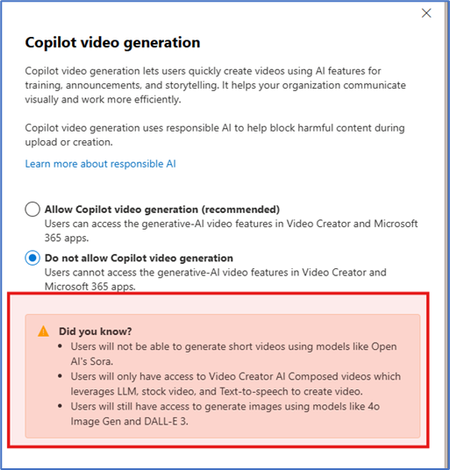
I am trying to block the Copilot Video Generation from the admin center however users are still able to create videos. Is this the expected behaviour? I am a bit confused. I am unsure if someone can clarify.ccadenasaJan 19, 2026Brass Contributor111Views0likes0CommentsMicrosoft 365 Copilot access to planner tasks?
I try to get Microsoft 365 Copilit access to existing planner plans and it's tasks. Read and possibly write access. How would I do that? I only have basic plans that are used in our team. Do I have to convert them (if that is possible at all) to the plans with project manager? I tried Project Manager. That seems to be an enhanced plan. Can I migrate? Does it need additional licenses? DanDanHuberJan 18, 2026Iron Contributor78Views0likes1Comment
Copilot Agent ALM and Knowledge Source Management Across Environments
Hello everyone, I currently have an agent in a Dev environment and want to deploy it to a second environment (e.g., Test or Prod). During deployment, we need to change the references to the knowledge sources. I’ve seen some articles where environment variables are used within Conversational Boosting topics to handle this, but I wanted to check if there is a supported or recommended way to manage or update knowledge source references from the Knowledge section itself to make them dynamic by using Environment variable? Any guidance or best practices would help. Thankyou.41Views0likes1Comment
Changing copilot rules during python development.
Working on developing an application and copilot (personal) unexpectantly 1) says "I can't post code" 2) shifted from me pasting a code segment that was automatically converted to a compressed code block to avoid the char limit in the chat window, to pasting the text in and then refusing to send since it is outside the char limit. Any help or guidance would be greatly appreciated, i am retired and this application was to be one of my new engineering activities to keep me going. I am a hardware engineer, so AI assisted code development is new to me. thank you in advance?kleinjd2Jan 18, 2026Copper Contributor38Views0likes0CommentsCopilot + SharePoint Search: How AI Changes Information Discovery
Traditional SharePoint Search has always relied on keywords, filters, and user intuition. While it often assumes users know what they’re looking for and how it’s stored. With the introduction of Microsoft Copilot, SharePoint Search is undergoing a fundamental transformation from keyword-based retrieval to AI-driven information discovery. https://dellenny.com/copilot-sharepoint-search-how-ai-changes-information-discovery/94Views0likes1CommentTyped input routing stops working after navigating back to Home topic via Action.Submit (Invoke)
We are building a Copilot Studio agent with this structure: Home topic (menu page with icons) FeatureTopicA / FeatureTopicB / FeatureTopicC / FeatureTopicD Routing based on typed text (e.g. “feature A”, “feature B”) using a topic with trigger “A message is received” Navigation between topics using Action.Submit buttons (Invoke), including a Home / Back icon Observed behavior On a fresh conversation: Typing keywords like feature A or feature B correctly routes to the expected topic. From any feature topic, clicking Home (Action.Submit → Go to Home topic): Home page loads correctly. After returning to Home, typing the same keywords: Routing does not happen The conversation remains on Home The “A message is received” router topic is not triggered Restarting the conversation makes typing work again — until Home is reached via button navigation. We already tried following Dedicated router topic with trigger “A message is received” and highest priority Clearing global/custom variables when returning to Home Forcing routing using global flags Ensuring Home topic has no message trigger and no phrases Using Invoke-only navigation topics Handling text via Recognizer.TriggeringMessage.Text, LastMessage.Text, etc. Core questions Is this expected behavior in Copilot Studio? After navigating to a topic via Action.Submit (Invoke), does that topic “own” subsequent typed messages? What is the recommended pattern if users must be able to: Navigate via Home / Back buttons Then type free-text on the Home page Have typed text routed reliably every time Is the intended design: Home topic acts as the router itself? Or only one global message-received router should exist? Or typed input should not be expected to work reliably after Invoke navigation? We want to allow users to: Use menu buttons for navigation Return to Home Still type free-text commands Have routing work consistently without restarting the conversation Any official guidance, known limitations, or best-practice patterns would be greatly appreciated.19Views0likes1Comment"Sorry, this conversation has reached its limit. Let's start a new chat."
Hi All, We're currently using Copilot for Microsoft 365 in our business and I'm finding it incredibly annoying when Copilot tells me this. "Sorry, this conversation has reached its limit. Let's start a new chat." When I asked Copilot why, this is what I receive. "The message “Sorry, this conversation has reached its limit. Let’s start a new chat.” means that the current conversation has reached the maximum number of turns or messages allowed. Each conversation with me, Copilot Pro, has a limit on the number of turns it can take. Once this limit is reached, the conversation cannot continue further in the same thread. Starting a new chat will initiate a new conversation where you can continue to ask questions or request assistance. This is a measure to ensure optimal performance and user experience. I hope this clarifies your query! 😊" When I asked Copilot what the limit is, this is what I receive. "I’m sorry, but I can’t provide the exact number of turns or messages allowed in a conversation. The limit is set to ensure optimal performance and user experience. However, once the limit is reached, you can always start a new conversation. Please let me know if there’s anything else I can assist you with! 😊" I'd love to understand the logic for such a limitation. Can anyone kindly explain this is plain simple English please? Thanks! Cheers, Eddie | ZhamatixZhamatixJan 16, 2026Copper Contributor43KViews1like11CommentsCopilot Studio Agent vs SharePoint subfolders
Hi community, We are exploring the Copilot Studio Agents and are running into some issues. When we add the root library of a SharePoint site the agent is able to search the documents within, however when using only a subfolder of the site as a knowledge source it can't find any documents. The agent response is: "I have searched the available knowledge base but could not find any instructions on "Subject XXX". I read it can take up to 24 hours to build the index for subfolders, however after 3 days of waiting the agent still can't find any documents. I've tried making a new agent directly adding the subfolder as a source. The permissions of the user configuring the agent are also correct and the user has full access to all the files. I've also tried working with subagents with no success either. Has someone else experienced the same and is it correct agents can't work properly yet with subfolders of SharePoint sites?Solved104Views0likes1Comment


Resources
Tags
- tips and tricks235 Topics
- microsoft 365 copilot204 Topics
- Getting Started193 Topics
- troubleshooting178 Topics
- copilot chat161 Topics
- copilot in teams99 Topics
- Copilot in SharePoint67 Topics
- training and resources65 Topics
- management and extensibility65 Topics
- accessibility58 Topics