Forum Widgets
Latest Discussions

Catalog homepage improvements are urgently needed
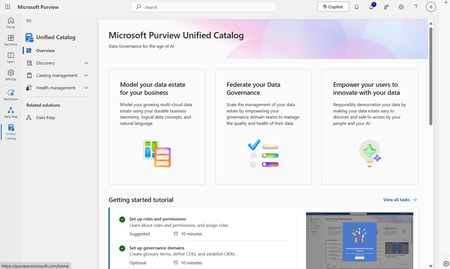
Hi Microsoft, Since this page for Purview DGS has opened, I though I'd start a discussion and provide some user feedback on the UX. Let's be honest: it is confusing for end users, and annoying for admins: Users navigate to the catalog to find data, but end up on a homepage that tells them how to set up a catalog. Trust me on this: they don't care, and neither do I after having set up the catalog already. Users do however see a search bar, which they will use. The 'search' bar on the homepage does not search for data assets or data products, but for Microsoft documentation. Users get stuck here, without ever finding data. The current set up of the homepage makes it totally feel like some preview/demo environment. This lint search bar persists throughout the application, leading to more confusion on data product or data assets search (as there are now two search bars), or within the page of a data product itself (where the search bar persists in the lint, but follow-up search actions using this search bar result in nothing helpful). I'd suggest removing this lint search option entirely, and bringing the 'discovery' search options to the homepage. Bonus points if the homepage becomes customizable (e.g. like a SharePoint page) so we can point our users to company specific documentation to help them get started. I thought this feature was promised in the previous roadmap, but unfortunately it seems to be deleted in the most recent publication. A better homepage will greatly aid user adoption.RikMar 13, 2025Iron Contributor861Views9likes10Comments
Moving Data Products Between Governance Domains
I have a number of data products whose location in the governance domain hierarchy is no longer a good fit. I'm struggling to find a route to move them, unpublishing and select edit gets me to the same options as during creation but the governance domain can't be selected and change. https://learn.microsoft.com/en-us/purview/how-to-create-manage-data-products#edit-data-product is ambiguous on what can be edited but there's no exclusions given. Copilot makes a number of suggestions (dragging and dropping and using the "move" option from the list of data products), unfortunately none of of these appear to be based in reality. Is there a route to make a move? Am I missing permissions? Or is the expectation that I delete and re-create data products any time they need to move.SolvedBarneyLMar 26, 2025Brass Contributor642Views8likes3CommentsFeature request: Get rid of "Welcome to new Microsoft Purview portal" screen
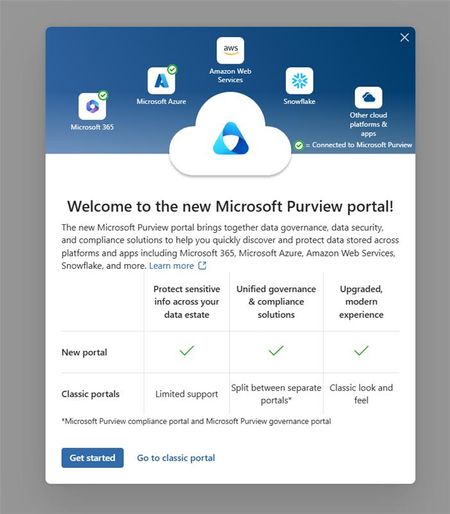
Any new user of Purview DGS will be shown this screen: I strongly believe this should be an admin led tenant-wide decision, and not an 'any new user on it's own decision'. The screen is confusing and completely unnecessary for new users with "Global Catalog Reader" permissions only. The problem with this screen is that it results in some users landing in the classic portal, while all documentation and training materials that we share are based on the new portal. My suggestions would be to move this option to 'settings'. After all, as Microsoft, you want your users to use the new portal too, right? P.S. in the meantime, please get rid of the homepage and move all that under a 'getting started' page: Catalog homepage improvements are urgently needed | Microsoft Community HubRikAug 07, 2025Iron Contributor767Views5likes8CommentsData Product Owner and Contacts should be separate fields
Currently, the 'contacts' field under a data product has a 1 on 1 relationship with the 'data product owner' field. It is not possible to add 'contacts' seperately. I believe this does not make sense for most organizations. For example, our data products have one owner, and multiple contacts (e.g. data stewards, data experts). That's how our governance works. We are not going to add people to the 'data product owner' field that are no data owners, just to show them in contacts. Also, why would you have two fields that basically do the same? Clicking on 'data product owner' already gives me the information for 'contacts'. Please let us add contacts here, that are not the data product owner.RikMar 17, 2025Iron Contributor597Views4likes11Comments
Business Glossary improvement ideas
It doesn’t appear as if you can easily move a term in the business glossary from one domain (eg finance to marketing). Workaround is to delete and recreate, which is inefficient. a full audit history of a glossary term available within the GUI would be great for organisations that want full traceability / transparency (so suggest implementing this as a purview admin setting).SolvedjamesgiopMar 13, 2025Brass Contributor205Views4likes1CommentGoverning Entra‑Registered AI Apps with Microsoft Purview
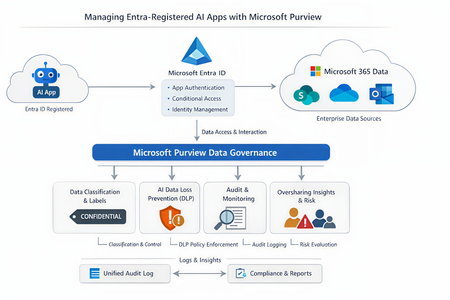
As the enterprise adoption of AI agents and intelligent applications continues to accelerate, organizations are rapidly moving beyond simple productivity tools toward autonomous, Entra‑registered AI workloads that can access, reason over, and act on enterprise data. While these capabilities unlock significant business value, they also introduce new governance, security, and compliance risks—particularly around data oversharing, identity trust boundaries, and auditability. In this context, it becomes imperative to govern AI interactions at the data layer, not just the identity layer. This is where Microsoft Purview, working alongside Microsoft Entra ID, provides a critical foundation for securing AI adoption—ensuring that AI agents can operate safely, compliantly, and transparently without undermining existing data protection controls. Lets look at the role of each solution Entra ID vs Microsoft Purview A very common misconception is that Purview “manages AI apps.” In reality, Purview and Entra serve distinct but complementary roles: Microsoft Entra ID Registers the AI app Controls authentication and authorization Enforces Conditional Access and identity governance Microsoft Purview Governs data interactions once access is granted Applies classification, sensitivity labels, DLP, auditing, and compliance controls Monitors and mitigates oversharing risks in AI prompts and responses Microsoft formally documents this split in its guidance for Entra‑registered AI apps, where Purview operates as the data governance and compliance layer on top of Entra‑secured identities. Lets look at how purview governs the Entra registered AI apps. Below is the high level reference architecture which can be extended to low level details 1. Visibility and inventory of AI usage Once an AI app is registered in Entra ID and integrated with Microsoft Purview APIs or SDK, Purview can surface AI interaction telemetry through Data Security Posture Management (DSPM). DSPM for AI provides: Visibility into which AI apps are being used Which users are invoking them What data locations and labels are touched during interactions Early indicators of oversharing risk This observability layer becomes increasingly important as organizations adopt Copilot extensions, custom agents and third‑party AI apps. 2. Classification and sensitivity awareness Purview does not rely on the AI app to “understand” sensitivity. Instead the Data remains classified and labeled at rest. AI interactions inherit that metadata at runtime Prompts and responses are evaluated against existing sensitivity labels If an AI app accesses content labeled Confidential or Highly Confidential, that classification travels with the interaction and becomes enforceable through policy. This ensures AI does not silently bypass years of data classification work already in place. 3. DLP for AI prompts and responses One of the most powerful but yet misunderstood purview capabilities is the AI‑aware DLP. Using DSPM for AI and standard Purview DLP: Prompts sent to AI apps are inspected Responses generated by AI can be validated Sensitive data types (PII, PCI, credentials, etc.) can be blocked, warned, or audited Policies are enforced consistently across M365 and AI workloads Microsoft specifically highlights this capability to prevent sensitive data from leaving trust boundaries via AI interactions. 4. Auditing and investigation Every AI interaction governed by Purview can be recorded in the Unified Audit Log, enabling: Forensic investigation Compliance validation Insider risk analysis eDiscovery for legal or regulatory needs This becomes critical when AI output influences business decisions and regulatory scrutiny increases. Audit records treat AI interactions as first‑class compliance events, not opaque system actions 5. Oversharing risk management Rather than waiting for a breach, Purview proactively highlights oversharing patterns using DSPM: AI repeatedly accessing broadly shared SharePoint sites High volumes of sensitive data referenced in prompts Excessive AI access to business‑critical repositories These insights feed remediation workflows, enabling administrators to tighten permissions, re‑scope access, or restrict AI visibility into specific datasets. In a nutshell, With agentic AI accelerating rapidly, Microsoft has made it clear that organizations must move governance closer to data, not embed it into individual AI apps. Purview provides a scalable way to enforce governance without rewriting every AI workload, while Entra continues to enforce who is allowed to act in the first place. This journey makes every organizations adopt Zero Trust at scale as its no longer limited to users, devices, and applications; It must now extend to AI apps and autonomous agents that act on behalf of the business. If you find the article insightful and you appreciate my time, please do not forget to like it 🙂477Views3likes2Comments
Fabric Lakehouse tables are not showing in Purview
Hi Purview Community, Further to scanning Fabric in purview, Delta Lake tables are showing up as assets in Purview. I can see the lakehouse but no details of the delta tables or associated folder/schema structure in the Related tab. In case you have encountered this issue before, I will appreciate your guidance on the troubleshooting. Thanks in advance!SolvedmasinghdataarchApr 01, 2025Copper Contributor881Views3likes4Comments
Scaling Data Governance- Does a Purview in a Day Framework Exist?
Hello Purview Community, I’ve been exploring the available acceleration resources for Microsoft Purview, and one thing I noticed is a potential gap in the "In a Day" workshop series. While we have excellent programs like Power BI in a Day or Fabric in a Day, I haven't yet seen a formalized Purview in a Day framework designed to help organizations jumpstart their governance journey in a single, cohesive session. I am reaching out because my team is currently preparing something in this area that we believe will be very useful to the community and Microsoft in the future. Rather than working in isolation, we want to ensure we are aligned with the official roadmap. I wanted to reach out to the community and the Microsoft product team to ask: Is there an official "In a Day" initiative for Purview currently in the works? If not, who would be the best point of contact to discuss alignment? Looking forward to hearing your thoughts and seeing if we can build something impactful together!229Views2likes3Comments
Unified Catalog and connection to AWS and GCP
Hi, I recently came across an article by Keshav Singh (on Medium), which discusses the use of Microsoft Fabric to unlock the Unified Catalog Governance and Data Management features when connecting to Amazon S3. Is this additional layer of Fabric necessary, or can the same features be accessed directly through Purview’s connection to S3? TIA PaulSolvedPaulCurrivanApr 04, 2025Tin Contributor394Views2likes5Comments



Tags
- purview8 Topics
- data governance8 Topics
- data product4 Topics
- Fabric4 Topics
- developer3 Topics
- data catalog2 Topics
- Classifications2 Topics
- api2 Topics
- developer platform2 Topics
- Microsoft Compliance Manager1 Topic