Pinned Posts

Forum Widgets
Latest Discussions

MDE endpoint to Purview onboarding
Hi All, I have Microsoft defender endpoint plan 2 onboarded endpoints in my organisation, as a new dlp functionality i need to test purview DLP functionality for few of my endpoints but i see that it needs to be enabled the device onboarding in microsoft purview under settings, and it also says that all MDE endpoints will populate automatically here and onboarded since they alreay have MDE, now my worry is, if i enable this and all endpoints start onboarding under purview automatically and if we start facing any difficulty with enspoints how to stop or rollback that since no. of endpoints are more than 500. although i have checked there are no DLP settings or policies configured in the purview. is there any way to include only few endpoints to purview and test before enabling the tenant level button? is there a way we can disable the button if we enable it and we start encountring any issues with endpoints? Appreciate help on this. Thanks VipinvipinjainSep 08, 2026Copper Contributor24Views0likes0Comments
Purview DSPM navigation difficulty
Purview DSPM show many stats which are difficult to relate. Even supporting data are often partial. For e.g. Unprotected Asset, Unlabeled Asset, Classified unlabeled. If Unprotected asset is combination of labelled+unlabelled+classified+unclassified all types? While showing count of unprotected asset, why the scope or denominator is not shown. So many categories are pretty confusing and the stats never tally as scope considered, logic considered are often different which is not clearly articulated. I see Sensitivity label coverage is 100% but at the same time it also shows unlabeled sensitive Assets.dsudip1Aug 07, 2026Copper Contributor66Views0likes0Comments
Purview SDK
I've been spending quite a bit of time working with Purview APIs, The APIs themselves are fine, but after a while I realized I was writing the same authentication, pagination and relationship handling code over and over again. So instead of construction the same code from project to project, I turned it into a python package, and now it's available on PyPI pip install purview-unified-sdk Right now, the SDK supports most of the common operations, such as creating, retrieving, updating and deleting business domains, data products, glossary terms, objectives, key results and etc., It also make it much easier to work with relationships, add group id as a owner, navigate resources and retrieve metadata across the unified catalog. https://niki9001.github.io/purview-unified-sdk/ https://github.com/purview-unified-sdk Feel free to fork the project, submit a pull request or open an issue if you have ideas or suggestions93Views0likes0CommentsUnified Catalog - Why I Think About Governance Domains Vertically and “Domains of Data” Horizontally
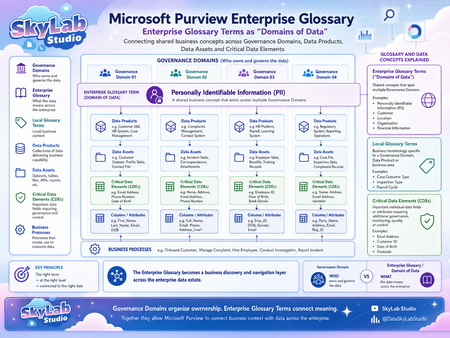
One of the more useful ways I have found to think about Microsoft Purview is to separate ownership from meaning. For me, that creates two different but connected structures: Vertical = Ownership Governance Domains tell us WHO owns and governs the data. They provide the organisational structure for accountability. A Governance Domain can contain: Data Products → Data Assets → Critical Data Elements → Columns and Attributes It also gives us the governance context around those objects: Ownership Stewardship Accountability Governance responsibilities Data quality Access Controls So when I look at a Governance Domain, I am really asking: Who is responsible for this data? That is the vertical view. Horizontal = Meaning Enterprise Glossary Terms give us a different perspective. Rather than focusing on who owns the data, they can represent what the data means across the organisation. This is what I think of as a “Domain of Data”. I use the phrase “Domain of Data” as a conceptual way of describing an enterprise business concept that can span multiple Governance Domains. Take Personally Identifiable Information (PII) as a simple example. PII is unlikely to fit neatly within a single Governance Domain. It may exist across: Customer information Complaints and incidents HR and work force data Case management Regulatory data Operational systems Contact information Financial and administrative processes Each Governance Domain may own and govern the PII within its own area. But the concept of PII itself spans all of them. That is where an Enterprise Glossary Term becomes particularly useful. It provides a common enterprise definition that cuts horizontally across multiple ownership boundaries. Why the two structures should not be the same It can be tempting to make the Enterprise Glossary hierarchy simply mirror the Governance Domain hierarchy. I think that misses an important opportunity. They answer different questions. Governance Domains WHO owns and governs the data? They represent: Ownership Accountability Organisational responsibility Enterprise Glossary Terms WHAT does the data represent? They represent: Business meaning Shared concepts Enterprise vocabulary The two structures should connect, but they should not simply duplicate each other. One Governance Domain can contain many Domains of Data A Governance Domain may contain many different business concepts. For example, one Governance Domain might contain: PII Customer Data Location Data Financial Data Operational Data The Governance Domain is therefore not necessarily a “type of data”. It is primarily an ownership and governance boundary. One Domain of Data can cross many Governance Domains The reverse is equally important. A single Domain of Data can exist across many Governance Domains. For example, PII might appear in: Governance Domain 01 – Customer and contact data Governance Domain 02 – Complaints and incident data Governance Domain 03 – Employee and work force data Governance Domain 04 – Regulatory and operational data This gives us a many-to-many relationship: One Governance Domain can contain many Domains of Data. One Domain of Data can exist across many Governance Domains. That is the part I think is especially powerful. Where the two structures intersect This is where the model becomes much more valuable. Think about it as: Governance Domain WHO owns it? Enterprise Glossary Term WHAT does it mean? Governed Business Context For example: HR Governance Domain PII Enterprise Glossary Term The result is: The HR-owned instance of an enterprise-wide PII concept. That intersection gives us both ownership and meaning. Why this matters for data consumers Most data consumers do not necessarily know: which Governance Domain owns the data; which platform contains it; which Data Product it belongs to; what the database table is called; or what the individual column names are. They may simply know the business question they are trying to answer. For example: Where do we hold PII? Which Data Products contain Customer information? Where is Location information used? Which Data Assets contain Financial information? This is where the Enterprise Glossary becomes much more than a list of definitions. It becomes a business discovery layer. From business concept to technical data If the relationships are created properly, a user can begin with a business concept and navigate towards the underlying data. For example: Enterprise Glossary Term → Data Products → Data Assets → Critical Data Elements → Columns and Attributes This creates a bridge between: Business meaning ↔ Technical implementation That is a much more useful experience than expecting users to understand the technical structure of the data estate before they can discover anything. Enterprise terms, local terms and CDEs There is also an important distinction between the different types of business metadata. Enterprise Glossary Terms These should represent concepts that have meaning across multiple Governance Domains. Examples might include: PII Customer Organisation Location Financial Information These provide the horizontal enterprise view. Local Glossary Terms These are better suited to terminology that is specific to: a Governance Domain; a business area; a Data Product; or a specialised process. They provide local business context without forcing every term into the enterprise vocabulary. Critical Data Elements CDEs are different again. A Domain of Data may represent a broad business concept such as PII, while CDEs represent individual important data elements such as: Email Address Date of Birth Customer Identifier Postcode That gives us another useful relationship: Enterprise Glossary Term: PII → Critical Data Element: Email Address → Physical Column: customer_email Now the business concept is connected directly to the technical implementation. The principle I keep coming back to The value is not in creating as many glossary terms as possible. It is in applying: The right term → at the right level → connected to the right data That means asking: Is this genuinely an enterprise-wide concept? Should this be local to one Governance Domain? Is this actually a Critical Data Element? What Data Products and Data Assets should it connect to? The quality of those relationships matters far more than the volume of metadata. The bigger picture This is ultimately why I think the horizontal and vertical model is useful. Vertical = Ownership Governance Domains tell us WHO owns and governs the data. Horizontal = Meaning Enterprise Glossary Terms tell us WHAT the data represents across the organisation. And where they intersect: Ownership + Meaning = Governed Business Context That is what allows Microsoft Purview to move beyond simply listing technical assets. Instead, it starts to create a connected view of: Ownership → Business Meaning → Discovery → Governance across the enterprise data estate. For me, that is where the real value of the catalogue starts to appear.sashakorniakUKJul 29, 2026Brass Contributor112Views0likes0CommentsDoes this Unity Catalog → Purview guidance make sense?
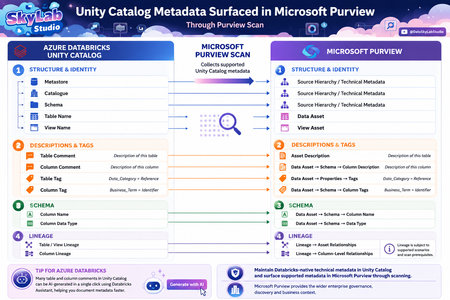
I’ve been working through how Azure Databricks Unity Catalog metadata surfaces in Microsoft Purview after a scan, and I’ve created the attached visual to make the relationship easier to understand. The principle I’m trying to communicate is simple: Maintain Databricks-native technical metadata in Unity Catalog → scan supported metadata into Microsoft Purview → use Purview for the wider enterprise governance, discovery and business context. The short guidance accompanying the visual would be: In Azure Databricks: Navigate to Catalog Explorer → Catalogue → Schema → Table/View. From here, maintain metadata such as table comments, column comments and Unity Catalog tags. Some comments can also be AI-generated as a starting point and reviewed before saving. After the Microsoft Purview scan: Find the corresponding Data Asset in Purview and review the surfaced metadata: Table Comment → Data Asset → Description Column Comment → Data Asset → Schema → Column Description Table Tag → Data Asset → Properties → Tags Column Tag → Data Asset → Schema → Tags Column Name / Data Type → Data Asset → Schema Table/View and Column Lineage → Data Asset → Lineage, subject to the relevant prerequisites. The distinction I’m trying to reinforce is that this is not Purview vs Unity Catalog, and it is not about manually duplicating technical metadata. Unity Catalog remains the Databricks-native governance and technical metadata layer, while Purview can consume supported metadata through scanning and place it into the wider enterprise governance context. I’d be interested in feedback from people implementing Purview + Azure Databricks Unity Catalog: Does the visual and navigation guidance make the relationship clear? In particular, are the field mappings and terminology intuitive enough for Data Engineers, Data Stewards and Data Owners, or is there anything you would simplify, rename or clarify?sashakorniakUKJul 27, 2026Brass Contributor72Views0likes0CommentsMicrosoft Purview, Databricks Unity Catalog and Medallion Architecture
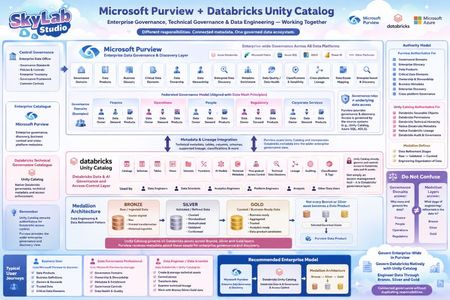
Microsoft Purview, Databricks Unity Catalog and Medallion Architecture three different responsibilities, one governed data ecosystem. I created this visual because these concepts are often mixed together. 🔵 Microsoft Purview = Enterprise Data Governance & Discovery Purview provides the enterprise-wide governance layer across Databricks and other platforms — Governance Domains, Data Products, glossary, Critical Data Elements, ownership, stewardship, metadata, data quality and discovery. 🔴 Databricks Unity Catalog = Databricks Data & AI Governance + Access Control Unity Catalog is not simply an access-management tool. It governs Databricks data and AI assets, including catalogs, schemas, tables, permissions, technical metadata, lineage, auditing and discovery. 🥉🥈🥇 Medallion = Data Engineering Bronze → Silver → Gold describes how data is progressively refined. It is not a governance hierarchy. That distinction is important: Governance Domains answer: 👉 Who owns and governs the data? Bronze / Silver / Gold answer: 👉 What stage of engineering and refinement is the data in? And Gold does not automatically equal Data Product. My preferred enterprise model is therefore: Purview → Enterprise Governance & Discovery Unity Catalog → Databricks Governance & Access Medallion → Data Engineering & Refinement The goal isn't Purview vs Unity Catalog. It is clearly defining which platform is authoritative for which responsibility and connecting the metadata and lineage into a coherent governance model. The distinction between governance domains (who owns the data) and Medallion layers (what stage of refinement) is one that trips up many implementation teams. In practice, when Microsoft Fabric is the analytics platform, Purview becomes the authoritative governance layer across both Fabric OneLake and Databricks, with Unity Catalog handling Databricks-internal access. Connecting lineage metadata across both is what creates a truly coherent governance model.sashakorniakUKJul 27, 2026Brass Contributor81Views0likes0Comments
Purview archive shipped. Delete policy is still armed.
Roadmap 561208 went GA over the last few weeks with very little noise. Purview retention policies in Data Lifecycle Management can now move inactive OneDrive and SharePoint content into Microsoft 365 Archive. The framing is storage cost. I want to talk about something else, because I think there's a gap here that's going to catch people out, and I'd like to know whether anyone else is seeing it. Archive is a storage tier. It is not a retention state. An archived SharePoint site stays fully in scope of every retention policy that applied to it while it was active. Nothing about archiving protects content. Now layer that onto conflict resolution. Retention beats deletion, so a site policy set to delete after 2 years goes dormant while a label is retaining the item. Dormant, not cancelled. So picture this: A file carries a retention label with a 4-year retention period. The site it lives on has a delete-after-2-years retention policy. The label's end-of-retention action is deactivate retention settings. For four years, everything looks correct. The label holds. The delete policy sits there doing nothing. Then the label reaches end of retention and deactivates. The shield is gone. The delete instruction wakes up, unopposed, two years overdue, and the file goes. Not to archive. Just gone. The reflex here is "explicit wins over implicit." It doesn't apply. That principle only arbitrates between competing delete actions. A label that expires with no delete action of its own brings nothing to the contest. There is no explicit action to outrank the policy with. "Do nothing" sounds like a safe default. It's actually a decision to stop defending the file. Right now you cannot set a label to archive at end of retention. The options are deactivate, delete automatically, disposition review, or hand it to a Power Automate flow. Archive isn't on the list. Microsoft shipped archive at the policy level and left the label level to flows and webhooks. That reads to me like they know the gap exists and haven't decided how to close it. And here's my suspicion about why this shipped now. Archived content is excluded from Copilot indexing. That's Microsoft's own framing in the message center post. Which suggests this feature is going to evolve on Copilot's roadmap rather than records management's. The moment "archive" becomes the button you press to clean up Copilot's answers, people will press it constantly, at scale, without once checking what policy is sitting underneath. Meanwhile Exchange has nothing. Purview retention still can't move mail into an archive mailbox, and we're all still running MRM tags next to Purview years after being told MRM was legacy. Has anyone hit the deactivate-into-delete scenario in a live tenant, or is this still theoretical? And does anyone read the label-level gap differently than I do? Genuinely open to being told I've got this wrong.Navan05Jul 16, 2026Copper Contributor96Views0likes0CommentsPublished Glossary Terms Not Appearing When Editing Microsoft Purview Data Assets
Help and Support for All Problem Published glossary terms were not available for selection when editing Data Map assets in Microsoft Purview. Although the glossary terms had been created and published within Governance Domains, and the user had the appropriate permissions, the Glossary Terms dropdown remained empty. This prevented glossary terms from being assigned to data assets or individual columns. Symptoms The following behaviour was observed: Published glossary terms existed within Governance Domains in the Unified Catalog. User permissions had been verified and were correctly configured. The Glossary Terms field was visible when editing a Data Map asset. The dropdown opened successfully but did not display any available glossary terms. Glossary terms could not be associated with data assets or columns. Root Cause The issue occurred because Asset Curation had not been enabled in Microsoft Purview. Although glossary terms had been created and published within Governance Domains in the Unified Catalog, the Data Map asset curation experience had not been configured to use Unified Catalog glossary terms. As a result, the Glossary Terms field was displayed when editing an asset, but no terms were available for selection. Microsoft Purview requires Asset Curation to be enabled and configured before Unified Catalog glossary terms can be assigned to Data Map assets and columns. Resolution The following steps resolved the issue: Confirmed that no Classic Glossaries, Classic Glossary Terms or Term Templates existed in the Purview account. Enabled Asset Curation (Preview). Configured Microsoft Purview to use Unified Catalog Glossary Terms. Completed the Asset Curation configuration wizard. Edited a Data Map asset and verified that published glossary terms were now displayed. Successfully assigned glossary terms to both Data Map assets and individual columns. Because no Classic Glossary content existed, there was no glossary content that required migration. Outcome After Asset Curation was enabled and configured, published Unified Catalog glossary terms became available in the Glossary Terms dropdown when editing Data Map assets. Glossary terms could then be successfully assigned to both assets and columns. Key Takeaway Creating and publishing glossary terms within Governance Domains is not sufficient on its own. To use Unified Catalog glossary terms when curating Data Map assets and columns, Asset Curation must also be enabled and configured to use Unified Catalog Glossary Terms.sashakorniakUKJul 16, 2026Brass Contributor72Views0likes0CommentsPurview Data Map – Proposed Domain & Collection Structure
Microsoft Purview Data Map – Proposed Domain & Collection Structure This proposed Microsoft Purview Data Map domain and collection structure ensures that users responsible for specific data assets can be granted precisely scoped permissions—particularly for updating metadata—by mapping Business Units, Departments, Teams, and environments in a clear hierarchy that allows RBAC inheritance to assign the right level of access to the right people. Domain Name Data Catalogue (Short, clear, governance-aligned name to avoid UI truncation and scripting issues.) Collection Path Data Catalogue → Business Units → Departments → Teams → [Prod | Non-Prod] Level 1: Business Units Level 2: Departments (within each Business Unit) Level 3: Teams (within each Department) Optional: Environment segregation under Teams (Prod / Non-Prod) Reasons & Requirements 1. Domain Naming Short, clear name avoids UI truncation and scripting issues. Detailed descriptions stored in metadata; name remains simple for automation and future-proofing. 2. Structure Alignment Alignment with organisational charts and unified governance hierarchy: Business Units → Departments → Teams Provides intuitive navigation and meaningful context for users. 3. Hierarchy Depth Limited to 4–5 levels for usability and RBAC inheritance. Avoids unnecessary complexity while maintaining clarity. 4. Environment Handling Prod / Non-Prod split under Teams for simplicity. Additional environments only if governance differs significantly. 5. RBAC & Ownership Permissions align with organisational roles. Supports the principle of least privilege. 6. Scanning & Policy Scans assigned at Team level for precise governance. Policies inherit from higher levels for consistency. Selective scanning preferred for cost efficiency. 7. Best Practice Compliance Matches Microsoft guidance: short names, shallow hierarchy, environment segregation. Clear distinction between governance path and technical hierarchy. Role Assignment in Collections Data Curator Role Designed for users who: Edit and update metadata. Manage business context for assets within the collection. Assign to: Data Owners (Directorate level). Data Stewards (Team level). Data Product Owners / Asset Managers (for their own assets). Why at Collection Level? RBAC in Purview inherits down the collection hierarchy: Assign at Team collection → edit metadata for all assets in that Team. Assign at Group or Directorate level → edit metadata for all child collections. Ensures least privilege and ownership-based editing. Best Practice Read-only roles (Data Reader) applied broadly for transparency. Data Curator scoped to the lowest level where the user has responsibility (usually Team). Avoid assigning Data Curator at the root unless absolutely necessary.sashakorniakUKDec 10, 2025Brass Contributor248Views2likes0CommentsSecure your data—Microsoft Purview at Ignite 2025
Security is a core focus at Microsoft Ignite this year, with the Security Forum on November 17, deep dive technical sessions, theater talks, and hands-on labs designed for security leaders and practitioners. Join us in San Francisco, November 17–21, or online, November 18–20, to learn what’s new and what’s next across data security, compliance, and AI. This year’s sessions and labs will help you prevent data exfiltration, manage insider risks, and enable responsible AI adoption across your organization. Featured sessions: BRK250: Preventing data exfiltration with a layered protection strategy Learn how Microsoft Purview enables a layered approach to data protection, including AI and non-AI apps, devices, browsers, and networks. BRK257: Drive secure Microsoft 365 Copilot adoption using Microsoft Purview Discover built-in safeguards to prevent data loss and insider risks as you scale Copilot and agentic AI. LAB548: Prevent data exposure in Copilot and AI apps with DLP Configure DLP policies to protect sensitive data across Microsoft 365 services and AI scenarios. Explore and filter the full security catalog by topic, format, and role: aka.ms/Ignite/SecuritySessions. Why attend: Ignite is your chance to see the latest Purview features, connect with product experts, and get hands-on with new compliance and data protection tools. Microsoft will also preview future enhancements for agentic AI and unified data governance. Security Forum (November 17): Kick off with an immersive, in‑person pre‑day focused on strategic security discussions and real‑world guidance from Microsoft leaders and industry experts. Select Security Forum during registration. Connect with peers and security leaders through these signature security experiences: Security Leaders Dinner—CISOs and VPs connect with Microsoft leaders. CISO Roundtable—Gain practical insights on secure AI adoption. Secure the Night Party—Network in a relaxed, fun setting. Register for Microsoft Ignite >548Views0likes0Comments


Tags
- purview158 Topics
- microsoft purview107 Topics
- Information Protection35 Topics
- Sensitivity Labels31 Topics
- data loss prevention20 Topics
- ediscovery18 Topics
- api18 Topics
- Azure Purview17 Topics
- endpoint dlp15 Topics
- Retention Policy14 Topics