Pinned Posts

Forum Widgets
Latest Discussions

Deleted labels showing pending deletion status
Hi All, We encountered an issue after deleting a sensitivity label through the Microsoft Purview portal. When we tried to recreate the same label a few hours later, a message indicated that a label with the same name still exists. We also attempted to remove it using PowerShell with the label GUID but received the error: “We cannot remove rule ‘label name’ since it is already in a pending deletion state.” Anyone comes across similar Thank younvisa1090Aug 18, 2026Copper Contributor239Views0likes3Comments
Microsoft Purview | Share block at external users
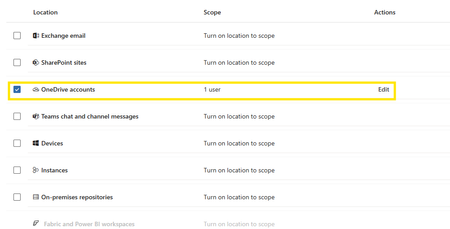
Hello community. I have an issue with Microsoft Purview DLP policies. I am trying to create a policy that prevents documents from being shared through OneDrive with external users, while allowing certain exceptions. However, when I select the option "Block Access to external domains and users" and assign a specific email address to be blocked, it does not work. The configured email address is not being blocked. I was reviewing this with Copilot, and it mentioned that if the external user you are sharing with already exists in Entra ID, the tenant may treat the user differently (not necessarily as an external user). My external user exists in Entra ID as a Guest account. The external user is registered as follows: Displayname: User Name Userprincipalname: user.name_external.domain#EXT#@company.onmicrosoft.com User Type: Guest Has anyone else experienced this issue? I am sharing evidence of the policy configuration.SNRCAug 13, 2026Copper Contributor341Views0likes6CommentsPurview DSPM navigation difficulty
Purview DSPM show many stats which are difficult to relate. Even supporting data are often partial. For e.g. Unprotected Asset, Unlabeled Asset, Classified unlabeled. If Unprotected asset is combination of labelled+unlabelled+classified+unclassified all types? While showing count of unprotected asset, why the scope or denominator is not shown. So many categories are pretty confusing and the stats never tally as scope considered, logic considered are often different which is not clearly articulated. I see Sensitivity label coverage is 100% but at the same time it also shows unlabeled sensitive Assets.dsudip1Aug 07, 2026Copper Contributor37Views0likes0Comments
Microsoft purview exchange online DLP duplicate events and alerts
Hello Everyone, We have Microsoft purview DLP policy for exchange online, We dont have any other exchange policy apart from this. there are three rules High (51- Any), Medium (10-50), Low( 2-9). Whenever any rule matches there are two events in activity explorer and alerts getting generated. Does anybody has encountered this issue? Kindly provide the feedback. Thank you.Afsar_ShariffAug 05, 2026Brass Contributor127Views0likes1CommentPurview Endpoint DLP "Turn on Device onboarding" Query
Hello Microsoft Community, We are planning to enable device onboarding in Microsoft Purview as a prerequisite for deploying Microsoft Purview Endpoint DLP. Our environment uses CrowdStrike Falcon as the primary antivirus/EDR solution. However, we have identified a significant number of Windows 11 devices where Microsoft Defender Antivirus is currently reporting: AMRunningMode : Normal This is occurring even though CrowdStrike is installed and is expected to be the primary antivirus provider. Our understanding is that, when a supported third-party antivirus such as CrowdStrike is correctly registered with Windows Security Center, Microsoft Defender Antivirus should normally operate in Passive mode after the device is onboarded to Microsoft Defender for Endpoint. We are investigating why these devices are showing Normal mode. One suspicion is that there may have been an incomplete or unsuccessful Microsoft Defender for Endpoint deployment in the past, or an issue with CrowdStrike registration, Windows Security Center, Defender policies, or the existing MDE onboarding state. We would like clarification on the impact of enabling Purview device onboarding in this situation. Environment Windows 11 devices CrowdStrike Falcon is intended to be the primary antivirus/EDR Microsoft Purview Endpoint DLP is planned Device onboarding has not yet been broadly enabled through Purview Some devices report Microsoft Defender Antivirus in Passive mode Large number of devices report Microsoft Defender Antivirus in Normal mode We are separately troubleshooting the Normal-mode devices Questions Does enabling Turn on device onboarding in the Microsoft Purview portal make any immediate configuration change to Windows devices, or is it only a tenant-side setting until the onboarding package is deployed? After “Turn on device onboarding” When the Purview onboarding package/script is deployed when the device is in “Normal mode”, does it modify the Microsoft Defender Antivirus operating mode? Is there any risk of performance degradation, duplicate file scanning, application impact, or antivirus conflict on devices where: CrowdStrike is active, and Microsoft Defender Antivirus is also reporting Normal mode? If we enable device onboarding? We are mainly trying to determine whether Purview device onboarding itself introduces any negative impact, as there is a pre-existing condition where both CrowdStrike and Microsoft Defender Antivirus may be operating actively. Thank you.Afsar_ShariffAug 03, 2026Brass Contributor123Views0likes2Comments
Microsoft Purview Data Map Sensitivity Labelling
I'm testing the new Microsoft Purview Data Map Sensitivity Labelling capability against Azure SQL and have a question about the relationship between Data Map classifications and Information Protection auto-labelling. My goal is to automatically apply a sensitivity label such as PERSONAL DATA to Data Map assets and columns when PII is detected. Examples of the PII classifications I'm interested in include: All Full Names Email Address Date of Birth Ethnic Group Person Age Person Gender Personal IP Address UK Driving Licence Number UK Electoral Roll Number UK NHS Number UK Passport Number UK UTR National Insurance Number Payment Card Number Other common personal identifiers From my testing, it appears that Data Map classifications and Microsoft Purview Information Protection auto-labelling use different detection engines and different supported rule sets. For example: Data detected Data Map classification Can directly trigger the Data Map Sensitivity Label? Full Name Yes No Date of Birth Yes, or detected through schema and context No Email Address Yes Not available in my tenant's rule picker National Insurance Number Yes Yes UK Passport Number Yes Yes Payment Card Number Yes Yes This suggests that Purview can classify many types of personal data during scanning, but only a subset of those classifications are available as conditions in the Data Map auto-labelling policy. My questions are: Is this the expected behaviour, or am I missing additional configuration? Is there a published mapping between Data Map classifications and the supported Sensitive Information Types (SITs) that can trigger Data Map sensitivity labels? Can custom Sensitive Information Types be used for Data Map auto-labelling, or are only Microsoft prebuilt SITs supported? Is there a roadmap for supporting classifications such as All Full Names, Date of Birth, Email Address, Person Age, Person Gender and similar PII as auto-labelling triggers? How are other organisations implementing a consistent PII handling model when many common personal-data classifications cannot currently trigger a Data Map sensitivity label? At present, my understanding is that the practical approach is: Use supported auto-labelling for eligible identifiers, such as National Insurance numbers and passport numbers. For classifications that cannot trigger a sensitivity label, such as Full Name or Date of Birth, use governance metadata such as custom attributes, glossary terms or Critical Data Elements (CDEs), together with governance policies and access controls. I'd be interested to hear how others are implementing this in enterprise Purview environments and whether there are any recommended patterns from the Microsoft product team.sashakorniakUKAug 03, 2026Brass Contributor193Views0likes4CommentsPurview SDK
I've been spending quite a bit of time working with Purview APIs, The APIs themselves are fine, but after a while I realized I was writing the same authentication, pagination and relationship handling code over and over again. So instead of construction the same code from project to project, I turned it into a python package, and now it's available on PyPI pip install purview-unified-sdk Right now, the SDK supports most of the common operations, such as creating, retrieving, updating and deleting business domains, data products, glossary terms, objectives, key results and etc., It also make it much easier to work with relationships, add group id as a owner, navigate resources and retrieve metadata across the unified catalog. https://niki9001.github.io/purview-unified-sdk/ https://github.com/purview-unified-sdk Feel free to fork the project, submit a pull request or open an issue if you have ideas or suggestions65Views0likes0CommentsUnified Catalog - Why I Think About Governance Domains Vertically and “Domains of Data” Horizontally
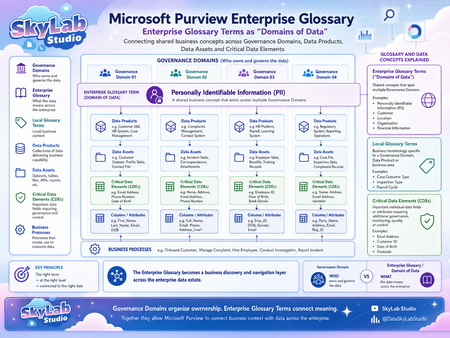
One of the more useful ways I have found to think about Microsoft Purview is to separate ownership from meaning. For me, that creates two different but connected structures: Vertical = Ownership Governance Domains tell us WHO owns and governs the data. They provide the organisational structure for accountability. A Governance Domain can contain: Data Products → Data Assets → Critical Data Elements → Columns and Attributes It also gives us the governance context around those objects: Ownership Stewardship Accountability Governance responsibilities Data quality Access Controls So when I look at a Governance Domain, I am really asking: Who is responsible for this data? That is the vertical view. Horizontal = Meaning Enterprise Glossary Terms give us a different perspective. Rather than focusing on who owns the data, they can represent what the data means across the organisation. This is what I think of as a “Domain of Data”. I use the phrase “Domain of Data” as a conceptual way of describing an enterprise business concept that can span multiple Governance Domains. Take Personally Identifiable Information (PII) as a simple example. PII is unlikely to fit neatly within a single Governance Domain. It may exist across: Customer information Complaints and incidents HR and work force data Case management Regulatory data Operational systems Contact information Financial and administrative processes Each Governance Domain may own and govern the PII within its own area. But the concept of PII itself spans all of them. That is where an Enterprise Glossary Term becomes particularly useful. It provides a common enterprise definition that cuts horizontally across multiple ownership boundaries. Why the two structures should not be the same It can be tempting to make the Enterprise Glossary hierarchy simply mirror the Governance Domain hierarchy. I think that misses an important opportunity. They answer different questions. Governance Domains WHO owns and governs the data? They represent: Ownership Accountability Organisational responsibility Enterprise Glossary Terms WHAT does the data represent? They represent: Business meaning Shared concepts Enterprise vocabulary The two structures should connect, but they should not simply duplicate each other. One Governance Domain can contain many Domains of Data A Governance Domain may contain many different business concepts. For example, one Governance Domain might contain: PII Customer Data Location Data Financial Data Operational Data The Governance Domain is therefore not necessarily a “type of data”. It is primarily an ownership and governance boundary. One Domain of Data can cross many Governance Domains The reverse is equally important. A single Domain of Data can exist across many Governance Domains. For example, PII might appear in: Governance Domain 01 – Customer and contact data Governance Domain 02 – Complaints and incident data Governance Domain 03 – Employee and work force data Governance Domain 04 – Regulatory and operational data This gives us a many-to-many relationship: One Governance Domain can contain many Domains of Data. One Domain of Data can exist across many Governance Domains. That is the part I think is especially powerful. Where the two structures intersect This is where the model becomes much more valuable. Think about it as: Governance Domain WHO owns it? Enterprise Glossary Term WHAT does it mean? Governed Business Context For example: HR Governance Domain PII Enterprise Glossary Term The result is: The HR-owned instance of an enterprise-wide PII concept. That intersection gives us both ownership and meaning. Why this matters for data consumers Most data consumers do not necessarily know: which Governance Domain owns the data; which platform contains it; which Data Product it belongs to; what the database table is called; or what the individual column names are. They may simply know the business question they are trying to answer. For example: Where do we hold PII? Which Data Products contain Customer information? Where is Location information used? Which Data Assets contain Financial information? This is where the Enterprise Glossary becomes much more than a list of definitions. It becomes a business discovery layer. From business concept to technical data If the relationships are created properly, a user can begin with a business concept and navigate towards the underlying data. For example: Enterprise Glossary Term → Data Products → Data Assets → Critical Data Elements → Columns and Attributes This creates a bridge between: Business meaning ↔ Technical implementation That is a much more useful experience than expecting users to understand the technical structure of the data estate before they can discover anything. Enterprise terms, local terms and CDEs There is also an important distinction between the different types of business metadata. Enterprise Glossary Terms These should represent concepts that have meaning across multiple Governance Domains. Examples might include: PII Customer Organisation Location Financial Information These provide the horizontal enterprise view. Local Glossary Terms These are better suited to terminology that is specific to: a Governance Domain; a business area; a Data Product; or a specialised process. They provide local business context without forcing every term into the enterprise vocabulary. Critical Data Elements CDEs are different again. A Domain of Data may represent a broad business concept such as PII, while CDEs represent individual important data elements such as: Email Address Date of Birth Customer Identifier Postcode That gives us another useful relationship: Enterprise Glossary Term: PII → Critical Data Element: Email Address → Physical Column: customer_email Now the business concept is connected directly to the technical implementation. The principle I keep coming back to The value is not in creating as many glossary terms as possible. It is in applying: The right term → at the right level → connected to the right data That means asking: Is this genuinely an enterprise-wide concept? Should this be local to one Governance Domain? Is this actually a Critical Data Element? What Data Products and Data Assets should it connect to? The quality of those relationships matters far more than the volume of metadata. The bigger picture This is ultimately why I think the horizontal and vertical model is useful. Vertical = Ownership Governance Domains tell us WHO owns and governs the data. Horizontal = Meaning Enterprise Glossary Terms tell us WHAT the data represents across the organisation. And where they intersect: Ownership + Meaning = Governed Business Context That is what allows Microsoft Purview to move beyond simply listing technical assets. Instead, it starts to create a connected view of: Ownership → Business Meaning → Discovery → Governance across the enterprise data estate. For me, that is where the real value of the catalogue starts to appear.sashakorniakUKJul 29, 2026Brass Contributor80Views0likes0CommentsMicrosoft Fabric metadata in Microsoft Purview
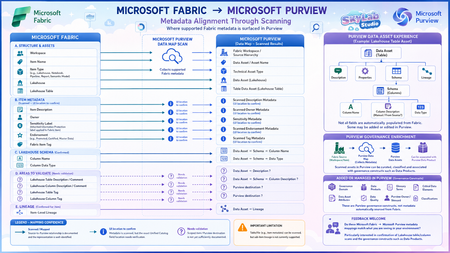
I’ve been mapping how Microsoft Fabric metadata is surfaced in Microsoft Purview through Data Map scanning, and I’ve created this visual to make the relationship easier to understand. The diagram separates: Documented mappings – such as Fabric items, Lakehouse tables, schema and item-level lineage. Metadata known to be scanned, but where the exact Purview UI location needs confirmation. ? Areas still needing validation – particularly Lakehouse table/column descriptions and tags. The principle I’m exploring is: Microsoft Fabric → Purview Data Map Scan → Purview Data Asset → Purview governance enrichment Importantly, a Fabric asset does not automatically become a Purview Data Product. It is first represented as a Data Asset, which can then be governed, enriched and associated with a Data Product. I’d really appreciate feedback from anyone working hands-on with Microsoft Fabric and Microsoft Purview: Does this mapping match what you are seeing in your environment? I’m particularly interested in confirming: Lakehouse table descriptions → Purview Asset Description? Lakehouse column descriptions → Purview Schema → Column Description? Lakehouse table/column tags → where exactly are these surfaced in Purview? Corrections, screenshots or practical experience would be very welcome.sashakorniakUKJul 28, 2026Brass Contributor344Views3likes4CommentsDoes this Unity Catalog → Purview guidance make sense?
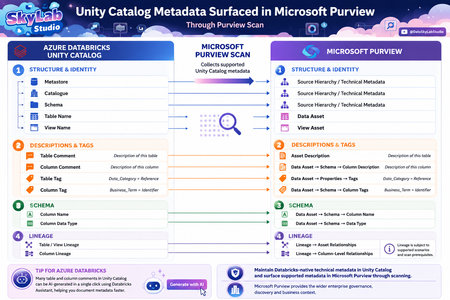
I’ve been working through how Azure Databricks Unity Catalog metadata surfaces in Microsoft Purview after a scan, and I’ve created the attached visual to make the relationship easier to understand. The principle I’m trying to communicate is simple: Maintain Databricks-native technical metadata in Unity Catalog → scan supported metadata into Microsoft Purview → use Purview for the wider enterprise governance, discovery and business context. The short guidance accompanying the visual would be: In Azure Databricks: Navigate to Catalog Explorer → Catalogue → Schema → Table/View. From here, maintain metadata such as table comments, column comments and Unity Catalog tags. Some comments can also be AI-generated as a starting point and reviewed before saving. After the Microsoft Purview scan: Find the corresponding Data Asset in Purview and review the surfaced metadata: Table Comment → Data Asset → Description Column Comment → Data Asset → Schema → Column Description Table Tag → Data Asset → Properties → Tags Column Tag → Data Asset → Schema → Tags Column Name / Data Type → Data Asset → Schema Table/View and Column Lineage → Data Asset → Lineage, subject to the relevant prerequisites. The distinction I’m trying to reinforce is that this is not Purview vs Unity Catalog, and it is not about manually duplicating technical metadata. Unity Catalog remains the Databricks-native governance and technical metadata layer, while Purview can consume supported metadata through scanning and place it into the wider enterprise governance context. I’d be interested in feedback from people implementing Purview + Azure Databricks Unity Catalog: Does the visual and navigation guidance make the relationship clear? In particular, are the field mappings and terminology intuitive enough for Data Engineers, Data Stewards and Data Owners, or is there anything you would simplify, rename or clarify?sashakorniakUKJul 27, 2026Brass Contributor48Views0likes0Comments
Tags
- purview158 Topics
- microsoft purview107 Topics
- Information Protection35 Topics
- Sensitivity Labels31 Topics
- data loss prevention20 Topics
- ediscovery18 Topics
- api18 Topics
- Azure Purview17 Topics
- endpoint dlp15 Topics
- Retention Policy14 Topics