Pinned Posts

Forum Widgets
Latest Discussions

Purview Endpoint DLP "Turn on Device onboarding" Query
Hello Microsoft Community, We are planning to enable device onboarding in Microsoft Purview as a prerequisite for deploying Microsoft Purview Endpoint DLP. Our environment uses CrowdStrike Falcon as the primary antivirus/EDR solution. However, we have identified a significant number of Windows 11 devices where Microsoft Defender Antivirus is currently reporting: AMRunningMode : Normal This is occurring even though CrowdStrike is installed and is expected to be the primary antivirus provider. Our understanding is that, when a supported third-party antivirus such as CrowdStrike is correctly registered with Windows Security Center, Microsoft Defender Antivirus should normally operate in Passive mode after the device is onboarded to Microsoft Defender for Endpoint. We are investigating why these devices are showing Normal mode. One suspicion is that there may have been an incomplete or unsuccessful Microsoft Defender for Endpoint deployment in the past, or an issue with CrowdStrike registration, Windows Security Center, Defender policies, or the existing MDE onboarding state. We would like clarification on the impact of enabling Purview device onboarding in this situation. Environment Windows 11 devices CrowdStrike Falcon is intended to be the primary antivirus/EDR Microsoft Purview Endpoint DLP is planned Device onboarding has not yet been broadly enabled through Purview Some devices report Microsoft Defender Antivirus in Passive mode Large number of devices report Microsoft Defender Antivirus in Normal mode We are separately troubleshooting the Normal-mode devices Questions Does enabling Turn on device onboarding in the Microsoft Purview portal make any immediate configuration change to Windows devices, or is it only a tenant-side setting until the onboarding package is deployed? After “Turn on device onboarding” When the Purview onboarding package/script is deployed when the device is in “Normal mode”, does it modify the Microsoft Defender Antivirus operating mode? Is there any risk of performance degradation, duplicate file scanning, application impact, or antivirus conflict on devices where: CrowdStrike is active, and Microsoft Defender Antivirus is also reporting Normal mode? If we enable device onboarding? We are mainly trying to determine whether Purview device onboarding itself introduces any negative impact, as there is a pre-existing condition where both CrowdStrike and Microsoft Defender Antivirus may be operating actively. Thank you.Afsar_ShariffAug 10, 2026Brass Contributor27Views0likes2Comments
Purview DSPM navigation difficulty
Purview DSPM show many stats which are difficult to relate. Even supporting data are often partial. For e.g. Unprotected Asset, Unlabeled Asset, Classified unlabeled. If Unprotected asset is combination of labelled+unlabelled+classified+unclassified all types? While showing count of unprotected asset, why the scope or denominator is not shown. So many categories are pretty confusing and the stats never tally as scope considered, logic considered are often different which is not clearly articulated. I see Sensitivity label coverage is 100% but at the same time it also shows unlabeled sensitive Assets.dsudip1Aug 07, 2026Copper Contributor1View0likes0Comments
Insider Risk Level not being correctly picked up by DLP
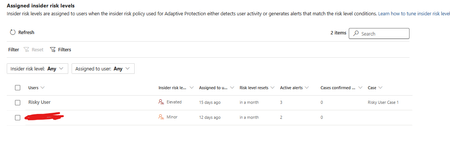
I have two users currently with assigned Insider Risk levels, one elevated and one minor. I have taken the templated DLP policy (DSPM for AI - Block sensitive info from AI sites) which looks for sensitive information being pasted to generative AI sites, and applies a block if the user is an elevated risk user, and a block with override for a moderate/minor risk user (this was audit only originally). For each advanced DLP rule within that policy, I have a separate policy tip which shows so I know which Advanced DLP rule has been hit. However, I'm having some discrepancies with the correct insider risk level being identified by Purview and therefore the wrong advanced DLP rule is being applied. Testing examples: Logged into a Windows 11 PC with the account, and using Medium confidence UK NINO's I try pasting the content into ChatGPT: Elevated risk user: Block with Override Minor Risk user: Block with Override If I try the exact same scenario on a different PC, I can sometimes get to the point where even though its the same set of data, Purview allows me to paste it at after checking the data. Or in another scenario, I was getting both users hitting the "elevated risk" advanced DLP rule. The Devices are all showing as up to date sync wise with DLP policies, and the policy itself is showing as fully synced. Assigned insider risk levels: DLP Rules: Elevated: Moderate/Minor:37Views0likes1Comment
Microsoft Purview Data Map Sensitivity Labelling
I'm testing the new Microsoft Purview Data Map Sensitivity Labelling capability against Azure SQL and have a question about the relationship between Data Map classifications and Information Protection auto-labelling. My goal is to automatically apply a sensitivity label such as PERSONAL DATA to Data Map assets and columns when PII is detected. Examples of the PII classifications I'm interested in include: All Full Names Email Address Date of Birth Ethnic Group Person Age Person Gender Personal IP Address UK Driving Licence Number UK Electoral Roll Number UK NHS Number UK Passport Number UK UTR National Insurance Number Payment Card Number Other common personal identifiers From my testing, it appears that Data Map classifications and Microsoft Purview Information Protection auto-labelling use different detection engines and different supported rule sets. For example: Data detected Data Map classification Can directly trigger the Data Map Sensitivity Label? Full Name Yes No Date of Birth Yes, or detected through schema and context No Email Address Yes Not available in my tenant's rule picker National Insurance Number Yes Yes UK Passport Number Yes Yes Payment Card Number Yes Yes This suggests that Purview can classify many types of personal data during scanning, but only a subset of those classifications are available as conditions in the Data Map auto-labelling policy. My questions are: Is this the expected behaviour, or am I missing additional configuration? Is there a published mapping between Data Map classifications and the supported Sensitive Information Types (SITs) that can trigger Data Map sensitivity labels? Can custom Sensitive Information Types be used for Data Map auto-labelling, or are only Microsoft prebuilt SITs supported? Is there a roadmap for supporting classifications such as All Full Names, Date of Birth, Email Address, Person Age, Person Gender and similar PII as auto-labelling triggers? How are other organisations implementing a consistent PII handling model when many common personal-data classifications cannot currently trigger a Data Map sensitivity label? At present, my understanding is that the practical approach is: Use supported auto-labelling for eligible identifiers, such as National Insurance numbers and passport numbers. For classifications that cannot trigger a sensitivity label, such as Full Name or Date of Birth, use governance metadata such as custom attributes, glossary terms or Critical Data Elements (CDEs), together with governance policies and access controls. I'd be interested to hear how others are implementing this in enterprise Purview environments and whether there are any recommended patterns from the Microsoft product team.sashakorniakUKAug 06, 2026Brass Contributor67Views0likes4Comments
[HELP] "Action required for browser protections" alert
Hello! I have an Endpoint DLP policy with Device location. After several scoping changes (device groups, inclusions/exclusions) to narrow it to a specific target group, the orange alert appeared: Action required for browser protections. One or more policies were not applied in Edge for Business. This could be due to a policy sync issue, lack of required permissions, or an issue with the server. Either resync these policies or contact an admin with the required permissions to resync. After resyncing, you might still see this message for up to 1 day while the system completes the sync and activates protections. The policies were working before. Clicked Resync multiple times, only for the error to return. Please help!DevincitAug 05, 2026Copper Contributor247Views1like4CommentsMicrosoft purview exchange online DLP duplicate events and alerts
Hello Everyone, We have Microsoft purview DLP policy for exchange online, We dont have any other exchange policy apart from this. there are three rules High (51- Any), Medium (10-50), Low( 2-9). Whenever any rule matches there are two events in activity explorer and alerts getting generated. Does anybody has encountered this issue? Kindly provide the feedback. Thank you.Afsar_ShariffAug 05, 2026Brass Contributor32Views0likes1Comment
I just want to secure AI. DLP vs Info Protection vs DSPM vs Governance vs...
I'm with an MSP, and I've avoided Purview like the plague, because it seems to be suffering from the same 'made by marketing teams' 'strategy' the 365 documentation is. However, it's my understanding Purview policies are needed for Data control of Copilot. Here's my issue: all of these different 'solutions' sound like the exact same thing, but are pitched as if they are something different. i'm going to post a couple of descriptions for these 'solutions' to illustrate this. 'discover, label, and protect sensitive and business-critical info' 'make sure your organization can identify, monitor, and protect sensitive info across the expanding Microsoft 365 landscape' 'discover and secure all your sensitive data across Microsoft 365 and non-365 data sources' 'Discover, label, and protect sensitive and business-critical info across your multicloud data estate.' I genuinely do not have time to figure out what each of these 'solutions' are, then figure out their policies, then their giant library of settings (below)... It's not even clear to me what's active NOW, considering we never licensed Purview - but somehow have been roped into it. It SEEMS like these are all variations of marketing terms, which all point to 3-4 actual technical implementations in obscure ways. Can someone advise on the ACTUAL technical policies we want to target and enable? Or just give some clarity? I've never felt so overwhelmed or disconnected from Microsoft's environment. We just want to secure our tenant's AI usage.342Views1like9Comments
Performance in scanning
We are trying to search for CUI data on internal file stores. Last week, I decided to run another discovery scan, this time using ALL instead of Policy Only. It took much longer and left the scanner server in an almost unusable state and didn’t give really any more information than the first one did. Based on my research, we need to define and set the policy before we run scans. This is the information tip from the Purview scanner settings: Scan started at: 2026-05-20 22:54:06Z Scan ended at: 2026-05-24 16:16:51Z Scan duration: 3 days, 17 hours, 22 minutes, 45 seconds Scan id: 93acb922-e2ac-4fb7-b259-d6184e7aa434 Repository: \\cab-filesrv-01.fg.com\Departments. Enforce mode is Off Scanned files:3509640 Actions: Classified:3369456 Classified as Public:14 Classified as Fg Private:3369442 Labeled:0 Remove label:0 Protected:0 Remove protection:0 Files with matched information types:572895 Skipped due to - No match:0 Skipped due to - Not supported:0 Skipped due to - Already labeled:0 Skipped due to - Already scanned:0 Skipped due to - Require justification:0 Skipped due to - Unknown reason:0 Skipped due to - Excluded:98833 Skipped due to - Attribute:0 Failed:41318sagedogusaAug 02, 2026Copper Contributor111Views0likes3CommentsMicrosoft Fabric metadata in Microsoft Purview
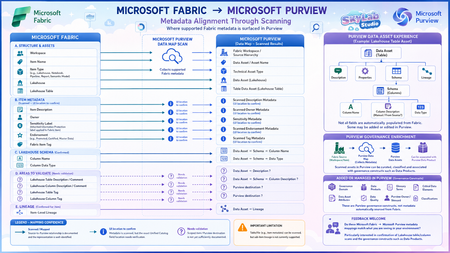
I’ve been mapping how Microsoft Fabric metadata is surfaced in Microsoft Purview through Data Map scanning, and I’ve created this visual to make the relationship easier to understand. The diagram separates: Documented mappings – such as Fabric items, Lakehouse tables, schema and item-level lineage. Metadata known to be scanned, but where the exact Purview UI location needs confirmation. ? Areas still needing validation – particularly Lakehouse table/column descriptions and tags. The principle I’m exploring is: Microsoft Fabric → Purview Data Map Scan → Purview Data Asset → Purview governance enrichment Importantly, a Fabric asset does not automatically become a Purview Data Product. It is first represented as a Data Asset, which can then be governed, enriched and associated with a Data Product. I’d really appreciate feedback from anyone working hands-on with Microsoft Fabric and Microsoft Purview: Does this mapping match what you are seeing in your environment? I’m particularly interested in confirming: Lakehouse table descriptions → Purview Asset Description? Lakehouse column descriptions → Purview Schema → Column Description? Lakehouse table/column tags → where exactly are these surfaced in Purview? Corrections, screenshots or practical experience would be very welcome.sashakorniakUKJul 29, 2026Brass Contributor106Views1like3CommentsPurview SDK
I've been spending quite a bit of time working with Purview APIs, The APIs themselves are fine, but after a while I realized I was writing the same authentication, pagination and relationship handling code over and over again. So instead of construction the same code from project to project, I turned it into a python package, and now it's available on PyPI pip install purview-unified-sdk Right now, the SDK supports most of the common operations, such as creating, retrieving, updating and deleting business domains, data products, glossary terms, objectives, key results and etc., It also make it much easier to work with relationships, add group id as a owner, navigate resources and retrieve metadata across the unified catalog. https://niki9001.github.io/purview-unified-sdk/ https://github.com/purview-unified-sdk Feel free to fork the project, submit a pull request or open an issue if you have ideas or suggestions28Views0likes0Comments
Tags
- purview157 Topics
- microsoft purview106 Topics
- Information Protection35 Topics
- Sensitivity Labels31 Topics
- data loss prevention20 Topics
- ediscovery18 Topics
- api18 Topics
- Azure Purview17 Topics
- endpoint dlp15 Topics
- Retention Policy14 Topics