Pinned Posts

Forum Widgets
Latest Discussions

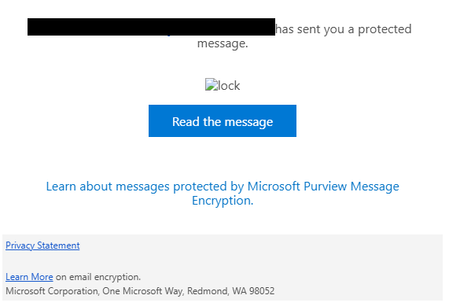
Purview Message Encryption - Broken Icon
The lock image url referenced in the "has sent you a protected message" email is invalid. Image source: https://outlook.office365.com/Encryption/lock.png I can confirm this was last working on 2/12/2025. Messages sent on 2/12 and today 3/6 reference the same url. This is not a case of the image being blocked by the mail client. Thank you, MattmjhelmbMar 06, 2025Brass Contributor1.2KViews5likes15Comments
Purview DLP: Paste to supported browsers
I've enabled a policy that audits "Paste to Supported Browsers." The policy applies if the file has a specific sensitivity label assigned. When I copy content from the file to an unallowed domain e.g. gmail.com I'm not seeing the activity recorded in the log. I'm reading the Microsoft endpoint data loss prevention page definition for "paste to supported browser" and it appears to only apply if the content copied itself is sensitive e.g. a social security number pattern. So I'm guessing there's no way to prevent users from copying content from a sensitive file and pasting to an unallowed domain. Is that right? "Detects when a user attempts to paste content to a restricted service domain. Evaluation is performed on the content that is being pasted. This evaluation is independent of how the source item that the content came from is classified." https://learn.microsoft.com/en-us/purview/endpoint-dlp-learn-aboutMX_ITJul 11, 2024Copper Contributor3KViews0likes14CommentsTwo sensitivity labels on PDF file
Hi everyone, First time poster here. We encountered an interesting issue yesterday where we had a user come to us with a PDF that had two sensitivity labels attached. In Purview activity explorer, we can see the file hit the DLP policy and the two labels, but when trying to replicate the issue cannot do it, or see how this has been done. Has anyone else encountered a similar issue? We were able to remove labels in our PDF editor but in Office suite once a label is applied, I could not see a way to remove it. We tried applying a label to a Doc file, converting to PDF and then seeing if it was there where it was being asked for another label but it was not, it just let us change the original. Many thanks in advance!courtney_gJan 14, 2026Copper Contributor964Views0likes12CommentsForced to new purview portal nothing works or is too slow
so what we feared has occured; forced to the new portal and nothing works. cannot change roles we have roles as they worked in the old portal but new portal doesn't seem to accept the custom roles. cannot implement content search across SPO anyone else having issues?mikebaker26Nov 25, 2024Brass Contributor2.6KViews8likes12Comments
Auto label based on content matching by Information protection scanner
I have on premises repository in TBs. I have already configured information protection scanner and added repository where files are placed and my scanner is scanning the files also. I want to auto label them based on content matching. for example: Auto label files as "Confidential" when there is a match of world "budget" Auto label files as "Internal use only" when there is a match of word "leave request form" I know auto labeling is available for M365 for example exchange, ondrive and sharepoint. but How can I achieve above using information protection scanner. Please help. Thankssecurityxpert1122Aug 03, 2023Tin Contributor3.2KViews0likes12CommentsOnboard devices in Purview is grayed out
I’m getting started with Microsoft Purview and running into issues onboarding devices. In the Purview portal, no devices appear, and the “Onboard devices” option is grayed out. I have EMS E5 licenses assigned to all users, and I’m signed in as a Global Admin with Purview Administrator and Security Administrator roles. All devices are managed by Intune and run Windows 11 Enterprise with the latest updates. They are Microsoft Entra joined (AAD joined), show up correctly in Defender, and their Defender onboarding status is active and onboarded. What piece am I missing that would prevent these devices from showing in Purview and keep the onboarding option disabled? Any guidance would be appreciated.FaisalMFeb 17, 2026Tin Contributor871Views0likes10CommentsI just want to secure AI. DLP vs Info Protection vs DSPM vs Governance vs...
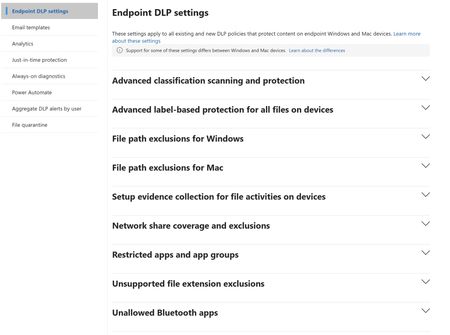
I'm with an MSP, and I've avoided Purview like the plague, because it seems to be suffering from the same 'made by marketing teams' 'strategy' the 365 documentation is. However, it's my understanding Purview policies are needed for Data control of Copilot. Here's my issue: all of these different 'solutions' sound like the exact same thing, but are pitched as if they are something different. i'm going to post a couple of descriptions for these 'solutions' to illustrate this. 'discover, label, and protect sensitive and business-critical info' 'make sure your organization can identify, monitor, and protect sensitive info across the expanding Microsoft 365 landscape' 'discover and secure all your sensitive data across Microsoft 365 and non-365 data sources' 'Discover, label, and protect sensitive and business-critical info across your multicloud data estate.' I genuinely do not have time to figure out what each of these 'solutions' are, then figure out their policies, then their giant library of settings (below)... It's not even clear to me what's active NOW, considering we never licensed Purview - but somehow have been roped into it. It SEEMS like these are all variations of marketing terms, which all point to 3-4 actual technical implementations in obscure ways. Can someone advise on the ACTUAL technical policies we want to target and enable? Or just give some clarity? I've never felt so overwhelmed or disconnected from Microsoft's environment. We just want to secure our tenant's AI usage.572Views1like9Comments
DLP Policy - DSPM Block sensitive info from AI sites
Having issues with this DLP policy not being triggered to block specific SITs from being pasted into ChatGPT, Google Gemine, etc. Spent several hours troubleshooting this issue on Windows 11 VM running in Parallels Desktop. Testing was done in Edge. Troubleshooting\testing done: Built Endpoint DLP policy scoped to Devices and confirmed device is onboarded/visible in Activity Explorer. Created/edited DLP rule to remove sensitivity label dependency and use SIT-based conditions (Credit Card, ABA, SSN, etc.). Set Paste to supported browsers = Block and Upload to restricted cloud service domains = Block in the same rule. Configured Sensitive service domain restrictions and tested priority/order (moved policy/rule to top). Created Sensitive service domain group for AI sites; corrected entries to hostname + prefix wildcard a format (e.g., chatgpt.com + *.chatgpt.com) after wildcard/URL-format constraints were discovered. Validated Target domain = chatgpt.com in Activity Explorer for paste events. Tested multiple SIT payloads (credit card numbers with/without context) and confirmed detection occurs. Confirmed paste events consistently show: Policy = Default Policy, Rule = JIT Fallback Allow Rule, Other matches = 0, Enforcement = Allow (meaning configured rules are not matching the PastedToBrowser activity). Verified Upload enforcement works: “DLP rule matched” events show Block for file upload to ChatGPT/LLM site group—proves domain scoping and endpoint enforcement works for upload. Disabled JIT and retested; paste events still fall back to JIT Fallback Allow Rule with JIT triggered = false. Verified Defender platform prerequisites: AMServiceVersion (Antimalware Client) = 4.18.26020.6 (meets/exceeds requirements).Bosanac89Apr 14, 2026Brass Contributor646Views0likes9Comments
DLP policy to block access to external organization however allow access for some external domains
Hi, we have successfully setup a DLP policy to block sensitive information from going outside using "Block access to external organization", however we want to allow a few domains to receive those files. How can we whitelist those external domains so they can receive the content? any thoughts? Thanks FahadSolvedFahadAhmedAug 22, 2023Brass Contributor9.7KViews1like9Comments

Tags
- purview158 Topics
- microsoft purview107 Topics
- Information Protection35 Topics
- Sensitivity Labels31 Topics
- data loss prevention20 Topics
- ediscovery18 Topics
- api18 Topics
- Azure Purview17 Topics
- endpoint dlp15 Topics
- Retention Policy14 Topics