
Forum Widgets
Latest Discussions
What is the best disk management tool for windows 11
I’m currently using a Dell laptop running Windows 11, and I’ve been trying to manage my disk partitions more efficiently. The built-in Disk Management tool works for basic tasks, but it feels quite limited when it comes to resizing partitions, merging drives, or handling more advanced operations. I also want something safe and easy to use since I have important data on my system.EzraKnightApr 09, 2026Iron Contributor15Views0likes0CommentsHow to Secure Your Windows 11 PC (Complete Guide)
If you’re using Windows 11 daily—whether for work, gaming, or personal tasks security should never be an afterthought. As someone who has worked extensively with Windows systems, I can confidently say that Windows 11 is one of the most secure operating systems Microsoft has released. But here’s the catch: out-of-the-box security is only the starting point. To truly protect your PC, you need to actively configure and maintain it. https://dellenny.com/how-to-secure-your-windows-11-pc-complete-guide/44Views0likes0CommentsHow to Automate Tasks in Windows 11: A Complete Guide for Power Users
Automation is no longer a luxury reserved for developers or IT professionals it’s a necessity for anyone looking to save time, reduce repetitive work, and improve productivity. Windows 11 offers a rich set of built-in tools and third-party options that make automation accessible to both beginners and advanced users. In this guide, we’ll walk through practical, technical methods to automate tasks in Windows 11, from simple scheduled actions to advanced scripting workflows. https://dellenny.com/how-to-automate-tasks-in-windows-11-a-complete-guide-for-power-users/59Views0likes0Comments
Windows update has rendered a purchased app unusable
After a routine Windows update, yesterday 27th March, an image editing app, Paintshop Pro no longer loads. I have run through various potential fixes suggested by Claude - according to which the problem is the MSVCR90.dll file overwritten by the Windows update. I have downloaded the old version of the file and copied it directly into the Paintshop directory, but it still doesn't load. It's analogous to having some authority performing upgrades outside your house and destroying part of your property. Straightforward fixes really need to be provided for this sort of thing.Cats00eyeMar 28, 2026Copper Contributor14Views0likes0Comments
Wrong KB mentioned inside the MS Update Catalogus 26200.8116
Looking for the latest preview update for 25H2; 26200.8116 under the download button there are 2 KB's motioned: UpdateID c0bc5d1e-4605-4952-af36-1152c7d3c695 Updates downloaden 2026-03 Preview cumulatieve update voor Windows 11, version 25H2 voor systemen op basis van x64 (KB5079391) (26200.8116) https://catalog.sf.dl.delivery.mp.microsoft.com/filestreamingservice/files/f7b8d266-ccc7-4709-81f4-28bcd6c45062/public/windows11.0-kb5079391-x64_0a0129ebe88fdd66e19ac7d40d9cddd0b18c3332.msu (SHA1: CgEp6+iP3WbhmsfUDZzd0LGMMzI=) (SHA256: BmFwNaDXI68tFuP1UZJZtDrv6vedsOWDljabVoQSTGU=) https://catalog.sf.dl.delivery.mp.microsoft.com/filestreamingservice/files/d8b7f92b-bd35-4b4c-96e5-46ce984b31e0/public/windows11.0-kb5043080-x64_953449672073f8fb99badb4cc6d5d7849b9c83e8.msu (SHA1: lTRJZyBz+PuZuttMxtXXhJucg+g=) (SHA256: gZYyYQoQGvEccpB/sT/wW1+0IiwOJj7poDvMHR1fJqQ=) KB5043080 should not be there on this page. This KB point towards Build 26100.1742, the initial release of 24H2. This entry should be deleted. Just pointing this out......haderMar 27, 2026Copper Contributor17Views0likes0CommentsWindows11 PC Manager & OpenClaw
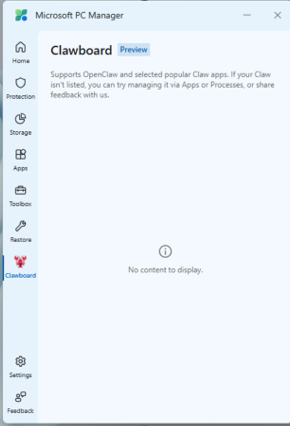
Anyone tried Clawboard with Windows11 PC Manager? Is OpenClaw worth using?BreckenFosterMar 26, 2026Iron Contributor274Views0likes0CommentsREGRESSION: Update deletes HKCU input keys and breaks Text Input Service
Environment: Windows 11 (Latest Cumulative Update) Component: Text Input Management Service, Input Method Editor (IME), CTF Loader (ctfmon.exe), Settings GUI Issue Summary: Following the deployment of the latest Windows 11 update, the system's localized input framework ceases to function. All installed language packs, keyboard layout assignments, and system-wide spellchecking/autocorrection settings are removed from the Settings UI and become inactive across the operating system. Technical Details & Diagnostics: Investigation of the registry reveals that the update removes specific configuration keys governing text input. Specifically, the following registry path is affected: HKEY_CURRENT_USER\Software\Microsoft\input\Settings The update deletes the EnableAutocorrection and EnableSpellchecking DWORD (32-bit) values from this location. Concurrently, the localized input framework fails to initialize correctly, with ctfmon.exe failing to hook into the language bar or load installed regional configurations. Workaround Attempted: Restoring base functionality requires manual registry modification (re-creating the missing EnableAutocorrection and EnableSpellchecking DWORDs and assigning a hex value of 1), followed by a manual restart of the Text Input Management Service via services.msc. Impact: This regression breaks core text input and language components out of the box after the update. It requires manual, system-level intervention (registry edits and service restarts) to resolve, which significantly impacts standard usability and productivity. Requesting a review of the update package to prevent the deletion of these registry keys in future deployments.Missing_In_ActionMar 26, 2026Copper Contributor30Views0likes0Comments
Need for full support of Bluetooth A2DP Sink in Phone Link app
About 6 years ago, it was added A2DP Sink functionality in Windows. However, there is no Microsoft app (at least that I'm awared of) that uses this NICE functionality. There are multiple 3rd party apps that allows the use of this, however, since you already have PC app that managed a link to the phone, I think that this is not only appropriate, but an insanely nice to have feature. You have HFP already in your app (for phone calls), maybe it's time to add A2DP Sink (for multimedia audio) so we get the full combo! The best would be to also include in Windows bluetooth LE support for both phone calls and multimedia audio. While also adding support in the Phone link app. - that really would be a game changer.ItamarMMMar 24, 2026Copper Contributor26Views0likes0Comments



Tags
- Features2,066 Topics
- configuration1,933 Topics
- device management1,332 Topics
- Update management1,036 Topics
- Application Management903 Topics
- security809 Topics
- deployment572 Topics
- community463 Topics
- accessibility293 Topics
- licensing243 Topics