Recent Discussions

Two-tier AD Certificate Services error importing cert into SubCA
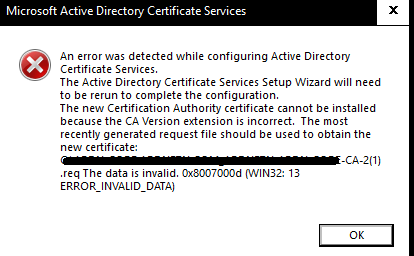
Hello, I'm new here, but excited about being able to hob nob with all you in furthering our IT goals. I'm setting up my root and Subordinate CA and I'm importing my rootCA issued, subCA certificate into the subCA. I get I get the same error when the subCA automatically exports its cert req to the root Ca and when I do it manually. I also get this error whether i'm using X.509 or p7b files. what's unusual about this error is that it seems to be referencing a .req file with a '(1)' added to the end of the title. Original .req did not have the '(1)'. any assistance I can get from the community would be appreciated.61Views0likes1Comment
Issue with Temporary Profile on Windows Server 2025 after renaming built-in Administrator account
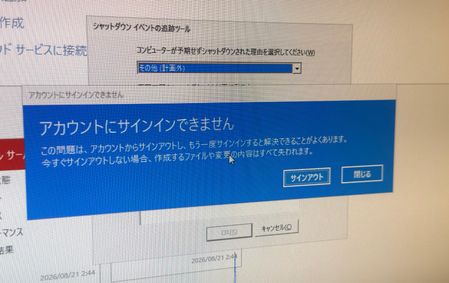
Hi everyone, I am facing an issue with a temporary profile on Windows Server. Environment details: ・OS: Windows Server 2025 Datacenter ・Setup: On-premises environment with 2 servers (AD DS Domain Controller and Web Server) ・Affected Server: Web Server (Domain joined) Recently, I renamed the built-in Administrator account on the Web Server. After that, the system became completely unresponsive, so I had to force a power off. Upon signing in after the reboot, I received the error message: "We can't sign in to your account" (or "You've been signed in with a temporary profile"). It seems the profile folder or registry mapping for the renamed Administrator account was corrupted due to the force shutdown. I tried restarting the server, but the issue persists. Could anyone please advise on the proper way to resolve this registry/profile conflict and safely restore the renamed Administrator profile? Please note that I am a native Japanese speaker and a beginner in IT, so I may not fully understand complex technical English. Simple, step-by-step instructions would be greatly appreciated! Thank you in advance for your help! Translated by Gemini, grammar checked by DeepL219Views2likes7Comments
Migrating from VMware to Hyper-v
Hi, I've recently deployed a new 3x node Hyper-v cluster running Windows Server 2025. I have an existing VMware cluster running exsi 7.x. What tools or approach have you guys used to migrate from VMware to Hyper-v? I can see there are many 3rd party tools available, and now the Windows Admin Center appears to also support this. Having never done this before (vmware to hyper-v) I'm not sure what the best method is, does anyone here have any experience and recommendations pls?3.9KViews0likes6CommentsWindows Server 2022 Hyper-V : vmconnect introuvable pour accéder à la console VM (Server Core)
Contexte Windows Server 2022 [Standard/Datacenter — à préciser], rôle Hyper-V installé. J'ai créé une VM invitée Linux nommée « Wazuh » (installation d'une plateforme SIEM), elle démarre correctement. ce serveur est une VM imbriquée dans un autre hyperviseur type VMware Workstation. je suis en simple groupe de travail (workgroup). Ce que je constate PS C:\Users\Administrator> Start-VM -Name 'Wazuh' PS C:\Users\Administrator> vmconnect localhost Wazuh vmconnect : The term 'vmconnect' is not recognized as the name of a cmdlet, function, script file, or operable program. Check the spelling of the name, or if a path was included, verify that the path is correct and try again. At line:1 char:1 + vmconnect localhost Wazuh + ~~~~~~~~~ + CategoryInfo : ObjectNotFound: (vmconnect:String) [], CommandNotFoundException + FullyQualifiedErrorId : CommandNotFoundException PS C:\Users\Administrator> Get-VM -Name 'Wazuh' | Select-Object State, Status State Status ----- ------ Running Operating normally PS C:\Users\Administrator> vmconnect localhost Wazuh vmconnect : The term 'vmconnect' is not recognized as the name of a cmdlet, function, script file, or operable program... La VM est bien « Running / Operating normally » selon Get-VM, donc le souci n'est pas la VM elle-même mais l'accès à sa console. Ce que j'ai déjà essayé Get-WindowsFeature *Hyper-V* → [colle ici la sortie exacte que tu as obtenue] Install-WindowsFeature -Name RSAT-Hyper-V-Tools -IncludeAllSubFeature → toujours pas de vmconnect.exe fonctionnel après coup Je soupçonne que ce serveur est installé en mode Server Core (pas d'interface graphique locale), et j'ai lu que la conversion Core → Desktop Experience n'est plus possible après coup depuis Server 2016. Ma question pour la communauté Est-il vraiment impossible d'obtenir une console graphique locale (vmconnect / Hyper-V Manager) sur un Server Core, même une fois les outils de gestion Hyper-V installés ? Quelle est la méthode la plus fiable pour accéder à la console d'une VM Hyper-V hébergée sur un Server Core, en environnement non-domaine (workgroup) : Windows Admin Center, Hyper-V Manager distant (config WinRM/TrustedHosts), ou faut-il simplement réinstaller en Desktop Experience ? Si quelqu'un a déjà mis en place Windows Admin Center ou du Hyper-V Manager distant sur un lab en groupe de travail (sans AD), un retour d'expérience serait très utile. Merci d'avance !18Views0likes0Comments
Hyper-V Converged Networking for VEEAM Backups
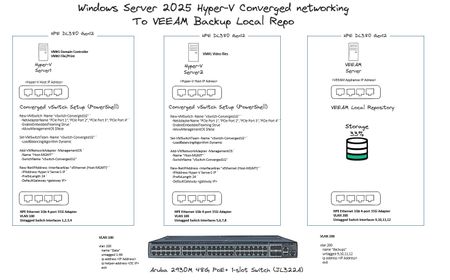
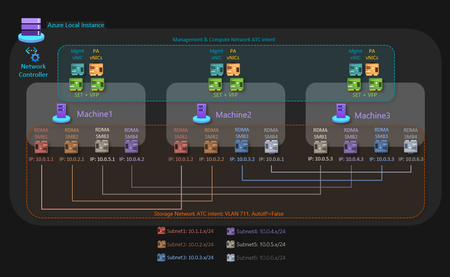
Hi All, As per the image below, I have 3 x HPE DL380 Gen 12 Servers, Server1 and Server2 are ADDS domain joined, VEEAM Local Repo is not. For the converged networking to work, is there anything else I need to perform in terms of additional power-shell commands, VLAN tagging etc? Thanks!108Views0likes2Comments
Unable to Build Switchless Storage using Network ATC
3-Node HV/S2D Cluster using Switchless Storage and Network ATC getting Network HUD Error I have a Dell 3-node server cluster being used to host Hyper-V with S2D. Each node is identical and certified to pass S2D requirements. The networking consists of 2 onboard 1 Gbps and 2 quad-port PCI(e) NICs at 10/25 Gbps. The 2 onboard ports are being used for the management intent, 2 ports from each of those NICs are being connected to 2 top-of-rack switches for the compute intent at a total of 12 10 Gbps connections, and the other 2 ports from each of those NICs are being connected directly to the other nodes in a dual mesh method for the storage intent at a total of 6 25 Gbps connections. Very similar to the Microsoft diagram for a three-node storage switchless, dual TOR, dual link deployment network reference pattern for Azure Local, but I am using Windows Server 2025 Datacenter, not Azure Local. The problem I am encountering is when I attempt to create the switchless storage intent, I get an error (shown below) that reads "Failed to fetch physical NIC mapping from the Network HUD service. Please diagnose..." If I leave off the switchless option, it builds without issue. The error only occurs when I attempt to use the switchless option. I tried without configuring the NIC IP addresses first, as well as trying configuring the NIC IP addresses beforehand. I tried without having a cluster built first, as well as building a failover cluster without storage before running the network intent command. The error I posted below shows my last attempt after having the NICs configured with IP addresses and having a failover cluster established before running the command. The error has remained the same throughout the process. Has anyone else run into an issue like this with switchless storage? It seems like everything that I am trying to do is within scope and should be a supported solution. My fallback plan is to use my existing switches, but that drops my connection speeds down from 25 Gbps to 10 Gbps due to hardware limitations.273Views0likes4CommentsPrnproc$ Share on Windows Print Server
Hi all, I was wondering if anyone had some information in regards to the pronproc$ share on Windows print servers? I am running a Windows Server 2019 instance and had the share flag as a potential vulnerability for allowing read & execute on the share. From what I can see the built-in users group has this permission on the share. Is this share something the can be locked down for privileges or will it break the functionality of the server's services?1.8KViews0likes2CommentsCreate a CLI and API like wslc but for Windows containers
The current issue is the dependency on Docker and the docker cli for Windows Containers. We would like a native solution from Microsoft for Windows Containers. This would be similar to wslc, but fully compatible for Windows containers. This could be done by leveraging existing Windows container APIs and the containerd container engine for Windows containers. I have also opened an enhancement feature on github for Windows Containers a month ago but there has been no feedback. https://github.com/microsoft/Windows-Containers/issues/643 Microsoft needs to step up and make Windows/ Windows Server containers on par with linux containers28Views0likes0Comments 22Views0likes0Comments
Windows Server 2025 DC — LSASS handle leak identified via WinDbg — authz!AuthzpDeQueueThreadWorker
Hello All!! Im having a problem, LSASS crashes on a Windows Server 2025 Domain Controller, I identified what appears to be the root cause using WinDbg memory dump analysis. Sharing this hoping someone else has seen it or Microsoft can confirm. The Problem LSASS handle count grows continuously over time and eventually crashes with a 0xC0000005 access violation (Event ID 1015). After a reboot the cycle repeats. The growth rate correlates with authentication load and faster during peak hours, slower overnight. WinDbg Dump Analysis Captured LSASS dump at high handle count and ran !handle 0 f: Token handles: overwhelmingly dominant Everything else: negligible Every leaked token shows: GrantedAccess: 0x8 (TOKEN_QUERY only) PointerCount: overflowed to negative integer Running !findstack authz 2 shows multiple worker threads all sitting in: authz!AuthzpDeQueueThreadWorker What Was Tested And Eliminated Stopped or disabled each individually and measured handle growth rate — zero meaningful difference from any: - Antivirus (all components) - Backup software - Application services - VSS snapshots - Hardware management agents etc.. Environment OS: Windows Server 2025, fully patched with the latest updates including April LSASS update. Role: Domain Controller DNS PAM: Not active. Conclusion Token handles are opened with TOKEN_QUERY access inside authz!AuthzpDeQueueThreadWorker and never released. Reference counter overflows to negative integer. Growth rate scales directly with authentication load. Current workaround: reboots during off hours. Has anyone else seen this pattern on Windows Server 2025? Is there a known fix or Microsoft acknowledgment for this specific authz token handle leak?962Views4likes5Comments
Cannot Connect to VMs in Windows Admin Center
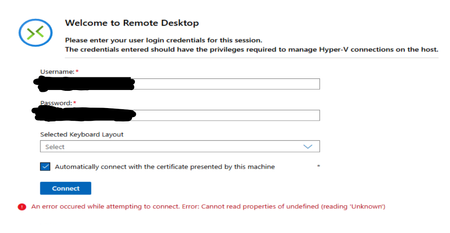
Hi all, I have 1 Server Cluster made up of 3 Server 2022 Hosts on which there is a large number of VMs running on Hyper-V. The typical process for accessing the VMs has been through Windows Admin Center, which is hosted on one of the VMs in the cluster. Around 1 week ago, it was no longer possible to connect to the VMs through Windows Admin Center as an infinite loading screen was presented. Sometimes, the following error shows up in VMConnect: The cluster and servers are still connected to WAC and all the VMs that are expected are present on WAC. Since then, the following things have been attempted: - Restart all servers - Rebuild WAC on Current VM - Build WAC on Fresh VM with the same and different network configuration, using current (2606) and previous (2511) versions of WAC - Build WAC on one of the hosts All these attempts result in the same error as seen before. Has anyone experienced this issue before? Or does anyone have any advice? Thank you in advance!Solved696Views2likes13CommentsWindows Server Datacenter: Azure Edition preview build 29651 now available in Azure
Hello Windows Server Insiders! We welcome you to try Windows Server vNext Datacenter: Azure Edition preview build 29651 in both Desktop experience and Core version on the Microsoft Server Operating Systems Preview offer in Azure. Azure Edition is optimized for operation in the Azure environment. For additional information, see Preview: Windows Server VNext Datacenter (Azure Edition) for Azure Automanage on Microsoft Docs. For more information about this build, see https://techcommunity.microsoft.com/discussions/windowsserverinsiders/announcing-windows-server-vnext-preview-build-29651/4549702.73Views1like0CommentsAnnouncing Windows Server vNext Preview Build 29651
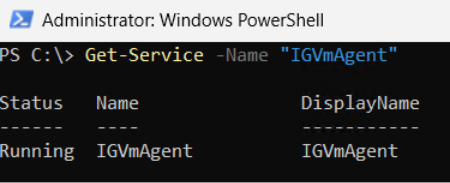
Hello Windows Server Insiders! Today we are pleased to release a new build of the next Windows Server Long-Term Servicing Channel (LTSC) Preview that contains both the Desktop Experience and Server Core installation options for Datacenter and Standard editions and Azure Edition (for VM evaluation only). Branding remains Windows Server 2025 in this preview - when reporting issues please refer to Windows Server vNext preview. Build 29531 established a new Server preview baseline build. Please perform a clean install of Build 29531 (or later) using the installation media linked below. Please note: Upgrades from Windows Server vNext preview builds older than 29531 are not supported. We encourage all Windows Server vNext preview users to perform a clean install using 29531 or later to successfully upgrade to future Windows Server vNext preview builds. While upgrades from earlier Windows Server previews (Build 26525 and older) are not technically blocked by setup.exe, a number of known issues have been identified related to upgrades necessitating the establishment of a new baseline build for our Server vNext Preview Program. The new baseline build (29531) will not be Flighted due to upgrade issues. Flighting support resumed with preview build 29550 or later. What's New Trusted Launch for virtual machines (TVMs) on Windows Server—a security feature you can enable when creating Generation 2 VMs. This initial preview supports TVMs with Secure Boot, vTPM, and vTPM state protection (at rest), managed via PowerShell. ⚠ Not supported in this release: Moving TVMs to another server TVMs in failover clusters or Hyper-V Replica Boot integrity verification TVMs in Windows Admin Center (WAC) Instructions 1. Install the latest ServerInsider preview build. 2. Enable Hyper-V (restarts the server): Install-WindowsFeature -Name Hyper-V -IncludeManagementTools -Restart 3. Set the registry keys: New-Item -Path "HKLM:\SOFTWARE\Microsoft\AszIgvmAgent" -Force New-ItemProperty -Path "HKLM:\SOFTWARE\Microsoft\AszIgvmAgent" -Name "TvmWinServer" -Value 1 -PropertyType DWord -Force 4. Enable Trusted Launch: Enable-WindowsOptionalFeature -Online -FeatureName "IsolatedGuestVm" -NoRestart 5. Verify IGVmAgent is running (should show Running): Get-Service -Name "IGVmAgent" If it isn't running, report the issue with the IGVmAgent and IGVmSystem Operational logs (Event Viewer → Applications and Services Logs → Microsoft → Windows). 6. Create an external virtual switch (if needed): (Get-VMSwitch | Where-Object { $_.SwitchType -eq "External" }).Name 7. Create the TVM. With an existing Gen 2 VHDX: New-VM -Name <VMName> -Generation 2 -GuestStateIsolationType TrustedLaunch -SwitchName <switch> -VHDPath <path to vhdx> -Path <config path> Or with a new VHD, then attach a Gen 2–compatible guest OS ISO: New-VM -Name <VMName> -SwitchName <switch> -NewVHDPath <new VHD path> -NewVHDSizeBytes 40GB -Generation 2 -GuestStateIsolationType TrustedLaunch -Path <config path> Add-VMDvdDrive -VMName <VMName> -Path <Guest OS ISO path> Ensure the DVD drive is first in the firmware boot order so the VM boots from it. 8. Verify isolation type (should return TrustedLaunch): (Get-VM -Name <VMName>).GuestStateIsolationType 9. Verify guest state protection: Stop the IGVmAgent service and restart the VM—without IGVmAgent running, a Trusted launch VM with guest state protection won't start. For more information, please review our blog post: Announcing Trusted Launch for Virtual Machines for Windows Server Insiders | Microsoft Community Hub Quick Machine Recovery available in Windows Server vNext Insider Previews. Quick machine recovery (QMR) is now available for Server vNext Insiders to test. This feature enables the recovery of Windows Server devices when they encounter boot critical errors that prevent them from booting. QMR can automatically search for cloud‑based remediations to recover from widespread boot failures significantly reducing the burden on IT administrators when multiple devices are impacted. This supports the goals of the Windows Resiliency Initiative by enabling applicable fixes to be delivered through trusted Windows Update to restore affected devices, helping reduce downtime and minimize manual recovery efforts across enterprise environments. This feature is currently enabled in the latest Server vNext Insider builds for customers to experience test mode. A Group Policy option to enable or disable the feature will be introduced in upcoming builds to provide additional administrative control. To simulate the quick machine recovery experience, use the following commands from an elevated command prompt: Enable test mode: reagentc.exe /SetRecoveryTestmode Configure Windows to boot to Windows Recovery Environment on the next boot: reagentc.exe /BootToRe Reboot your device.The system goes through autoremediation of a simulated crash safely and reboots back to Windows Server. For more information, please review Quick machine recovery (QMR) and Windows Resiliency Initiative. When providing feedback using Feedback hub, please select QMR from the Recovery and Uninstall category in the app. NVMe-over-Fabrics (NVMe-oF) extends the NVMe protocol—originally designed for local PCIe-attached SSDs—across a network fabric. Instead of using legacy SCSI-based protocols such as iSCSI or Fibre Channel, NVMe-oF allows a host to communicate directly with remote NVMe controllers using the same NVMe command set used for local devices. In this Insider build, Windows Server supports: NVMe-oF over TCP (NVMe/TCP), allowing NVMe-oF to run over standard Ethernet networks without specialized hardware. NVMe-oF over RDMA (NVMe/RDMA), enabling low-latency, high-throughput NVMe access over RDMA-capable networks (for example, RoCE or iWARP) using supported RDMA NICs. For more information, please visit: Introducing the Windows NVMe-oF Initiator Preview in Windows Server Insiders Builds | Microsoft Community Hub ReFS Boot is enabled for Windows Server vNext preview builds. Known Limitations ReFS Boot systems create a minimum 2GB WinRE partition. When WinRE cannot be updated due to space constraints, the system may disable WinRE. Disabling WinRE does not remove the partition. If the WinRE partition is deleted and the boot volume is extended over it, this operation is unrecoverable without a clean install. For more information, please visit: Resilient File System (ReFS) overview | Microsoft Learn Feedback Hub app is available for Server Desktop users! The app should automatically update with the latest version, but if it does not, simply Check for updates in the app’s settings tab. Known Issues A race condition in the TLS hybrid key exchange implementation may cause the LSASS service to crash when hybrid groups are negotiated by a TLS server. To avoid this issue until the fix is released, please disable hybrid groups (X25519_MLKEM768, SecP256r1_MLKEM768, SecP384r1_MLKEM1024) using TLS cmdlets or Group Policy, as outlined here. Server Core Upgrades and AppCompat FOD: Enabling AppCompat FOD after reinstall may fail due to legacy 3rd-party license compatibility issues on Server Core devices. Server Core users may be unable to install the latest AppCompat FOD after upgrading to build 29574. This appears to be limited to Server Core installations with 3rd-party application licenses that fail compatibility checks after upgrade. This will be addressed in a future build. Upgrading from older builds of Windows Server vNext previews (26525 or older) are not supported. Please perform a clean install of build 29531 or later. Users may experience failures when attempting to upgrade from earlier previews (build 26525 and older). VMs may fail to upgrade or start after upgrade from older preview builds impacting live migration and failover cluster scenarios. Download Windows Server Insider Preview (microsoft.com) Flighting: The label for this flight may incorrectly reference Windows 11. However, when selected, the package installed is the Windows Server vNext update. Please ignore the label and proceed with installing your flight. This issue will be addressed in a future release. Available Downloads Downloads to certain countries may not be available. See Microsoft suspends new sales in Russia - Microsoft On the Issues. Windows Server Long-Term Servicing Channel Preview in ISO format in 18 languages, and in VHDX format in English only. Windows Server Datacenter Azure Edition Preview in ISO and VHDX format, English only. Microsoft Server Languages and Optional Features Preview Keys: Keys are valid for preview builds only Server Standard: MFY9F-XBN2F-TYFMP-CCV49-RMYVH Datacenter: 2KNJJ-33Y9H-2GXGX-KMQWH-G6H67 Azure Edition does not accept a key. Symbols: Available on the public symbol server – see Using the Microsoft Symbol Server. Expiration: This Windows Server Preview will expire October 15, 2027. How to Download Registered Insiders may navigate directly to the Windows Server Insider Preview download page. If you have not yet registered as an Insider, see GETTING STARTED WITH SERVER on the Windows Insiders for Business portal. We value your feedback! The most important part of the release cycle is to hear what's working and what needs to be improved, so your feedback is extremely valued. Please use the new Feedback Hub app for Windows Server if you are running a Desktop version of Server. If you are using a Core edition, or if you are unable to use the Feedback Hub app, you can use your registered Windows 10 or Windows 11 Insider device and use the Feedback Hub application. In the app, choose the Windows Server category and then the appropriate subcategory for your feedback. In the title of the Feedback, please indicate the build number you are providing feedback on as shown below to ensure that your issue is attributed to the right version: [Server #####] Title of my feedback See Give Feedback on Windows Server via Feedback Hub for specifics. The Windows Server Insiders space on the Microsoft Tech Communities supports preview builds of the next version of Windows Server. Use the forum to collaborate, share and learn from experts. For versions that have been released to general availability in market, try the Windows Server for IT Pro forum or contact Support for Business. Diagnostic and Usage Information Microsoft collects this information over the internet to help keep Windows secure and up to date, troubleshoot problems, and make product improvements. Microsoft server operating systems can be configured to turn diagnostic data off, send Required diagnostic data, or send Optional diagnostic data. During previews, Microsoft asks that you change the default setting to Optional to provide the best automatic feedback and help us improve the final product. Administrators can change the level of information collection through Settings. For details, see http://aka.ms/winserverdata. Also see the Microsoft Privacy Statement. Terms of Use This is pre-release software - it is provided for use "as-is" and is not supported in production environments. Users are responsible for installing any updates that may be made available from Windows Update. All pre-release software made available to you via the Windows Server Insider program is governed by the Insider Terms of Use.
Quick Assist not opening error code - %d
3 days ago I tried opening Quick Assist to getting a %d error code. I have reset my computer twice, tried creating a local account as administrator and tried opening Quick Assist that way, still same error persists. When I go to Installed apps > Microsoft Edge WebView2 Runtime, when I click on the 3 dots next to it the options are not white they are a grey colour and doesn't allow me to click on them. My OS Build 29639.1000 and my Windows Edition is - Windows 11 Home Insider Preview and the version is - Dev Also doesn't allow me to log into any PC Xbox accounts as well. Any help would be very appreciated.104Views0likes1Comment
Can't share a folder on a local network in Microsoft Windows Server 2025 STD
We have two Microsoft Windows Server 2025 Standard (Version 24H2, Build Number 26100.32995) servers in our Active Directory. We can't share folders; it constantly asks for a username and password. We've tried every solution, but nothing worked. I found a similar thread, but the solutions there didn't work either. topic : https://learn.microsoft.com/en-us/answers/questions/5559013/opening-fire-share-on-2025-server-from-another-202 How can i solve this sharing problem ?127Views0likes3CommentsBLOG: CVE-2024-38063 - Disabling IPv6 binding = fix - or not?
Dear community, in today's LinkedIn Stream and other social media you might have noticed a recent CVE and the recommendation to disable IPv6 in Windows Server and Windows Client. We are talking about this one: https://msrc.microsoft.com/update-guide/vulnerability/CVE-2024-38063 Reading the advisory carefully, Microsoft, strictly speaking, does not directly recommend disabling (technically remove binding) of IPv6. Citing: "Mitigation refers to a setting, common configuration, or general best-practice, existing in a default state, that could reduce the severity of exploitation of a vulnerability. The following mitigating factors might be helpful in your situation: Systems are not affected if IPv6 is disabled on the target machine." Maybe I am a bit nitpicking here about old experiences and would greatly appreciate a refreshed Microsoft statement on the disablement (unbinding) of IPv6 and the side-effects in 2024. What we have learned in the past - do no disable IPv6 easily. - yes, you can face issues with IPv6 being on by default and unexpected or misconfiguration. Often caused by DHCPv6, especially in the combination of critical domain controllers, Dual Stack ISPs and SoHo routers messing up your DNS. What's the fuss about IPv6? I am not actively using it in corporate / at home. IPv6 is being used in Windows. More specifically non-routable fe80 addresses and loopback ::1 for internal purposes of Windows or other software. One may complain use cases are - unrightfully - not well and transparent documented. Have a read in the past Here are some references that Copilot brings up. Trust my memory, I've read more like this. https://techcommunity.microsoft.com/t5/core-infrastructure-and-security/ipv6-for-the-windows-administrator-why-you-need-to-care-about/ba-p/256251 https://community.spiceworks.com/t/is-it-a-bad-practice-to-disabe-ipv6/781811/9 https://learn.microsoft.com/en-us/troubleshoot/windows-server/networking/configure-ipv6-in-windows My personal conclusion Hold on, we need patches for this CVE, but we should not disable IPv6 easily. Please disable IPv6 temporarily, when you cannot patch this CVE immediately / in time. Take notes which system you have had to disable and consider re-enabling once patches have been tested and applied. If you are using IPv6 knowingly, note the NIC configs. They will be lost when using static settings rather DHCPv6. I am sad to see that NetSec people, undoubtedly experts in their area, jump on the bandwaggon esp. on Social Media to easily disgrace the IPv6 by default enablement of Windows Client and Windows Server, telling you the easier story: "Disable IPv6 and you are good / if you do not need it." Let me counter: You might not know you're "needing it" it in the first place. Whenever you are changing system defaults in Windows, mind that Microsoft and other software vendors may not consider these changes in their testing. And the Crowdstrike Black Friday showed us clearly how outlier system configs and unwell testing goes along. Not very well. IPv6 usage and defaults today One of the most recent example that Microsoft is using IPv6 can be found in the Azure Arc Agent (Connected Machine Agent) changelog: "Better handling when IPv6 local loopback is disabled" source: https://learn.microsoft.com/en-us/azure/azure-arc/servers/agent-release-notes How can I disable IPv6, if required? Many roads led to Rome. Windows + X > Terminal / PowerShell (Admin) #save current NIC config into a simple text file Get-NetAdapterBinding -ComponentID "ms_tcpip6" | where Enabled -eq $true | Out-File $env:temp\original-ipv6-config.txt #disable IPv6 on all adapters Get-NetAdapterBinding -ComponentID "ms_tcpip6" | where Enabled -eq $true | Disable-NetAdapterBinding And how to revert the change? Windows + X > Terminal / PowerShell (Admin) #enable IPv6 on all adapters (mind the text file) Get-NetAdapterBinding -ComponentID "ms_tcpip6" | where Enabled -eq $true | Enable-NetAdapterBinding TL:DR Microsoft is using fe80 addresses and loopback ::1 addresses for internal reasons. IPv6 is preferrably used over IPv4 when it is bound to a network adapter, including said special non- routable addresses. Please disable IPv6 temporarily, when you cannot patch this CVE immediately / in time. Take notes of current config. Please share the word and mind that disabling IPv6 can turn your OS into an outlier system, causing immediate or later issue due lack of testing by Microsoft or other software vendors, assuming the defaults, which is IPv6 being turned on.8.1KViews2likes2CommentsConfiguration for directAccess and VPN
Hi: When I open server manager, I see a yellow ! point, when I check I see that configuration required for DirectAccess and VPN (RAS) at aestone. I click on configuration and get the following error message: Initializing operations before applying configuration Preparing to apply configuration changes... Backing up GPOs... Configuring Remote Access settings Retrieving server GPO details... Clearing existing stale configuration settings. This might take a few minutes... Checking the specified adapters... Deploying the Remote Access server behind NAT... Checking the network location server certificate... Checking the specified adapters... Checking for a native IPv6 deployment... Verifying the IP-HTTPS certificate... Creating a DNS entry for the network location server certificate... Generating a self-signed network location server certificate on server aestone.stoneandstone1.com... Retrieving internal network DNS settings... Verifying the GPO to write settings... Creating the GPO. Linking the GPO to the domain... Checking for a client GPO to write settings... Creating the GPO. Linking the GPO to the domain... Checking for permissions to apply DirectAccess client policies to the GPO... Identifying all domains... Identifying infrastructure servers in domain stoneandstone1.com... Registering the DNS entry used to check client connectivity... Registering the web probe in DNS... Clearing existing stale configuration settings... Creating DirectAccess client policies... Updating client policies... Initializing accounting settings... Writing settings to the server GPOs... Writing settings to the client GPOs... Updating local settings... Applying GPOs on the Remote Access servers... Adding DirectAccess NRPT settings Retrieving server GPO details... Opening the server GPO... Opening the client GPOs... Checking for edit permissions on the client GPOs... Error: The DNS suffix directaccess-nls.stoneandstone1.com already exists in client GPO stoneandstone1.com\DirectAccess Client Settings. Finishing operations after applying configuration Information: Attempting to roll back the configuration... How do I fix this? Allen106Views0likes3Comments



Events
Recent Blogs
- Windows Server continues to be the foundation for many of the world's most critical business applications. As organizations modernize their infrastructure, extend management beyond the datacenter, an...Aug 12, 2026216Views1like0Comments
- Trusted Launch for virtual machines We are excited to announce Trusted Launch for virtual machines (TVMs) in Windows Server Insider Preview. Trusted Launch is a security feature you can enable whe...Jul 14, 2026841Views4likes5Comments