windows server 2025
18 Topics
Windows Server 2025 – DHCP Failover con dos controladores de dominio: el ámbito no se sincroniza
Hola buenas a todos. Recientemente he configurado una implementación de DHCP Failover entre dos controladores de dominio con Windows Server 2025 (DC1 y DC2), utilizando el modo Hot Standby. La configuración del ámbito se replica correctamente después de la configuración inicial, pero después de realizar cualquier cambio manual en las opciones del ámbito (por ejemplo, modificar la puerta de enlace predeterminada o añadir una nueva reserva), los cambios no se sincronizan automáticamente con el servidor asociado. Cada vez tengo que ejecutar manualmente «Replicar ámbito». Ambos servidores están en la misma subred y pueden comunicarse sin problemas. ¿Se trata de un problema conocido de DHCP Failover en Windows Server 2025, o hay alguna configuración específica que pueda estar pasando por alto para habilitar la replicación automática de los cambios realizados en el ámbito? Gracias.177Views0likes1CommentWindows Server 2025 – DHCP Failover con dos controladores de dominio: el ámbito no se sincroniza
Hola buenas a todos. Recientemente he configurado una implementación de DHCP Failover entre dos controladores de dominio con Windows Server 2025 (DC1 y DC2), utilizando el modo Hot Standby. La configuración del ámbito se replica correctamente después de la configuración inicial, pero después de realizar cualquier cambio manual en las opciones del ámbito (por ejemplo, modificar la puerta de enlace predeterminada o añadir una nueva reserva), los cambios no se sincronizan automáticamente con el servidor asociado. Cada vez tengo que ejecutar manualmente «Replicar ámbito». Ambos servidores están en la misma subred y pueden comunicarse sin problemas. ¿Se trata de un problema conocido de DHCP Failover en Windows Server 2025, o hay alguna configuración específica que pueda estar pasando por alto para habilitar la replicación automática de los cambios realizados en el ámbito? Gracias.101Views0likes0Comments
Windows Server 2025 DC — LSASS handle leak identified via WinDbg — authz!AuthzpDeQueueThreadWorker
Hello All!! Im having a problem, LSASS crashes on a Windows Server 2025 Domain Controller, I identified what appears to be the root cause using WinDbg memory dump analysis. Sharing this hoping someone else has seen it or Microsoft can confirm. The Problem LSASS handle count grows continuously over time and eventually crashes with a 0xC0000005 access violation (Event ID 1015). After a reboot the cycle repeats. The growth rate correlates with authentication load and faster during peak hours, slower overnight. WinDbg Dump Analysis Captured LSASS dump at high handle count and ran !handle 0 f: Token handles: overwhelmingly dominant Everything else: negligible Every leaked token shows: GrantedAccess: 0x8 (TOKEN_QUERY only) PointerCount: overflowed to negative integer Running !findstack authz 2 shows multiple worker threads all sitting in: authz!AuthzpDeQueueThreadWorker What Was Tested And Eliminated Stopped or disabled each individually and measured handle growth rate — zero meaningful difference from any: - Antivirus (all components) - Backup software - Application services - VSS snapshots - Hardware management agents etc.. Environment OS: Windows Server 2025, fully patched with the latest updates including April LSASS update. Role: Domain Controller DNS PAM: Not active. Conclusion Token handles are opened with TOKEN_QUERY access inside authz!AuthzpDeQueueThreadWorker and never released. Reference counter overflows to negative integer. Growth rate scales directly with authentication load. Current workaround: reboots during off hours. Has anyone else seen this pattern on Windows Server 2025? Is there a known fix or Microsoft acknowledgment for this specific authz token handle leak?1.6KViews4likes5Comments
Windows Server 2025 Failover Cluster Live Migration Issue
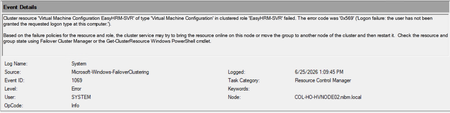
Hi Everyone, I am facing an issue in a Hyper-V Failover Cluster environment where Live Migration intermittently fails due to a service logon-related problem. The environment was previously working normally, but now whenever we attempt to Live Migrate a VM between cluster nodes, the migration fails unless we manually run “gpupdate /force” on the Hyper-V host first. After running gpupdate /force, the migration works temporarily, but the issue returns again during the next migration attempt. This makes it appear that some policy or permission is not being applied consistently on the cluster nodes. During troubleshooting, I attempted to add “NT VIRTUAL MACHINE\Virtual Machines” to the “Log on as a service” policy under Local Security Policy > Local Policies > User Rights Assignment. However, the account does not appear or resolve in the Object Picker when trying to add it manually. At this stage, I am trying to understand whether this is related to a domain GPO overwriting local policy settings, a Failover Cluster permission issue, or something specific to Hyper-V virtual machine accounts. Has anyone encountered a similar issue where Live Migration only works after running gpupdate /force? Also, is there a correct method to add “NT VIRTUAL MACHINE\Virtual Machines” to the “Log on as a service” policy, or should this permission already exist by default on Hyper-V hosts? Any guidance or recommendations would be greatly appreciated.443Views0likes1Comment
Windows Admin Center Preview - 2511 English [MSI Corrupt]
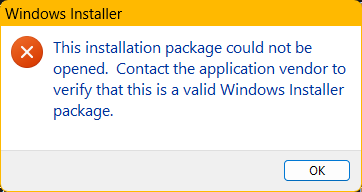
When attempting to launch the WindowsAdminCenterPreview_2511.msi, I received an error message (See Below). In addition, when I test the MSI using 7zip, the archive fails to validate. This occurred downloading the installer package twice over a two-day period. My system info is below.507Views1like2CommentsServer 2025 Core ADDS DC, Network Profile Showing as "Public" and not as "DomainAuthenticated"
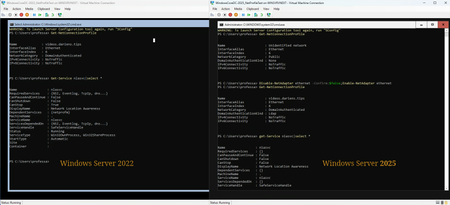
OS: Windows Server 20225 Standard Core (no GUI), build 26085.1 Role: ADDS, DNS ForestMode: Windows2025Forest DomainMode: Windows2025Domain Platform: Hyper-V guest When standing up a clean Windows Server 2025 using server core and configuring it as a domain controller, the network category (profile) always shows as "public." A clean load of Windows Server 2022 with server core as a domain controller has the same behavior. However, in Server 2022, the fix is to add DNS as a required service to the nlasvc (Network Location Awareness) service. Once that is done, the network category reflects "DomainAuthenticed" and persists between reboots. In Server 2025, the nlasvc service does not have the same requiredservices as Windows Server 2022, and it does not start automatically. Even after configuring the nlasvc service the same way it is in Server 2022 and adding DNS as a required service, the network category still reflects "public." The only way to get the network category to properly reflect the "DomainAuthenticated" status is to disable and reenable the network adapter after each reboot.23KViews14likes85Comments
VBS and TPM Chip
Hi All In the Microsoft documentation a TPM Chip is a hard requirement for VBS: https://learn.microsoft.com/en-us/windows-hardware/design/device-experiences/oem-vbs But VBS can be enabled without a TPM Chip. VMWare also describes this scenario: https://blogs.vmware.com/vsphere/2018/05/introducing-support-virtualization-based-security-credential-guard-vsphere-6-7.html I'm now wondering, if the Microsoft Article is wrong and it is an optional requirement in fact; or if the feature is only supported, if a TPM Chip is present. As Windows Server 2025 comes with VBS enabled by default, this could be an issue (Most visualized Systems to hot have a TPM Chip by default)...132Views0likes0Comments